

Portable Photo Date Changer 1.20
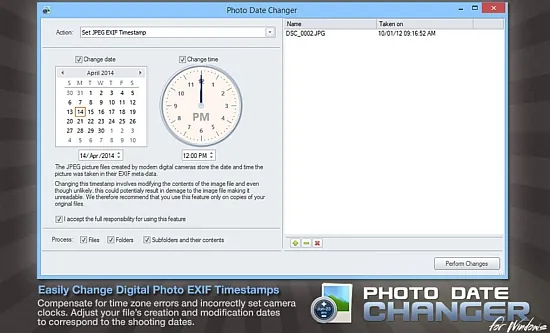
Photo Date Changer Portable is a specialized batch utility engineered for photographers, digital archivists, and casual users who need to correct or manipulate the embedded timestamps in image files to ensure accurate chronological sorting across photo management software, operating systems, online galleries, and slideshow applications.
This lightweight Windows application—available in versions optimized for modern systems up to 2025—focuses exclusively on EXIF metadata editing for JPEGs and a wide array of RAW formats including CR2 (Canon), NEF (Nikon), ARF (Sony), CRW, and CIFF, allowing users to set precise shooting dates/times, batch-shift timestamps by arbitrary offsets (hours, days, years), or synchronize file system dates (creation/modification) with EXIF data.
By addressing common pain points like incorrect camera clocks, timezone oversights during travel, or scanner-imported photos lacking metadata, Photo Date Changer Portable restores proper order to disorganized libraries without altering pixel data, ensuring non-destructive operations that preserve image quality and file integrity for professional workflows, family albums, or legal evidence chains.
Core Timestamp Manipulation Capabilities
Photo Date Changer Portable’s primary strength lies in its intuitive EXIF editor, accessible via a clean, single-window interface that lists dropped files with current timestamps prominently displayed. Users select a base date/time—manually entered, derived from the first/last file, or pulled from system clock—and apply it universally or sequentially (e.g., increment by 5 minutes per photo for scanned prints). Batch shifting adds/subtracts intervals like “+3 hours” for jet lag corrections or “-2 years” for clock resets, with preview dialogs confirming changes before commitment.
The software handles edge cases gracefully: photos with missing EXIF (e.g., edited in Photoshop or from older cameras) receive new timestamps without warnings, while duplicates avoid overwrites via user prompts. Sub-second precision supports millisecond adjustments for high-speed burst modes, and timezone offsets embed correctly in EXIF DateTimeOriginal, DateTimeDigitized, and ModifyDate tags. Operations process thousands of files in seconds, leveraging multi-threading for SSD/NAS efficiency.
File System Date Synchronization
A standout feature synchronizes EXIF shooting dates with Windows file attributes—creation date, last modified date, and last access date—crucial for apps ignoring metadata (e.g., basic file explorers, some cloud syncs). One-click modes propagate EXIF to filesystem forward (images dictate files) or reverse (files update EXIF), with granular checkboxes for date-only, time-only, or both. This ensures folders sort chronologically in Explorer, preventing “newest first” mishaps where edited JPEGs jump ahead of originals.
For recursive folders, it traverses subdirectories, maintaining relative orders while skipping non-images. Verification scans post-change confirm sync success, logging discrepancies to TXT for audits. This bidirectional harmony proves invaluable for Lightroom/Photos.app imports, where mismatched dates scramble events.
Supported Formats and Batch Processing Power
Beyond standard JPEGs, Photo Date Changer Portable excels with RAW support: Canon’s CR2/CRW, Nikon’s NEF, Sony’s ARF, Kodak’s CIFF, preserving vendor-specific tags during edits. TIFF and select HEIF files receive partial support for IPTC/XMP timestamps. Drag-and-drop imports entire folders or Explorer selections, with right-click shell integration (“Change Dates with Photo Date Changer Portable”) for seamless workflow.
Batch previews thumbnail images alongside old/new timestamps, sortable by name/date/size. Filters exclude by extension, size (>10MB skips RAWs), or criteria (only files missing EXIF). Undo stacks revert batches via backup copies (optional to temp folder), safeguarding against errors. Command-line mode (Pro edition) scripts automation: pdc.exe -shift +1d folder/*.jpg for server pipelines.
User Interface and Workflow Efficiency
The minimalist UI prioritizes speed: central file list with sortable columns (filename, old/new date, size, EXIF status), toolbar buttons for common actions (Set to Today, Shift by Camera Diff, Sync Filesystem), and modal dialogs for precise inputs (calendar picker, time spinner). Dark mode adapts to Windows themes; high-DPI scaling renders crisply on 4K monitors.
Wizards guide novices: “Travel Timezone Fix” auto-calculates offsets from EXIF GPS or user input; “Scanner Sequential” numbers prints chronologically. History logs every operation with before/after diffs, exportable to CSV for records. Portable ZIP runs sans install, ideal for USB triage.
Advanced Editing and Metadata Preservation
Edits target seven EXIF fields: DateTimeOriginal (shooting moment), DateTimeDigitized (scan time), DateTime (file mod), SubSecTime (milliseconds), OffsetTime (timezone), GPSDateStamp/TimeStamp. Custom offsets apply per-tag (e.g., shooting +1h, digitized unchanged). GPS coordinates sync optionally, embedding location-aware timestamps.
Non-destructive writes create XMP sidecars alongside originals, preserving editability in Adobe apps. Bulk renaming appends dates (IMG_20250101_120000.jpg), customizable formats (YYYY-MM-DD_HHMMSS, camera-serial prefixed).
Real-World Use Cases and Scenarios
Photographers: Correct bursts from mis-set clocks during weddings/events, ensuring Lightroom grids chronologically.
Travelers: Shift European trips back 6 hours for US imports, matching family timelines.
Archivists: Date-scan 35mm negatives sequentially, filling EXIF voids for digital catalogs.
Forensics: Standardize evidence photos’ timestamps for court admissibility.
Families: Fix smartphone imports where dates reset, restoring vacation albums’ order.
Professionals: Prep client deliverables for stock sites requiring accurate metadata.
Edge workflows: multi-camera sync (align Canon/Nikon shoots via reference photo); pre-upload fixes for Flickr/Instagram chronological feeds.
Performance, Safety, and Compatibility
Ultra-light (5MB install), it processes 10,000+ JPEGs/RAWs in under a minute on mid-range CPUs. No internet required; fully local. Safety includes read-only previews, auto-backups, and conflict dialogs. Windows 7-11 compatible (64-bit), with ARM preview for Windows on ARM.
Pro edition adds scripting, regex filters, and API for plugins (e.g., Lightroom exporter).
Customization and Extensibility
Profiles save presets (“Canon Timezone +2h”), assignable per folder. Exclude lists skip .xmp pairs or videos. Language support (English, German, French) via resource swaps.
Limitations and Complementary Tools
Focuses solely on dates—no pixel edits—forces pairing with editors for crops/resizes. Lacks video support, prioritizing stills.
Photo Date Changer Portable demystifies metadata mayhem, restoring temporal truth to digital memories with surgical precision. Its batch prowess, sync intelligence, and RAW breadth make it the unsung hero of photo organization—empowering flawless libraries where seconds matter. Whether salvaging timezone blunders or sequencing scans, it proves timestamp tweaks unlock chronological clarity, saving hours in sorting purgatory.