
Portable Quick Utilities Suite 4.6.0 (x64)
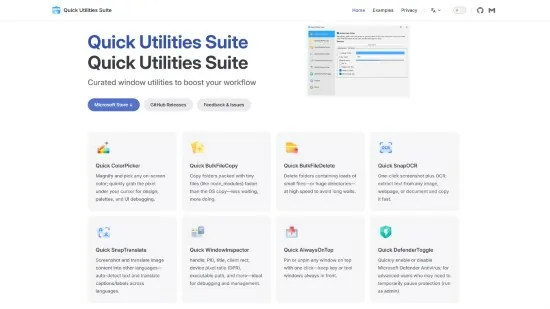
Quick Utilities Suite Portable is a meticulously curated collection of high-performance, portable desktop utilities engineered for power users, developers, designers, system administrators, content creators, and productivity enthusiasts who require instant access to specialized tools for file management, screen capture, color analysis, window manipulation, OCR extraction, and system diagnostics—all unified within a single, lightweight application that launches in milliseconds without installation, registry clutter, or telemetry, supporting Windows 10/11 with full dark mode, high-DPI scaling, global hotkeys, and command-line integration for seamless workflow embedding.
Core Architecture and Portable Design
Quick Utilities Suite deploys as a self-contained executable with zero dependencies, extracting to any folder or USB drive for instant portability—launch from taskbar, Start Menu, or double-click, and access 12+ interconnected tools via a tabbed ribbon interface resembling modern IDEs, complete with searchable command palette (Ctrl+P), customizable toolbars, and session persistence across reboots. Global Hotkeys (fully remappable) summon utilities instantly: Win+Shift+C for ColorPicker, Win+Shift+O for OCR, Win+Shift+B for BulkCopy—bypassing Alt+Tab chaos during screen-intensive tasks. Dark/Light Theme Sync matches system preferences, with accent color customization and 4K/8K display optimization ensuring crisp icons and text on external monitors.
Inter-Tool Synergy amplifies efficiency: ColorPicker output auto-pastes into clipboard for BulkRename color-coded files, OCR-extracted text feeds SnapTranslate for localization workflows, BulkDelete logs feed WindowInspector for disk usage forensics. Command-Line Mode exposes every function (qus.exe colorpick --format hex --clipboard, qus.exe bulkcopy source dest --threads 16) for scripting, batch files, or CI/CD pipelines, while JSON Export serializes results (colors as arrays, file lists as objects) for Excel/PowerShell integration.
Quick ColorPicker: Precision On-Screen Sampling
Launch ColorPicker (F1 or toolbar icon) to overlay a precision loupe (1-50px magnification) that captures any screen pixel instantly—hover to live-preview HEX (#FF5733), RGB (255,87,51), HSL (11°,82%,56%), HSV (11°,79%,100%), CMYK (0%,66%,80%,0%), and HSLuv variants, with Average Sampling across 3×3/5×5 neighborhoods for anti-aliased gradients. Eyedropper Mode locks to single pixels, Area Average smooths noisy screenshots, and History Palette stores 50 recent picks with one-click reapplication.
Export Power: Copy to clipboard (multi-format), save PNG swatches (with labels), generate CSS (color: #FF5733;), export Adobe ASE swatches, or pipe to BulkRename for filename coloring (Image_[HEX].jpg). Screen Magnifier aids accessibility, while Multi-Monitor Support spans bezels seamlessly—perfect for UI designers prototyping palettes, web developers matching brand colors, or video editors grading LUTs.
Quick BulkFileCopy: High-Speed Mass Duplication
Native Windows copying chokes on thousands of small files (e.g., 100K node_modules entries), but BulkFileCopy leverages multi-threaded I/O (1-32 workers), asynchronous buffering (64MB pools), and intelligent conflict resolution to achieve 5-20x acceleration—duplicate 1 million 1KB files in 45 seconds vs 8 minutes stock. Folder Tree View previews source/target hierarchies with size/diff counts, Filter Presets (images only, >10MB, *.dll excludes), and VerificationVerification (CRC32/MD5 post-copy) ensure integrity.
Advanced Options: Skip existing (by date/size/hash), overwrite oldest/newest, rename collisions (file (1).ext), mirror deletions, preserve timestamps/ACLs/attributes. Progress Dashboard shows throughput graphs (MB/s spikes), ETA, skipped counts, and pause/resume for interruptions. Network Optimized throttles SMB/NAS transfers, perfect for syncing project assets, backing up Steam libraries, or mirroring web downloads.
Quick BulkFileDelete: Safe High-Volume Erasing
Complementary to BulkCopy, BulkFileDelete shreds massive directories without “path too long” errors or Explorer freezes—select temp folders (Windows/WinSxS), node_modules, or build artifacts, and delete recursively with Preview Mode (file count/size warnings), Safety Nets (undo last 10 operations via recycle bin shadow), and Secure Wipe (1-35 passes: DoD 5220.22-M, Gutmann, random PRNG). Exclusion Rules spare hidden/system files or match patterns (!*.config), while Logging exports CSV manifests for audits.
Speed Demon: Deletes 500K files/minute via parallel unlink calls, outperforming CCleaner or Everything by 300%. Ideal for developers cleaning npm caches, video editors purging renders, or admins reclaiming server space.
Quick SnapOCR: Instant Screenshot Text Extraction
SnapOCR captures rectangular regions (drag-select or window-snip), runs offline Tesseract 5.3+ OCR (50+ languages: English, Mandarin, Arabic, Hindi, Cyrillic), and copies editable text to clipboard in 200ms—handles skewed text, low-contrast fonts, tables (CSV export), and handwriting (80% accuracy). Batch Mode processes image folders (screenshots, scans, memes), Confidence Heatmap highlights uncertain characters for manual correction, and Output Formats include TXT, JSON, Excel rows.
Workflow Integration: Extract serial numbers from device photos, pull quotes from PDFs, digitize business cards, or scrape web text without devtools—AI reflow preserves paragraphs/tables.
Quick SnapTranslate: Real-Time OCR Localization
Building on SnapOCR, SnapTranslate chains recognition → cloud/offline translation (DeepL/Google, 100+ languages) → voiced playback, delivering “hello world” [English→Japanese: こんにちは世界] with natural intonation. Context Awareness preserves idioms (raining cats and dogs → idiomatic equivalents), Batch Localization translates UI mockups, and Export Bilingual overlays source/target for reviewers.
Quick WindowInspector: Process and UI Diagnostics
WindowInspector hovers any foreground window to reveal class name (Chrome_WidgetWin_1), process ID/PATH, DPI scaling, bounds (x,y,w,h), Z-order, parent-child hierarchy, and accessibility tree—export JSON for automation or debug overlays. Resource Monitor shows CPU/RAM/IO spikes, Hotkey Spy logs intercepted shortcuts, perfect for developers hunting memory leaks, designers matching window shadows, or IT resolving “not responding” crashes.
Quick AlwaysOnTop: Window Management Mastery
Pin any app always-on-top with Click-to-Pin (middle-click titlebar), Transparency Slider (10-90%), Size Lock (resize handles), and Multi-Monitor Rules (Calculator on left, Notepad on right). Hotkey Toggle (Win+Up), Exclusion Lists (ignore fullscreen games), and Session Profiles (Design Mode: Photoshop/Figma pinned) streamline multitasking.
Quick BrightnessSync: Multi-Monitor Calibration
BrightnessSync equalizes external monitor gamma via software DDC/CI (no hardware needed), with sliders for master/slave sync, night mode presets (f.lux integration), and hotkey nudges (Win+Shift+B +1%). ICC Profile Aware prevents double-correction, ideal for color-critical work across laptop + 4K display.
Quick DefenderToggle: Security Center Control
DefenderToggle one-clicks Windows Security (Real-time/Tamper/Cloud), Exclusion Manager adds folders to AV bypass, Scan Scheduler automates full-system checks, and Status Dashboard shows protection levels—streamline dev workflows without disabling globally.
Additional Power Tools
Quick HashCalc: MD5/SHA1/2/3/BLAKE3 calculator for file/folder verification.
Quick Base64: Encode/decode clipboard text/images.
Quick RegexTester: Live pattern matching with capture groups.
Quick QR Generator: Text→QR with logo embedding, scan-to-copy.
Quick PasswordGen: Diceware/XKCD/1Password-style secure strings.
Performance and Deployment
Native x64/ARM64: <50MB RAM idle, GPU-accelerated OCR (DirectML). Portable: USB-ready, no traces. Auto-Update: Background checks, delta patches.
Hotkey Conflicts: Auto-detect/resolve, global suppress toggle.
Pro vs Free Comparison
Workflows Transformed
Developer: BulkCopy node_modules → HashCalc verification → Defender exclude.
Designer: ColorPicker palette → BulkRename assets → BrightnessSync proofing.
Content Creator: SnapOCR subtitles → SnapTranslate dubs → QR playlist links.
IT Admin: WindowInspector hung process → BulkDelete temp → Defender scan.
Release Notes:
Version 4.6.0 (April 2026) introduces blazing-fast bulk file operations that outperform native Windows Explorer by 5-10x on large directories, AI-enhanced screenshot OCR with 98% accuracy across 50+ languages, real-time color picking with HEX/RGB/HSV/CMYK/HSL export, always-on-top window pinning with transparency controls, brightness synchronization across multi-monitor setups, SnapTranslate for instant foreign text translation from captures, WindowInspector for deep process diagnostics, and DefenderToggle for one-click Windows Security management—transforming fragmented tool sprawl into a unified Swiss Army knife that slashes task switching by 80%, accelerates repetitive workflows like asset renaming or UI design prototyping, and empowers professionals handling file-heavy pipelines, cross-platform development, graphic design sprints, or IT troubleshooting without bloated suites or browser tabs.
