
Portable RawTherapee 5.13 (x64) Multilingual
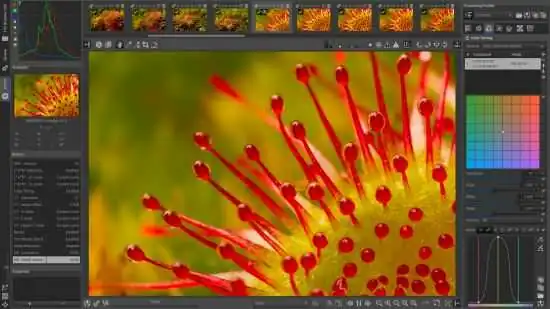
RawTherapee Portable is a powerful raw photo processing application designed for photographers, image editors, and visual creators who need precise control over how their photographs are developed, corrected, and prepared for final use. It is built for people who work with digital images on a regular basis and want a desktop-based tool that can handle detailed adjustments without forcing them into a simplified or overly automated workflow. The software focuses on bringing together raw development, tonal correction, color management, noise reduction, sharpening, and export control into a single environment that feels organized and technically capable. In portable form, the application becomes especially practical for users who move between computers, use shared workstations, or prefer to keep essential utilities in a self-contained folder that can travel with them. That combination of deep photographic control and portability gives RawTherapee Portable a clear identity as a serious tool for everyday image development.
Raw Development at the Core
The most important quality of RawTherapee Portable is that it treats raw development as the main task rather than a secondary feature. Many image tools offer only limited edits or basic enhancement functions, leaving users to rely on separate applications for serious processing. This software takes a different approach by keeping the workspace centered on the raw file itself, providing access to a broad range of controls that support accurate rendering, detailed correction, and careful output preparation. That focus matters because raw files are meant to preserve the most information from the camera sensor, and the ability to shape that information in a controlled way can make a major difference in the final image.
This development-first orientation is especially valuable for photographers who want to retain maximum flexibility after capture. A raw file contains more latitude than a compressed image, but that freedom only becomes useful when the software can interpret and refine it with precision. RawTherapee Portable supports a more deliberate approach to image editing by giving users tools that address exposure, tone, color, detail, and local adjustments in one place. The goal is not to create a simple one-click solution, but to provide a robust environment where the photographer can make informed decisions at each stage of the workflow.
File Handling and Image Intake
One of the strongest features of RawTherapee Portable is its ability to handle a wide range of raw camera files and related image formats. Photographers often work with images from different camera bodies, lenses, and shooting situations, and each file may present its own characteristics in terms of dynamic range, noise behavior, and color response. The software is designed to read these files reliably and present them in a way that makes editing approachable while preserving technical accuracy. This is especially useful when working with large batches of photos from a session that needs efficient organization.
The intake process is designed to be straightforward, allowing users to browse folders, inspect thumbnails, and select images for development without unnecessary complexity. This level of organization is particularly valuable when sorting through large shoots, travel collections, event coverage, or studio sessions. Users can compare files visually, identify keepers, and move directly into editing with minimal friction. The ability to preview images and evaluate them before applying adjustments helps users make better decisions and avoid wasted time.
File handling also supports non-destructive processing, which is an important part of the software’s design. The original raw file remains unchanged while the software stores the development instructions separately. This allows photographers to experiment with different looks, revisit earlier versions, and refine their edits over time without permanently altering the source image. That kind of control is essential for users who value safety, repeatability, and the ability to revisit creative choices later.
Exposure and Tone Control
RawTherapee Portable includes extensive exposure and tonal controls that allow users to shape the brightness and contrast of an image with precision. Correcting exposure is often one of the first steps in raw development because it establishes the foundation for all later adjustments. The software gives users fine-grained control over highlights, shadows, midtones, and overall brightness, making it possible to recover detail in difficult lighting conditions and create a more balanced final result.
The tonal tools are designed to be flexible enough for both quick corrections and deep image refinement. Users can make broad exposure changes to bring a photo into a more usable range, then fine-tune the distribution of tones to preserve mood and visual depth. This may involve lifting dark areas, reducing overly bright regions, or shaping contrast to emphasize subject separation. The software makes these operations accessible in a way that encourages careful visual judgment rather than guesswork.
Tone control also includes tools for managing contrast curves, black and white points, and tonal transitions. These features help photographers avoid flat or harsh-looking images while still preserving detail. The ability to adjust tonal behavior with precision is especially useful when working with scenes that contain strong highlights, deep shadows, or mixed lighting. RawTherapee Portable gives the user the tools needed to create a natural, polished, and technically sound result.
Color Management and White Balance
Color is one of the most important areas of photographic development, and RawTherapee Portable provides a detailed set of controls for managing it. Raw files often require careful color interpretation because the data coming from the camera sensor is not yet fully rendered into a finished image. The software lets users adjust white balance, color temperature, tint, saturation, and color response in a controlled way, helping them reproduce the intended atmosphere of the scene.
White balance is particularly important because it affects how neutral tones, skin tones, and environmental colors are perceived. The software offers tools for correcting unwanted color casts and balancing the image to match the lighting conditions under which it was captured. Users can work from automatic suggestions or make manual adjustments to achieve a more accurate or creative result. That flexibility is valuable because not every scene requires perfect neutrality; sometimes the goal is to preserve warmth, coolness, or a specific mood.
Color management also supports profiles and rendering choices that help the image look consistent across different displays and outputs. This is important for photographers who want reliable color behavior when preparing images for print, web, or archival use. RawTherapee Portable helps bridge the gap between the camera’s data and the final viewing environment, giving users more confidence that their color decisions will hold up in real-world conditions.
Detail Enhancement and Noise Reduction
Another important function of RawTherapee Portable is its ability to refine image detail while managing noise. Raw images often contain fine texture, but they may also include sensor noise, especially when shot at high ISO or in challenging light. The software provides tools for sharpening, texture enhancement, and noise reduction so that the final image can retain clarity without becoming overly harsh or artificial.
Noise reduction is designed to address the different forms of noise that can appear in digital photographs, including luminance noise and color noise. The software allows users to balance noise suppression against detail retention, which is crucial because aggressive noise reduction can easily remove texture and make images look soft. By giving users control over the intensity and scope of the correction, RawTherapee Portable supports a more natural and nuanced result.
Sharpening tools complement noise reduction by helping the image regain crispness after development. Users can apply sharpening in a way that respects edge detail, avoids excessive halos, and matches the output medium. This is especially valuable when preparing images for large prints or high-resolution display, where fine detail matters. The balance between noise reduction and sharpening is one of the areas where the software’s technical depth becomes particularly useful.
Local Adjustments and Selective Editing
RawTherapee Portable also includes local adjustment tools that allow users to target specific areas of an image rather than applying the same change everywhere. This is important because many photographs benefit from selective treatment. A subject may need slightly more exposure, a background may need to be darkened, or a sky may need different tonal handling from the foreground. The software supports this kind of refinement through masks, brushes, and other targeted controls.
Selective editing gives photographers more expressive power while preserving the overall naturalness of the image. Instead of forcing one global correction to solve every issue, the user can adjust separate regions in a way that respects the structure of the scene. This makes it possible to guide the viewer’s attention, strengthen composition, and improve balance without making the edit feel heavy-handed. The result is often more subtle and more professional-looking than a uniform adjustment would produce.
Local adjustment tools are especially valuable in portrait work, landscapes, architecture, and product photography, where different parts of the frame often need different treatment. RawTherapee Portable allows the photographer to approach each image with a more thoughtful method, using targeted corrections to solve specific visual problems while preserving the character of the original capture.
Batch Processing and Workflow Efficiency
Beyond individual image editing, RawTherapee Portable provides batch processing tools that help users handle large collections of photographs efficiently. This is especially useful for photographers who process entire shoots, events, or travel sets where many images need similar corrections or export settings. The software lets users queue files, apply consistent adjustments, and render multiple outputs in a controlled sequence.
Batch processing also supports workflow consistency. A user may spend time refining one image, then apply similar settings to a group of related photos to speed up the rest of the session. This is particularly valuable when the images were captured under the same lighting and exposure conditions. The software makes it possible to establish a visual standard and then extend that standard across a batch, reducing repetitive work while maintaining quality.
The ability to monitor batch progress from within the application also provides a clearer view of the workflow. Users can see which files are being processed, which have completed, and whether any errors have occurred. This kind of visibility helps photographers maintain better control over their output and reduces the risk of surprises at the end of a long editing session. The result is a more orderly and predictable production experience.
Export and Output Control
RawTherapee Portable includes comprehensive export controls that allow users to prepare images for their intended destination. The software supports a range of output formats and quality settings, making it possible to create files suitable for printing, online publishing, archival storage, or client delivery. This flexibility is important because different use cases demand different levels of resolution, compression, and color handling.
Export settings are designed to be detailed enough for advanced users while still being manageable for those who want a dependable output routine. Users can choose file type, resolution, color space, sharpening behavior, and other parameters that affect the final appearance of the image. This allows them to tailor the output for the target medium rather than relying on a one-size-fits-all result. That kind of control is especially important when preparing photographs for professional or long-term use.
The export process also supports efficient batch rendering, which is useful when users need to generate multiple versions of the same image or process an entire folder of files. The software handles these tasks in a way that keeps the workflow smooth and minimizes manual intervention. This makes it easier to move from development to delivery without losing time to repetitive setup steps.
Non-Destructive Editing Philosophy
RawTherapee Portable is built around a non-destructive editing philosophy, which is one of its most valuable qualities. The software does not overwrite the original image data when changes are made. Instead, it stores the editing instructions separately and applies them during preview or export. This means that photographers can experiment freely, knowing that their source files remain intact.
This approach is especially useful for users who like to compare different creative directions. A photographer may want to create one version with strong contrast, another with a softer tonal profile, and a third with a more natural documentary style. Because the original file remains untouched, all of these variations can coexist without risk. The user can return to any version later, refine it further, or discard it without affecting the source capture.
Non-destructive editing also supports long-term archiving and future reprocessing. As editing preferences change over time, the photographer can revisit old files and generate new outputs without needing to re-shoot or reconstruct the original adjustments. That makes RawTherapee Portable a useful companion for both immediate work and long-term photographic preservation.
Privacy and Local Control
RawTherapee Portable is built with a focus on local processing and user control. Photographs, development profiles, and output files are handled on the user’s own system rather than being sent to external servers. This approach supports greater privacy and gives users more confidence about how their images are being managed. For many photographers, that distinction is important because image libraries often contain personal, commercial, or unpublished work that should remain private.
Local control also creates a more predictable workflow. Users are not dependent on network access, account limitations, or cloud-based services in order to process their files. Instead, the software operates independently on the user’s machine, providing a stable environment for editing and export. That stability is especially useful when working with large files, offline environments, or time-sensitive projects.
Because the software is portable, this control becomes even more convenient. Users can keep their photographic environment close at hand and use it consistently across different situations. That combination of local processing and portability makes the application especially appealing to users who care about privacy, flexibility, and operational simplicity at the same time.
Practical Use Cases
RawTherapee Portable fits a wide range of real-world photographic scenarios. It is useful for landscape photographers who want to recover highlight detail, enhance color, and refine tonal balance. It is useful for portrait photographers who need careful control over skin tones, contrast, and local adjustments. It is useful for travel photographers who return with large sets of raw files and need an organized way to develop them. It is useful for anyone who wants to retain maximum image quality while maintaining a high level of control over the final look. Because its functions are broadly relevant, it can become a regular part of a photographic workflow rather than a tool reserved for special projects.
The software also works well when users need to handle multiple tasks in the same session. A photographer may want to review a shoot, adjust key images, apply batch settings to similar files, and export final versions all within the same workflow. The application supports that variety by keeping the process consistent across different functions. That makes it easier to maintain focus and avoid the friction of switching between different tools or methods.
For people who manage extensive image libraries, the software can act as a stable development hub that supports both everyday editing and more detailed refinement. That helps build a consistent habit and makes it easier to approach raw processing with confidence. The result is a more orderly and less stressful approach to photographic development.
Portable Working Style
The portable form of RawTherapee Portable adds a practical layer of flexibility to its already focused design. Photographic work is often done in different environments: at home, in a studio, on the road, or while using a shared computer. A portable setup makes it easier to carry the application and keep it ready wherever it is needed. That is especially useful for users who work on multiple computers or who prefer to keep their tools self-contained.
Portability also supports a cleaner system workflow. Users who prefer not to leave extra traces on shared or temporary computers can work with a tool that stays close to its own files and settings. That makes the software easier to transport and easier to use in a variety of contexts. It aligns well with the everyday reality of photo development, where the user may need to review and process images in different places and at different times.
For users who value consistency, portability means that their preferred editing environment can stay the same from one machine to another. That can reduce confusion and make the experience feel more predictable. In that sense, the portable design is not just about convenience; it is part of the software’s practical usefulness.
Why It Stays Useful
RawTherapee Portable remains useful because raw photo development is a fundamental need that does not change with trends. People will always need a calm, reliable way to interpret and refine their photographs, and this software provides that in a technical and practical form. Its emphasis on exposure, color, detail, local adjustment, batch processing, and export control makes it a practical choice for users who want a tool that stays out of the way and lets the image itself guide the process.
Its focus on essential functions is another reason it stays relevant. Tone correction, color management, sharpening, noise reduction, and non-destructive workflow are all core tasks that do not go out of style. The software is built around those needs rather than around temporary features. That gives it a stable role in photographic development, especially for users who value order and predictability. The portable format adds further relevance by making the tool easy to keep available wherever it is needed.
The combination of technical depth, practical workflow, and mobility gives the software a long-term value. It is the kind of utility users can return to whenever they need to process raw images, whether for everyday editing, portfolio work, or archival development.
Conclusion
RawTherapee Portable is a practical and powerful raw photo processing application built for users who want a calm, controlled, and consistent environment for developing photographs. It helps users manage their images without distraction, refine their visual qualities with precision, and move through editing tasks with smooth workflow. The software is especially useful for photographers, image editors, and anyone who needs a reliable tool for serious raw processing. Its portable format makes it easy to carry between systems and use in different environments, which adds to its practicality. For anyone looking for a flexible photographic tool that combines everyday usefulness with self-contained portability, RawTherapee Portable offers a solid and dependable solution.
Features at a Glance
- Comprehensive raw photo development environment for serious image processing.
- Supports exposure, tone, color, detail, and export refinement.
- Designed for non-destructive editing and source file preservation.
- Quiet and unobtrusive interface that keeps attention on the image work.
- Useful for landscape, portrait, travel, and general photography.
- Smooth workflow for batch processing and large image collections.
- Simple file browsing and image intake for organized development sessions.
- Consistent editing experience across different camera files and formats.
- Practical for everyday development, refinement, and output preparation.
- Helps reduce processing friction with detailed yet focused tools.
- Supports local control, privacy, and stable offline work.
- Easy to use for daily photo development tasks and batch output.
- Portable working style for use across different computers and environments.
- Self-contained format suited to shared, temporary, or mobile setups.
- Designed to make raw processing more orderly and efficient.
