

Portable RealCADD 5.71 (x64)
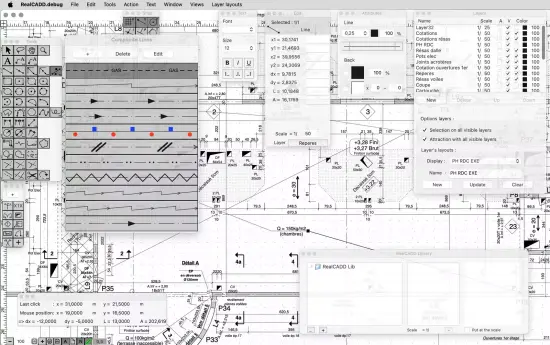
RealCADD Portable is a powerful, intuitive 2D computer-aided design (CAD) software tailored for architects, engineers, hobbyists, and technical illustrators who demand precision drafting without the bloat or expense of enterprise-level suites. Available primarily for macOS with cross-platform compatibility considerations, this vector-based drawing program delivers a streamlined workflow that echoes the simplicity of classic tools like MacDraw while incorporating modern features such as DXF import/export, image underlay support, and advanced shape manipulation.
Whether sketching floor plans, mechanical schematics, electrical diagrams, or custom illustrations, RealCADD Portable empowers users to create scalable, professional-grade drawings through an uncluttered interface that prioritizes drawing speed, accuracy, and editability over unnecessary complexity.
Core Drawing Tools
RealCADD Portable’s foundation rests on a comprehensive array of vector drawing primitives, each designed for exactness and ease. The line tool draws straight segments with arrowheads, dimension markers, or dashed patterns, snapping to grids or existing geometry for perfect alignment. Constrained lines enforce horizontal, vertical, or specified angles (e.g., 45° for isometric views), ideal for architectural elevations. Rectangle and rounded rectangle tools generate boxes with independently adjustable corner radii, while ellipse and arc commands support center/radius, three-point, or tangent definitions, facilitating circular plans or curved elevations.
Polygon tools create regular or irregular shapes—stars, hexagons, or freeform outlines—with live vertex editing. Spline curves produce smooth, flowing paths via control points, perfect for organic forms like rivers in landscape plans or ergonomic product designs. Freehand lines capture sketches fluidly, auto-smoothing into Bézier-like paths post-draw. Text insertion spans single lines to multiline paragraphs, with alignment, kerning, and superscript/subscript controls for technical annotations or title blocks.
Quotation lines—unique to RealCADD Portable—automate dimensioning: drag between points to generate linear, angular, or radial callouts with customizable arrow styles, text overrides, and tolerance bands. Hatch and fill patterns texture closed shapes (solids, gradients, crosshatch), supporting transparency for overlaid plans.
Precision and snapping system
Accuracy defines every interaction through a robust snapping engine. Endpoint, midpoint, intersection, perpendicular, tangent, and center snaps guide cursors magnetically, with tolerance sliders fine-tuning sensitivity. Grid snapping toggles absolute (fixed spacing) or relative (object-based), while polar tracking restricts angles to multiples of 15°, 30°, or user-defined increments. Orthogonal mode locks to 0°/90°, crucial for orthogonal architecture.
Measurement tools query distances, areas, perimeters, and centers dynamically—hover over a polyline for instant length, select a room polygon for square footage. Scale-independent drawing lets users work at 1:1 while printing at 1:50 or 1/4″=1′-0″, eliminating paper-space confusion found in some competitors.
Layer and Organization Management
Layer support rivals pro suites: unlimited named layers with color coding, line weights, linetypes (solid, dash, dot), and transparency levels. Toggle visibility, lock for protection, or isolate for focused edits. Layer states save/load configurations—”Structural,” “Electrical,” “Furniture”—accelerating plan switches. Groups bundle elements non-destructively, maintaining editability while moving or scaling ensembles.
Page layout mode arranges multiple worksheets on virtual sheets, adding title blocks, legends, and crop marks for plot-ready outputs. Scale per viewport independently, overlaying details at different ratios on one sheet.
Import, Export, and Interoperability
DXF round-tripping forms the interoperability backbone: import AutoCAD-compatible files with layers, hatches, and dimensions intact; export preserving hierarchy for CNC machines or fabricators. Image import underlays raster scans (JPEG, PNG, TIFF) as traceable templates, with opacity sliders blending for clean vector overlays—digitize hand sketches or site photos effortlessly.
Native .rcd format saves compactly with full edit history. PDF export generates print-ready sheets with vector fidelity, while SVG output suits web or laser-cutting. Copy-paste exchanges with Illustrator or Inkscape via clipboard vectors. Print/plot supports tiled sheets, bleeds, and color separations.
User Interface and Workflow Efficiency
RealCADD Portable embraces Apple’s Human Interface Guidelines with floating, contextual tool palettes that unfold on demand—select a line, reveal stroke/angle options; grab text, expose font controls. Single-window design minimizes clutter, with toolbar customization hiding unused icons. Contextual menus (right-click) offer transform, align, or group actions instantly.
Unlimited undo/redo with branching history previews alternatives. Zoom extents fits drawings dynamically, overview window navigates large canvases. Full-screen mode immerses, keyboard shortcuts (L=line, R=rectangle) build muscle memory.
Dark/light themes reduce eye strain, resizable UI scales on Retina displays. Tooltips and status bar echo actions live—”Line at 37.2° length 15.4m.”
Advanced Editing Capabilities
Boolean operations shine: union merges overlapping shapes, intersect extracts commons, subtract punches holes (e.g., window voids from walls). Cut tool divides paths at intersections, essential for revisions.
Transform tools rotate, scale, mirror, skew with origin points and proportional locks. Array commands duplicate linearly, radially, or along paths—tile pavers, bolt circles, roof trusses. Offset parallels lines/curves at fixed distances, thickening walls or creating concentric rings.
Align/distribute palettes position ensembles precisely—center multiple fixtures, space evenly. Envelope distortion warps selections via bounding meshes, curving text along arches or bending logos.
Dimensioning and Annotation Suite
Beyond basic quotes, associative dimensions update automatically—stretch a wall, lengths recalculate. Tolerances display ranges (e.g., +0.1/-0.05), baselines chain multiples, ordinates measure from datums. Leader lines point to details with multiline notes.
Symbol libraries store reusable blocks: doors, windows, fixtures—drag from palette, edit instance without globals. Parametric constraints link dimensions (e.g., door width = half room length), driving changes associatively.
Hatching, Patterns, and Styling
100+ hatch patterns fill enclosures—ANSI iron, brick, concrete—with scale/angle controls. Gradient fills blend colors radially or linearly, transparency layering for section cuts. Line styles define complex dashes (e.g., 5-2-5-2), endcaps (round, square), joins (miter, bevel).
Measurement and Calculation Tools
Area calculator sums irregular polygons, subtracting voids for net volumes. Polyline length totals segmented paths. Coordinate table exports XYZ data for spreadsheets. Trigonometric calculator aids angles/slopes.
Customization and Extensibility
Tool customization creates bespoke commands: combine line+arc into “fillet,” script repetitive sequences via macro recorder. REALbasic roots allow plugin development for niche needs (e.g., HVAC symbols).
Preferences store grid scales, snap tolerances, default layers per project type.
Performance and Platform Optimization
Lightweight footprint (50MB RAM typical) handles 10,000+ entity drawings smoothly on 2012+ Macs. Metal-accelerated rendering on M1+ ensures fluid pans/zooms. Universal binary supports Intel/Apple Silicon natively.
Use Cases Across Disciplines
Architects draft plans/elevations/sections: layer walls, hatches floors, dimensions rooms. Engineers detail machine parts: splines gears, arrays bolts, exports CNC. Interior designers layout furniture: blocks symbols, hatches carpets.
Hobbyists illustrate comics: freehands panels, fills colors.
Fabricators vectorize signage: traces logos, plots vinyl.
Printing and Plotting Excellence
Scale-to-fit outputs match plotter media, colormaps separate plates. PDF proofs embed measurements. Batch print multi-sheets.
Accessibility and Learning Curve
High-contrast modes, scalable fonts, VoiceOver support. Tutorials embed: “Draw Wall > Hatch > Dimension.” Manual covers workflows exhaustively.
Multi-Language Support
French, German, English interfaces localize menus/tools.
Getting Started Workflow
Launch, set units (metric/imperial), draw line—snaps activate. Import DXF, layer organize, annotate, export PDF. Perpetual license unlocks all.
RealCADD Portable distills CAD essentials into an elegant, efficient package, bridging classic simplicity with pro precision for drawings that scale from sketch to specification.
Release Notes:
– Dimensions and Constrained Angles preferences have been removed from general preferences because they are available from the tools.
– Improved editing of multi-line texts,
– Some other improvements and bug fixes.