
Portable Task Manager TMOG 1.0.1
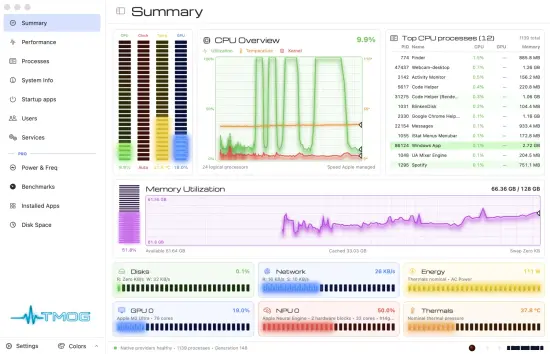
Why is my Computer Slow? TMOG Portable Knows Why! One glance at TMOG shows which process and which subsystem are responsible—right now. One measuring core. Three native applications. No browser shell.
Solved case 01 · The fan
Your computer’s fan just spun up. TMOG names the process before it spins down.
TMOG helps you connect the sound, heat, stutter, dropped frame, or drained battery to the process and subsystem that caused it.
– Sort and filter a live process hierarchy
– Compare CPU, memory, disk, network, and energy impact
– Follow identity-safe processes even when the system recycles a PID
Precision Instrumentation
A measuring instrument should never make up an answer. One glance at TMOG and you know why.
That promise rests on engineering rules you can verify yourself. TMOG distinguishes zero from unavailable and leaves gaps when samples stop. Every reading carries an explicit availability state, so a missing sensor cannot quietly become a plausible-looking value.
Here are the ten strongest facts behind the screen.
Native code all the way down.
TMOG uses Swift and AppKit on macOS, C++ and Win32 on Windows, and C++ with Qt 6 on Linux over one shared C++20 measuring core. No Electron, no web view, no embedded browser.
Twelve destinations, one glance apiece.
Summary, Performance, Processes, System Info, Startup apps, Users, Services, Power & Freq, Connections, Installed Apps, Disk Space, and Benchmarks.
Unsupported means unsupported.
TMOG never shows a zero it did not measure. Zero means the provider measured zero.
A stopped measurement leaves a gap.
A gap is the truth. Drawing a smooth line through missing samples would not be.
TMOG can measure itself, too.
Turn on the self-monitoring option to include TMOG’s own process and inspect the monitor’s cost.
Performance and efficiency cores stay distinct.
The CPU view color-codes them and can switch between overall, logical-processor, and NUMA views.
Replay the slow hour.
On macOS, Windows, and Linux, Flight Recorder records, saves, scrubs, and replays the same seven telemetry panels in one interchangeable .tmogtrace format. PRO
Energy has a cause.
The Energy view shows instantaneous watts, history, power state, and the processes responsible.
A PID is not enough.
TMOG pairs each PID with its creation identity so a recycled number cannot redirect an action to the wrong process.
Your machine stays your business.
TMOG sends no usage statistics, hardware inventory, process information, or identifiers. Its only routine request is an update check.
Release Notes:
- TMOG no longer closes itself after the computer wakes from sleep or hibernation.
- The hang watchdog now closes TMOG only when a stopped TMOG window would otherwise hold the mouse and keyboard of the whole desktop. Any other slow moment is left to Windows, as for every other program.
- When the hang watchdog closes TMOG, it now saves only its short text report. Writing a memory dump as well could stall and keep a stopped TMOG from closing.
- TMOG starts on Windows Server without the Wireless LAN Service installed, and on editions of Windows without Media Foundation, where recording now says what it needs.
- When Intel’s Dynamic Tuning software or AMD’s graphics driver library fails inside TMOG, TMOG stops reading from it and keeps running, instead of closing a few seconds after it starts.
- When TMOG runs as administrator, App History no longer asks Windows to delete the shadow copy it reads, which security software flagged. The screensaver no longer reads App History at all.
