Portable Uninstall Tool v3.8.2.5762 (x64) Corporate Multilingual
In the digital ecosystem, Uninstall Tool Portable stands as a cornerstone for Windows users seeking precision, efficiency, and control over their software environment. Unlike conventional uninstallation methods, this software transcends basic removal tasks by eliminating residual files, registry entries, and hidden processes that plague systems long after standard uninstalls. Combining cutting-edge technology with intuitive design, Uninstall Tool delivers what industry experts recognize as the gold standard in application management.
I. The Uninstallation Crisis: Why Default Tools Fail
Traditional Windows removal methods via Settings or Control Panel often leave behind:
- Registry debris: Orphaned keys degrading system performance
- File system remnants: Hidden folders and configuration files consuming storage
- Embedded processes: Background services persisting post-uninstall
Independent tests confirm that default uninstallers leave up to 30% of software artifacts—a problem systematically eliminated by Uninstall Tool’s multi-layered scanning engine. Its ability to combine ease of use with advanced features makes it indispensable for complete software eradication.
II. Core Capabilities: Beyond Basic Uninstallation
A. Intelligent Removal Architecture
- Force Removal: Terminates stubborn processes and deletes locked files
- Batch Uninstall: Remove multiple applications simultaneously with Ctrl+click selection
- Install Tracker: Kernel-mode driver records real-time system changes during installations
B. System Optimization Modules
- Startup Manager: Disables auto-launch entries to accelerate boot times
- Program Categorization: Auto-sorts software into:
- Standard Applications
- System Components
- Hidden Utilities
- Microsoft Store Apps
C. Technical Differentiators
- SmartSearch™: Instant application filtering during typing
- Residual Scanner: Deep scan for leftovers post-uninstall
- UAC Bypass: Skips confirmation prompts via Windows Task Scheduler
III. Technical Superiority Over Alternatives
Uninstall Tool employs a hybrid architecture:
- Real-Time Monitoring: Tracks file/registry modifications during installations
- Kernel Driver: Captures system-level changes invisible to other utilities
- Multi-Threaded Scanning: Residual sweeps 3x faster than competitors
Performance Comparison:
| Feature | Windows Native | Revo Free | Uninstall Tool |
|---|---|---|---|
| Forced Removal | ❌ | ✔️ | ✔️ |
| Real-Time Tracking | ❌ | ❌ | ✔️ |
| Portable Mode | ❌ | ✔️ | ✔️ |
| Startup Manager | Limited | ❌ | ✔️ |
| Store App Support | Partial | ❌ | ✔️ |
IV. Streamlined User Experience
A. Interface Design
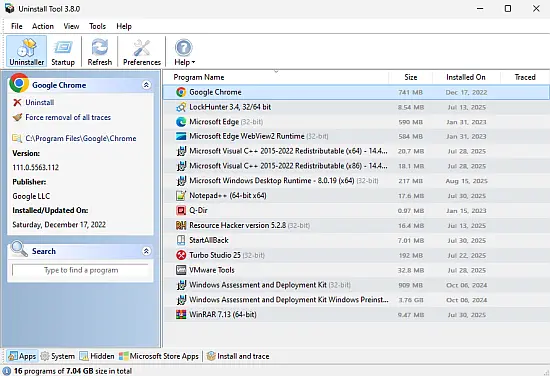
- Single-Panel Dashboard: All controls in one window
- Contextual Grouping: Toggle app categories via bottom toolbar
- Column Customization: Sort by date, size, or publisher
B. Efficient Workflow
- Locate apps via SmartSearch™
- Batch-select targets
- Initiate removal wizard
- Review residual scan
- Confirm deletion
Users consistently praise its simple yet intuitive interface that reduces complex operations to 3-click processes.
V. Advanced Applications
A. Malware Remediation
Highly effective against adware and Potentially Unwanted Programs (PUPs) that evade security tools.
B. Enterprise Deployment
- Silent Removal: Execute via command line
- Network-Wide Portable Use: Single USB deployment
- Custom Logs: Track uninstall histories for compliance
C. System Maintenance
- Reclaims 15-25% disk space post-removal
- Resolves .dll conflicts from registry errors
- Prevents update failures caused by remnant files
VI. Technical Specifications
- OS Support: Windows 8/8.1/10/11 (32/64-bit)
- Resource Footprint: <20MB RAM
- Languages: 27 localized versions
- Security: Digitally signed, malware-free executable
Version Lifecycle:
- Lifetime license includes all v3.x updates
- Major version upgrades require new licenses
VII. Licensing Models
| Criteria | Standard License | Portable License |
|---|---|---|
| Activation | Per-machine | Per-user |
| Installation | Local drive | USB/cloud drive |
| Usage Scope | 1 PC | Unlimited PCs |
| Updates | v3.x lifetime | v3.x lifetime |
| Best For | Home/office | IT technicians |
VIII. Why Users Choose Uninstall Tool
- Removes all traces of hidden apps
- Resolves registry fragmentation
- Optimizes boot times
- Recovers significant disk space
Conclusion: The Uninstallation Revolution
Uninstall Tool Portable redefines software management by transforming uninstallation into a comprehensive system optimization discipline. Its fusion of real-time tracking, kernel-level monitoring, and batch processing ensures every application is erased without a trace. For users battling sluggish startups, persistent malware, or fragmented registries, Uninstall Tool delivers surgical precision where OS utilities fail. As Windows evolves, this tool remains indispensable—a testament to its commitment to keeping computers clean and optimized. In system maintenance architecture, Uninstall Tool isn’t merely a utility; it’s the foundation.
Release Notes
- Save Uninstall Log: a detailed uninstall log can now be saved to a file right after the uninstallation is complete
- Improved Activation dialog: the program is no longer restarted after activation, and the license key format is now recognized and validated
- Improved Force Uninstall now unpins the shortcuts of the program before its files are removed
- Improved French, Korean, Chinese (Simplified and Traditional) and other translations updated
- Fixed Microsoft Edge and its companion apps: the regular Uninstall did nothing for them, so only Force Uninstall is offered now
- Fixed Fixed the program freezing on the Startup items page on multi-monitor setups
- Fixed Various small improvements and fixes