
Portable VisionSearch 1.7.0 Multilingual
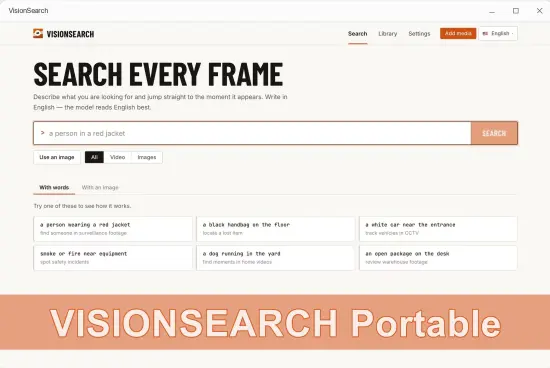
VisionSearch Portable is a visual discovery and image-based search application designed for users who want to explore, organize, and retrieve visual content through intuitive, image-driven workflows. It is built for researchers, designers, archivists, educators, content creators, and anyone who works with collections of photographs, illustrations, diagrams, or visual references regularly and wants a desktop-based tool that can handle visual search tasks without unnecessary complexity.
The software focuses on bringing together image indexing, visual similarity matching, metadata tagging, collection management, and export options into a single environment that feels direct and efficient. In portable form, the application becomes especially practical for users who move between computers, use shared workstations, or prefer to keep essential utilities in a self-contained folder that can travel with them. That combination of focused visual search control and portability gives VisionSearch Portable a clear identity as a modern, no-nonsense tool for everyday image discovery and organization.
Visual Discovery as the Core
The most important quality of VisionSearch Portable is that it treats visual search as the main task rather than a secondary feature. Many file management tools offer only basic text-based search or simple folder browsing, leaving users to rely on memory or manual scanning when looking for specific images. This software takes a different approach by keeping the workspace centered on the visual content itself, providing access to a range of functions that support image-based querying, similarity matching, visual filtering, and result refinement. That focus matters because images often contain information that cannot be fully captured by filenames or text descriptions alone, and the ability to search by visual characteristics in a single environment can save time, reduce stress, and prevent important content from being overlooked.
This discovery-first orientation is especially valuable for people who work with large or complex image collections. A designer may need to find all images with a particular color palette, a researcher may want to locate diagrams with similar structures, or an educator may need to gather visual references that share a common theme. VisionSearch Portable supports a more deliberate approach to these needs by giving users tools that address visual similarity, content patterns, and contextual relationships in one place. The goal is not to replace full-featured database systems, but to give the user a more direct and efficient way to handle common visual search and organization tasks.
Image Indexing and Collection Setup
One of the strongest features of VisionSearch Portable is its image indexing and collection setup functionality. Users often work with images stored in multiple folders, drives, or project directories, and keeping track of all that content can be challenging. The software provides a structured way to scan, index, and catalog image collections, creating a searchable database that reflects the visual content rather than just the file structure. This level of organization is particularly valuable when working with large archives, photo libraries, or reference collections where manual browsing would be impractical.
The indexing process is designed to be straightforward, allowing users to select folders or drives to scan, review the detected images, and organize them into logical collections. This may involve grouping images by project, subject, date, or any other criteria that makes sense for the user’s workflow. Users can preview the indexed content, verify that the correct files have been included, and make adjustments as needed. The ability to build and manage collections in this way helps users create a structured foundation for all future search and retrieval tasks.
Image indexing also supports different scenarios, including single-folder catalogs, multi-drive archives, and ongoing collection growth. The software is built to handle a variety of situations, providing options for quick setup when the user has a small collection and more detailed organization when managing extensive libraries. This flexibility makes it a practical tool for both simple reference needs and more complex archival workflows.
Visual Similarity and Pattern Matching
VisionSearch Portable includes robust tools for visual similarity and pattern matching, which is especially useful when users need to find images that look alike or share common visual characteristics. Traditional text-based search cannot easily identify images based on color, shape, texture, composition, or visual style, but this software is designed to analyze those qualities and use them as search criteria. This makes it possible to locate related images even when filenames or metadata do not provide clear guidance.
The similarity matching process is designed to be accessible to users with varying levels of experience. The software allows users to select a reference image and then search for other images in the collection that share visual traits. This may involve finding images with similar color distributions, comparable compositions, matching textures, or related structural patterns. The goal is to provide a smooth search experience that allows users to focus on visual relationships rather than technical configuration.
Pattern matching also supports different levels of specificity, from broad visual themes to more precise structural matches. Users can start with a general search to explore the collection, then refine the results by adjusting similarity thresholds or adding additional filters. The software handles these operations in a way that maintains responsiveness and clarity, even with large image libraries. This kind of flexibility makes it a practical tool for both exploratory browsing and targeted retrieval.
Metadata Tagging and Contextual Search
Another important function of VisionSearch Portable is its support for metadata tagging and contextual search. While visual similarity is powerful, combining it with descriptive information can make search results even more accurate and useful. The software provides tools for adding tags, keywords, notes, and other metadata to images, allowing users to enrich their collections with contextual information that supports more precise querying.
The tagging process is designed to be intuitive, allowing users to assign descriptive terms to individual images or groups of images. This may involve labeling subjects, locations, events, projects, or any other information that helps identify the content. The goal is to provide a flexible system that adapts to the user’s workflow without imposing rigid categorization rules.
Contextual search also supports combining visual and text-based criteria, allowing users to narrow results by both appearance and description. A user may want to find all images that look similar to a reference photo and also contain a specific keyword, or they may want to filter results by date, project, or custom category. The software makes it possible to apply these filters in a way that maintains clarity and relevance, providing flexibility for different types of searches. This kind of control is essential for maintaining efficiency and ensuring that the final results match the intended query.
Collection Management and Organization
Beyond search functionality, VisionSearch Portable provides general collection management tools that help users organize and maintain their image libraries. The software includes features for creating, editing, and managing collections, allowing users to structure their content in ways that make sense for their workflow. This is useful for keeping projects separate, maintaining thematic groupings, or preparing curated sets for specific purposes.
Collection management also supports hierarchical organization, allowing users to create parent and child collections that reflect the relationships between different sets of images. This is particularly valuable when working with complex archives or multi-phase projects where content needs to be grouped at different levels of detail. The software makes it easy to move images between collections, duplicate sets for different purposes, or archive older content without losing track of the overall structure. This kind of automation helps users work more efficiently and reduces the risk of disorganization over time.
The ability to view collection statistics from within the application also provides a clearer view of the library. Users can see how many images are in each collection, which collections have grown the most, and whether any collections need attention. This kind of visibility helps users maintain better control over their content and reduces the risk of unexpected problems during search or retrieval. The result is a more orderly and predictable approach to managing visual assets.
Export and Output Management
VisionSearch Portable includes features designed to support export and output management for search results and curated collections. When working with images, it is important to be able to move selected content out of the application and into other workflows, whether for presentation, sharing, further editing, or archival storage. The software provides tools for exporting search results, selected images, or entire collections in formats that are easy to use in other applications.
The export process is designed to help users identify the strongest results and prepare them for their intended destination. This may involve selecting specific images from a search, organizing them into a new folder, or creating a summary report of the findings. The software makes it easy to keep track of these decisions, providing a structured way to manage the output.
Output management also includes the ability to export images in formats suitable for different purposes. This may include formats optimized for web sharing, print preparation, or archival storage. The software makes it possible to choose the appropriate output format based on the user’s needs, providing flexibility for different types of projects. This kind of versatility is essential for maintaining workflow efficiency and ensuring that the final output is ready for its intended destination.
Privacy and Local Control
VisionSearch Portable is built with a focus on local data handling and user control. Image collections, search indexes, metadata, and export files are managed on the user’s own system rather than being sent to external servers. This approach supports greater privacy and gives users more confidence about how their content is being handled. For many people, that distinction is important because image libraries often include unpublished work, proprietary references, or personal archives that should remain private.
Local data handling also creates a more predictable workflow. Users are not exposed to variable network conditions, server-side changes, or service limits that can interrupt access to their files. Instead, the software operates within the user’s own system, giving them a consistent way to manage their visual content. That predictability is especially useful when dealing with large collections, tight deadlines, or time-sensitive projects.
Because the software is portable, this control becomes even more convenient. Users can keep their search environment close at hand and use it consistently across different situations. That combination of local handling and portability makes the application especially appealing to users who care about privacy, flexibility, and operational simplicity at the same time.
Practical Use Cases
VisionSearch Portable fits a wide range of real-world visual search scenarios. It is useful for designers who need to find reference images with specific visual qualities. It is useful for researchers who want to locate diagrams, charts, or illustrations that share common structures. It is useful for archivists who need to organize and retrieve content from large photo libraries. It is useful for educators who want to gather visual materials for teaching or presentations. Because its functions are broadly relevant, it can become a regular part of a visual workflow rather than a tool reserved for occasional use.
The software also works well when users need to handle multiple tasks in the same session. A user may want to index a new folder, search for similar images, tag the results, and then export a curated selection all within the same environment. The application supports that variety by keeping the workflow consistent across different functions. That makes it easier to maintain focus and avoid the friction of switching between different tools or methods.
For people who manage large volumes of images, the software can act as a stable discovery hub that supports both everyday search and more complex archival tasks. That helps build a consistent habit and makes it easier to approach visual organization with confidence. The result is a more orderly and less stressful approach to image retrieval and management.
Portable Working Style
The portable form of VisionSearch Portable adds a practical layer of flexibility to its already focused design. Visual search is often needed in different environments: at home, in an office, at a client location, or while traveling. A portable setup makes it easier to carry the application and keep it ready wherever it is needed. That is especially useful for users who work on multiple computers or who prefer to keep their tools self-contained.
Portability also supports a cleaner system workflow. Users who prefer not to leave extra traces on shared or temporary computers can work with a tool that stays close to its own files and settings. That makes the software easier to transport and easier to use in a variety of contexts. It aligns well with the everyday reality of visual organization, where the user may need to search and retrieve images in different places and at different times.
For users who value consistency, portability means that their preferred search environment can stay the same from one machine to another. That can reduce confusion and make the experience feel more predictable. In that sense, the portable design is not just about convenience; it is part of the software’s practical usefulness.
Why It Stays Useful
VisionSearch Portable remains useful because visual search is a fundamental need that does not change with trends. People will always need a calm, reliable way to handle their image collections, and this software provides that in a focused and practical form. Its emphasis on image indexing, visual similarity, metadata tagging, collection management, and export control makes it a practical choice for users who want a tool that can handle essential tasks without requiring complex configuration.
Its focus on essential functions is another reason it stays relevant. Indexing, similarity matching, tagging, organization, and output management are all core tasks that do not go out of style. The software is built around those needs rather than around temporary features. That gives it a stable role in visual workflow, especially for users who value order and predictability. The portable format adds further relevance by making the tool easy to keep available wherever it is needed.
The combination of focused functionality, practical workflow, and mobility gives the software a long-term value. It is the kind of utility users can return to whenever they need to handle their images, whether for everyday search, batch organization, or final output preparation.
Conclusion
VisionSearch Portable is a practical and focused visual search application built for users who want a calm, controlled, and consistent environment for handling image indexing, similarity matching, metadata tagging, and basic image organization tasks. It helps users manage their images without distraction, organize their search with ease, and move through tasks with smooth workflow. The software is especially useful for designers, researchers, archivists, educators, and anyone who needs a reliable tool for everyday visual discovery. Its portable format makes it easy to carry between systems and use in different environments, which adds to its practicality. For anyone looking for a flexible image tool that combines everyday usefulness with self-contained portability, VisionSearch Portable offers a solid and dependable solution.
Features at a Glance
- Focused visual search and image discovery environment for everyday organization tasks.
- Supports image indexing, visual similarity matching, and pattern recognition.
- Designed for handling multiple image collections without separate tools.
- Quiet and unobtrusive interface that keeps attention on the search work.
- Useful for finding related images based on visual characteristics.
- Smooth workflow for metadata tagging, collection management, and export preparation.
- Simple format support for common image containers and output needs.
- Consistent search experience across different file types and libraries.
- Practical for everyday discovery, organization, and file preparation.
- Helps reduce search friction with direct visual and text-based controls.
- Supports collection statistics and organized project management.
- Easy to use for daily image tasks and basic organization.
- Portable working style for use across different computers and environments.
- Self-contained format suited to shared, temporary, or mobile setups.
- Designed to make visual search more orderly and efficient.
Natural Language Video Search
Type what you are looking for in plain language. Vision Search finds the exact timestamp in any video in your library.
Image Library Search
Search through hundreds of photos by describing colors, objects, scenes, or anything visible in the image.
Instant Results
High-performance vector search delivers results in milliseconds, even across large media collections.
AI-Powered Indexing
Automatically analyzes every frame of your videos using state-of-the-art multimodal AI embedding models.
Fully Private & Offline
All processing happens locally on your PC. Your media files never leave your device.
Jump to the Moment
Click a search result to jump directly to the matching scene in your video — no manual scrubbing needed.
Release Notes:
– Add files instantly — selecting hundreds of files at once is now fast and responsive
– Add an entire folder at once — scans up to 2 levels deep so you can import a whole media collection in one click
– Media library now highlights in-progress items at the top so you always know what’s being processed
– Batch delete: select multiple files and remove them all at once
– Real-time extraction and indexing progress is now accurately reflected while your videos are being processed
– Improved stability when closing the app during active processing
– Various layout and display fixes in the media library
