Portable Starus Web Detective 4.2 Multilingual

Starus Web Detective Portable is a specialized Windows application designed for recovering, analyzing, and reporting on web browsing activity and related artifacts stored on a computer, mounted disk image, or virtual machine. The program focuses on extracting both present and deleted records that document a user’s interactions with websites, search engines, downloads, social networks, and browser-stored credentials. By combining targeted browser parsing with low-level disk scanning, Starus Web Detective Portable reconstructs browsing sessions, timelines, and file access events that can be crucial for forensic analysis, incident response, internal investigations, legal discovery, and personal data recovery.
Key capabilities and functional areas
– Acquisition and scanning
– Automatic detection of local user profiles and installed browsers, plus support for analyzing profiles from browsers that were uninstalled or from other accounts on the same system.
– Ability to scan live systems, mounted disk images, and virtual machine volumes, enabling examinations where the original operating system is not running.
– Low-level file system scanning to locate remnants of browser artifacts that were deleted or partially overwritten, increasing the chance of recovering cleared history and cached resources.
– Browsing history reconstruction
– Extraction and reconstruction of visited URLs with timestamps, page titles, visit counts, navigation chains, and referrer relationships.
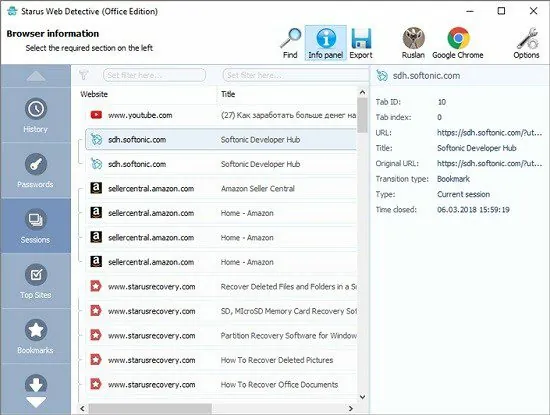
– Grouping of records into browsing sessions and the ability to view session boundaries and the sequence of pages visited within each session.
– Identification of entries that have been removed from the browser’s native history, with an indicator showing whether each record currently exists in the browser database or was recovered from residual disk data.
– Search queries and search behavior
– Collection of search queries submitted to mainstream search engines and site-specific searches, including timestamps and the search engine or site used.
– Contextual metadata that links searches to the pages visited immediately before and after the query, enabling analysts to trace intent and follow-up actions.
– Download and file access analysis
– Enumeration of files downloaded via the browser, with recorded source URLs, local save paths, file sizes, MIME types where available, and timestamps for download events.
– Preview and quick-inspect capability for images and common documents, plus a file recovery option to extract deleted files from the volume when recoverable.
– Images and cached media
– Cataloging of images, thumbnails, and cached media retrieved during browsing sessions, including the origin URL and the local cache path.
– Display of thumbnails and metadata to help identify visual evidence without needing to export every item first.
– Bookmarks and favorites
– Extraction of active and deleted bookmarks (favorites) and the ability to recover bookmark metadata such as creation/modification dates and the target URL.
– Presentation of bookmark hierarchies and the option to export selected bookmarks in bulk.
– Stored form data and addresses
– Retrieval of saved form entries (names, addresses, phone numbers, email addresses) that browsers store for form autofill, with timestamps linking them to the profile and origin site when available.
– Passwords and authentication artifacts
– Extraction of cached authentication credentials and saved passwords preserved by supported browsers, presented alongside metadata such as username, usage frequency, and last-used timestamp where the browser stores or the artifact indicates that information.
– Clear labeling of credentials that were stored in the browser versus credentials recovered via low-level scanning of browser files or residual artifacts.
– Social network and web app activity
– Parsing of social network interactions and application-level artifacts preserved in browser caches and local storage, such as posts, messages, comments, and timestamps where retrievable.
– Grouping of social activity by platform and per-account view to make it easier to narrow analysis to specific user identities.
– Incognito and private browsing recovery
– Investigation of traces left by private browsing modes by analyzing residual cache and temporary files at the file system level, potentially surfacing pages visited during incognito sessions that were not recorded by the browser’s normal history.
– Reporting and export
– Multi-format export options including Excel (XLS/XLSX or CSV), HTML, and PDF to support evidence sharing, case reports, and documentation.
– A Report Wizard that guides the user through selecting date ranges, data types, user accounts, and output format so that exports are tailored to the needs of the investigation.
– Support for saving raw artifact lists, preview images, and recovered files alongside the structured report for forensic review.
– Preview and triage features
– Built-in preview for images, HTML pages, and commonly used document types so analysts can triage results quickly without exporting everything.
– Filtering and search capabilities (by date, URL, domain, type, bookmark status, removed-from-history flag, etc.) to narrow the dataset to relevant records.
– Multi-browser and legacy support
– Compatibility with a broad set of browsers (modern mainstream and many less-common variants), enabling extraction from standard Chromium-based browsers, Firefox profiles, legacy Internet Explorer data stores, and other vendor-specific storage formats.
– Recognition and handling of native browser formats such as SQLite history databases, JSON configuration files, local storage, and indexedDB, plus generic extraction techniques for non-standard or removed browsers.
User experience and interface
– Clean, task-oriented UI
– The product is designed with a simple, stepwise workflow: select target media/profile, run the scan, review categorized results, preview items, then export or recover.
– Key sections organized as tabs or categories such as Sessions, History, Top Sites, Searches, Downloads, Images, Files, Bookmarks, Passwords, Social Networks, and Reports for rapid navigation.
– Profile and account selection
– Easy selection of which Windows account or browser profile to analyze; administrative privileges enable access to other user accounts on the same computer.
– Automatic detection and suggestion of the most likely profiles to examine, with the ability to point to external profile folders on mounted images.
– Visual cues and indicators
– Distinct markers indicate whether a record was found in an intact browser database, recovered from deleted data, or inferred from cached artifacts.
– Timestamps and frequency counters displayed next to each entry help prioritize high-value items.
– Export wizards and reporting tools
– Guided export ensures that reports contain consistent metadata and meet standard documentation needs for investigations or audits.
– Options to include or exclude recovered-only records, previews, and recovered files when building a report.
Supported platforms and technical requirements
– Primary support for Microsoft Windows 7, 8, 10, and 11 in both 32-bit and 64-bit editions; many installations also run on earlier Windows versions although certain features may be limited on legacy OS builds.
– Ability to analyze volumes from other environments by mounting disk images or accessing virtual machine disk files; the product is not limited to live-system analysis.
– Administrative privileges required when the investigator needs to access files for other Windows accounts on a single machine.
– Modest resource requirements: scanning and recovery performance scales with disk size and the amount of browser data present; typical desktop systems with modern hardware perform scans in reasonable time, while very large images or heavily fragmented disks will take longer.
Typical workflows and use cases
– Digital forensics and law enforcement investigations
– Reconstruction of suspect web activity, recovery of deleted browsing sessions, identification of contacts and social interactions, and preservation of evidence for legal proceedings.
– Use of the exportable reports and recovered files as part of a chain-of-custody workflow when combined with standard forensic imaging tools.
– Incident response and security investigations
– Rapid identification of malicious downloads, phishing site visits, and related indicators of compromise by correlating download source URLs and local file placements with timestamps.
– Assessment of user actions during a suspected security breach to determine whether credentials were reused or sensitive resources were accessed.
– Corporate and internal investigations
– Examination of employee web usage where policy compliance or intellectual property concerns are under review, using structured exports to provide documentation for HR or legal teams.
– Personal data recovery
– Retrieval of accidentally deleted bookmarks, saved passwords, download records, and images that a user may need to restore for continuity of work or personal record-keeping.
– E-discovery and legal support
– Targeted extraction of browsing evidence that is relevant to litigation, with the ability to export selected date ranges and item types for inclusion in discovery packages.
Data interpretation, evidence handling, and limitations
– Interpretation guidance
– The program provides contextual metadata—timestamps, origin paths, visit counts, and “removed from history” flags—so analysts can interpret whether an item was actively used, recovered from residual data, or solely cached.
– Aggregation by session and domain assists in reconstructing activity sequences and inferring user intent.
– Forensic handling
– While Starus Web Detective Portable can scan mounted images and volumes, best-practice forensic workflows still recommend working from bit-for-bit images and maintaining proper chain-of-custody documentation for evidentiary use.
– Exported reports and recovered files should be archived with metadata that identifies the source image, time of acquisition, and the scanning environment used.
– Known limitations
– As with any artifact-focused tool, full recovery is subject to whether deleted data blocks have been overwritten by subsequent writes; deleted history and files may be partially or completely unrecoverable on heavily used disks.
– Browser-specific encryption or OS-level encryption (such as encrypted user profiles or encrypted drive volumes) can prevent direct access to some stored credentials; administrative access and, in some cases, access to master decryption secrets are required to fully extract encrypted items.
– Artifacts recovered from cache or residual storage may lack certain metadata (for example, exact visit duration) compared to a native browser history entry.
Security and privacy considerations
– Local analysis model
– The product is built to read and analyze artifacts on the local file system or from mounted images; it does not require sending extracted data to external cloud services to produce a report or perform recovery.
– Handling of sensitive data
– Because the tool can reveal login credentials, saved personal form entries, and other sensitive items, proper access controls and secure handling of exported reports and recovered files are essential to protect subject privacy and meet legal obligations.
– Recommended precautions
– Run analyses in a controlled forensic environment, restrict export access to authorized personnel, and use encryption for archived reports containing sensitive information.
Advanced features and analyst workflows
– Filtering, tagging, and bookmarking within the tool
– Analysts can apply filters and tags to focus on items relevant to their line of inquiry, flagging high-priority records for inclusion in reports or follow-up recovery actions.
– Cross-correlation and timeline building
– Exported records can be used in external timeline tools or case management platforms; exports include the necessary timestamps and metadata fields that allow integration into broader investigative workflows.
– Bulk recovery and selective export
– Recover multiple deleted files at once and selectively export only the records and files necessary for the current investigative scope to conserve storage and streamline review.
– Command chain and audit trail
– The tool logs scanning and export actions so investigators can document what was done during an analysis session, which supports internal audits and defensibility in legal contexts.
Supported browser list and format compatibility (examples)
– Chromium-based browsers and derivatives
– Google Chrome, Microsoft Edge (Chromium), Vivaldi, Opera, Brave, Cent Browser, Comodo Dragon, and many other Chromium forks via detection of Chromium storage formats and profile structures.
– Firefox series
– Mozilla Firefox and equivalent profiles using Firefox’s SQLite-based history and local storage formats.
– Legacy and other browsers
– Internet Explorer (IE) artifacts where present, Safari caches and history files when accessible via mounted volumes, and a variety of lesser-known or regional browsers that store history in standard formats.
– Storage formats
– SQLite databases, JSON configuration and preference files, local storage entries, indexedDB, cookies, cache files, and common temporary files used by browsers.
Practical tips for effective use
– Acquire a forensic image when evidence is required for legal proceedings to ensure changes to the original system are avoided.
– Use administrative privileges only where necessary and document access to other user profiles.
– When recovering deleted files, save recovered data to a different physical disk or external media to minimize the risk of overwriting recoverable data.
– Combine the tool’s exports with other forensic artifacts (system logs, application logs, network captures) to create a fuller picture of the event timeline.
– Leverage the Report Wizard to produce consistent, repeatable reports that include the filters and date ranges used, making downstream review simpler.
Example investigative scenarios
– Scenario: Suspicious download and malware investigation
– Use Starus Web Detective Portable to locate the download event, capture the source URL, identify the local download path and timestamp, preview the downloaded file if possible, and export the evidence for sandbox analysis and incident response.
– Scenario: Reconstructing a user’s online activity for e-discovery
– Scan a disk image, recover deleted browsing sessions and bookmarks, extract search queries and social network posts within a target timeframe, then export a curated report for review by legal counsel.
– Scenario: Recovering lost bookmarks and credentials for a user
– Point the tool at the user’s profile, list bookmarks and saved credentials, recover deleted bookmarks, and export or re-import recovered bookmarks into a working browser profile for user restore.
Summary
Starus Web Detective Portable is a focused forensic and recovery tool built to expose, reconstruct, and preserve web browsing artifacts. It combines browser-aware parsing with low-level disk analysis to surface both existing and deleted records spanning visits, searches, downloads, images, bookmarks, saved form entries, and stored credentials. Its reporting, preview, and export features support investigative workflows across law enforcement, corporate investigations, incident response, e-discovery, and personal data recovery. While recovery success depends on underlying disk conditions and encryption constraints, the tool’s broad browser compatibility, session reconstruction, and user-friendly reporting make it a practical choice for analysts who need to transform raw browser artifacts into actionable evidence and clear, exportable documentation.
Key Features
Starus Web Detective Portable offers a comprehensive suite of features that enhance its functionality in recovering and analyzing web data. Below are some of the key features:
1. Browser Support
Starus Web Detective Portable supports a wide range of popular web browsers, including:
- Google Chrome
- Mozilla Firefox
- Microsoft Edge
- Opera
- Internet Explorer
- Safari
This extensive compatibility ensures that users can recover data from their preferred browsers without limitation.
2. Recovery of Deleted Browsing History
One of the standout features of Starus Web Detective Portable is its ability to recover deleted browsing history. Even after users clear their browser history or uninstall browsers, remnants of this data often remain on the hard drive. The software employs advanced scanning techniques to locate and restore this information, providing insights into user activities that may otherwise be lost.
3. Session Tracking
The software tracks web browsing sessions, allowing users to view a detailed list of websites visited during specific time frames. This feature categorizes visits by date and time, making it easier to reconstruct browsing habits.
4. Social Networking Analysis
Starus Web Detective Portable provides tools for analyzing activities on popular social networks. Users can access cached credentials and stored passwords, facilitating a deeper understanding of online interactions.
5. Download History Examination
The application also analyzes files downloaded by the user, including images and documents. It records the source URLs and the file locations on the hard drive, which can be crucial for forensic investigations.
6. Password Recovery
Starus Web Detective Portable can extract cached passwords and authentication credentials stored by various browsers. This feature is particularly beneficial for users who may have forgotten their passwords or need to verify account access.
7. File and Image Tracking
Users can view all images accessed or downloaded during browsing sessions. The software categorizes these files for easy retrieval, enabling users to recover deleted files efficiently.
8. Exporting and Reporting Capabilities
The tool includes robust exporting options, allowing users to save recovered data in formats such as Excel, HTML, or PDF. The integrated Report Wizard enables customization of reports based on date ranges and data types, which is essential for professionals needing to present findings formally.
User Experience
Starus Web Detective Portable is designed with an intuitive user interface that simplifies navigation and operation. Its layout is clean and organized, ensuring that even those with limited technical skills can effectively utilize its features without facing a steep learning curve. The step-by-step recovery process guides users through each stage, making it accessible for both novices and experienced users alike.
System Requirements
To run Starus Web Detective Portable effectively, the following system requirements should be met:
- Compatible with Windows operating systems (Windows 7 through Windows 10)
- Supports both 32-bit and 64-bit versions
- Sufficient disk space for installation and recovery processes
Applications in Various Fields
Starus Web Detective Portable serves multiple user bases across different fields:
Home Users
For average consumers, Starus Web Detective Portable provides a means to manage online privacy effectively by recovering lost browsing history and ensuring that sensitive information can be retrieved when needed.
Law Enforcement and Forensic Specialists
The software is particularly valuable for law enforcement agencies and forensic experts who require detailed analysis of digital evidence in investigations. Its ability to recover deleted records from various browsers makes it a critical tool in gathering evidence related to cybercrime or other digital offenses.
Corporate Use
In corporate environments, Starus Web Detective Portable can assist IT departments in monitoring employee internet usage while ensuring compliance with company policies regarding internet activity.
Conclusion
Starus Web Detective Portable stands out as an essential tool for anyone needing to recover or analyze web browsing data. Its comprehensive feature set addresses the needs of diverse user groups—from casual home users wanting to maintain their online privacy to professionals requiring detailed forensic analysis of web activities. The software’s ability to recover deleted browsing history, track sessions, analyze social media interactions, and extract passwords makes it a versatile solution in today’s digital landscape.
With ongoing advancements in technology and increasing concerns over online privacy, tools like Starus Web Detective Portable will continue to play a vital role in helping users manage their digital footprints effectively while providing essential support in investigative contexts.
The current version of Starus Web Detective Portable supports the following browsers: