
Portable Allavsoft Video Downloader 3.29.7 Multilingual
Media Download Workflow
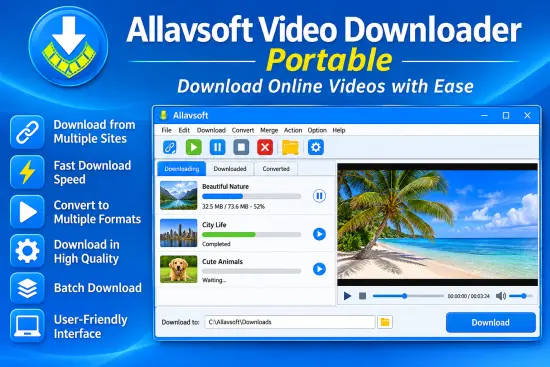
The most visible role of Allavsoft Portable is downloading media from supported online sources. A typical workflow starts with a copied URL, after which the software can detect the link and prepare it for processing. From there, the user chooses the target format or leaves the source intact, depending on whether the goal is direct preservation or conversion. This makes the application approachable for new users while still leaving enough control for more experienced users who care about format, quality, and file naming.
Batch handling is one of the most practical parts of the program. Instead of processing each item individually, Allavsoft Portable can line up multiple links and manage them in sequence. That matters when a user needs to archive a playlist, collect a lecture series, save a group of music videos, or prepare material from different sources in one session. The batch model reduces repetitive work and keeps the process organized, which is important for anyone dealing with media in volume rather than as occasional single downloads.
The program also emphasizes download stability. It supports pause and resume behavior, which helps when connections are inconsistent or when a long session must be interrupted and continued later. That is a valuable detail for large files or slower networks, because it reduces the risk of having to restart the entire task from the beginning. In practical terms, this makes the tool feel more dependable when handling longer projects or files that take significant time to complete.
Format Conversion Strength
Allavsoft Portable is not only a downloader; it is also a converter, and that dual role is a major part of its appeal. Users can convert videos into standard containers and codecs suited for general playback, editing, or sharing. The software supports a wide range of output choices, which gives flexibility when the final destination matters as much as the source. Someone preparing files for a media player, a mobile device, an editing application, or a library archive can often choose a suitable format without needing a second tool.
Audio conversion is equally important. The software can extract sound from online video sources and save it into common music formats. That capability is useful when the user wants a spoken lecture, an interview, a soundtrack, or a live performance without the accompanying video. It also helps when building a personal audio archive from video-based sources. By separating the audio layer from the visual layer, Allavsoft Portable makes it easier to preserve the part of the content that matters most for the intended use.
The conversion process is designed to be simple enough for routine work, yet broad enough to support many everyday needs. Users who frequently move between video and audio collections can set a preferred output style and reuse it across multiple tasks. This creates consistency across a media library and helps prevent unnecessary re-encoding steps. For users who are organizing content for long-term storage, the ability to normalize formats is often as important as the ability to download them in the first place.
Supported Content Types
One of the strongest points of Allavsoft Portable is the variety of supported content categories. It is positioned as a tool for media acquisition, but its scope is not limited to one type of source or one type of file. In addition to standard video downloads, the software can handle music, playlist-based material, subtitles, and source media that arrives in different containers or streaming styles. That wider support makes it more practical than a narrow-purpose downloader that only works in one scenario.
Subtitle handling adds another useful layer. For users who want offline viewing with captions, transcripts, or translated text, the ability to capture subtitles alongside video can save time and prevent manual reconstruction later. Subtitles are often overlooked until they are needed, but they become essential for language study, accessibility, and reference. Having them available within the same workflow as the main media file helps keep the archive complete and easier to use later.
The software also supports content from a broad range of media-sharing platforms. That kind of flexibility matters because users rarely keep media in one place. Instead, their material may come from educational websites, social networks, video libraries, music services, or niche hosting platforms. Allavsoft Portable is built to reduce the friction caused by this variety by giving users a consistent interface for many different sources.
User Interface and Practicality
Allavsoft Portable is built around a straightforward interface that keeps the main actions visible. Users are not forced to navigate a deep hierarchy of menus before they can begin a task, and that reduces the learning curve for people who just want to paste a link and begin downloading. At the same time, the interface still exposes the key decision points that matter: output format, destination folder, quality options, and conversion behavior. That balance between simplicity and control is one of the reasons it remains practical for everyday use.
The portable format adds another layer of convenience to that practical design. Because it does not depend on a traditional installation process, it is easier to keep on removable storage, move between machines, or use in environments where software installation is restricted. That can be especially valuable for users who work on shared computers, maintain multiple test systems, or simply prefer keeping tools separate from the operating system. The software remains self-contained, which makes it easier to manage and remove when needed.
Another useful detail is how the software keeps the workflow focused. Instead of pushing the user toward complicated configuration screens before any useful work can happen, it lets the main media tasks come first. This makes the program more approachable for quick jobs, but it still allows enough control for more deliberate usage. A user can move from a basic download to a more refined conversion routine without changing tools, which helps keep the overall process efficient.
Quality and Output Control
Output quality control is a major concern in any downloader-converter application, and Allavsoft Portable addresses it by allowing users to choose how files are saved. That means the final result can be tailored to the intended purpose rather than forced into one default profile. If the goal is maximum playback compatibility, the user can choose a common format. If the goal is smaller file size, a different choice can be made. If the goal is preserving a source file as closely as possible, that can also be taken into account.
The same flexibility applies to audio extraction. Some users want a compact audio library for portable listening, while others want a high-quality track for editing or archival purposes. A single workflow cannot serve both equally well, so the software’s value comes from letting the user decide. That kind of choice is what turns a generic media tool into a more adaptable one, because the output can match the real-world use case instead of being locked to one assumption.
Quality control also influences confidence. When users know they can select the desired output before launching a job, they are less likely to waste time redoing tasks. That matters when working with large files or long playlists, where a mistake in settings can mean waiting again for an entire batch to finish. Allavsoft Portable reduces that risk by making the important decisions visible at the start of the process.
Batch Handling and Scale
For people who work with media in quantity, batch operations are a defining feature. Allavsoft Portable can line up multiple downloads and process them in a structured sequence, which is much more efficient than handling every item one by one. This is useful for playlist archiving, lecture collection, music library building, or preparing a set of media files for later editing. Once the batch is set, the software can keep moving through the list with minimal intervention.
Scale matters not only because of file count but also because of the time involved. Media tasks often take longer than expected, and a tool that can manage a queue without constant supervision has real value. The user can continue with other work while the queue runs, then return later to review what was completed. This makes the software more suitable for practical productivity than for one-off novelty use.
Batch behavior also helps with consistency. When several files are processed under the same settings, the user gets a more uniform result than if each one were treated separately with ad hoc choices. That consistency can be important when building a collection intended for a shared player, a project archive, or a long-term storage folder where file organization needs to stay predictable.
Audio Extraction and Media Reuse
One of the most useful capabilities in Allavsoft Portable is audio extraction from video sources. Many users do not actually want the entire video when the audio component carries the primary value. A concert recording may be kept for the soundtrack, an interview may be saved for the spoken content, and a tutorial may be retained for its narration. By separating audio from video, the software allows that content to be reused in a lighter and more manageable form.
This is particularly helpful for media collectors who build curated libraries. Instead of storing large video files for every source, they can extract the useful sound material and archive it in a cleaner format. That lowers storage pressure and makes browsing easier later. It also allows the same source to be used in multiple ways, depending on whether the user wants the full video, only the audio, or both in different formats.
For editing-oriented users, audio extraction can be a starting point rather than a final step. Once audio is available in a common format, it can be imported into editing software, tagged, trimmed, normalized, or combined with other media. That means Allavsoft Portable can fit into a broader workflow instead of acting only as a final destination.
Subtitle and Metadata Value
Subtitles add more value than many people first assume. They can support accessibility, language learning, transcription, indexing, and searchability. When Allavsoft Portable can collect subtitles along with the main media, it helps preserve the full context of the source rather than only the audible or visible layer. That matters for educational content, multilingual materials, and any case where the spoken or written text may need to be revisited later.
Metadata preservation is another area that contributes to a useful archive. Audio tags and file information can help identify what the user has saved, especially when a library becomes large. If the software keeps relevant tag data during conversion, the resulting files remain easier to sort and recognize. That reduces cleanup work later and makes the collection more practical for long-term use.
These smaller details matter because media management is not only about getting the file onto disk. It is also about keeping the file understandable after the original browser tab is gone and the download queue is complete. A tool that respects subtitles and metadata is more likely to produce a library that remains organized and useful over time.
Typical Use Scenarios
Allavsoft Portable can serve different kinds of users without needing a completely different interface for each case. A student may use it to save lecture videos and extract audio for review. A music listener may use it to collect tracks from supported sources and convert them into a preferred format. A media organizer may use it to build a local archive of videos, subtitles, and audio files from multiple websites. A content worker may use it to prepare source media for later editing or reference.
The software also fits well into environments where portability is a priority. Users who do not want to leave a permanent footprint on a machine can keep the application in a portable folder and bring it out only when needed. This is especially helpful for temporary workstations, shared offices, or systems with strict permission settings. Because the tool is self-contained, it becomes easier to maintain a clean working environment.
For people who regularly switch between home, office, and travel machines, the ability to keep the same utility available in a portable form reduces friction. The user does not need to rebuild preferences from scratch every time. That continuity can be just as valuable as the actual download feature, because it keeps the workflow stable across different locations.
Why It Feels Practical
Allavsoft Portable feels practical because it combines common media tasks into a single routine. Downloading, converting, and extracting no longer have to be separated into different applications unless the user wants them to be. The result is a workflow that is easier to remember and faster to repeat. That simplicity is important in software meant for frequent use, because repeated tasks become much more comfortable when the steps stay predictable.
The program also avoids making the user think too far ahead before starting. A copied link, a selected format, and a destination are usually enough to begin. That low-friction approach suits everyday use better than a heavily technical tool that demands detailed setup before any result appears. At the same time, users who care about control can still make choices that affect quality, organization, and output type.
In that sense, the software is aimed at utility rather than spectacle. It is built for the practical work of collecting and reshaping media, not for showing off a complicated interface. That makes it easier to recommend as a routine tool for people who need repeatable results more than experimental features.
Overall Character
Allavsoft Portable presents itself as a broad, user-oriented media utility with a strong emphasis on downloading and conversion. Its value comes from the combination of supported sources, output flexibility, batch handling, audio extraction, subtitle support, and a workflow that stays simple enough for regular use. For users who deal with online media often, that mix can cover a lot of ground without requiring multiple separate programs.
Its portable nature further improves the experience by making the tool easier to carry, easier to keep separate from the system, and easier to use in places where installation is inconvenient. That makes the software especially attractive to users who like keeping their tools organized and mobile. In everyday use, it works best as a dependable helper for collecting, converting, and organizing media with as little friction as possible.
As a result, Allavsoft Portable is best understood as a practical media management companion. It is built to take common online media tasks and make them more manageable, more repeatable, and easier to fit into a larger personal or professional workflow. For anyone who values media saving, conversion, and portability in one place, it offers a solid and familiar approach.
Key Features:
- Comprehensive Multimedia Download: Allavsoft Portable supports downloading videos, music, playlists, and subtitles from a wide range of popular websites, including YouTube, Facebook, Dailymotion, Vimeo, and more. The software detects and captures the video or audio playing on the web page, enabling users to effortlessly save them to their local storage.
- Batch Download and High-Speed Conversion: With Allavsoft Portable, users can download multiple videos or audio files simultaneously. This feature saves time and effort, especially when dealing with large playlists or multiple media files. Furthermore, the software employs advanced acceleration technology, ensuring swift download and conversion speeds without compromising quality.
- Versatile Format Compatibility: Allavsoft Portable supports a vast array of multimedia formats, allowing users to download and convert videos and audio files to formats compatible with various devices and platforms. Whether it’s MP4, AVI, WMV, MOV, MPG, FLAC, MP3, WAV, or any other popular format, Allavsoft Portable has got you covered.
- Extract and Convert Audio from Videos: This software excels at extracting audio tracks from videos, enabling users to save their favorite songs or background music from movies, TV shows, or online videos. Allavsoft Portable provides options to convert extracted audio tracks to popular formats, making them playable on devices such as smartphones, tablets, or MP3 players.
- Advanced Video Editing Features: Allavsoft Portable offers a range of video editing features, empowering users to customize downloaded videos according to their preferences. Users can trim, crop, merge, or add watermarks, subtitles, or effects to enhance the visual appeal of the videos. With these editing capabilities, users can create personalized videos for sharing or professional presentations.
- Built-in Media Player: Allavsoft Portable includes a built-in media player that allows users to preview downloaded or converted files without the need for external players. This eliminates the hassle of switching between different applications and ensures a seamless user experience.
- Download and Convert 4K, HD, and 3D Videos: Allavsoft Portable supports the downloading and conversion of high-resolution 4K, HD, and even 3D videos. Users can enjoy their favorite movies, documentaries, or music videos in stunning clarity and immerse themselves in a truly immersive multimedia experience.
- User-Friendly Interface: Allavsoft Portable boasts an intuitive and user-friendly interface, making it accessible to both novice and advanced users. The software’s layout and navigation are designed to simplify the download and conversion processes, ensuring a hassle-free experience for all users.
- Automatic Shutdown and Action After Download: Allavsoft Portable offers the convenience of automatic actions after download completion. Users can set the software to shut down the computer, sleep mode, or hibernate after the download or conversion process finishes. This feature is especially useful for users who need to leave their computer unattended during lengthy downloads or conversions.
Conclusion: In conclusion, Allavsoft Portable is an exceptional software solution for downloading and converting multimedia content. With its comprehensive features, format compatibility, and user-friendly interface, Allavsoft Portable provides an unmatched experience for users seeking a reliable and portable multimedia download and converter tool. Whether you’re a professional needing to download videos for work or a student wanting to save educational content, Allavsoft Portable has you covered, making it a must-have software for multimedia enthusiasts.