

Portable ChrisPC VideoTube Downloader Pro 15.26.0207 Multilingual
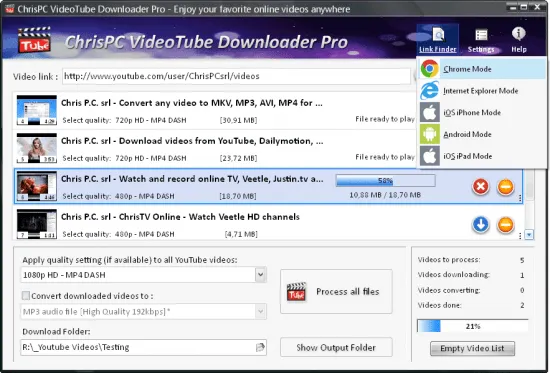
ChrisPC VideoTube Downloader Portable is a robust, Windows-optimized multimedia retrieval tool that empowers users to capture videos, audio, and playlists from over 10,000 online platforms with remarkable efficiency and precision. Tailored for tech enthusiasts managing personal media libraries or integrating downloads into advanced workflows like video upscaling and audio analysis, it combines intuitive controls with pro-grade features for seamless offline content management.
Interface and User Experience
ChrisPC VideoTube Downloader Portable greets users with a polished, resizable interface featuring a dark-mode default that’s easy on the eyes during marathon download sessions. The central pane dominates with a prominent URL input field—simply paste links via Ctrl+V for instant detection—flanked by thumbnail previews, quality selectors, and real-time progress bars animated with fluid gradients. A collapsible left sidebar organizes tabs for Downloads, Playlists, History, Converter, and Settings, each with sub-panels that expand on hover for clutter-free navigation.
Customization reigns supreme: drag to reorder queue items, apply skins from a gallery of 15 themes (from sleek metallic to vibrant neon), and assign global hotkeys like F9 for “Download All” or Ctrl+Shift+P for playlist mode. High-DPI scaling ensures crisp icons on 4K displays, while accessibility options include voice-over support, large-text modes, and keyboard-only operation. The system tray icon pulses with download stats, enabling one-click pauses or speed checks without stealing focus.
On launch, a quick wizard calibrates settings: detect optimal download threads based on your internet speed, set default formats (MP4 1080p shines for most), and whitelist folders like NSIS project dirs to skip scans. Progress visuals break down transfer rates (MB/s graphs), ETA countdowns, and segment completion—making it feel like a command center for media acquisition.
Core Downloading Engine: Versatility Across 10,000+ Sites
The heart of ChrisPC VideoTube Downloader Portable is its adaptive engine, supporting downloads from juggernauts like YouTube, Vimeo, Dailymotion, BBC iPlayer, ITV, FOX, ABC, CBS, and niche archives. It deciphers complex streaming protocols—RTMP for live broadcasts, HDS (F4M manifests), HLS (M3U8 playlists), MPD DASH for adaptive bitrate, and straight VOD files in MP4, FLV, WebM, 3GP—ensuring no content slips through.
Paste a single video URL, and it auto-probes qualities from 144p proxies to 4K UHD (2160p), listing options like MP4 H.264 (universal compatibility), WebM VP8 (web-optimized), FLV H.264 (legacy support), or 3GP (mobile-first). Batch mode parses playlists or channels effortlessly: input a 200-video series, select “All in 720p MP4,” and watch it queue with total size estimates (e.g., 45GB) and parallel threading up to 32 segments per file for gigabit speeds.
Live stream recording captures broadcasts as they air, segmenting into MP4 chapters with timestamps—ideal for archiving webinars or concerts. Segmented downloading accelerates YouTube grabs by 12x, splitting files into 10+ parts simultaneously, with smart resuming from byte 0 on drops. Proxy support (HTTP/SOCKS5) and user-agent rotation bypass geo-blocks, while bandwidth throttling prevents hogging shared connections.
Video Link Finder: Intelligent Detection Magic
A standout innovation, the Video Link Finder scans pages in multiple modes—Chrome emulation, IE legacy, Android/iOS mobile—to unearth hidden streams. Load a webpage URL, hit “Find Links,” and it crawls for embedded videos, extracting 50+ candidates with previews, durations, and protocols. Filters let you grab “All HLS” or “MP4 >1080p only,” saving hours versus manual hunting.
For power users, advanced tweaks control concurrency: download M3U8/MPD in up to 10 parallel parts for 15x speed boosts on fast lines. HTML5 video sniffing catches progressive streams, while audio-only detection pulls MP3/AAC from music pages—priming files for chord analysis in Scaler 3.
Batch and Playlist Mastery: Scale Without Sweat
Batch downloading turns solo grabs into bulk operations. The queue manager handles unlimited entries, sortable by ETA, size, or source. Import URLs from clipboard history, text files (one per line), or browser extensions for seamless flow. Reorder via drag, group into jobs (“Music Playlists,” “Tutorials”), and apply bulk presets: “Convert all to 1080p MOV for editing.”
Playlist support is granular: auto-detect full YouTube lists/channels, select subsets (e.g., videos 1-50), or filter by duration/quality. Scheduling automates via Windows integration— “Grab new uploads from Channel X every midnight in FLAC audio”—with email alerts on completion. History log tracks everything: search by title, author, date, retaining thumbnails and resumable states for interrupted runs.
Built-In Converter and Format Flexibility
Post-download, the integrated converter transforms files without external apps. Outputs span AVI, MPEG-4, WMV, MOV, MP3, AAC, with hardware acceleration (NVIDIA/Intel/AMD) for 10x faster encodes. Presets optimize for devices: “iPhone HEVC,” “Android VP9,” or “PC Archive ZIP.” Batch-convert queues apply two-pass compression, shrinking 4K to 720p at 50% size with near-lossless quality.
Audio extraction is pristine: rip 320kbps MP3 or lossless FLAC from videos, with normalization to -14 LUFS and metadata tagging (artist/title from source). Subtitle support embeds SRT from streams, auto-syncing to waveforms. For video pros, “Proxy Export” creates lightweight edits-ready files for Luminar Neo or Mocha Pro pipelines.
The embedded player previews everything—frame-accurate scrubbing, A/B quality compares, volume normalization—before finalizing.
Media Organization and Library Tools
Downloads auto-organize into smart folders: /Platform/Quality/YYYY-MM-DD/Title, with customizable trees. Duplicate checker uses perceptual hashes to skip repeats, while rename rules pattern-match (e.g., “[Artist] – [Song] [Res].mp3”). Export queues to M3U playlists for Oilsky A66-style players or iTunes.
Download History doubles as a library: filterable grid with ratings, play counts, and “Re-download” buttons. Cloud sync (Pro-exclusive) backs states to Dropbox for multi-PC workflows.
Performance Tuning and System Optimization
Lightweight at ~40MB install, ChrisPC sips resources: <100MB RAM peak, multi-threaded for your CPU cores, SSD-aware caching. Profiler dashboard graphs usage, suggesting tweaks like thread caps for older rigs. Portable mode runs USB-free, ideal for clean testing pre-NSIS packaging.
No ads, auto-updates (delta-patched <5MB), and silent runs keep it optimized. CLI access (cvtdlpro.exe --playlist url.txt --format mp4_4k) enables scripting: integrate into NSIS installers for “Download + Install Media Pack” flows, complete with Resource Hacker splash screens.
Security and Privacy Layers
Pro version locks down with integrity checks (SHA-256 verifies files), sandboxed temps, and no telemetry. Proxy chaining, incognito queues (erase on exit), and VPN passthrough ensure private grabs. Exclusions protect custom folders from accidental overwrites.
Advanced Features for Multimedia Pros
RTMP/HLS Experts: Manual manifest edits for custom streams.
YARA-Like Filters: Regex for link selection (e.g., “tutorial.*chord”).
API Hooks: JSON exports for NSIS/PowerShell automation.
Live DVR: Pause/rewind streams mid-download.
Batch Presets: “Scaler Prep” (ProRes 10-bit), “Audio Stem” (multi-track rips).
Version 15 comes with new features and improvements:
- Improved Link Finder Expert engine, now supporting over 30,000 sites. The interface has been redesigned for improved user-friendliness and includes a Favorites feature for quicker access to your preferred video sites.
- Added Enhance Mode to Link Finder Expert to improve video stream detection. If you have issues accessing a website due to BOT protection or CAPTCHA challenges, deactivate this feature temporarily while logging in to your preferred website, and reactivate it afterward.
- Download Age restricted videos and your private videos from YouTube using the new “Sign In to YouTube” feature, available in the PRO version (“Settings”->”Sign in to YouTube”).
- Improved Playlist Preview and Playlist History for YouTube videos, that lets you easily find the videos you want to download from a playlist.
The Playlist Preview loads all available videos from a playlist and lets you filter/search the list by name. You can also sort the list alphabetically, by duration or author.
Video selection can be made individually by clicking the checkboxes from 1st column or by batch using the SHIFT key and UP/DOWN arrow keys (or mouse) and pressing the SPACE key.
With Playlist History you can monitor new videos added to a playlist from previous versions or compare it with another list. - Added the option Set live recording end time (available for YouTube live streams and M3U8 streams, by pressing on the 3 dots menu of the video). It can be adjusted at any time during live recording.
- Added the option Disable sleep mode while software is running, it will prevent your PC from entering in sleep mode (Settings->Advanced settings).
- Link Finder Expert is a new powerful feature to be used when you can`t detect and download your video using copy/paste mode or with Link Finder engine.
- Improved detection using Link Finder for videos from My5, Channel4, TVNow, TVNZ, threenow, UKTV Play, RTEPlayer, TG4, Atresplayer, NPOStart, 9Now, 7Plus, GlobalTV, CityTV, CTV, VirginPlayer, TF1, Prosieben, 6play, TVAPlus, VRai, MediasetPlay, Kijk, Zee5 and many more.
- Added the Advanced Mode to Link Finder engine, which lets you choose the browser type from a list of 25+ browser configurations, like Safari on iPhone, Edge on iPad, Chrome on Android and many more. This way, you can find different video streams (like M3U8, MPD, MP4 or MP3) for the same video content depending on the platform it is played on.
- Added advanced settings where you can choose how many parts to be downloaded at same time for M3U8 and MPD DASH streams. If your Internet connection is fast you can download up to 10 parts simultaneous.
- Improved download speed by up to 15x times for M3U8, MPD and F4M streams.
- Added segmented download option to improve YouTube video download by up to 12x times.
- Improved Link Finder engine detection of HTML 5 videos, M3U8, F4M, MPD, MP4, M4A, M4V, MP3 video and audio streams.
- Video Download History keeps a log of all your downloads, helps you find downloaded videos by title, author, day of download.
- Added the option to automatically select subtitle language to download for YouTube, ITV, BBC, CBS, ABC, NBC, FOX and others.
- You can download videos up to 3 GB with the free version from the popular video websites: YouTube, Vimeo, DailyMotion, Metacafe.
- Record live streams from YouTube, Livestream, Ustream, M3U8 HLS and F4M HDS streams.
- Improved support for RTP Play, VTM Go, Viaplay, Talking Pictures TV Encore, CBS, NBC, ABC, Channel 5, Channel 4, Joyn, 7Plus, ITVX, MediasetPlay, RTL+, RTEPlayer, Roku, Shahid.net, NPOStart, Movistarplus, SVTPlay, Videoland, VTMGo, mhzchoice.com, DR.dk, Discovery videos.
- Improved detection for videos from mewatch.sg, kinostream.com, Channel4, Videoland, Rakuten Viki, Roku Channel, ITV, CBS, animeonegai.com using Link Finder Expert.
- Improved stream detection for GlobalTV, Radio Canada, Tou.tv, Raiplay.it,RTE, TG4, DiscoveryPlus, Shahid.net, YouTube.
Release Notes
- Improved detection for YouTube Private and Age Restricted videos.
- Improved MPD stream detection and download.
- Other fixes and improvements.