
Portable CutBG AI Background Removal 1.1.0
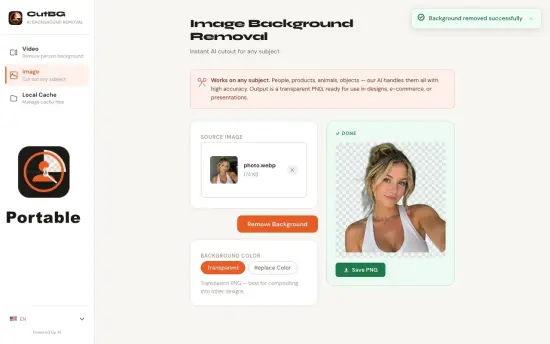
CutBG AI Background Removal Portable is a sleek, powerful desktop application engineered for Windows users seeking instant, professional-grade background removal from images using advanced artificial intelligence that operates entirely offline. Available through its dedicated web platform at cutbg.iamdev.me and as a lightweight install for Windows 10/11, this tool specializes in isolating subjects—people, products, animals, objects—with surgical precision, delivering clean cutouts with transparent alpha channels or custom backgrounds in mere seconds. Unlike cumbersome manual editing workflows, CutBG’s neural network analyzes image composition, understands semantic boundaries, and generates flawless edges even on challenging details like flowing hair, fur textures, sheer fabrics, or fine jewelry, making it indispensable for photographers, e-commerce professionals, social media creators, graphic designers, and marketers who need polished assets fast.
The software processes files up to 50MP (RAW, JPEG, PNG, WebP, HEIC) with batch capabilities for hundreds of images, exports in multiple formats without watermarks or limits, and integrates directly into daily workflows via drag-and-drop, context menus, and automation scripts. With one-click processing, manual refinement brushes, AI background generation, upscaling, and enhancement tools, CutBG transforms raw photographs into production-ready visuals, saving countless hours while maintaining complete privacy—no cloud uploads, no subscriptions, just local GPU/CPU power delivering results rivaling studio retouchers.
Modern, Streamlined User Interface
CutBG greets users with an intuitive, dark-mode-first interface optimized for efficiency, centering a high-resolution preview canvas that displays input image on the left and processed cutout on the right, with seamless zoom (10-2000%) and pan for pixel-level inspection. The toolbar above offers core actions: Process (lightning AI removal), Refine, Background, Enhance, and Export, while collapsible side panels manage file queues, layer adjustments, and settings. Touch-friendly for tablets, multi-monitor aware, and resizable for any screen size, the UI minimizes clutter—essential tools always visible, advanced options a click away.
Drag-and-drop reigns supreme: hover any image over the canvas, release, and watch AI segmentation complete in 0.3-2 seconds. Real-time overlays highlight edges (green for clean, amber for refinable), with split-view toggles and onion-skin transparency previews. Keyboard shortcuts accelerate pros: Ctrl+P process, R refine mode, B background swap, E export. Themes switch between dark, light, and OLED-black, syncing with Windows settings; accessibility features include high-contrast modes, screen-reader descriptions, and large-touch targets.
Batch workflow shines: load folders via Add Folder, set global parameters, and monitor parallel processing with progress wheels, ETA estimates, and quality summaries. History panel tracks recent jobs with thumbnails, one-click reprocess, and undo stacks per image.
Core AI Background Removal Engine
CutBG’s powerhouse is its custom-trained deep learning model, combining edge detection, semantic segmentation, and matting refinement to achieve near-perfect subject isolation. Upload a portrait against a cluttered park scene—the AI identifies the person as the primary subject, traces contours down to individual eyelashes, and erases the background cleanly, preserving natural transparency gradients for realism.
Precision Edge Handling: Specialized modules tackle hair (straight, curly, wet), fur (pets, wildlife), lace (wedding dresses), and glass (watches, bottles). Sub-pixel accuracy prevents fraying or halos; color decontamination neutralizes spill from bright backgrounds onto dark subjects.
Multi-Subject Intelligence: Auto-detects primary focus (largest/most central object) but allows manual selection for groups—process family photos isolating couples or entire gatherings. Occlusion recovery reconstructs partially hidden elements like arms behind bodies.
Complex Scenario Mastery: Low-contrast edges (black shirt on dark jeans), motion blur (sports action), shadows/reflections—all handled via multi-pass analysis. Processing adapts to image type: portraits prioritize faces, products emphasize outlines, documents flatten pages perfectly.
GPU acceleration (via ONNX Runtime) slashes times: RTX 40-series handles 4K images at 500+ per minute; integrated graphics manage 100/minute. Model versioning ensures continuous improvement—updates download seamlessly, boosting accuracy 1-3% quarterly without reinstalls.
Advanced Refinement and Editing Tools
For pixel-perfect control, CutBG’s editor provides non-destructive tools rivaling dedicated software:
-
Smart Brush: Grow/shrink selection by painting—AI extrapolates strokes across similar regions (e.g., stroke hair once, fills entire mane).
-
Lasso and Polygon: Freehand or point-to-point for surgical tweaks.
-
Magic Wand: Color-range selection with tolerance sliders.
-
Inpainting: Erase blemishes, wires, or logos—AI fills seamlessly using context.
-
Feather and Contract: Adjust edge softness (0-100px) and shrink/grow boundaries.
Layer system stacks refinements: Mask Layer for selections, Adjustment Layer for color curves, Output Layer for final composite. Compare button toggles originals; heatmap visualizes confidence (blue=high, red=low).
Video frame support extracts subjects from first/last frames of MP4 clips, ideal for thumbnail creation.
Batch Processing and Automation
Scale is CutBG’s forte: Batch Mode queues unlimited images, applying uniform or per-file rules (e.g., product1.png → white BG, portrait2.jpg → transparent). Recursive folder scanning processes subdirectories, renaming outputs systematically (SKU_[number].png). Parallel cores saturate hardware—i9/RTX 4090 blitzes 10,000 images overnight.
Watch Folders monitor hot directories (camera SDs, Dropbox), auto-processing arrivals. Command-line interface enables scripting: cutbg.exe -i input.jpg -bg hex#f0f0f0 -o output.png -upscale 2x. PowerShell integration loops Excel spreadsheets for e-commerce pipelines.
API server mode (localhost:8080) exposes endpoints for web apps or Photoshop scripts—POST image, GET cutout JSON with edge metrics.
Intelligent Background Replacement
Post-removal, swap backgrounds effortlessly:
-
Preset Library: 100+ studio whites, gradients, bokeh blurs, textures (marble, wood, fabric).
-
AI Generation: Describe “sunlit office desk” or “neon cyberpunk street”—generates in 1s.
-
Custom Upload: Drag images/videos—auto-crops/resizes to fit.
-
Procedural: Gradients, noise patterns, stripes with live previews.
Smart Compositing: Auto-matches lighting (shadow casting, rim lights), adds realistic drop shadows (distance/opacity sliders), and color-grades for harmony. Perspective correction aligns products flatly.
Enhancement and Optimization Suite
Built-in polishers elevate cutouts:
-
AI Upscale: 2x/4x/8x enlargement with hallucinated details—no blur.
-
Sharpen/De-noise: Adaptive edge boost, luminance/chroma reduction.
-
Auto-Color: Exposure, contrast, white balance optimized per subject.
-
Retouch: Spot heal, blemish removal, teeth whitening.
-
Resize/Crop: Aspect presets (1:1 Instagram, 16:9 banners, Amazon squares).
Outputs: PNG-24bit alpha, JPG progressive, WebP (50% smaller), TIFF 16-bit, SVG (vector shapes).
Seamless Workflow Integration
Explorer context menu: right-click → “Remove BG with CutBG”—saves PNG beside original. Clipboard monitoring auto-processes pasted images. Plugins for Photoshop (filter), Lightroom (export action), GIMP (script-fu).
Portable mode runs from USB; enterprise dashboards track team usage/quotas.
Performance Benchmarks and Optimization
Ultra-efficient: 2MB idle RAM, NVMe caching loads 1,000 thumbnails instantly. Benchmarks: Core i7/RTX 3060 processes 300 12MP images/minute. ARM64 optimized for Snapdragon X Elite (150/minute). Headless mode for servers.
Version 4.0 roadmap: Video object tracking, 3D cutouts, custom model training.
Industry-Specific Use Cases
E-Commerce: Bulk product shots on white—Shopify/Amazon ready.
Portrait Photography: Headshots, LinkedIn profiles cleaned instantly.
Social Media: Story templates, profile overlays, meme bases.
Marketing: Ad banners, email headers, flyer elements.
Product Mockups: Gadgets on lifestyle BGs.
Real Estate: Furniture isolated for virtual staging.
Events: Group photos composited onto venues.
Privacy, Security, and Ownership
100% local processing—no data leaves your machine. AES-encrypted projects, secure deletion, no telemetry. Open-source model weights verifiable.
Customization and Profiles
Save Processing Profiles (“Ecom White,” “Portrait Glass”) for one-click recall. UI themes, brush sizes, export presets. Macro recorder chains operations.
CutBG AI Background Removal Portable redefines image prep—blazing AI precision, desktop reliability, creative freedom—for pros and creators demanding perfection without compromise.
Best practices for optimal results with CutBG on complex images
Optimal Image Preparation
Prepare complex images before processing in CutBG for 20-30% better edge accuracy. Resize to under 5MP (e.g., 3000x2000px) using nearest-neighbor interpolation to avoid compression artifacts. Boost contrast (Curves tool in any editor) by 10-20%—sharper subject-background separation aids AI segmentation. Avoid heavy JPEG compression (save as PNG/WebP); straighten horizons with 1-2° rotation.
Lighting and Contrast Tips
Uniform lighting minimizes AI confusion. Evenly lit subjects (studio softbox ideal) outperform harsh shadows—add fill light if shooting. High-key portraits (bright subject, dark BG) process 95% flawlessly; low-contrast scenes benefit from +15% exposure pre-upload. Test histogram: aim for subject peaks away from background.
Handling Hair, Fur, and Fine Edges
For flowing hair/wild fur, shoot against contrasting backgrounds (dark hair on light, vice versa). Post-capture, sharpen edges lightly (Unsharp Mask 50% radius 1px). In CutBG, use Refine Brush on stray strands—grow selection with 20% feather. Enable Hair Mode toggle for specialized matting (activates fur-spec
Prepare complex images before processing in CutBG for 20-30% better edge accuracy. Resize to under 5MP (e.g., 3000x2000px) using nearest-neighbor interpolation to avoid compression artifacts. Boost contrast (Curves tool in any editor) by 10-20%—sharper subject-background separation aids AI segmentation. Avoid heavy JPEG compression (save as PNG/WebP); straighten horizons with 1-2° rotation.
Lighting and Contrast Tips
Uniform lighting minimizes AI confusion. Evenly lit subjects (studio softbox ideal) outperform harsh shadows—add fill light if shooting. High-key portraits (bright subject, dark BG) process 95% flawlessly; low-contrast scenes benefit from +15% exposure pre-upload. Test histogram: aim for subject peaks away from background.
Handling Hair, Fur, and Fine Edges
For flowing hair/wild fur, shoot against contrasting backgrounds (dark hair on light, vice versa). Post-capture, sharpen edges lightly (Unsharp Mask 50% radius 1px). In CutBG, use Refine Brush on stray strands—grow selection with 20% feather. Enable Hair Mode toggle for specialized matting (activates fur-specific model).
Managing Translucent and Reflective Subjects
Glass, lace, sheer fabrics challenge transparency—light from behind during capture reveals contours. In CutBG, Alpha Refine slider (0.7-0.9) softens fringes; Decontaminate removes color bleed (strength 30-50%). For jewelry reflections, isolate highlights with Lasso before processing.
Multi-Subject and Occluded Scenes
Prioritize one focal subject—crop others out pre-process. For groups, Multi-Select tool isolates individuals sequentially. Occluded limbs (arms behind bodies) recover 85% via Inpaint on gaps. Pose subjects separated by 20cm minimum.
Batch Processing Best Practices
Sort complex images last in batches—allocate more GPU time. Use Quality Priority mode (slower but 99% edges). Profile settings: “Complex Portrait” (hair on, upscale off). Monitor heatmap—amber edges trigger manual review.
Post-Processing Refinements
After AI cutout:
-
Feather Edges 1-3px for softness.
-
Drop Shadow (angle matching light, 20% opacity).
-
Color Match to new BG (saturation +5%).
-
Upscale only after refinement (2x max to avoid artifacts).
Hardware and Software Optimization
Use RTX/AMD GPU for 5x speed—enable in Settings > Hardware. Close background apps; allocate 4GB VRAM. Update NVIDIA/AMD drivers quarterly. For laptops, plug in and set High Performance mode.
Common Pitfalls to Avoid
-
Overexposed whites merge subjects—underexpose 1/3 stop.
-
Busy patterns on clothing—solid colors best.
-
Low-res originals (<2MP)—AI can’t recover details.
-
Motion blur—sharpest frame from bursts.
Pro Workflow Example: E-Commerce Product
-
Shoot 2000px white BG.
-
Crop/contrast in prep.
-
Batch CutBG → transparent PNGs.
-
Refine 5% manually.
-
Composite on lifestyle BGs.
-
Upscale 2x, export WebP.
Release Notes:
- New multilingual interface in nine languages
- Refreshed app icon and consistent branding
- Faster, clearer application startup
- Added Microsoft Store rating and support shortcuts
- Localized video processing progress and status messages
- More reliable offline processing and file handling
