
Portable Ezee Graphic Designer Professional Plus 2.1.4.0
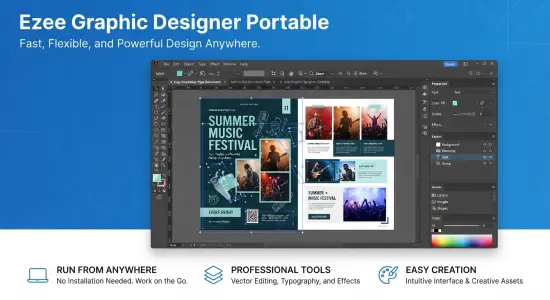
Ezee Graphic Designer Portable is a graphics application for creating polished images for personal projects, small businesses, events, and online publishing. It is intended to make common design tasks approachable, helping users assemble visual content without needing to begin every project with a blank canvas or learn a complex professional design suite.
From social media posts and blog graphics to flyers, brochures, invitations, and business cards, the software supports a broad range of everyday design needs. Its focus is on helping users put together useful, attractive layouts with familiar visual elements such as images, text, colors, and shapes. That makes it a potential fit for people who want to create practical materials themselves, whether they are preparing a one-off announcement or producing graphics for an ongoing project.
What Is Ezee Graphic Designer Portable?
Ezee Graphic Designer Portable is desktop software for making image-based designs. Its intended audience includes beginners, hobbyists, educators, community groups, and small organizations that need graphics but may not have a dedicated designer on hand.
A general-purpose design application can be useful when the same person needs to create several types of material. A small business, for example, might need a promotional flyer, a simple brochure, a social media post, and a coupon. A family might make a birthday invitation, greeting card, or photo-based announcement. Rather than treating each project as a specialized technical task, Ezee Graphic Designer Portable is presented as a way to handle these familiar formats through a visual design workflow.
The program is available for Mac and Windows, with platform-specific versions and system requirements. Its exact capabilities and availability may differ by version, so it is sensible to check the current download and product information before relying on a particular feature or operating-system requirement.
Create Designs for Print and Online Use
One of the main strengths of a versatile graphics tool is the variety of projects it can accommodate. Ezee Graphic Designer Portable is suited to designing materials for both printed use and online sharing. That range can be especially useful for people who produce graphics occasionally and prefer one application for multiple kinds of work.
Possible project types include:
- Advertisements and promotional images
- Blog graphics and website visuals
- Brochures and business cards
- Calendars, coupons, and event tickets
- Flyers, posters, and postcards
- Greeting cards and invitations
- Infographics and graphical announcements
- Letterheads and menus
- Magazine covers and book covers
- Presentations and recipe books
- Social media images and posts
- Rack cards and other small promotional pieces
The project list suggests a practical emphasis: common communication materials rather than highly specialized illustration or production workflows. Users can build a graphic around a message, choose imagery and text, and arrange the elements to suit the intended purpose.
For print projects, it is important to consider the final dimensions and the way the design will be reproduced. A layout that looks good on a screen may need different proportions, spacing, or text size when printed. For online graphics, the dimensions and visual hierarchy should suit the platform where the image will appear. Planning these details before beginning can make the finished result clearer and reduce the need for major revisions.
A Friendly Starting Point for New Designers
Graphic design software can feel intimidating when its interface is built around professional terminology and dozens of technical controls. Ezee Graphic Designer Portable is positioned as a straightforward option for people who want to make attractive graphics without a steep learning curve.
A beginner can approach a project by first deciding what the design needs to communicate. A flyer might need a headline, a short description, a date, a location, and a way to respond. A social post may need only a striking image and a concise message. Once those essentials are clear, the user can organize them into a layout and refine the visual details.
This kind of step-by-step process helps keep the design focused:
- Choose the kind of material to create.
- Identify the main message and essential information.
- Select imagery and colors that support the message.
- Arrange text and visual elements in a clear order.
- Review the design at its intended size.
- Export or prepare the finished graphic for its intended use.
A simple workflow can be valuable even for experienced users. When the task is a small promotional graphic or a quick event announcement, a focused tool may be more convenient than opening a large professional application with features that are not needed for the job.
Useful for Small Businesses and Independent Creators
Small businesses frequently need a steady supply of visual material. Announcements, promotions, menus, service lists, coupons, and social media graphics can all help a business communicate with customers. Ezee Graphic Designer Portable offers a way for owners and staff to create some of these materials in-house.
A consistent visual style makes a business easier to recognize. Reusing a small selection of colors, type styles, and imagery can give different graphics a more coherent appearance. For instance, a shop might use the same accent color and logo placement across a seasonal promotion, a printed flyer, and a social post. The designs do not need to be identical; repeated visual cues can create continuity while allowing each piece to serve its own purpose.
Independent creators can also use a general graphics application to prepare cover images, promotional posts, invitations, announcements, and other supporting materials. A writer might make a book-cover concept or a graphic for a new release. A consultant might create a brochure or a simple presentation visual. Community organizers may need posters and event notices that can be shared digitally and printed for local distribution.
The software does not replace the need for clear communication or thoughtful design. It provides a workspace in which users can put those principles into practice. Keeping layouts uncluttered, making important text easy to read, and choosing images that fit the subject are still essential parts of producing an effective graphic.
Design Social Media Graphics and Blog Images
Online publishing depends heavily on visual presentation. A clear image can help a post stand out, reinforce its subject, or provide a consistent appearance across a website or social account. Ezee Graphic Designer Portable can be used for blog images and social media graphics, including content intended for popular image-sharing platforms.
A useful online graphic generally has one main idea. If a post announces an event, the design should make the event name and key details easy to find. If it promotes a product or service, the image should direct attention to the most important benefit or action. Adding too many decorative elements or lengthy blocks of text can make a graphic difficult to understand, especially when it is viewed on a small phone screen.
Before exporting an online image, review it at a reduced size. Text that appears readable on a large desktop display may become too small on a mobile device. Strong contrast between text and background, concise wording, and a clear focal point help make the design more accessible and effective.
Blog graphics can benefit from similar care. A consistent style across article images can make a site feel more organized. Repeating colors, image treatments, or typography can help readers recognize content from the same publisher, while a distinct title or image keeps each article identifiable.
Prepare Flyers, Posters, Invitations, and Brochures
Printed communication has different demands from a social post. A flyer or poster may need to be understood from a distance, while a brochure can contain more information and guide a reader through several sections. Invitations need to make event details prominent, and business cards need to remain readable at a compact size.
Ezee Graphic Designer Portable is suited to these familiar formats, making it useful for school activities, local events, small-business promotions, personal celebrations, and community projects. A well-structured print layout puts the most important information first. A poster might emphasize the event name, date, and location. A brochure can use headings and short sections to keep details organized. An invitation should make the occasion and practical arrangements easy to spot.
Before printing, check the final page size, margins, image quality, and spelling. If a design will be produced by a print shop, confirm the format and specifications required by that provider. Different printing services may have different requirements for file types, bleed, color, or resolution; these details should be checked separately rather than assumed.
Make Cards, Covers, Coupons, and Other Personal Projects
Not every design is intended for business use. Ezee Graphic Designer Portable can also support personal projects such as greeting cards, invitations, recipe books, photo-based announcements, and book covers. These projects can be made for a special occasion, a hobby, or a keepsake.
A personal design often benefits from a specific theme. A birthday invitation might use colors and imagery connected to the celebration, while a recipe book could use a repeatable layout that makes each page easy to scan. A book-cover concept might focus on a title and image that communicate the mood or subject. Keeping the design’s purpose in view helps prevent decorative choices from distracting from the content.
Templates can be especially helpful when the user wants a starting point or needs to complete a project quickly. They offer a structure to build on, though adjusting the layout to suit the specific content can make the result feel more individual. Users should check the available design resources and templates for the edition they are using.
A Desktop Workflow on Mac and Windows
Ezee Graphic Designer is offered for both Mac and Windows computers. The developer’s product information lists versions for macOS and Windows, and describes supported operating systems for those releases. Since software compatibility changes over time, users should check the current requirements before downloading or installing the application.
A desktop workflow can be convenient when working with several images, writing and arranging text, or preparing graphics for print. A larger screen makes it easier to inspect spacing and alignment, while a mouse or trackpad can provide precise control over layout adjustments. Users who move between computers should also consider how project files are stored and transferred, and whether their chosen version supports the workflow they need.
The word “Portable” in the product name here describes the version being discussed, but portability should not be treated as a guarantee of a specific installation method or feature. Check the product’s current documentation and download details for confirmation of how the software runs, what files it creates, and which systems it supports.
Free Trial and Licensing Considerations
Ezee Graphic Designer is offered as a free download for trial use, with a paid license available. The product information indicates that exported graphics may carry watermarks when a license has not been activated. Users planning to publish or print completed work should review the licensing conditions and test the export process before committing time to a larger project.
A trial is a good opportunity to check whether the software suits a particular workflow. Try creating a small sample design, adjusting text and imagery, and exporting the result. This can help establish whether the interface feels comfortable and whether the output is appropriate for the intended use.
It is also helpful to understand the license terms before using the software commercially or distributing finished graphics. The terms may explain usage rights, activation, supported devices, and other conditions that affect how the product can be used.
Tips for Getting Better Results
A few practical design habits can improve almost any project made with Ezee Graphic Designer Portable:
- Start with the message. Decide what the viewer should notice or do before arranging decorative details.
- Use a clear reading order. Make the headline prominent, then give supporting information a logical place.
- Keep text concise. Short copy is easier to scan, particularly in small online graphics.
- Limit the color palette. A few coordinated colors usually create a more unified result than many competing shades.
- Choose suitable images. Use visuals that support the subject and do not obscure important text.
- Check spacing. Give headings, images, and edges enough room so the design does not feel crowded.
- Review at the final size. Examine the image at the dimensions where it will be printed or displayed.
- Proofread carefully. Check names, dates, addresses, and contact details before sharing or printing.
- Save an editable working copy. Keep a version that can be revised later, along with a final export for distribution.
- Test the finished output. Open the exported file and confirm that it looks as expected.
These habits are useful for both first-time designers and people who create graphics regularly. A polished design does not need to be complicated; clarity, consistency, and careful review often make the greatest difference.
Who Should Consider Ezee Graphic Designer Portable?
Ezee Graphic Designer Portable may suit people who want a desktop tool for everyday graphics, especially when their projects include promotional materials, event graphics, social media images, brochures, cards, or posters. It can be a reasonable choice for beginners who value a direct workflow and for small organizations that need to prepare routine visual content without outsourcing every design.
It may be less suitable for users whose work depends on specialized illustration, advanced photo retouching, complex page-layout production, or professional collaboration features. Those requirements should be compared with the capabilities of the current version before choosing a tool. The best fit depends on the type of output, the user’s experience, the supported operating system, and the amount of control needed over the final files.
Final Overview
Ezee Graphic Designer Portable is a desktop graphics application centered on practical, everyday design. Its range of suggested uses spans print materials, online images, marketing graphics, personal invitations, and other common creative projects. The appeal is its accessible approach: users can focus on assembling a useful design rather than navigating a specialized production workflow.
For a new user, a small sample project is the best way to evaluate the application. Create a basic flyer, card, or social graphic, then check how comfortable the design process feels and whether the exported result meets the requirements. Confirm the current platform compatibility, licensing details, and version information before depending on it for an important project.
Features at a Glance
- Desktop graphic design for Mac and Windows
- Suitable for beginners and everyday design tasks
- Projects for print and digital sharing
- Create flyers, brochures, posters, and business cards
- Make invitations, greeting cards, coupons, and postcards
- Design blog images and social media graphics
- Produce covers, menus, letterheads, and presentations
- Platform requirements and version details should be checked before installation
