
Portable Lazesoft Disk Image and Clone Unlimited 5.3.0.1 (x64) + WinPE
Lazesoft Disk Image and Clone Portable provides robust capabilities for managing disk storage through imaging and cloning operations. This edition unlocks full functionality for advanced users handling multiple systems or large-scale data tasks.
Core Functionality
Lazesoft Disk Image and Clone Portable excels in creating exact replicas of entire disks or individual partitions, ensuring data integrity during transfers. Users initiate the process via a straightforward wizard that scans connected drives and presents them in a clear tree-view interface, allowing selection of source and target without confusion. The software supports sector-by-sector copying, which preserves every bit of data, including unused space, for forensic-level accuracy or when dealing with complex boot configurations.lazesoft-disk-image-clone-unlimited-edition.updatestar+1
This Unlimited version removes restrictions on the number of operations or disk sizes, making it ideal for environments with high-capacity SSDs or RAID arrays. It handles dynamic disks, GPT partitions, and MBR schemes seamlessly, adapting to modern hardware like NVMe drives. During cloning, intelligent algorithms detect and adjust partition sizes automatically, fitting content onto smaller or larger targets while maintaining bootability.
User Interface Design
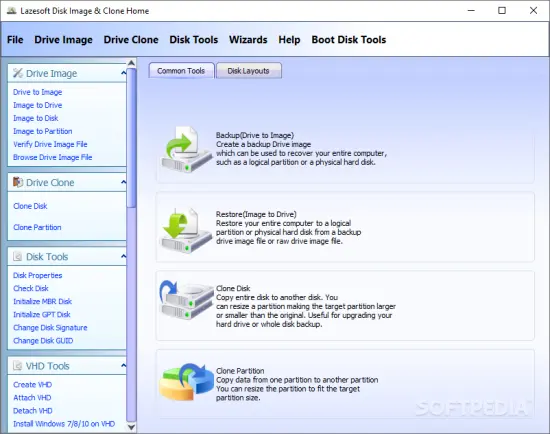
The interface adopts a clean, wizard-driven layout divided into tabs for imaging, cloning, backup, and recovery, minimizing clicks to complete tasks. A central dashboard displays disk layouts with color-coded partitions, free space indicators, and health status previews, helping users visualize operations before committing. Toolbar icons for common actions like “Create Image” or “Clone Disk” sit prominently, with tooltips explaining each step for newcomers.
Customization options abound, such as toggling verification checks post-operation or selecting compression levels for image files. The progress window shows real-time speed, estimated time remaining, and throughput graphs, keeping users informed during long sessions. Keyboard shortcuts accelerate repetitive workflows, appealing to power users who prefer efficiency over mouse navigation.
Disk Imaging Features
Creating a disk image starts with selecting a source drive, where the software lists all connected volumes with capacities, file systems (NTFS, FAT32, exFAT, ReFS), and labels. Users choose full disk, partition-specific, or used-space-only imaging to optimize file sizes, with options for splitting large images across multiple files for easier storage on external media. Compression employs LZNT or custom algorithms, reducing gigabyte-sized images by up to 60% without data loss.
Images save in proprietary .LDI format, which includes metadata like timestamps, checksums (MD5/SHA-1), and hardware compatibility notes for reliable restores. Incremental imaging tracks changes since the last backup, appending deltas to base images for space-efficient versioning. This proves invaluable for scheduled routines, as the software integrates with Windows Task Scheduler via exportable scripts.
Verification runs automatically or on-demand, scanning images against originals to confirm bit-for-bit matches, alerting on discrepancies with detailed logs. Users mount images as virtual drives for browsing contents non-destructively, extracting files via drag-and-drop without full restoration.
Cloning Operations
Cloning mirrors source disks to targets, supporting scenarios like HDD-to-SSD upgrades where alignment optimizes for flash memory. The process offers “Intelligent Clone” for resizing partitions proportionally or manually dragging boundaries in a visual editor. Sector-by-sector mode ensures identical copies, while “Used Space Only” skips empty areas for faster transfers on sparse drives.
Universal cloning adapts bootloaders (Windows Boot Manager, GRUB) across architectures, fixing drivers and hal.dll mismatches for seamless booting on new hardware. For multi-partition setups, it clones in sequence or parallel, prioritizing system volumes to minimize downtime. Post-clone, a boot test option simulates startup from the target without disconnecting the source.
The Unlimited edition handles unlimited drives simultaneously via batch queues, processing multiple clones overnight. It supports hot-cloning live systems using Volume Shadow Copy Service (VSS), capturing consistent snapshots even with open files or running databases.
Backup and Restore Workflows
Backups extend imaging with scheduling wizards for daily, weekly, or event-triggered captures, storing images locally, on NAS, or cloud-mapped drives. Rotation policies retain N latest versions, purging old ones automatically to manage storage. Encryption secures images with AES-256, keyfiles, or passwords, integrating with Windows BitLocker for dual protection.
Restoration reverses the process, booting from Lazesoft’s WinPE-based media to recover to bare-metal hardware. The software detects dissimilar configurations, injecting storage drivers and regenerating BCD stores on-the-fly. Partition resizing during restore expands volumes to utilize full target capacity, with alignment for SSD performance.
Disaster recovery shines in offline environments; users burn ISOs to USB/CD or PXE-boot over networks for fleet-wide restores. Selective file restore from images bypasses full deployments, ideal for quick data salvage after corruption.
Advanced Capabilities
Scripting support via command-line interface (CLI) enables automation, with parameters for silent imaging (/clone /source:0 /target:1 /verify) integrated into batch files or PowerShell. API hooks allow embedding into custom applications for enterprise deployment.
Volume management tools complement core functions, including resize/move, merge, and format operations pre-cloning. Bad sector skipping during reads prevents failures on aging drives, remapping data transparently. UEFI/BIOS dual-boot handling ensures compatibility across legacy and modern systems.
Performance tuning includes multi-threading for reads/writes, leveraging all CPU cores and RAM caching to hit speeds over 200MB/s on SATA3 interfaces. Buffer adjustments and I/O priority sliders fine-tune for low-impact background runs.
Bootable Media Creation
A dedicated wizard crafts fully customized WinPE environments, packing the software alongside drivers for exotic hardware like RAID controllers or USB3.0. Users add extras like antivirus scanners or network stacks for comprehensive rescue disks. PXE server mode broadcasts images over LAN, centralizing restores for IT teams.
Media supports touchscreens and high-DPI displays, with resizable windows and multilingual prompts (over 20 languages). Secure Boot compatibility via signed loaders ensures enterprise policy compliance.
Data Integrity Measures
Checksum validation permeates every operation, from imaging to mounting, with logging to files or Event Viewer. Pre-flight checks scan for locks, low space, or firmware issues, aborting risky jobs with recovery suggestions. Undo snapshots capture pre-operation states for rollback if needed.
Error recovery employs retry logic with exponential backoff, salvaging partial clones via resume features. Detailed reports export to HTML/PDF, timestamped with hashes for audit trails.
Hardware Compatibility
The software spans Windows 11/10/8.1/Server editions (32/64-bit), detecting NVMe, SAS, SCSI, and optical drives. It navigates BitLocker-encrypted volumes (password prompt) and dynamic disks without conversion. Large sector formats (4K native) and 2TB+ volumes pose no limits in Unlimited mode.
Virtual environments like VMware, Hyper-V, or VirtualBox disks image/clone as physical, with VHD/VMDK import/export. For Macs via Boot Camp, it handles hybrid MBRs.
Performance Optimization
Adaptive buffering scales with available RAM, prefetching data to sustain peak throughput. SSD-specific options enable TRIM post-clone and 4K alignment offsets. For HDDs, it defragments sources pre-operation to boost sequential reads.
Benchmarking tools profile drive speeds, identifying bottlenecks like cable issues or controller limits. Overheating alerts pause jobs during extended runs.
Security Features
Beyond encryption, role-based access restricts functions via passwords. Audit logs track all actions with user IDs and IPs. Images resist tampering via digital signatures, verifiable on restore.
WinPE media includes read-only modes, preventing accidental overwrites. Secure Erase integration wipes free space or entire targets pre-cloning.
Workflow Examples
Upgrading to a larger SSD involves selecting the system disk, choosing the new drive, opting for proportional resize, and verifying post-clone before swapping cables—all under 30 minutes for 500GB drives. Migrating dual-boot setups clones both OS partitions sequentially, regenerating EFI stubs automatically.
For server maintenance, schedule weekly full images with daily incrementals, restoring individual VMs from mounts during outages. Batch cloning provisions identical setups across workstations via USB media
Customization Options
Skins and themes alter the UI, with layout persistence across sessions. Hotkeys remap to user preferences, and startup profiles load presets for common tasks like “Daily Backup.” CLI scripting supports variables for dynamic sources.
Plugin architecture hints at future extensions, currently allowing custom compression modules or driver packs.
Resource Usage
Lightweight installer (under 50MB) runs on systems with 1GHz CPU, 1GB RAM minimum, scaling efficiently on high-end rigs. Idle CPU stays below 5%, spiking to 100% only during intensive I/O. No background services unless scheduled.
Update and Support Mechanisms
Integrated updater checks for patches silently, downloading fixes for stability or new hardware support. Change logs detail enhancements like faster NVMe handling or ReFS improvements. Unlimited users access priority email/ticket support with remote diagnostics.
Practical Scenarios
Home users protect family photos/videos with weekly images to external HDDs, restoring files after ransomware hits. IT admins clone departmental laptops before OS upgrades, rolling back en masse if issues arise. Photographers archive RAW libraries via incremental backups, mounting for edits without extraction.
Gamers image boot drives pre-patch, cloning to SSDs for load-time cuts. Developers snapshot VMs for testing branches, merging changes via delta applies.
Limitations and Workarounds
While powerful, live cloning may hiccup on heavily fragmented NTFS; a quick defrag resolves this. Network destinations require stable Gigabit links for practicality. For encrypted Linux ext4, boot media handles reads but not live ops—use offline mode.
Future-Proofing
Roadmap focuses on AI-driven anomaly detection in scans, NVMe-oF support, and ZFS integration. Cloud backup seeds and deduplication loom large for Unlimited scalability.
Integration with Ecosystems
Plays nice with OneDrive/Google Drive mappings for offsite storage. PowerShell cmdlets expose functions for DevOps pipelines. Event log hooks notify on completions via email/Slack webhooks.
Educational Value
Built-in tutorials and tooltips teach concepts like partition tables or VSS, turning novices into pros. Glossary and FAQ cover edge cases like “cloning locked BitLocker volumes.” Sample images demonstrate restores hands-on.
Need to backup your System safely?
With Lazesoft Disk Image & Clone, your can backup your entire system or disk to image files safely on offline, or clone your entire disk to another for backup.
Has options to create WinPE 64 bit PE Recovery Disk
Added Start Menu on boot disk
Options to set screen resolution in the boot disk
Add Network Interface Card Drivers in the boot disk
Upgrade, Clone disk/Partition.
• Clone an old hard disk drive to a new large one.
• copy system partition to a new SSD drive.
• Easy to use wizard-driven interface.
• Partitions can be copy either with original sizes and locations, or Resizes transferred partitions to match new hard disk size.
• Clone with fast mode (Only copy used blocks) or complete mode (sector by sector copy).
• Support any types of hard disks like SATA, IDE, SSD, SAS, RAID, USB.
• Support FAT, FAT32, NTFS file systems.
• Includes special sector-by-sector support for other partitions and corrupted file systems.
• When partitions are copied an original hard disk remains unchanged.
Backup and Restore
• Create Backup Disk Image (occupied clusters only)
• Create Raw Disk Image (sector by sector copy)
• Image files compression
• Support Incremental image backup
• Options to encrypt the backup image with different options
• Command line interface (only for the paid versions)
• Supports FAT16, FAT32, NTFS file systems
• Other partitions and corrupted file systems can be backup with sector-by-sector.
• Auto splitting into 4GB size chunks for FAT32 destination partition.
• Exclude pagefile.sys, hiberfil.sys, swapfile.sys when backup a system disk/volume to a file
Partition Management
• Creates FAT, FAT32, NTFS partitions.
• deletes any types of partitions.
• Format FAT, FAT32, NTFS partitions.
• Hide/unhide partition.
• Set active partition.
Wipe Disk or Partition
• Securely wipe entire disk.
• Wipe multiple partitions even if system partition.
• Has quick mode and deep mode.
• Wipe any types of partitions.
• Support GPT, MBR and Dynamic volumes.
Repair Tools
• Backup/Restore/Rebuild MBR
• Backup/Restore/Rebuild MBR boot sector
• Rebuild Boot Menu
• Lost Partition Recovery
• Added Lazesoft BCD Doctor
VHD Management
• Create VHD
• Attach VHD
• Detach VHD
• Install Windows 7/8/10/11 on VHD
• Install Windows 8/8.1/11 on USB disk
Release Notes:
- Faster BitLocker Volume Backup: Faster backup of unlocked BitLocker volumes with smaller backup image files.
- Create a Portable Windows 11 USB Drive: Create a portable Windows 11 installation on an external USB hard drive.
- Enhanced USB Boot Hard Disk Builder: Create a bootable USB hard disk with a separate data partition for backup images and other files.
- Enhanced WinPE Boot Disk Builder: Improved Windows 11 compatibility when creating bootable recovery media.
Download Lazesoft Disk Image and Clone
Portable:
Filespayout – 66.4 MB
RapidGator – 66.4 MB
WinPE:
Filespayout – 335.3 MB
RapidGator – 335.3 MB
