Portable Perfectly Clear WorkBench 5.1.1.3229 + Addons (x64)
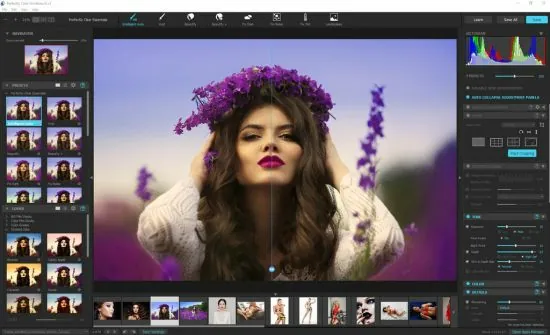
Perfectly Clear WorkBench Portable is a professional image correction and enhancement environment designed for users who want fast, reliable, and highly polished photo adjustment results. It is built around automated intelligence and manual refinement, giving photographers, editors, studios, and technical users a practical way to improve image quality without turning every task into a long, complicated editing session. The software focuses on clarity, consistency, and speed, which makes it especially valuable when large batches of images need to be improved with precision.
The Portable edition adds a layer of mobility to that workflow. Instead of being tied to a single installed setup, Perfectly Clear WorkBench Portable can be carried and launched in a self-contained way, which is useful for users who work across multiple Windows systems or maintain a flexible photo-processing toolkit. That portable approach is particularly appealing when you need the same correction environment available on different machines without extra installation steps or permanent system changes.
Core purpose
The main purpose of Perfectly Clear WorkBench Portable is to improve images efficiently while preserving natural-looking results. It is built for correction rather than just decoration, which means the software is especially focused on exposure, tone, color balance, sharpness, contrast, and overall visual consistency. This makes it a strong option for users who want their photos to look better without losing the authenticity of the original capture.
That purpose matters because many photos need more than a simple filter. Some are too dark, some are flat, some need better color separation, and others require subtle sharpening or face-aware adjustments. Perfectly Clear WorkBench Portable is designed to handle those common image problems in a controlled way, making it practical for everyday correction work as well as more demanding production environments.
Portable workflow
Portability is one of the most useful aspects of this edition. A portable image tool can be stored on removable media or in a dedicated project folder and used when needed without the overhead of traditional installation. For photographers, retouchers, and support professionals, that means a familiar correction environment can travel with the user and remain available wherever the next job happens.
This is helpful in real-world situations where the working computer changes often. You may be editing on one desktop, reviewing images on another, or handling a temporary workstation in a studio, lab, or office. Perfectly Clear WorkBench Portable fits into those environments by staying self-contained and easy to launch, which makes the overall workflow more flexible and less dependent on one machine.
Image correction focus
What distinguishes Perfectly Clear WorkBench Portable is its emphasis on correction quality. Rather than simply applying surface-level effects, it aims to improve the structural qualities of an image so that the final result feels more balanced and usable. This includes working with brightness, contrast, skin tones, color accuracy, and detail clarity in a way that supports realistic enhancement.
That correction-first mindset is important for professional image work. A photo may need to be improved for a catalog, presentation, archive, album, or client review, and in those contexts overly aggressive editing can be a disadvantage. A tool that respects the source image while enhancing it intelligently gives users more confidence in the final output.
Automatic enhancement
One of the key strengths of Perfectly Clear WorkBench Portable is its automatic enhancement capability. The software is built to analyze an image and apply intelligent corrections that help it look more polished with minimal manual effort. That makes it especially useful for users who need consistent results across many images or who do not want to spend time adjusting every individual photo from scratch.
Automatic enhancement is valuable because photo problems are often repetitive. Underexposure, poor white balance, weak contrast, and lack of clarity appear in many different shooting scenarios. A tool that can recognize and correct those issues quickly helps streamline the editing process and allows the user to focus on selection, review, and refinement rather than repetitive manual labor.
Manual control
Even though automation is important, users also need control. Perfectly Clear WorkBench Portable is appealing because it does not force the user to rely on automatic processing alone. It supports a workflow where the user can inspect the correction, adjust the settings, and refine the image to match a particular purpose or aesthetic. That combination of automation and manual oversight is what makes the software feel professional.
Manual control matters because not every photo should be corrected in the same way. Some images need stronger tone recovery, others need more restraint, and some require specific choices based on subject matter or output format. A tool that allows adjustment after the initial enhancement gives users a more adaptable and trustworthy editing experience.
Face-aware processing
Portrait work often benefits from face-aware image processing, and Perfectly Clear WorkBench Portable is associated with that kind of capability. When a photo contains people, the software can prioritize features that help faces look natural, readable, and visually balanced. That is especially useful in portrait, event, school, or commercial image workflows where facial presentation is central to the image’s value.
Face-aware enhancement is important because human subjects are sensitive to overcorrection. Skin can easily become too flat, too shiny, too sharp, or too artificial if the processing is not careful. A system that understands face regions and adjusts them thoughtfully can improve the photo while preserving a more natural appearance, which is often the desired outcome in professional work.
Color and tone control
Color correction is one of the most essential parts of image editing, and Perfectly Clear WorkBench Portable provides a framework for improving it efficiently. Photos often suffer from poor lighting conditions, mixed color temperatures, or sensor limitations that make the final result look off. The software is designed to address those issues with corrections that bring the image closer to a pleasing and usable state.
Tone control is equally important because images need the right balance of brightness, shadow detail, and overall contrast. If an image is too dark, important details disappear. If it is too flat, the subject loses presence. Perfectly Clear WorkBench Portable helps users manage those tonal qualities with a workflow that is both fast and visually meaningful.
Batch-oriented thinking
Many image tasks are not about one perfect photo but about many photos that need similar improvement. That is where a tool like Perfectly Clear WorkBench Portable becomes especially useful. It is well suited to batch-oriented thinking, where the user wants to preview correction behavior, apply settings consistently, and process multiple images in a unified way.
This is a major advantage for photographers and studios because batch handling saves time while preserving uniformity. When many images belong to the same session, product set, or project, they often need the same style of correction. A tool that supports efficient repeated processing can make the entire workflow much more manageable and predictable.
Preview and review
Good image correction software should let users see the effect of their choices before final output. Perfectly Clear WorkBench Portable supports a review-driven process where the user can inspect adjustments, compare states, and decide whether the result matches the intended look. That helps prevent the common problem of over-processing or applying a correction that feels too strong once it is viewed in context.
Preview-driven editing is valuable because images do not exist in isolation. They are used in print, on screens, in albums, on websites, and in archives, and each destination may demand a slightly different visual balance. The ability to review and refine the image before final use improves confidence and reduces wasted time later.
Practical studio use
Perfectly Clear WorkBench Portable is well suited to studio-style workflows where speed and quality must coexist. Studios often need to process large numbers of images without losing consistency, and a correction tool that can apply intelligent adjustments helps keep production moving. The software’s balance of automation and control makes it a good fit for that kind of environment.
This also applies to labs and service workflows where image correction is part of a larger output chain. A tool that can improve source images before they move into another stage of production can save time and improve the final result. That makes Perfectly Clear WorkBench Portable more than just a photo editor; it becomes part of a broader image preparation process.
Usability and learning curve
Despite its professional character, the software remains approachable. A useful image correction tool should not require a deep technical background before it becomes productive, and Perfectly Clear WorkBench Portable is attractive because it offers a fairly direct path from image import to improvement. Users can often understand the core workflow quickly and begin getting useful results without extensive training.
That ease of use matters because photo correction is often time-sensitive. Users want to see whether the image can be improved quickly and whether the software gives them enough confidence to continue. A clear interface and sensible workflow reduce friction and help the software feel practical rather than intimidating.
Output readiness
Another important aspect of a correction tool is how well it prepares images for real output. Perfectly Clear WorkBench Portable is meant to help users generate images that are ready for broader use, whether that means publication, review, archiving, or further editing in another stage. Its enhancements are aimed at making the image more usable without undermining detail or realism.
This kind of readiness is especially important when the final destination is unknown at the start of editing. A corrected image may be used in print, online display, documentation, or client delivery, so it needs to hold up across different contexts. A tool that helps produce clean, balanced, and reliable output is valuable because it supports multiple downstream needs.
Consistency across projects
Consistency is one of the biggest practical benefits of Perfectly Clear WorkBench Portable. When users work on image sets from the same shoot or production batch, they need the correction style to stay coherent across files. A tool built around predictable enhancement logic helps maintain that consistency better than an ad hoc manual process would.
Consistency also matters from a branding and presentation standpoint. Product images, portrait collections, and promotional materials usually look better when they share a similar tone and finish. The software helps users preserve that cohesive appearance, which makes the final collection feel more polished and deliberate.
Why portability matters here
Portability is particularly useful for a photo correction environment because image work happens in many places. A photographer may work in a studio one day, on a laptop the next, and on a different machine during client review or backup preparation. Having a portable workbench means the correction workflow stays familiar and available even when the hardware changes.
That mobility also helps when the software is part of a larger toolkit. If image correction is one stage in a broader workflow, a portable utility can be moved alongside the project files and used only when needed. This keeps the process tidy and helps the user maintain a more flexible, organized working style.
Audience and use cases
Perfectly Clear WorkBench Portable is suitable for a wide range of users, but it is especially attractive to photographers, imaging professionals, retouchers, and technical users who care about image quality. It can also benefit teams that handle a lot of similar photos and want a reliable correction process that does not require constant fine-tuning from scratch. The portable form expands its usefulness by making it easier to move from one environment to another.
Its use cases include portrait enhancement, session cleanup, batch correction, quick previewing, and preparation for delivery or archiving. That range makes it a very practical image tool because it can fit into production, review, and improvement workflows without forcing the user into a narrow role.
Overall character
Perfectly Clear WorkBench Portable stands out as a focused image correction utility that combines intelligent enhancement with manual refinement. It is built to make photos look better quickly, while still allowing careful control over the final result. The portable format strengthens that usefulness by making the software easier to carry, launch, and reuse across different Windows systems.
Its overall character is professional, efficient, and dependable. It is designed for people who need more than a simple filter and less chaos than a full artistic editing pipeline. That balance is one of its biggest strengths, because it helps users improve images in a way that feels both fast and credible.
For anyone who values image consistency, thoughtful correction, and a flexible portable workflow, Perfectly Clear WorkBench Portable offers a highly practical solution. It brings together automation, face-aware processing, tone control, and repeatable results in a format that is easy to carry and easy to use. That makes it a strong fit for modern photo workflows where quality and speed need to work together.
What’s New in Perfectly Clear WorkBench 5:
1. AI Scene Detection & Preset Selection
The AI has been retrained for higher accuracy. The system can now identify the specific content of an image (portrait, landscape, night, etc.) with much greater precision and automatically apply the most relevant preset.
- Universal vs. Pro Models: You can now toggle between different AI models depending on your needs. The Pro Model is specifically tuned for portrait and school photography, offering more conservative contrast and vibrancy.
- People at Night Preset: A new specialized preset designed to handle the difficult lighting conditions of night-time photography involving human subjects.
2. AI Skin Tone Accuracy 2.0
One of the most touted updates is the massive improvement in skin tone detection.
- Inclusivity: The AI has been retrained on hundreds of thousands of images to ensure natural, lifelike skin tones across all ethnicities, boasting up to 99.5% accuracy for dark skin tones.
- Automatic Glare Removal: A new tool specifically designed to remove or reduce the glare on eyeglasses in portraits.
3. Auto Crop 2.0
This feature is a major time-saver for high-volume photographers (like school or corporate headshot shooters).
- Consistent Composition: It automatically crops images based on face detection to ensure consistent head sizes and eyelines across an entire batch.
- Customizable Parameters: You can define your own crop presets and export them for use in other workflows.
4. Enhanced Workflow & UI Tools
The interface and underlying engine have received several “quality of life” updates:
- AI Image Upscaling: Directly within WorkBench, you can now upscale low-resolution images using AI to prepare them for large-format printing.
- Selective Color: This tool has been overhauled to be more intuitive, allowing for precise adjustments to specific color ranges without affecting the rest of the image.
- Expanded File Handling: The previous restriction of 400 files per job has been removed, allowing for much larger batch processing.
- ICC Profile Conversion: Images can now be converted to any ICC profile during the export process.
5. Performance and Stability
- Faster Processing: The AI models have been optimized to be smaller and faster than in version 4.
- Red-Eye Correction: Based on modern camera improvements, red-eye removal is now turned off by default in most presets but remains available as a manual toggle.