Portable Polarr Photo Editor Pro 5.11.11 (x64)
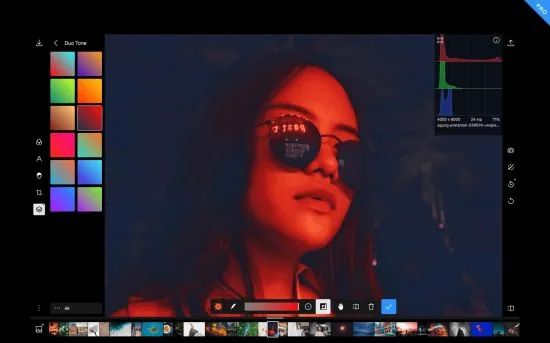
Polarr Photo Editor Portable is an advanced, feature-rich photo editing software designed to empower photographers, graphic designers, and photo enthusiasts with a comprehensive set of tools to enhance, manipulate, and transform images with precision and creativity. Polarr is recognized for combining powerful editing capabilities with an intuitive, user-friendly interface, making sophisticated image editing accessible to users of all skill levels.
Overview and Positioning
Polarr Photo Editor Portable stands out in the crowded field of photo editing applications due to its versatility and emphasis on customization and automation. Unlike many photo editors that primarily focus on basic enhancements or preset filters, Polarr bridges the gap by offering a professional-grade editing environment that supports detailed manual editing as well as intelligent enhancements powered by artificial intelligence.
The software is available across multiple platforms including Windows, macOS, iOS, Android, and even as a web-based app, allowing users to edit photos seamlessly whether they are on desktop or mobile devices. This cross-platform flexibility ensures that users can work on their photography projects anytime and anywhere with consistent results.
Interface and Usability
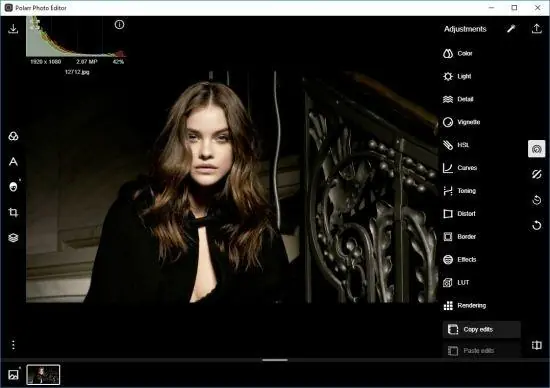
Polarr Pro features a clean, modern interface that balances a rich toolset with a layout designed to reduce user overwhelm. The main workspace puts a large preview panel front and center, giving users clear visibility of their edits in real-time. Tool panels and adjustment sliders are logically grouped and can be customized in terms of position and visibility, which is especially beneficial for users who prefer to streamline their workspace for efficiency.
One of the notable aspects of Polarr’s user interface is its dual approach catering to both beginners and professionals. Beginners can easily apply one-click filters and auto-enhancements, whereas professional users can dive deep into layered adjustments, masking, and selective editing features.
Core Features of Polarr Photo Editor Portable
1. Comprehensive Adjustment Tools
Polarr offers an extensive suite of basic and advanced adjustment sliders for manipulating every fundamental aspect of an image, including exposure, contrast, highlights, shadows, whites, blacks, clarity, vibrance, saturation, temperature, tint, and more. Users can perform precise tone and color corrections to bring out the best in every photo.
Additionally, advanced color grading tools allow for split toning and detailed hue, saturation, and luminance adjustments across multiple color channels, enabling creative styles and mood creation tailored to the photographer’s vision.
2. Advanced Masking and Layering
One of Polarr’s standout features is its powerful masking toolset. Users can create complex masks using radial, linear gradient, brush, and color range masks. These masks allow targeted adjustments, meaning you can selectively edit parts of the photo without affecting the whole image. The layering system supports multiple masks that can be combined and refined with opacity and blending modes for sophisticated edits.
This layered masking capability makes Polarr particularly useful for portrait retouching, landscape enhancements, and any situation where local adjustments dramatically improve image quality.
3. AI-Powered Enhancements and Auto Adjustments
Polarr incorporates cutting-edge AI technology to analyze photos and automatically suggest enhancements. For example, AI-driven auto-enhance can intelligently adjust brightness, contrast, colors, and sharpness optimized to each image. AI also powers features like skin smoothing, object removal, and background enhancement, making it easier for users to polish images quickly.
These AI features are highly customizable, allowing professional users to control how much influence they have over the final results, combining automatic intelligence with manual finesse.
4. Creative Filters and Effects
Polarr boasts a vast library of filters and effects designed by professional photographers and artists. Users can apply styles ranging from vintage and black-and-white to modern cinematic looks. These filters are fully adjustable so they can be tweaked for intensity, color balance, and other parameters, ensuring that no two edits are exactly the same.
Beyond filters, users have access to artistic effects like film grain, bokeh, glitch, light leaks, and distortions that can be layered and combined to create unique aesthetic touches.
5. Batch Editing and Preset Syncing
For photographers working with large collections of images, Polarr Pro offers efficient batch editing tools. Users can apply adjustments or filters to multiple photos simultaneously, saving time and ensuring consistency across shoots. Presets created and saved by users can be shared and synced across devices, enabling a smooth workflow whether you’re editing on a phone, tablet, or desktop.
6. Raw Photo Support and Export Options
Polarr supports editing a wide variety of image formats, including popular raw formats from DSLR and mirrorless cameras. Raw support is crucial for professional photographers who want to unlock the full potential of their camera sensors with non-destructive editing.
When it’s time to export, Polarr offers numerous options including control over file format, resolution, quality, color profile, and metadata. Users can export images optimized for social media, printing, or archiving, with custom presets for different use cases.
Unique Functionalities
-
Face Detection and Portrait Enhancement: Polarr includes facial recognition technology to apply smart enhancements tailored to portraits. This includes skin retouching, teeth whitening, eye enhancement, and facial contour adjustments without affecting background details.
-
Customizable Workspace and Shortcuts: Polarr allows power users to customize keyboard shortcuts and workspace layout extensively, speeding up their editing workflow.
-
Cloud Integration and Collaboration: With cloud sync, users can save projects to the cloud and access them on any device. This also facilitates collaboration and sharing presets with teams or clients.
-
Video Tutorials and Learning Resources: Polarr supports new users by providing in-app tutorials and guides to master both basic and advanced editing techniques.
Performance and System Requirements
Polarr Photo Editor Portable is optimized for high performance and quick rendering times, even on mobile devices. It leverages GPU acceleration when available, providing smooth navigation and real-time previews during complex editing tasks. The app is regularly updated to improve compatibility and add new features optimized for the latest operating systems.
On desktops, minimum system requirements generally include modern Windows 10 or macOS versions with 4GB of RAM and a multi-core processor. Mobile versions support a wide range of iOS and Android devices.
Use Cases for Polarr Photo Editor Portable
-
Professional Photographers: Its robust color grading, masking, and batch processing capabilities make it ideal for photo shoots, fashion photography, events, and editorial work.
-
Graphic Designers and Digital Artists: The layering and effects features provide creative freedom for designing visuals and compositing.
-
Social Media Influencers and Content Creators: Quick filters, auto-enhance, and export presets streamline content creation for platforms like Instagram, TikTok, and YouTube.
-
Hobbyists and Enthusiasts: Beginners benefit from guided editing, simple filters, and AI-powered improvements without a steep learning curve.
Comparison to Other Photo Editors
Polarr Pro offers many features found in high-end editors like Adobe Lightroom and Capture One but at a more accessible price point and with a lighter system footprint. Its key advantage lies in combining powerful manual controls with intelligent automation and an intuitive interface, making it a versatile choice for a wide spectrum of users.
While other software might offer more extensive brush tools or integration with other Adobe Creative Cloud apps, Polarr’s cross-platform flexibility, cloud syncing, and focused toolset make it particularly attractive for users who want a consistent, capable editor across devices.
Subscription and Licensing
Polarr Photo Editor Portable is generally available through a subscription model offering monthly or annual plans. This subscription unlocks the full suite of advanced features including batch editing, premium filters, raw processing, and cloud sync. Free versions of Polarr exist with limited features, but the Pro edition is designed to cater to users seeking professional-quality tools and ongoing updates.
Final Thoughts
Polarr Photo Editor Portable is a comprehensive, adaptable, and modern photo editing software that balances power and ease of use. Its combination of manual precision tools, AI-driven automation, creative effects, and cross-platform compatibility makes it a compelling choice for anyone serious about photo editing.
Whether you are a professional photographer looking for detailed control over every pixel, a social media creator wanting fast yet sophisticated edits, or a hobbyist eager to explore creative enhancement, Polarr provides a flexible environment to elevate images and bring creative visions to life.
With continual updates and a growing community, Polarr Photo Editor Portable remains at the forefront of photo editing innovation, making complex editing accessible without sacrificing quality or flexibility. Its blend of technology and artistry ensures it remains an indispensable tool for photo editor enthusiasts worldwide.
Main Features:
– Custom overlay and complex blending modes
– Dual lens effects and depth adjustments
– Complete set of masking and local adjustment tools
– Advanced suite of face-editing tools with smart detection
– Create, customize and share your own filters
– Batch exporting
Overview
– Custom overlay and complex blending modes
– Dual lens effects and depth adjustments
– Complete set of masking and local adjustment tools
– Advanced suite of face-editing tools with smart detection
– Create, customize and share your own filters
– Batch exporting
Filters
– Make and share your own custom Filters
– Get started with basic filters, grow with pro filters
– Sync filters between all of your devices
Layers and blending modes
– Superimpose photos with 10 and more blending modes
– Add photorealistic effects like clouds, weather effects, light leaks, flares and more
– Duotone your photos with our presets or create your own unique flavor
Local adjustments include
– Depth mask: Adjust photo based on depth using the dual camera
– Brush mask: Draw your mask with an advanced edge-aware brush
– Color mask: Selective adjustment with color
– Radial mask: Circular adjustment over your photo
– Gradient mask: Adjusting photo over a gradient
– Luminance mask: Selective adjustment based on brightness.
– Additional local tools: Lens blur, feathering, invert, and more
– Blend any local adjustment mask with an overlay
– Unlimited stacking of local adjustments.
Global adjustments include
– Intelligent auto enhance for exposure and white balance
– Color: Temperature, Tint, Vibrance, Saturation
– Light: Dehaze, Exposure, Brightness, Contrast, Highlights, Shadows, Whites, Blacks, Diffuse
– Detail: Clarity, Sharpen, Denoise (Color and Luminance)
– Vignette: Amount, Highlights, Roundness
– Lens: 8-point perspective distortion tool, horizontal, and vertical perspective
– Effect: Custom fringing, Pixelate, Noise amount and size
– HSL: Hue, Saturation, Luminance for eight color channels
– Curves: Master, blue, red, green channels
– Toning: Highlight and shadow tone, tone balancing
– Denoise: Focus, enhancement, and clarity
– LUT: Import and export 3D LUT
– Border tool: add a border that auto-suggests colors based on the content of your photo
Polarr is customizable
– Select from dark or white color themes or create and share your own
– Two workspaces available: Pro and Express
– Rearrange icons to make the app yours