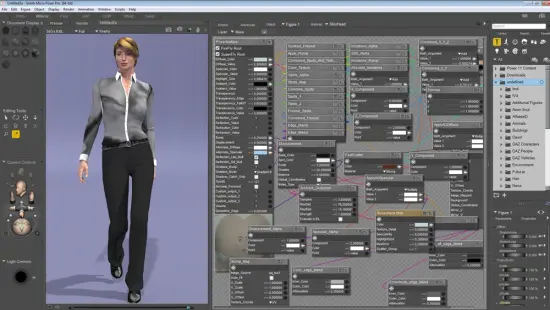
Portable Poser Pro 14.0.439 (x64)

Bondware Poser Portable is a 3D figure art and animation application built for artists, illustrators, designers, and visual creators who want to work with human forms, characters, and posed scenes in a controlled and expressive environment. It is centered on the idea that digital figures should be easy to shape, light, and arrange so that the artist can focus on composition, mood, and storytelling rather than getting lost in complex modeling workflows. The software provides a complete workspace for building scenes from figures, props, cameras, and lights, allowing users to create still images, character studies, concept art, and animated sequences that feel deliberate and visually engaging. In portable form, the application becomes especially practical for users who move between computers, use temporary workstations, or prefer to keep their creative tools self-contained and easy to carry. That combination of figure art focus and mobility gives Bondware Poser Portable a clear identity as a practical studio for 3D character composition and visual storytelling.
Figure Art as the Core
The heart of Bondware Poser Portable is its dedication to figure art. Unlike general-purpose 3D applications that treat characters as one part of a much larger toolset, this software is built around the human form and the creative decisions that come with posing, lighting, and presenting figures in a scene. That focus matters because working with characters involves more than just moving joints. It is about understanding how a body communicates, how posture affects mood, how lighting shapes presence, and how camera angles influence the way a viewer perceives the subject. The software is designed to make those decisions accessible and controllable without requiring the user to build everything from scratch.
This figure-first orientation is especially valuable for artists who want to explore character design, anatomy, or visual storytelling without getting tied up in technical modeling tasks. A user can start with a figure, adjust the pose to match a specific gesture or emotion, add lighting that supports the mood, and frame the shot in a way that feels cinematic or illustrative. That workflow supports a wide range of creative goals, from study sketches to polished concept art. The software becomes a digital mannequin studio that can be shaped into a finished piece of visual work.
Posing and Character Control
Posing is one of the most important parts of the Bondware Poser Portable experience. The software gives users a structured way to adjust the body, limbs, head, and hands of a figure so that it communicates the intended action or emotion. This is useful for artists who need reference material for drawing, for designers who want to visualize a character before production, or for illustrators who want to build a scene with a strong sense of posture and movement. The posing tools are designed to feel manageable, allowing the user to shape the figure without fighting against the underlying structure.
Character control extends beyond simple joint rotation. A good posing system allows the artist to refine the gesture, balance the weight of the body, and create natural-looking relationships between different parts of the figure. Bondware Poser Portable supports that kind of work by giving users enough control to shape realistic or stylized poses depending on the artistic goal. That flexibility is important because not every project requires the same kind of figure behavior. A dynamic action pose demands different handling than a quiet portrait or a contemplative stance. The software makes it possible to explore that range without leaving the same core environment.
The ability to save and reuse poses is another practical advantage. Artists often develop a library of gestures that they return to when building new scenes. The software supports that workflow by allowing poses to be stored, recalled, and adjusted as needed. This makes it easier to maintain consistency across multiple images or to build variations on a theme. It also speeds up the creative process because the user does not need to rebuild common poses from scratch every time.
Scene Building and Composition
Bondware Poser Portable is not only about figures; it is also about building complete scenes around them. A figure rarely exists in isolation. It interacts with space, light, props, and camera angles that all contribute to the final image. The software provides tools for arranging these elements in a way that supports the story or visual idea the user wants to communicate. That makes it possible to create compositions that feel intentional rather than accidental.
Scene building includes the placement of cameras, lights, and environmental elements that help define the mood. A character can be lit dramatically to create tension, softly to suggest calm, or brightly to feel energetic. The camera can be positioned to emphasize power, vulnerability, movement, or stillness. The software gives users control over these choices so that the final image reflects their creative intent. This is especially valuable for artists who want to think like directors, shaping not just the figure but the entire visual context in which it appears.
Props and additional objects can also be added to the scene to support the narrative. A character might hold an object, stand near a piece of furniture, or interact with elements that help tell the story. The software makes it possible to bring these pieces into the composition and arrange them in a way that feels natural. That level of control helps transform a simple figure study into a more complete visual idea.
Lighting and Mood
Lighting is one of the most powerful tools in 3D figure art, and Bondware Poser Portable gives users a practical way to shape it. Light determines how the figure is perceived, where the viewer’s attention is drawn, and what emotional tone the image carries. A scene can feel dramatic, mysterious, warm, cold, energetic, or subdued depending on how the light is placed and adjusted. The software supports that kind of expressive work by making lighting a central part of the creative process rather than a technical afterthought.
Lighting control includes the ability to place multiple light sources, adjust their intensity, direction, and color, and observe how they interact with the figure and the scene. This is important because realistic or stylized lighting often depends on the relationship between different sources rather than a single light. A key light may define the main shape, a fill light may soften shadows, and a rim light may separate the figure from the background. The software gives users the means to manage these relationships and create a balanced, intentional look.
Mood is closely tied to lighting choices. A dark, high-contrast setup can create tension or drama. A soft, even light can make a scene feel calm or clinical. Colored lighting can suggest time of day, atmosphere, or emotional state. Bondware Poser Portable supports all of these directions by making light a flexible creative tool. That makes it especially useful for artists who want their images to communicate more than just the shape of a figure.
Camera and Framing
Camera work is another essential part of the Bondware Poser Portable workflow. The way a figure is framed can change how the viewer interprets the image. A low angle can make a character feel powerful. A high angle can suggest vulnerability. A close-up can emphasize emotion, while a wide shot can show context and environment. The software gives users control over camera position, focal length, and framing so that the final image supports the intended story or visual idea.
Framing also affects composition. A well-framed shot guides the viewer’s eye through the image and creates a sense of balance. The software helps users achieve that by providing clear controls for camera movement and view adjustment. This is especially valuable for artists who want to create images that feel cinematic or illustrative rather than random. The camera becomes part of the storytelling process, not just a way to view the scene.
Multiple camera setups can also be used to explore different views of the same scene. This is useful for creating a series of images that show a character from different angles or for building a sequence that suggests movement or progression. The software supports that kind of workflow by allowing cameras to be saved, recalled, and adjusted as part of the scene. That makes it easier to maintain consistency across multiple images.
Animation and Motion
Bondware Poser Portable is not limited to still images; it also supports animation and motion-based work. Figures can be posed across a sequence of frames to create movement, gestures, or short scenes. This is valuable for artists who want to explore how a character moves, how a pose transitions into another, or how a sequence of actions can tell a story. Animation adds another layer of expression to the figure art workflow, allowing users to think about time and motion as well as static composition.
Animation in this context is often more about character performance than complex mechanical motion. A user may want to create a simple walk cycle, a gesture sequence, or a short narrative scene. The software supports that by providing tools for keyframing poses and adjusting timing. This makes it possible to build motion that feels intentional and supports the overall creative goal. That is especially useful for concept animatics, story visualization, or character studies that benefit from movement.
Animation also helps artists understand how a figure behaves over time. A pose that looks good in a single frame may need adjustment when it is part of a sequence. The software makes it easier to test and refine motion so that the final result feels natural and expressive. That kind of iterative work is an important part of character animation and visual storytelling.
Content and Figure Libraries
Bondware Poser Portable includes access to a range of figures, props, and content that users can incorporate into their scenes. This is important because not every artist wants to build every element from scratch. Having a library of ready-to-use figures and objects allows the user to focus on posing, lighting, and composition rather than spending time on asset creation. That makes the software more practical for everyday creative work.
Figure libraries can include different body types, styles, and character designs, giving users the ability to explore a variety of looks and forms. This is useful for artists who work on different projects that require different kinds of characters. A realistic human figure may be needed for one project, while a stylized or fantastical character may be needed for another. The software supports that variety by making different figures available within the same environment.
Props and scene elements also expand the creative possibilities. A character can be placed in a more complete context by adding furniture, vehicles, weapons, or other objects that help tell the story. The software makes it possible to bring these elements into the scene and arrange them in a way that feels natural. That helps transform a simple figure study into a more complete visual narrative.
Rendering and Output
Rendering is the final stage of the Bondware Poser Portable workflow, where the scene is converted into a finished image or animation. The software provides rendering tools that allow users to control the quality, lighting fidelity, and overall appearance of the output. This is important because the rendered result is what the audience will see, and it needs to reflect the creative decisions made throughout the process. The software supports that by giving users control over how the final image is produced.
Rendering quality affects how the materials, lights, and shadows appear in the final image. A higher-quality render may take longer but can produce more realistic or polished results. The software allows users to balance quality and speed depending on their needs. This is especially useful for artists who need quick previews during the creative process and higher-quality output for final presentation.
Output options also include the ability to export images and animations in formats that can be used in other applications. This is important for artists who want to incorporate their Poser work into larger projects, such as illustrations, composites, or video productions. The software supports that workflow by making it easy to move the rendered content into the next stage of production.
Practical Use Cases
Bondware Poser Portable fits a wide range of creative scenarios. It is useful for illustrators who need character reference or want to build concept art. It is useful for designers who want to visualize characters before production. It is useful for artists who want to study anatomy, posture, and lighting in a controlled 3D environment. It is useful for animators who want to create short character sequences or motion studies. Because its functions are broadly relevant to figure-based work, it can become a regular part of a creative workflow rather than a tool reserved for occasional use.
The software also works well when users need to create multiple images or variations on a theme. A character can be posed in different ways, lit under different conditions, and framed from different angles to explore a range of visual ideas. The application supports that variety by keeping the workflow consistent across different setups. That makes it easier to maintain focus and avoid the friction of switching between different tools.
For people who work with characters regularly, the software can act as a stable figure studio that supports both study and production. That helps build a consistent habit and makes it easier to return to character work as part of a daily routine. The result is a more orderly and less stressful approach to 3D figure art.
Portable Working Style
The portable form of Bondware Poser Portable adds a practical layer of flexibility to its already focused design. Creative work is often done in different environments: at home, in a studio, at a client location, or while traveling. A portable setup makes it easier to carry the application and keep it ready wherever it is needed. That is especially useful for users who work on multiple computers or who prefer to keep their tools self-contained.
Portability also supports a cleaner system workflow. Users who prefer not to leave extra traces on shared or temporary computers can work with a tool that stays close to its own files and settings. That makes the software easier to transport and easier to use in a variety of contexts. It aligns well with the everyday reality of creative work, where the user may open a project in different places and at different times.
For users who value consistency, portability means that their preferred creative environment can stay the same from one machine to another. That can reduce confusion and make the work feel more predictable. In that sense, the portable design is not just about convenience; it is part of the software’s practical usefulness.
Why It Stays Useful
Bondware Poser Portable remains useful because character and figure work is a fundamental part of visual art that does not change with trends. Artists will always need a calm, reliable way to work with 3D figures, and this software provides that in a focused and practical form. Its emphasis on posing, lighting, composition, and animation makes it a practical choice for users who want a tool that stays out of the way and lets the creative work take center stage.
Its focus on essential functions is another reason it stays relevant. Posing, scene building, lighting, camera work, and rendering are all core tasks that do not go out of style. The software is built around those needs rather than around temporary features. That gives it a stable role in digital figure art, especially for users who value order and predictability. The portable format adds further relevance by making the tool easy to keep available wherever it is needed.
The combination of creative control, practical workflow, and mobility gives the software a long-term value. It is the kind of utility artists can return to whenever they need to pose, light, or animate characters, whether for study, concept work, or finished art.
Conclusion
Bondware Poser Portable is a practical and focused 3D figure art application built for users who want a calm, controlled, and consistent environment for working with characters, poses, and scenes. It helps artists create expressive figure compositions without distraction, organize their creative assets with ease, and move through projects with smooth workflow. The software is especially useful for illustrators, designers, animators, and visual artists who need a reliable tool for everyday character work. Its portable format makes it easy to carry between systems and use in different environments, which adds to its practicality. For anyone looking for a flexible figure art tool that combines everyday usefulness with self-contained portability, Bondware Poser Portable offers a solid and dependable solution.
Features at a Glance
- Focused 3D figure art and character composition environment.
- Supports posing, lighting, camera work, and scene building.
- Designed for illustrators, designers, animators, and visual artists.
- Quiet and unobtrusive interface that keeps attention on the creative work.
- Useful for character studies, concept art, and visual storytelling.
- Smooth workflow for posing figures and arranging scenes.
- Simple library organization for managing figures and props.
- Consistent creative experience across different projects.
- Practical for study, production, and exploratory character work.
- Helps reduce creative friction with a clean and stable layout.
- Supports both still images and animated sequences.
- Easy to use for daily figure art and scene creation tasks.
- Portable working style for use across different computers and environments.
- Self-contained format suited to shared, temporary, or mobile setups.
- Designed to make 3D figure art more orderly and efficient.
Version 14 Release Notes:
Bondware Poser Portable Version 14 represents a significant update to the 3D figure art and animation application, introducing a range of enhancements designed to improve workflow efficiency, rendering quality, character control, and overall creative flexibility. This release focuses on making the experience of posing, lighting, and rendering figures more intuitive while also expanding the tools available to artists who rely on the software for concept art, illustration, character design, and animation. The following notes outline the key areas of improvement and new capabilities introduced in Version 14.
Enhanced Posing and Figure Control
Version 14 brings notable improvements to the posing system, giving artists more precise and natural control over figure articulation. Joint behavior has been refined to allow smoother transitions between poses, reducing the likelihood of unnatural bending or distortion in complex gestures. The updated rigging system responds more intuitively to user input, making it easier to achieve lifelike postures without excessive manual adjustment. This is particularly valuable for artists who need to create dynamic action poses or subtle emotional expressions that rely on nuanced body language.
New pose presets have been added to the library, providing a broader range of starting points for character work. These presets cover a variety of common gestures, stances, and expressive positions that can be quickly applied and then customized to fit the specific needs of a scene. The ability to save and share custom poses has also been streamlined, allowing users to build personal libraries of favorite configurations that can be reused across multiple projects. This enhancement supports greater consistency and efficiency in character development workflows.
Hand and facial controls have received special attention in this release. Finger articulation is now more detailed, enabling more natural hand gestures and object interactions. Facial expression tools have been expanded to include a wider range of emotional states, from subtle shifts in eyebrow position to more pronounced changes in mouth and jaw configuration. These improvements make it easier to convey character personality and mood through posture and expression alone.
Advanced Lighting and Rendering
The rendering engine in Version 14 has been upgraded to deliver higher quality output with improved handling of light, shadow, and material properties. Artists will notice more realistic shadow casting, softer transitions between light and dark areas, and better representation of surface textures under different lighting conditions. These enhancements are particularly important for creating images that feel polished and professional, whether for final presentation or client review.
New lighting presets have been introduced to help users quickly establish common moods and atmospheres. These include options for dramatic high-contrast setups, soft ambient environments, and stylized colored lighting scenarios. Each preset can be customized further, allowing artists to fine-tune intensity, direction, and color temperature to match their creative vision. The improved lighting system also supports more complex multi-light arrangements without significant performance degradation.
Render times have been optimized through better use of available system resources. Users can now choose between faster preview modes for iterative work and higher quality settings for final output. This flexibility allows artists to maintain creative momentum during the development phase while still achieving professional results when the project is complete. The rendering pipeline has also been made more stable, reducing the likelihood of crashes or errors during long render sessions.
Improved Camera and Composition Tools
Camera controls in Version 14 offer greater precision for framing and composition. The updated viewfinder includes additional guides and overlays that help users align elements according to common compositional principles such as the rule of thirds, golden ratio, and symmetry. These tools are particularly useful for artists who want to create images with strong visual balance and intentional focal points.
Depth of field effects have been enhanced to provide more realistic background blur and focus transitions. Artists can now adjust aperture settings with finer control, allowing for more cinematic looks that draw attention to specific parts of the scene. The camera system also supports smoother movement and rotation, making it easier to explore different angles without losing track of the overall composition.
Multiple camera setups can be saved and recalled more efficiently in this version. This is valuable for artists who need to create a series of images showing the same scene from different perspectives or for those building animation sequences that require consistent camera behavior across multiple frames. The improved camera management system reduces the time needed to switch between views and helps maintain consistency throughout a project.
Animation and Timeline Enhancements
Animation capabilities have been expanded in Version 14 with a more intuitive timeline interface and improved keyframe management. Users can now visualize pose changes more clearly across the timeline, making it easier to identify and adjust problematic transitions. The keyframe system supports more precise timing controls, allowing for smoother motion and better synchronization between different elements of a scene.
New interpolation options give artists more control over how movements flow between keyframes. Linear, ease-in, ease-out, and custom curve options are available to match the desired motion style. This is particularly useful for creating animations that feel natural and expressive rather than mechanical or robotic. The timeline also supports layer-based organization, helping users keep complex animations organized and easy to navigate.
Preview playback has been optimized to run more smoothly even with complex scenes. This allows artists to review their work in real time without waiting for lengthy render cycles. The improved playback system supports frame-by-frame navigation as well as continuous looping, making it easier to identify timing issues or awkward transitions that need adjustment.
Content Library and Asset Management
Version 14 includes an expanded content library with additional figures, props, and environmental elements. New character models offer a wider range of body types, styles, and aesthetic options, giving artists more flexibility in their creative work. The prop library has been updated with more diverse objects that can be used to build richer, more detailed scenes.
Asset management has been streamlined to make it easier to find, organize, and apply content within projects. The browser interface now supports better search functionality and category filtering, reducing the time needed to locate specific items. Users can also create custom collections of frequently used assets, allowing for quicker access during active work sessions.
Import and export options for third-party content have been improved to support a wider range of file formats. This makes it easier to integrate external models, textures, and props into Poser scenes without compatibility issues. The enhanced import system also handles scale and orientation more accurately, reducing the need for manual adjustment after loading external assets.
Performance and Stability Improvements
Overall application performance has been optimized in Version 14 to provide a smoother experience across a range of hardware configurations. Memory management has been improved to handle larger scenes with more complex figures and higher resolution textures without excessive slowdown. This is particularly important for artists who work on detailed projects that require multiple elements in a single scene.
Loading times for figures, props, and scenes have been reduced through more efficient file handling and caching systems. Users will notice faster startup times when opening projects and quicker response when switching between different elements in the workspace. These improvements help maintain creative momentum by reducing the time spent waiting for the application to respond.
Stability enhancements address several issues reported in previous versions, including crashes during rendering, problems with file saving under certain conditions, and occasional display glitches in the viewport. The updated codebase provides a more reliable foundation for daily work, reducing the risk of losing progress due to unexpected errors or application failures.
User Interface and Workflow Refinements
The user interface has been refined in Version 14 to improve clarity and reduce visual clutter. Common tools and controls are now more accessible, with better organization of menus and panels. This makes it easier for both new and experienced users to find the functions they need without navigating through multiple layers of options.
Workspace customization has been enhanced to allow users to create layouts that better match their specific workflows. Panels can be rearranged, docked, and saved as custom configurations that can be recalled as needed. This is particularly useful for artists who work on different types of projects and prefer different tool arrangements for each.
Context-sensitive help and tooltips have been expanded to provide more detailed information about tools and functions directly within the interface. This reduces the need to consult external documentation for common tasks and helps users discover features they may not have been aware of previously. The improved help system supports a gentler learning curve for new users while still providing the depth that experienced artists expect.