Portable SharpScanner 3.2.0 (x64) Multilingual

SharpScanner Portable brings several everyday PC maintenance and security checks together in one Windows dashboard. It is designed to help users review installed applications for known vulnerabilities, run a malware scan, inspect browser cookies, manage programs that launch at startup, and monitor basic system activity. Instead of opening a separate utility for each task, users can reach these tools from a single interface and review their results in one place.
What Is SharpScanner Portable?
SharpScanner Portable is a Windows utility suite focused on security awareness and basic system oversight. Its functions cover several related but distinct areas: application vulnerability checks, malware scanning, browser-cookie inspection, startup-item controls, and real-time monitoring of selected system and network information.
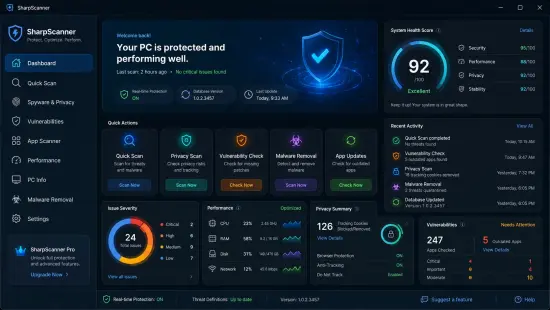
The suite is intended to make these checks accessible without requiring users to navigate several independent Windows tools. A central dashboard presents a high-level view, including a visual security score, vulnerability severity information, summary cards, and hardware details. Individual tools provide more focused views—for example, the vulnerability scanner reports potentially exposed applications, while the performance monitor displays CPU, memory, and disk activity.
This combination can be useful for a home computer owner who wants a quick overview, or for a technically curious user who prefers to inspect system activity and startup behavior directly. The tools do not all serve the same purpose: finding a vulnerable application is different from finding malware, and monitoring resource usage is different from repairing a performance problem. SharpScanner Portable is best understood as a collection of inspection and management features rather than a single-purpose antivirus product or automatic repair system.
Vulnerability Scanning for Installed Applications
One of the suite’s central capabilities is checking installed applications for known security vulnerabilities. SharpScanner Portable uses the OSV vulnerability database and CVE queries to identify software that may have a published vulnerability. Findings are classified by severity, giving users a way to distinguish more serious issues from lower-priority results.
This kind of check can help answer a practical question: “Are any of the applications on this PC associated with known security advisories?” That is valuable because users may not regularly track updates for every program they have installed. A vulnerability report can point out software that deserves attention and encourage the user to look for an update, replacement, or vendor advisory.
A result should be treated as a starting point for investigation, not as a complete security verdict. Vulnerability databases describe known issues, but whether a particular issue affects a user can depend on the application version, configuration, operating environment, and whether the vulnerable feature is present or enabled. Likewise, an application not appearing in a scan does not prove that it is free of security weaknesses. The scanner’s results are most useful when combined with sensible software-update habits and careful review of the details.
The product information notes that internet access is required for CVE lookups. That makes sense for a feature that consults vulnerability information, but it also means users should expect this part of the workflow to depend on connectivity. If the lookup cannot complete, the user may not receive current or complete results. Reviewing the report after a scan—and checking the specific application and version identified—helps prevent misinterpreting a finding.
Malware Scanning with Microsoft MRT
SharpScanner Portable includes malware scanning that uses Microsoft’s Malicious Software Removal Tool, commonly called MRT. The interface describes real-time progress tracking during a deep system scan, so users can follow the scan as it runs rather than seeing only a final status.
Malware scanning serves a different purpose from vulnerability checking. A vulnerability check looks for installed applications associated with known security issues; a malware scan looks for malicious software covered by the scanning engine. A vulnerable program is not necessarily infected, and a clean malware scan does not mean every installed application is fully up to date.
The use of MRT is also important context when interpreting the feature. SharpScanner Portable provides an interface for running or tracking this scan, but the detection capabilities depend on the underlying Microsoft tool. Users should not assume that this replaces all the protections or maintenance provided by Windows security features or a dedicated security product. It is more useful to think of it as an additional scan option within the broader toolkit.
A careful user can make the scan more useful by saving work before starting, allowing the process to finish, and reading any results that appear. If the scan identifies something, follow the recommended handling steps and avoid deleting unfamiliar files manually without understanding what they are. If a computer shows persistent suspicious behavior, one scan result alone may not be enough to diagnose the cause.
Browser Cookie Scanner and Tracker Checks
The cookie scanner examines data in Chrome, Edge, Firefox, Brave, and Opera. It is described as detecting more than 60 known tracker domains, making it a browser-focused tool for reviewing cookies associated with tracking.
Cookies can support ordinary website functions, such as remembering a session or preferences, but some are used to recognize activity across websites. A scanner that identifies cookies associated with known tracking domains can help users see which browser profiles contain them and decide whether to remove selected items.
Cookie cleanup involves trade-offs. Deleting cookies may sign users out of websites, reset saved preferences, or require certain pages to load as though they were being visited for the first time. It is therefore sensible to review what the tool finds and understand the potential effect before cleaning. Users who rely on stored sessions for work or other important tasks may want to save their login information securely before clearing browser data.
The feature is best viewed as a focused browser-privacy and housekeeping aid, not a complete measure of online privacy. It checks for recognized tracker domains in supported browsers; it does not establish that all tracking has been eliminated or assess every way websites and services may collect information. Its practical value lies in making a particular kind of browser data easier to inspect.
Startup Management for Faster, More Controlled Booting
SharpScanner Portable can manage startup programs through several Windows mechanisms: the registry, startup folders, and Task Scheduler. It provides enable and disable toggles, allowing users to control whether selected items launch automatically.
Reducing unnecessary startup activity can make a computer feel more orderly and may shorten the time between signing in and being ready to work. It can also reduce the number of background applications running continuously. However, not every startup entry is unnecessary. Some programs launch services needed for hardware features, security tools, synchronization, or peripherals. Disabling the wrong item can affect how a device or application behaves.
A cautious approach is to change one item at a time. Before toggling an entry, identify its publisher, purpose, and relationship to software or hardware you use. If the name is unclear, investigate it before making a change. After disabling an item, restart the computer and confirm that normal functions still work. This makes it easier to reverse a change if a needed application no longer starts as expected.
Because startup entries can come from different Windows locations, bringing them together in one interface can be convenient. The feature offers control, but it does not guarantee that disabling a particular item will noticeably improve boot time. The result depends on what the item does and how much work it performs during startup.
Performance Monitoring for Everyday Troubleshooting
The performance monitor displays live CPU, RAM, and disk usage. It also includes network-connection tracking and open-port detection in real time. These views can help users observe what the computer is doing during ordinary use or when a slowdown occurs.
For example, if a computer becomes sluggish, a user can look for unusually high CPU or memory use and note whether disk activity is busy. If the system feels idle but network connections are active, the connection view may provide a useful prompt for further investigation. Open-port information can also help technically minded users see part of the computer’s current network posture.
Monitoring is not the same as diagnosis. A high CPU reading might be caused by a normal update, a demanding application, or a process that deserves closer inspection. A network connection or open port is not automatically suspicious; many legitimate applications and Windows services use network communication. The monitor provides observations that can guide follow-up, but users need context to interpret them.
A helpful troubleshooting habit is to compare readings under different conditions. Check the system when idle, then observe it while running the application or task that causes a slowdown. Look for patterns rather than treating one momentary spike as conclusive. If a process or connection seems unfamiliar, identify it before ending it or changing system settings.
A Dashboard for a Quick Security Overview
The dashboard is designed to summarize information from different parts of the suite. Its visual security score, vulnerability-severity charts, summary cards, and hardware information give users a quick way to orient themselves before exploring individual reports.
A summary dashboard can reduce the effort involved in checking multiple system areas. It can highlight where the user may want to look next, such as a vulnerability finding or a system resource that appears busy. The charts and cards are intended to make results easier to scan, especially for people who do not want to interpret long lists before deciding what needs attention.
A score should still be treated as a summary, not a complete measurement of a computer’s security. It can only reflect the checks and criteria included in the software. A reassuring score cannot guarantee protection against every threat, and a low score does not necessarily mean the PC is compromised. Users should look at the underlying details and use the score as a navigational aid.
The suite’s overall benefit comes from combining these different views. Vulnerability findings, malware scan progress, browser-cookie results, startup entries, and live system metrics each answer different questions. The dashboard helps bring them into one workflow, while the detailed tools are where users can examine individual findings more carefully.
Local Operation and Data Handling
The product description states that SharpScanner Portable runs locally on the PC and does not collect user data. It also identifies internet access as necessary for CVE lookups. These statements should be considered together: the software describes local operation and no data collection, while the vulnerability lookup feature depends on an internet connection to query vulnerability information.
For users, the practical distinction is that some checks can examine the computer itself, while vulnerability information may require online access. If data handling is a deciding factor, review the software’s current documentation and policies before installation, especially if using it on a work-managed device or a computer containing sensitive material. Organizations may also have rules about running third-party utilities, granting administrator permissions, or connecting security tools to external services.
SharpScanner Portable requires administrator access according to its listed system requirements. Administrator privileges allow software to inspect and manage areas of Windows that ordinary accounts may not be able to change. Users should install and run security utilities only when they understand where the software came from and why elevated permissions are needed. On a managed work computer, checking with the IT administrator first is a sensible step.
Windows Compatibility and System Requirements
SharpScanner Portable is listed for Windows 10 version 19041.0 or later and Windows 11. The stated minimum memory requirement is 2 GB of RAM, with 4 GB recommended. It supports x86 and x64 architectures, and the product information says it works with 32-bit and 64-bit editions of Windows 10 and 11.
The system requirements also specify administrator access and internet connectivity for CVE lookups. These details are useful to check before downloading or installing the program. A compatible Windows version alone does not necessarily mean every feature will behave identically on every device; available system permissions, browser profiles, network configuration, and installed applications can all affect what the tools can inspect.
The interface is available in six languages: English, Spanish, French, Chinese, German, and Portuguese. Users can change the language from Settings without reinstalling, according to the product information. This can make the controls and reports more accessible to multilingual households or teams.
Who May Find SharpScanner Portable Useful?
SharpScanner Portable may suit users who want several basic system-inspection tools grouped together. A home user could use it to review application vulnerabilities, check browser cookies, or see which programs start automatically. A technically curious user may value the live resource and network views. Someone who supports a small number of Windows PCs may appreciate having a common dashboard for routine checks.
It may be less suitable for users who expect a hands-off solution that automatically fixes every issue, provides comprehensive endpoint protection, or replaces all Windows security and maintenance tools. The available information describes scanning, monitoring, and management features; it does not establish that the software automatically patches third-party applications, blocks all threats, or performs every repair. Users should match the tool to the task they need it to perform.
The suite is also Windows-focused. It is listed for Windows 10 and Windows 11, so people using macOS, Linux, or mobile operating systems should not assume it will run there. Likewise, users who need organization-wide management, centralized reporting, or enterprise policy enforcement should evaluate whether the software meets those specific requirements before relying on it.
A Sensible Way to Use SharpScanner Portable
A measured routine can make the suite easier to use without treating every alert as an emergency. Begin by reviewing the dashboard, then open the detailed report behind any item that attracts attention. For vulnerability findings, note the affected application and version and check for an update or vendor guidance. For malware scans, allow the scan to complete and review its result. For cookies, consider the effect of removing items before cleaning. For startup entries, change only items whose purpose you understand. Use performance and network data as clues that may need further investigation.
It is also wise to keep Windows and regularly used applications updated, maintain backups of important files, and use appropriate account and security settings. A system utility can make certain checks more convenient, but safe computing depends on more than a single dashboard. SharpScanner Portable is most helpful when its findings support informed decisions rather than substitute for them.
SharpScanner Portable: Overall Assessment
SharpScanner Portable brings together application vulnerability lookups, malware scanning through Microsoft MRT, browser-cookie inspection, startup management, and performance and network monitoring. Its dashboard is intended to provide a quick overview, while language options and progress tracking support day-to-day use. The stated platform is Windows 10 and Windows 11, with administrator access required and internet access needed for CVE queries.
Its strongest appeal is convenience: several distinct checks are available through one Windows interface. Its limitations are equally important to understand. The tools have different purposes, results require interpretation, and a summary score cannot prove that a system is completely secure. The software should be treated as a practical inspection and management suite—not a guarantee of protection or a replacement for updates, backups, and appropriate security practices.
Features at a Glance
- Windows utility suite for security checks and system monitoring
- Vulnerability scanning using OSV database integration and CVE queries
- Severity classification for identified vulnerability results
- Malware scanning with Microsoft’s Malicious Software Removal Tool (MRT)
- Browser-cookie scanning for Chrome, Edge, Firefox, Brave, and Opera
- Detection of more than 60 known tracker domains
- Startup-program controls covering registry entries, folders, and Task Scheduler
- Enable and disable toggles for startup items
- Live CPU, RAM, and disk-usage monitoring
- Network-connection tracking and open-port detection
- Dashboard with security score, severity charts, summary cards, and hardware information
- Listed support for Windows 10 (19041.0 or later) and Windows 11
- Minimum 2 GB RAM; 4 GB recommended
- x86 and x64 architecture support
- Administrator access required; internet needed for CVE lookups
- Interface available in English, Spanish, French, Chinese, German, and Portuguese
Release Notes:
– New UI and Theme
– Fixed bugs on scanning
– Fixed apps scan vulnerabilities
– New: full support for 6 languages (English, Spanish, German, French, Portuguese, Chinese)
– New: modern redesigned dashboard and dialogs
– New: Security Score Trend — watch your PC’s health improve over time
– New: one-click exportable security report
– Smoother one-click fixes and a smarter Background Guardian
– Faster, lighter and more polished throughout