Portable SketchBook Pro 9.4.7.0 (x64) Multilingual
SketchBook Pro Portable is a professional-grade digital drawing, painting, and illustration software renowned for its intuitive interface, pressure-sensitive brush engine, and seamless support for styluses, tablets, and touch devices. Developed initially by Autodesk and later maintained by Sketchbook Inc., this application has evolved into a staple tool for artists, designers, illustrators, and hobbyists who demand natural, responsive drawing experiences without the bloat of full-featured suites like Photoshop. With over 140 customizable brushes, unlimited layers, massive canvas sizes up to 100 megapixels, and advanced features like symmetry guides, perspective rulers, and animation tools, SketchBook Pro Portable empowers users to create everything from quick sketches and concept art to polished illustrations and traditional-style animations. Its clean, radial menu-driven UI minimizes distractions, allowing creators to focus purely on their artistry while delivering performance optimized for modern hardware.
Interface and User Experience Philosophy
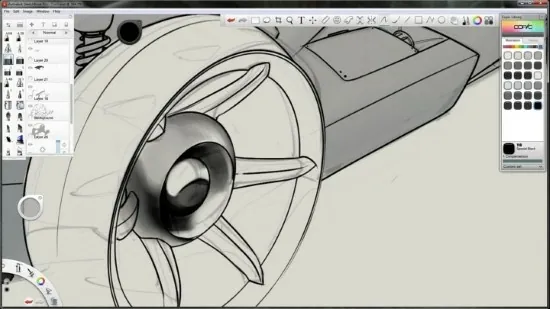
The hallmark of SketchBook Pro Portable is its minimalist yet powerful user interface, often described as the “Lagoon UI” due to its circular, gesture-based marking menus that radiate from the center of the screen like a tranquil pond. This design eliminates cluttered toolbars, replacing them with context-sensitive pucks and palettes that appear only when needed. The central canvas dominates the workspace, surrounded by the Brush Puck for quick tool switching, Color Puck for hue selection, and Lagoon for accessing layers, guides, and utilities.
Users can toggle between full-screen drawing mode and detailed editors with a flick of the wrist or keyboard shortcut. The spacebar (customizable to stylus buttons) activates a pan/zoom/rotate mode, enabling fluid navigation across large canvases without interrupting the creative flow. Auto-hide UI elements fade away during strokes, with a timer-based restoration ensuring uninterrupted immersion. High-DPI scaling and customizable hotkeys make it adaptable to desktops, laptops, tablets like iPad or Surface, and even smartphones via companion apps.
This philosophy prioritizes tactile responsiveness: brushes feel like real media—pencils with graphite texture, markers with ink bleed, airbrushes with soft edges—thanks to advanced pressure, tilt, and rotation sensitivity. The software’s low-latency rendering ensures strokes appear instantly, mimicking traditional paper even at high zoom levels.
Brush Engine and Customization
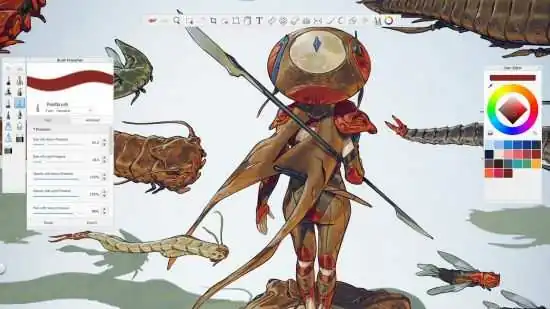
SketchBook Pro Portable’s brush library exceeds 140 presets, categorized into pencils, inks, markers, paints, smudgers, erasers, and synthetic effects like glow or watercolor. Each brush leverages a sophisticated texturing engine simulating real-world physics: watercolor brushes diffuse and blend wet-on-wet, oil paints build impasto layers, and textured pencils deposit grainy strokes that interact with underlying canvas texture.
Customization is boundless. Users tweak size, opacity, flow, jitter, spacing, shape, grain, and scatter via a dedicated Brush Palette. Dual-brush blending pairs a primary tool with a secondary modifier (e.g., a pencil with a smudge tail). Brush stamps repeat patterns for foliage or textures, while randomizers cycle sets mid-stroke for organic variety like fur or grass. Imported custom brushes from the community expand possibilities, with sharing via .skbr files.
Patented stroke stabilization smooths shaky lines into perfect curves or straight edges, with adjustable strength for natural wobbles. Predictive stroke guides predict paths for rulers, ellipses, and spirals, accelerating technical illustrations.
Layer System and Blending Modes
Unlimited layers form the backbone of complex compositions, supporting massive canvases up to 10,000 x 10,000 pixels (100MP) without performance degradation. Layers include blending modes (Normal, Multiply, Screen, Overlay, Soft Light, etc.—18 total), opacity sliders, and folder grouping for organization. Clipping masks confine effects to underlying shapes, while layer styles add drop shadows, glows, and strokes non-destructively.
Newer updates introduce alpha channel masking, where transparency acts as a mask, and group isolation for focused edits. The Layer Editor displays thumbnails, lock/hide toggles, duplicate/merge options, and blend previews. Midground/foreground stacking (legacy) evolves into flexible hierarchies, with onion-skinning for animation frames.
Reference layers lock images for tracing, while predictive fill intelligently extends strokes across gaps. This system rivals Photoshop’s power but feels lighter, ideal for illustration over photo manipulation.
Guides, Rulers, and Precision Tools
Precision drawing shines with built-in guides: infinite rulers for straight lines, ellipse/protractor tools for circles/arcs, French curves for organic contours, and perspective grids (1-3 point) snapping to vanishing points. Symmetry axes (X/Y/rotational) mirror strokes for mandalas or character designs. Custom guides import from images or drawings.
The transform tool handles freeform deform, perspective warp, liquify, and puppet distortion with live previews. Gradient fills (linear/radial) and pattern fills tile seamlessly. Selection tools (lasso/magic wand) support feathering and refinement for compositing.
Canvas rotation (arbitrary angles) and mirroring flip the workspace without altering pixels, aiding ergonomic drawing from any angle.
Color Management and Palettes
The Color Puck offers wheel, sliders, and eyedropper sampling with harmonic suggestions. Custom palettes hold up to 60 swatches across 12 sets (50 sets max), extractable from images for mood boards. Copic Library simulates physical marker colors, while gradient editors blend hues seamlessly.
Advanced users import/export ASE palettes or calibrate with hardware profiles for print accuracy. Recent updates enable palette randomization for experimental palettes.
Animation and Flipbook
SketchBook Pro Portable’s Flipbook turns static art into traditional 2D animation. Up to 4K resolution supports frame-by-frame drawing with onion-skinning (multi-frame ghosting in 7 tint colors), keyframe navigation, and playback controls. Timeline scrubbing, easing, and export to GIF/MP4/sequences integrate with video editors.
Presets for paper sizes and aspect ratios (A4/Letter/4K/2K) streamline storyboarding. Looping playback and exposure sheets aid timing.
File Handling and Compatibility
Native .skba/.skbr formats preserve layers/brushes, with PSD/TIFF import/export for Photoshop interoperability. Import brushes from Krita/GIMP communities. Massive canvases handle 64MP+ without crashes, optimized for SSDs and GPUs.
Export options include PNG/JPEG (lossless/lossy), SVG vectors (limited), and print-ready PDFs. Batch export processes layer variants.
Platform Support and Performance
Available for Windows, macOS, iOS, and Android, SketchBook Pro Portable shines on pen devices (Wacom, Surface, iPad Pro). GPU acceleration (NVIDIA/AMD/Intel) ensures 60fps strokes. System requirements: 4GB RAM minimum, 8GB+ recommended; DirectX 11/OpenGL 3.3.
Portable versions run from USB without installation.
Customization and Accessibility
Skins, themes (dark/light), and UI scaling adapt to preferences. Hotkeys mirror industry standards, with marking menu personalization. High-contrast modes and keyboard navigation aid accessibility.
Community shares brushes/tutorials via forums.
Use Cases
Concept Artists: Rapid ideation with symmetry/perspective.
Comic Creators: Inking, coloring via layers/blends.
Animators: Flipbook for pre-vis.
Educators: Annotation on imported refs.
Hobbyists: Natural media simulation.
Pro vs Free
Pro unlocks unlimited undo (vs 50), symmetry/perspective, custom brushes, PSD export, Flipbook 4K. Free suffices for basics.
Updates and Roadmap
Regular releases add masking/blend modes, color sets, randomizers, auto-UI hide. Future: AI assists, VR support.
SketchBook Pro Portable distills drawing essentials into an elegant, performant package, bridging traditional techniques with digital power for boundless creativity.