Portable Ashampoo Photo Optimizer Pro 26.0.4 (x64) Multilingual

Unparalleled automatic image optimization. The secret of the new Photo Optimizer Portable lies in its incredible image optimization technology. Each image is extensively analyzed to detect potential errors. Dull colors, bad exposure settings, or color temperature – Photo Optimizer’s advanced algorithms detect them all. For the first time, White Balance and Contrast Stretch settings are automatically adjusted. After analysis, the program breathes new life into your images – with excellent sharpness and vibrant colors – just like a good photo should be. Experience the power of Photo Optimizer and make your photos shine again!
Features:
- Brilliant perspective corrections for natural lines
- Significantly enhanced image auto-optimization
- Super-fast feature access through Favorites
- Manual color temperature adjustments
- Tonal curve adjustments
- Improved memory management for better stability and speed
- 64-bit optimized
Enhance your holiday, wedding and party photos.
Fix misaligned shots, fix perspective errors, and apply a variety of beautiful effects. You can now easily fix minor issues such as red eyes, blemishes, and blemishes. With Photo Optimizer you can save time and nerves and get great results almost instantly.
Pick, Click, Enjoy!
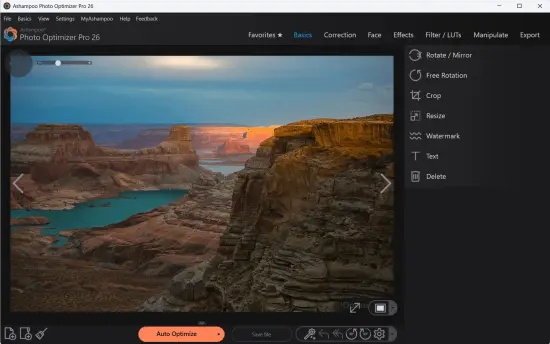
Photo Optimizer Portable has a very simple interface. Other photo editors have to painstakingly read lengthy manuals, but with Photo Optimizer you’ll get instant results. Of course, Ashampoo Photo Optimizer Portable includes all the usual features like cropping, rotating, watermarking and blurring. But that’s not all. Get creative with artistic effects and elegant frame designs. Whether you’re looking to recover a failed shot, improve image quality by an extra 5%, or just want to have fun, this is the program for you! , recognized and corrected by careful image analysis. Carefully developed algorithms automatically optimize color, contrast and exposure time for individual shots or entire collections, transforming disappointing shots into stunning photos!
Matter of opinion!
Photographs of buildings often have an unpleasant and noticeable perspective distortion depending on the position of the photographer. Buildings and other tall objects are about to topple over, adding an unintentional comical touch to your photo. Also, I forgot to bring my tripod and didn’t keep my camera perfectly level. Enter Photo Optimizer Portable’s new perspective correction! Fix horizontal or vertical distortion with just a few clicks and save recordings that would otherwise go straight to the trash. Give your photos another chance and always get the right perspective!
Favorites make it even better
We all have our favorite features that we rely on the most. Now you don’t have to navigate through different menus and categories to access them. Ashampoo Photo Optimizer Portable has a customizable ‘favorites’ menu that keeps all your favorite features in one place for quick access. Need to straighten the horizon, fix the viewpoint, or crop something after auto-optimization? Genius, right?
Superior Automatic Image Optimization
The secret of the new Photo Optimizer lies in its unique image optimization. All images are closely analyzed for potential weaknesses and possible improvements. You can now easily restore footage shot quickly with your smartphone’s camera. Dull colors, poor lighting, lack of contrast – Photo Optimizer’s advanced algorithms will detect them all! After analysis, your photos will be recreated, vibrant and lifelike. We went through thousands of setting combinations to find the one that provided the best results with a high hit rate. After two years of development and countless hours in our test lab, we are proud to introduce the next level of image optimization with Ashampoo Photo Optimizer.
Further Fine Tuning Options
As with automatic fine tuning, at some point you will want to make manual adjustments. Version 8 offers even more individual fine-tuning options. B. Color temperature adjustments that can completely change the nature of a shot – and bring the ‘cold’ cellphone images we know so well to life.Tone curves are especially useful when working with RAW footage. A surefire way to enhance shadows, midtones, and highlights. Try it to your heart’s content. A built-in backup system lets you undo any changes you make and instantly restore the original image.
Improved Memory Management
Ashampoo Photo Optimizer uses all available system memory when you need to take full advantage of your PC’s performance. This means that even ultra-high resolution images and huge collections can be optimized in seconds. Experience the fastest and most robust photo optimizer ever!
Improves white balance and enhances contrast distribution
White balance is critical to the color temperature of an image. Digital cameras are especially prone to dreadful bluish and pale colors. The result is a photo that is lifeless and completely devoid of the magic of the moment. Another common problem is low image contrast. This is often caused by poor lighting. With the help of custom white balance and contrast distribution settings, Photo Optimizer can breathe new life into otherwise ruined shots! Both features are part of automatic optimization, Automatically enabled when needed!
Edit photos in just a few clicks
Photo Optimizer’s interface is self-explanatory. Features are organized into intuitively named categories and can be accessed with just two clicks. While other photo editors require you to read through the manual, Photo Optimizer gives you immediate results. Everything is simple and logical with very little learning curve. Whether you’re a beginner or an expert, and don’t want to spend hours optimizing your images, Ashampoo Photo Optimizer is the right program for you.
Versatile Export Features
A good photo is worth looking at. That’s why Photo Optimizer Portable offers you various ways to share your photos with others. This includes email, the free Ashampoo Web, and even setting a photo as your desktop wallpaper. If you want to print your photos the traditional way, you’ll love the feature-rich print dialog that not only creates high-quality prints, but saves space when needed.
FEATURES FOR PERFECTIONISTS AND CREATORS
Many advanced features beyond automatic optimization. Whether you need to sharpen or blur individual areas, Photo Optimizer offers thoughtful tools for any use case. Reduce annoying image noise, adjust color temperature or crop images. Also included are multiple effects such as waves, swirls, implosions, and explosions for the artist in you. There is plenty of room for experimentation.
Enhance Natural Looking Portraits
Faces are the focal point of many photos, but they are rarely the perfect shot. Enhance portraits automatically or manually with Photo Optimizer. Fix red eyes, whiten teeth and create a bright smile. Fix minor imperfections and remove blemishes and other impurities like a pro with the Clone Tool. Create perfect yet natural looking portraits in just a few clicks!
Add color to your game!
You can’t take great pictures without great colors. This is where Photo Optimizer’s highly efficient color correction comes into play. Add a personal touch to your photos or give them a more realistic look. Few sliders are needed to improve contrast, saturation, and many other aspects. See your changes in real time with the built-in live preview, step back in time with a nostalgic sepia effect, or apply a sophisticated color reduction threshold. Don’t like what you see? Undo with the push of a button!
Convenient Batch Processing
Ashampoo Photo Optimizer Portable does so many things fully automatically that you can consolidate batch processing to save time and nerves, allowing the program to process your entire photo library at once. To do. Select individual images from various sources or entire folders and let Photo Optimizer work its magic. Each image is meticulously analyzed and quality optimized according to its specific characteristics. Treat your entire vacation at once, refine your wedding and birthday photos and bring the fun back to your photos.
Plenty of space for experimentation
Thanks to a robust security system, you can experiment freely without losing the original image. Restore the image to its original state at the touch of a button. And with built-in before and after views, there are no nasty surprises on the way to perfecting your photos. Bright, colorful and lively, as if looking into the future.
Release Notes:
Key New Features
- Intelligent Image Compression: A new compression engine that balances file size and image quality. It supports JPG, WebP, and PNG formats, allowing you to reduce file sizes for web or storage without visible quality loss.
- Live Preview & Size Control: As you adjust compression settings, you can now see the expected file size in real-time alongside a “before and after” visual comparison.
- Expanded LUT Library: 27 brand-new Look-Up Tables (LUTs) have been added across nine categories:
- Seasonal: Halloween, Christmas, Autumn, Summer.
- Stylistic: Vintage, Contrast, HighKey, LowKey, and FX.
- Modernized UI: The user interface has been streamlined for a more modern look while keeping the classic “two-click” workflow.
- New Photo Frames: A fresh collection of decorative frames to add artistic borders to your images.
Technical Enhancements
- Enhanced RAW Support: Improved compatibility for the latest camera models and faster RAW processing.
- Optimized Metadata Handling: Cleaner and more reliable processing of EXIF and XMP data.
- Performance Boost: Improved memory management and 64-bit optimization for faster batch processing of large image folders.
Summary Table: Version Comparison
| Feature | Photo Optimizer 11 | Photo Optimizer Pro 26 |
| Total LUTs | 45+ | 70+ (includes 27 new) |
| Compression | Basic | Advanced with Live Preview |
| Interface | Standard | Modernized / Refined |
| RAW Support | Standard | Enhanced / Optimized |