

Portable VideoMeld 1.80 (x64)
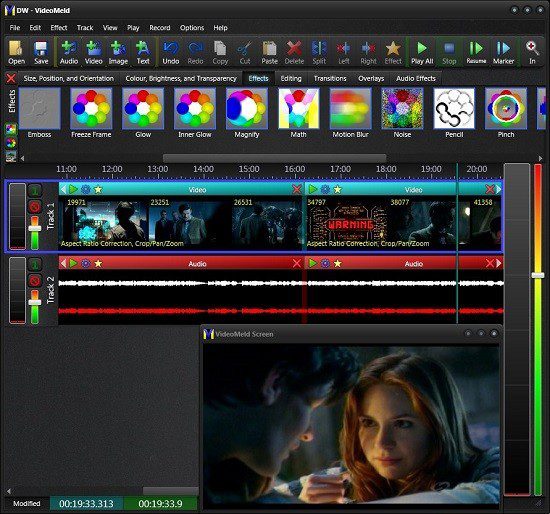
VideoMeld Portable is a versatile, multi-track video and audio editing software designed to deliver powerful editing capabilities with an intuitive, user-friendly interface. It caters to both beginner and professional content creators by combining video compositing, precise audio mixing, and screen recording into one seamless platform. Whether producing home movies, tutorial videos, music presentations, or professional-quality content for platforms like YouTube and Vimeo, VideoMeld Portable empowers users to create layered multimedia projects with ease and flexibility.
Overview and Philosophy
At its heart, VideoMeld is built to make video editing accessible while providing a robust toolkit that can scale to complex projects. It integrates many functions that typically require separate applications—such as video editing, audio mixing, screencasting, and visual effects—into a single software environment. This all-in-one approach removes the barriers of switching between different apps and formats, allowing creators to concentrate on their storytelling and artistic vision.
The software emphasizes a drag-and-drop workflow where editing, trimming, splitting, merging, or applying effects happens instantly without lengthy processing times. It maintains a non-destructive editing model, ensuring original files remain unaltered, while edits exist as virtual layers and applied effects. This design both speeds up workflow and safeguards original media assets.
Core Features
Multi-Track Video and Audio Editing
One of VideoMeld’s signature strengths lies in its support for multiple video and audio tracks. This capability enables creators to combine and synchronize various media sources such as video clips, audio tracks, still images, and text overlays into a single final video output. Its multitrack timeline interface is intuitive, letting users easily layer multiple clips and control each track independently.
The software supports high-definition video editing, including resolutions up to 1920×1080 (Full HD) and beyond, saved in popular formats such as MPEG-4 H.264. Audio is supported up to 8 channels for high-fidelity surround sound editing (7.1 surround sound). This multi-channel audio mixing excels in projects where vocals, instruments, sound effects, and background music must be balanced carefully.
Real-Time Effects and Transitions
VideoMeld is loaded with over 50 powerful video effects, transitions, and compositing tools to enhance the visual appeal of any project. Users can apply color corrections—including tint, brightness, contrast, and saturation adjustments—directly and dynamically. Other popular video effects include slow motion, fast motion, cropping, zooming, panning, and picture-in-picture overlays.
Video transitions such as fades, wipes, dissolves, and 3D effects add polish and professionalism to the flow between scenes or segments. Scrollable text captions and rolling credits enable users to add custom text overlays easily, ideal for movie titles, subtitles, credits, or information tickers.
All these effects operate in near real-time thanks to efficient software optimization and multiprocessor support. Because of this, users can preview edits instantly without waiting for rendering delays, allowing for faster creative iterations.
Audio Editing and Mixing
VideoMeld also places strong emphasis on audio quality and flexibility. Users can work with multiple audio tracks independently, mixing sounds from various sources including microphones, music files, sound effects, or voice-overs. This multitrack audio capability supports complex audio arrangements essential for podcasts, commentary overlays, and music videos.
The software includes a suite of seven key audio effects such as noise reduction, compressor/expander, equalizer, and pitch adjustment. These tools help clean imperfections from recordings, enhance voice clarity, balance loudness levels, and creatively alter audio tones. Audio channel controls also ensure proper routing and mixing for multi-channel surround sound projects.
Screen Recording and Screencasting
Uniquely, VideoMeld integrates a built-in screen recorder, commonly called screencasting functionality. Users can capture video directly from their computer screen to produce instructional videos, software demonstrations, gameplay recordings, webinars, and marketing content.
This feature simplifies the process of recording and editing screen captures by keeping everything within a single application. Recorded footage can then be combined with other video and audio tracks in VideoMeld’s multitrack editor, enabling seamless integration of webcam feeds, voice narration, and visual effects with screencast videos.
Non-Destructive Editing and Virtual Layers
A significant advantage of VideoMeld’s architecture is its non-destructive editing system. Instead of altering media files themselves, Virtual Layers hold edits, effects, transitions, and transformations as separate descriptors. This means users can experiment freely, undo or modify changes without damaging source footage or audio. It also enables a highly efficient workflow when working with large high-definition video files, as no time-consuming re-rendering is required until final export.
Export and Output Formats
VideoMeld supports exporting finished projects as high-quality MPEG-4 videos encoded with the widely compatible H.264 codec. This ensures excellent video quality combined with relatively compact file sizes, ready for uploading to popular online video platforms like YouTube, Vimeo, and Facebook.
Audio exports support popular formats like MP3 and high-fidelity multi-channel audio export options, ideal for professional mixing and post-production uses.
Supported Media Formats and Compatibility
VideoMeld supports virtually all common video, audio, and image file types, making it a universal tool for diverse project requirements. This includes:
-
Video: MP4, AVI, MOV, WMV, MPEG, and more
-
Audio: MP3, WAV, AAC, and multi-channel surround formats
-
Images: JPEG, PNG, BMP, GIF, TIFF
Its broad compatibility ensures that users can import footage from smartphones, DSLRs, webcam recordings, studio audio, web downloads, and scanned images without conversion hurdles.
User Interface and Workflow
The software offers a clean, modern interface designed to minimize the learning curve without sacrificing power. Its drag-and-drop editing paradigm applies consistently across video, audio, and text layers. Controls for cropping, scaling, rotating, and coloring are easily accessible, with visual previews supporting instant feedback.
Multi-level undo/redo functionality safeguards against errors, while keyboard shortcuts and context menus speed up repetitive tasks. An introduction tutorial further assists first-time users in mastering fundamental editing techniques through step-by-step guidance.
Advanced Video and Audio Effects
VideoMeld stands out among basic video editors by providing extensive real-time effects with adjustable parameters:
-
Video Effects: Include blurring, sharpening, color correction, tinting, transparency adjustments, overlay blending modes, and chroma key (green screen) support for advanced compositing.
-
Dynamic Video Effects: Users can animate effects for transitions such as zoom/pan changes over time or progressive color enhancements.
-
Audio Effects: Multi-band equalization, loudness normalization, dynamic range compression, noise gating, pitch shifting, and reverb help craft studio-quality soundtracks.
All effects are non-destructive and adjustable in real-time, allowing users to tweak settings interactively until achieving the desired output.
Use Cases and Target Audience
VideoMeld caters to a diverse range of users and project types, including:
-
Home Video Editing: Quickly trim, merge, and enhance family videos or personal clips with professional-looking effects and captions.
-
Content Creator Platform Videos: Streamline video production for YouTubers, streamers, and social media influencers by combining webcam footage, gameplay, voice-overs, and music into polished videos.
-
Educators and Trainers: Utilize screen recording and video editing to create engaging educational tutorials, presentations, and training materials.
-
Musicians and Podcasters: Mix multi-channel audio and video for music video production or podcast episode creation with voice and music layers.
-
Marketing and Advertisements: Produce compelling promotional and demonstration videos featuring overlays, branding, and dynamic graphics.
-
Film Students and Hobbyists: Experiment with multi-track editing and complex effects to learn the art and craft of video editing without expensive software.
Performance and Efficiency
VideoMeld optimizes performance by leveraging multiprocessor support, which accelerates effect processing and playback. Its virtual editing model eliminates the need for temporary file generation during editing, meaning changes occur interactively without delay.
Users benefit from instant visual feedback, reducing frustration, and speeding the creative process. The software maintains smooth playback even with multiple layered video and audio tracks, ensuring high-resolution editing on standard consumer hardware.
Additional Functionalities
-
Scrolling Credits and Captions: Create professional-looking credit rolls or subtitles with adjustable fonts, colors, and animation speeds.
-
Picture-in-Picture Compositing: Overlay images or video clips as inset windows within the main video frame with adjustable size, position, and transparency.
-
Split and Merge Audio Layers: Break down multi-channel audio into discrete tracks to fine-tune individual instruments or vocal parts and re-merge them seamlessly.
-
Batch Operations: Copy, paste, and apply effects simultaneously across multiple clips or layers to save time on repetitive editing tasks.
-
Color Grading Tools: Fine-tune look and feel with saturation, hue shifts, and tint controls for artistic or corrective grading.
Conclusion
VideoMeld Portable blends powerful video editing, audio mixing, and screen recording into a single cohesive platform that fulfills the needs of varied multimedia creators. Its multi-track timeline, high-quality effects, and real-time preview system equip users to easily produce cinematic or professional results without needing extensive technical knowledge.
From hobbyists stitching home movies to content creators crafting engaging tutorials and marketing videos, or musicians and educators enhancing their visual presentations, VideoMeld offers a versatile, efficient toolset. Its emphasis on accessibility, non-destructive editing, and comprehensive format support makes it an ideal choice for those seeking an all-in-one solution that balances simplicity with advanced capabilities.
This description comprehensively captures VideoMeld’s strengths, features, and typical applications, showcasing it as a robust and adaptable multimedia editing solution for users at any skill level.
Release Notes:
– Changed project “Meld” menu items to more common “Export”
– Updated FFmpeg library support to 7 (new download required).
– Adjusted Thermal colours.
– Changed selection drag-and-drop to automatically move trailing and linked sections to maintain relative positions.
– Improved linked sections’ relative positions when surrounding sections changed.
– Added experimental “Play backward” option to Audio and Video Sections.
– Fixed bugs: spin box style, shared image freeze, video effects preview frame rate, sudden termination trimming video section,
Ctrl/Shift and drag, undo error.