Portable Visual Similarity Duplicate Image Finder Pro 9.6.0.2 (x64)
Duplicate Image Finder Portable “looks” at your photos to find similarities. Find look-alike and duplicate images in a folder, computer, network, or find duplicates in Adobe Lightroom. Organize photos by eliminating useless repeating pictures – save valuable disk space. Identify similar and duplicate photos even if they are edited, rotated, flipped, or color-corrected.
Visual Similarity Duplicate Image Finder Portable is the choice of many professional photographers – you will never need another tool in order to organize photos.
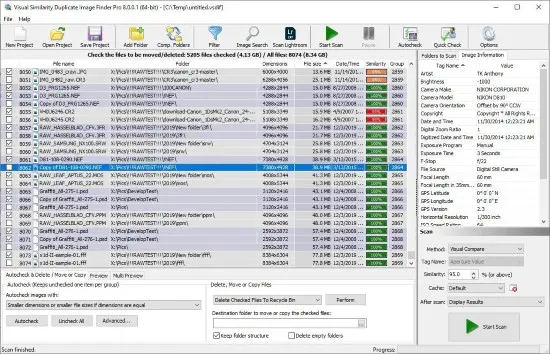
The duplicate photo finder shows all the duplicate images in groups and can automatically mark the smaller resolution and/or smaller file size images to be deleted – the lower quality ones.
Supports 40 popular image formats (including Photoshop/Lightroom PSD, TIFF, HEIC/HEIF, JPG, WebP…) and 300+ RAW camera photo formats(CRW, CR2, CR3, NEF, DNG…). Due to its innovative and optimized algorithms, it is the fastest and the most precise duplicate photo finder on the market.
Features
- Duplicate Image Finder is a powerful utility for finding similar and duplicate images in a folder and all its subfolders. It is the best duplicate photo finder and provides countless duplicate image removal options
- Find similar images or duplicate photos in a folder, drive, computer, or network using visual compare
- Find similar images of a sample photo – Reverse Image Search
- Find duplicate image files – exact duplicates
- Find Lightroom duplicates – scan Adobe Catalogs
- Search duplicate images by a time difference in EXIF original date time
- Identify rotated at 90°, 180°, 270°, flipped horizontal and/or vertical, and grayscaled duplicate photos
- Adjust the percent of image similarity for the photo search
- Smaller resolution duplicates can be automatically marked
- Smaller file size duplicates can be automatically marked
- Older files can be automatically marked for deletion
- Show preview of original and duplicate images
- Powerful filter and exclude from auto-check options
- Multiple Quick Check/Uncheck dialog
- Duplicate images can be copied, moved to Recycle Bin, custom folder or deleted permanently
- Supports all popular image file formats and RAW camera images (only in Pro and Corporate versions)
- Internal CACHE which dramatically improves performance for subsequent scans
Release Notes:
- Added: Included Created and Accessed file dates in the XML and CSV export files
- Added: Improved Quick Check
- Added: Improved image loading and processing
- Added: Improved user interface
- Added: Clearer filter and exclude from auto-check enabled/disables states
- Fixed: Many smaller improvements and fixes
- Fixed: Folder selection dialog was adding subfolders instead of the root folder in rare cases
- Fixed: Improved compatibility with third-party WIC codecs such as CopyTrans HEIC.