
Portable Text to Speech Studio Offline 1.0.0
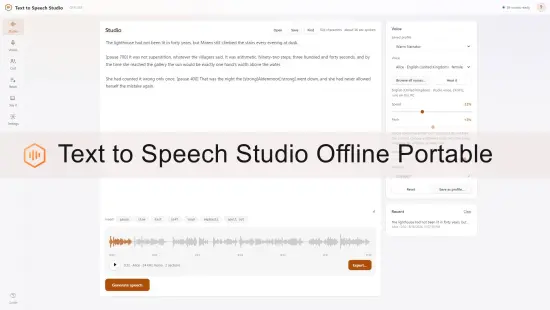
Turn any text into natural spoken audio – 59 voices, 9 languages, entirely offline on your PC. No account, no subscription, no upload. Export MP3 with subtitles.
59 VOICES IN 9 LANGUAGES, INCLUDED
Ships with 54 natural studio voices at 24 kHz – English (US and UK), Spanish, French, Italian, Portuguese, Hindi, Japanese and Mandarin Chinese – and also lists every speech voice Windows has installed. Nothing to download, nothing to sign up for. Everything runs on the processor; no graphics card needed.
Press Browse all voices to search by name or language, filter by female or male, star your favourites, and hear any voice instantly from its card.
GIVE EVERY CHARACTER THEIR OWN VOICE
The Cast screen turns a story into a performance. Paste prose with quoted dialogue and it separates narration from speech and works out who is talking, from phrases like “said Maren” or “Ellis shook her head”. Paste a script with NAME: lines and it reads that instead. Assign a voice to each character, press Record, and every line is spoken in its own voice and joined into one recording.
BLEND A VOICE NOBODY ELSE HAS
Mix any two studio voices of the same language with a slider. This combines them at the level the model uses to define what a voice is, so the result is a genuinely new voice, not a filtered copy.
WRITE AND NARRATE
Type or paste up to 200,000 characters. Long passages split automatically, with a progress bar and a live estimate of time remaining. Listen to the real waveform with a time ruler, click anywhere to skip, and export when it sounds right.
Your work saves itself as you type. Keep documents by name, import text files, and use Find and Replace on long manuscripts.
EXPORT MP3, WAV, FLAC OR OGG – WITH SUBTITLES
MP3 is about a fifth the size of WAV and plays on everything. FLAC is lossless. Tick a box and it also writes an .srt subtitle file, .vtt web captions, or a timecoded transcript beside the audio. Timings are measured from the audio actually produced, so captions line up exactly – drop them straight into Premiere, Resolve, CapCut or YouTube.
NARRATE A WHOLE BOOK IN ONE RUN
Batch takes a stack of text files, or one long script, and works through it while you do something else. Join everything into one file, or keep them separate. One bad block never abandons the rest, and any single block can be redone without re-running the queue.
FIX PRONUNCIATION ONCE
Names, brands, acronyms and technical terms that come out wrong go in a pronunciation list – Nguyen becomes “win”, SQL becomes “es cue el”. Rules apply everywhere, so a character’s name is fixed once for the entire book.
CONTROL DELIVERY INSIDE THE TEXT
Type[pause 800] for a silence of exactly that length. Wrap a phrase in[slow],[loud],[high] or[strong]. Use[spell] to read an acronym letter by letter.
PRIVACY IS THE POINT
No network features at all. The app refuses its own outbound connections at the process level, so your writing and your audio cannot be transmitted anywhere. No account, no sign-in, no telemetry. Nothing you write is used to train anything.
HONEST ABOUT WHAT IT IS
This does not clone a real person’s voice from a recording, and it cannot. It plays synthetic voices and lets you tune and blend them. Every exported file carries a note in its properties marking it as AI-generated synthetic speech, with the date and the voice used.
