
Portable ASCOMP PDF Conversa Pro 3.014
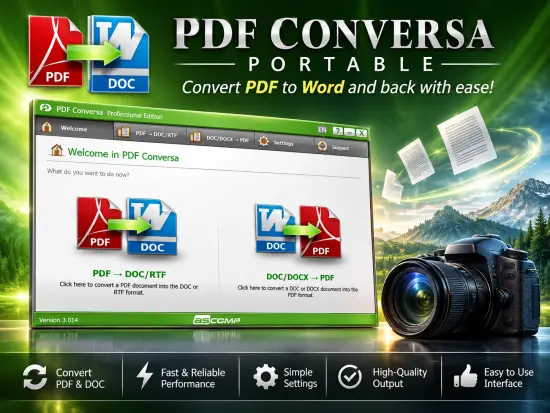
Managing digital documents efficiently is an essential requirement for businesses, students, professionals, and home users alike. PDF files have become the universal standard for sharing information because they preserve formatting and display consistently across devices. However, editing PDF documents or converting them into formats suitable for modification can often be challenging without specialized software. This is where ASCOMP PDF Conversa Portable provides a practical and efficient solution.
Designed to streamline document conversion tasks, ASCOMP PDF Conversa Portable focuses on accurate and reliable transformation between PDF and Word formats. Whether users need to convert PDFs into editable Word documents or create professional PDF files from Word documents, the software offers a straightforward workflow that eliminates unnecessary complexity while maintaining document quality.
By combining precision, speed, and ease of use, ASCOMP PDF Conversa Portable serves as a versatile document conversion utility suitable for everyday office work, academic projects, business reporting, documentation management, and personal productivity tasks.
What Is ASCOMP PDF Conversa Portable?
ASCOMP PDF Conversa Portable is a dedicated PDF conversion application that allows users to convert PDF documents into editable Word formats and transform Word documents into high-quality PDF files.
The software is designed to preserve the original structure of documents as accurately as possible during conversion. Elements such as tables, images, paragraphs, fonts, headers, and formatting are maintained to reduce the amount of manual editing required after conversion.
Unlike complex PDF editing suites that include dozens of features many users never utilize, ASCOMP PDF Conversa Portable concentrates on its primary objective: accurate document conversion. This focused approach results in a lightweight, user-friendly application that performs its tasks efficiently and reliably.
The software is suitable for individuals who regularly work with contracts, reports, invoices, forms, manuals, educational materials, and other document types that require conversion between PDF and Word formats.
Why PDF Conversion Is Important
PDF documents are excellent for sharing information but can present challenges when modifications are required. Many organizations receive reports, forms, contracts, or documentation as PDFs, yet often need to edit or update that content within Microsoft Word.
Manually recreating documents can consume substantial time and resources. Reliable PDF conversion software allows users to retain the original layout while transforming content into editable formats.
ASCOMP PDF Conversa Portable helps bridge this gap by making the conversion process simple and efficient. Rather than rebuilding documents from scratch, users can convert files and continue working with familiar word-processing tools.
This capability is particularly valuable in situations involving:
- Contract revisions
- Proposal editing
- Academic document updates
- Policy modifications
- Business reporting
- Form customization
- Documentation management
- Content migration projects
The software enables users to maximize productivity while minimizing formatting issues commonly associated with document conversions.
Seamless PDF to Word Conversion
One of the primary functions of ASCOMP PDF Conversa Portable is converting PDF files into editable Word documents.
This feature is especially useful when users receive information in PDF format but need to make changes, update content, or repurpose existing materials. The software converts PDF documents into DOC or RTF formats while striving to maintain layout fidelity.
During the conversion process, various document elements are preserved, including:
- Text formatting
- Paragraph structure
- Tables
- Images
- Graphics
- Font styles
- Page layouts
Maintaining these elements significantly reduces post-conversion editing work.
For business environments where document consistency is critical, this level of accuracy can save considerable time and improve workflow efficiency.
Users can open converted files in Microsoft Word and immediately begin editing without extensive manual corrections.
Fast Word to PDF Conversion
Creating PDF documents from Word files is equally important for professional document distribution.
ASCOMP PDF Conversa Portable enables users to convert DOC and DOCX files into PDF format quickly and efficiently. PDF output provides a standardized format that ensures recipients see documents exactly as intended regardless of their operating system, software version, or device.
Common uses include:
- Business proposals
- Legal documentation
- Contracts
- Invoices
- Technical manuals
- Project reports
- Academic papers
- Marketing materials
The software generates professional-looking PDFs while preserving the structure, formatting, and visual appearance of the original Word documents.
As a result, users can confidently distribute documents without worrying about formatting inconsistencies.
Accurate Preservation of Document Layouts
A major concern when converting between formats is the potential loss of formatting.
Many conversion tools struggle with complex layouts, causing misaligned tables, shifted images, altered fonts, or broken paragraph structures.
ASCOMP PDF Conversa Portable addresses this challenge by focusing on preserving document integrity throughout the conversion process.
When documents contain:
- Multiple columns
- Embedded images
- Complex tables
- Custom fonts
- Structured formatting
- Detailed page layouts
the software works to retain the original appearance as closely as possible.
This is especially beneficial for organizations that depend on accurately formatted documentation where presentation matters as much as content.
Support for Password-Protected PDF Files
Security is often a critical component of document management.
Many businesses distribute PDF files with password protection to prevent unauthorized access or modification. ASCOMP PDF Conversa Portable supports conversion of protected PDF documents when appropriate access credentials are available.
This functionality helps users work with secured files while maintaining established security practices.
Organizations handling confidential reports, contracts, or compliance documents can benefit from the ability to process protected PDFs without requiring additional specialized tools.
Advanced PDF Creation Features
ASCOMP PDF Conversa Portable offers more than simple document conversion. When creating PDF files, users can take advantage of several options designed to improve security, compatibility, and file quality.
These capabilities include:
Password Protection
Users can protect generated PDF files using passwords to restrict unauthorized access.
This feature is useful for:
- Financial reports
- Confidential contracts
- Employee documentation
- Internal communications
- Sensitive business records
Password protection helps ensure information remains accessible only to intended recipients.
Font Embedding
Embedded fonts help preserve document appearance across systems.
Without embedded fonts, documents may display differently if the recipient lacks certain fonts installed on their machine.
Font embedding increases consistency and professionalism when sharing PDF files.
Text Compression
Large documents can consume considerable storage space and slow down file transfers.
Text compression helps reduce file size while maintaining readability, improving efficiency for storage and distribution.
Image Quality Adjustment
Users can optimize image settings within generated PDFs to achieve the desired balance between visual quality and file size.
This flexibility is particularly valuable when preparing documents for:
- Email distribution
- Online sharing
- Archiving
- Printing
User-Friendly Interface
Many PDF tools overwhelm users with extensive menus, complicated settings, and unnecessary functionality.
ASCOMP PDF Conversa Portable takes a different approach by emphasizing simplicity.
The interface is organized and intuitive, enabling users to perform conversions quickly without extensive training or technical expertise.
Key benefits of the interface include:
- Clear navigation
- Logical workflow design
- Easy file selection
- Rapid conversion setup
- Minimal learning curve
Users can focus on completing tasks rather than figuring out how the software works.
This makes the application suitable for beginners and experienced professionals alike.
Designed for Productivity
Efficiency is one of the software’s greatest strengths.
Document conversion tasks that might otherwise require multiple tools or manual recreation can often be completed with only a few clicks.
This productivity advantage becomes increasingly valuable when dealing with large numbers of documents.
Organizations handling content archives, document migration projects, or regular reporting requirements can benefit substantially from streamlined conversion workflows.
The software helps reduce repetitive tasks and enables users to concentrate on higher-value activities.
Ideal for Business Users
Businesses frequently rely on document conversion for communication, collaboration, compliance, and reporting.
ASCOMP PDF Conversa Portable supports these requirements through reliable PDF and Word conversion capabilities.
Business use cases include:
- Contract management
- Proposal revisions
- Legal documentation
- Financial reporting
- Human resources documentation
- Client communications
- Internal documentation
The software provides a practical solution for efficiently managing document workflows across departments.
Valuable for Students and Educators
Educational environments often involve extensive document exchange.
Students receive PDF assignments, academic papers, lecture materials, and research resources that sometimes require editing or reformatting.
Educators frequently create and distribute course materials in PDF format.
ASCOMP PDF Conversa Portable enables conversion between formats while preserving formatting and content structure, simplifying academic work and reducing administrative effort.
A Helpful Tool for Home Users
Personal document management has become increasingly important in the digital age.
Home users may need to:
- Edit forms
- Update resumes
- Convert reports
- Organize personal records
- Share documentation
ASCOMP PDF Conversa Portable offers a straightforward solution for handling these tasks without requiring expensive or overly complex software suites.
Its intuitive design makes it accessible even to users with limited technical experience.
Reliable Document Compatibility
Compatibility issues often create frustration when sharing files across different platforms and software environments.
PDF remains one of the most universally accepted document formats, making it ideal for long-term storage and distribution.
By enabling seamless conversion between PDF and Word formats, ASCOMP PDF Conversa Portable enhances compatibility and improves document accessibility.
Users can confidently share files with colleagues, clients, educational institutions, and family members knowing that recipients can view content consistently.
Efficient Document Archiving
Organizations and individuals frequently archive important documentation for future reference.
PDF files are generally preferred for archiving because they preserve formatting and remain accessible over time.
ASCOMP PDF Conversa Portable allows users to convert editable Word documents into stable PDF files that are suitable for long-term storage.
This capability supports:
- Regulatory compliance
- Historical record keeping
- Business continuity planning
- Information preservation
The result is a more organized and reliable document archive.
Lightweight and Focused Functionality
Rather than attempting to replace every document management application, ASCOMP PDF Conversa Portable concentrates on performing conversion tasks exceptionally well.
This focused design philosophy offers several advantages:
- Faster operation
- Easier deployment
- Reduced complexity
- Improved usability
- Simplified workflows
Users who need dependable PDF and Word conversion tools can benefit from software that remains dedicated to its core purpose.
Professional Results Without Complexity
The software succeeds by combining powerful conversion technology with an uncomplicated user experience.
Whether converting a single report or handling a larger collection of documents, users can achieve professional-quality results without extensive configuration or technical knowledge.
The balance between functionality and simplicity makes ASCOMP PDF Conversa Portable an attractive choice for many different user groups.
Its ability to preserve formatting, support security features, and maintain workflow efficiency positions it as a valuable addition to almost any productivity toolkit.
Conclusion
ASCOMP PDF Conversa Portable is a practical and efficient document conversion solution designed to simplify the process of transforming PDF files into editable Word documents and converting Word files into professional PDF documents.
Its strengths lie in accurate conversions, preservation of document structure, support for password-protected files, PDF security options, font embedding, compression capabilities, and an intuitive user interface. These features make it suitable for businesses, students, educators, professionals, and home users who require dependable document conversion capabilities.
By focusing on quality, speed, and usability, ASCOMP PDF Conversa Portable helps users save time, maintain document integrity, and improve productivity across a wide range of document management scenarios.
Features at a Glance
- Convert PDF documents to DOC format
- Convert PDF documents to RTF format
- Convert DOC documents to PDF
- Convert DOCX documents to PDF
- Preserve original document layouts
- Maintain tables and formatting during conversion
- Retain images and graphics
- Preserve fonts and typography
- Support for password-protected PDF documents
- PDF password protection options
- Font embedding functionality
- Text compression capabilities
- Adjustable image quality settings
- Fast conversion engine
- User-friendly interface
- One-click conversion workflow
- Professional-quality PDF output
- Suitable for business, education, and personal use
- Compatible with modern Windows systems
- Lightweight and efficient operation
Changelog
- Improved PDF to Word conversion accuracy.
- Enhanced preservation of tables, graphics, and document formatting during conversion.
- Optimized DOC/DOCX to PDF conversion performance.
- Refined user interface for easier navigation and workflow efficiency.
- Improved handling of password-protected PDF documents.
- Better font embedding support in generated PDF files.
- Enhanced text compression and PDF generation quality.
- Increased overall stability and reliability during document processing.
- General performance optimizations.
- Minor bug fixes and code improvements.