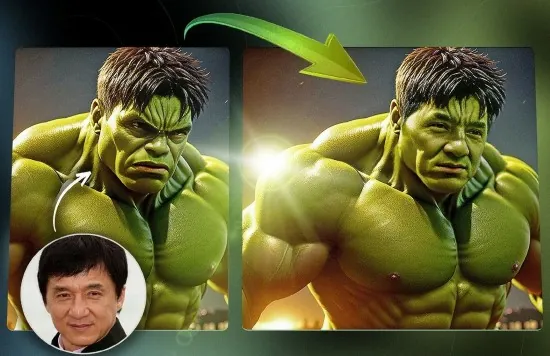
Portable AI Image FaceSwap 2.7.3 (x64) Multilingual

AI Image FaceSwap Portable is a modern face replacement tool designed for users who want to exchange faces between images in a fast, visually convincing, and easy-to-follow workflow. It is centered on the practical goal of turning two ordinary images into a transformed result where facial features are swapped while the rest of the composition remains recognizable and coherent. The portable format adds a layer of convenience, making the software feel more flexible for users who work on multiple Windows systems or prefer a self-contained tool that can move with them.
What makes AI Image FaceSwap Portable especially interesting is the way it combines automation with accessible creative control. Face swapping used to be a task that demanded manual masking, blending, and careful adjustment. This software aims to simplify that process by using AI-driven recognition to identify faces and perform the exchange in a smoother, more direct way. The result is a tool that feels both playful and practical, suitable for entertainment, concept work, and image experimentation.
Core purpose
The core purpose of AI Image FaceSwap Portable is simple: it helps users swap faces between still images using artificial intelligence. That may sound like a novelty at first, but the real value lies in how quickly it turns a complex transformation into a manageable workflow. The software focuses on making the process accessible so users can create face-swapped images without needing advanced editing skills or a long chain of manual adjustments.
That purpose gives the software a broad range of uses. It can be used for entertainment, for visual experimentation, for social content, or for testing ideas that would otherwise be difficult to produce by hand. Because the face replacement happens in a still-image context, the workflow is often more immediate and easier to control than a more complicated motion-based project. That makes the software appealing to users who want quick visual results with minimal friction.
Portable convenience
The Portable aspect is a meaningful part of the software’s identity. A portable application can be carried on removable storage, launched without a traditional installation process, and used across different computers in a more flexible way. That is especially helpful for users who work in multiple places, maintain a toolkit of mobile utilities, or simply want to avoid permanent software changes on a host machine.
Portability also supports a cleaner workflow. If the software is self-contained, it becomes easier to use in temporary environments, on secondary computers, or during sessions where the user wants to keep the working environment consistent. This makes AI Image FaceSwap Portable easier to integrate into real-world media workflows because it can go wherever the project needs it.
AI-based face detection
At the heart of the software is AI-based face detection. The program must identify the facial region in each image before it can swap anything effectively, and that recognition process is one of the reasons the result can look more natural than a purely manual composite. Accurate detection helps the software understand where the face begins and ends, which features matter, and how the face relates to the rest of the photo.
Face detection matters because the quality of the swap depends heavily on alignment. If the software cannot isolate the face correctly, the transformed image will look awkward or mismatched. AI recognition helps reduce those problems by handling much of the analysis automatically, giving the user a faster and more approachable experience while keeping the output visually coherent.
Still image workflow
AI Image FaceSwap Portable is focused on still images, which gives the workflow a very direct feel. The user can choose an image containing the target face and another image containing the source face, then let the software perform the transformation. Because the task is image-based rather than frame-based, it is easier to preview and compare the result without having to work through a long timeline or many sequential frames.
This kind of workflow is especially useful for users who want fast creative results. A still-image face swap can be used for humorous edits, concept art, social media visuals, or reference experiments. The simplicity of the process helps make the tool accessible even to people who do not normally work with advanced image editing tools.
Creative experimentation
One of the strongest reasons people use face swap software is creative experimentation. AI Image FaceSwap Portable gives users a way to explore different visual identities, imaginative concepts, and stylized presentations without building everything manually. That freedom can be inspiring because it allows the user to see unexpected combinations and explore possibilities that would be hard to create from scratch.
Creative experimentation is valuable not only for entertainment but also for ideation. A user may want to test how a face appears in a different scene, explore a visual concept for a project, or create reference material for a larger composition. A tool that can quickly generate these alternate versions gives the creative process more momentum and less technical drag.
Entertainment and sharing
Face swapping naturally has strong entertainment value, and AI Image FaceSwap Portable is well suited to that role. The software can be used to create amusing or surprising images for personal fun, group sharing, or casual visual storytelling. Because the transformation is fast, it encourages experimentation and makes it easy to try several combinations until the user finds the result they want.
This entertainment aspect is one reason the software has broad appeal. It is not limited to professionals or technical users; it can also be enjoyed by casual users who simply want to explore the playful side of image editing. When a tool is easy to use and visually rewarding, people tend to return to it more often, especially for quick content creation.
Image quality goals
A good face swap tool must preserve image quality as much as possible while altering the face itself. AI Image FaceSwap Portable is designed around that idea, aiming to keep the output sharp enough and natural enough to remain visually convincing. The face should feel integrated into the original image rather than pasted on top of it in an obvious or distracting way.
This matters because the surrounding photo still needs to make sense after the swap. Lighting, scale, angle, and color balance all contribute to how believable the final image feels. A tool that pays attention to these details can produce results that are more polished and more useful for creative work or casual sharing.
Single-image face exchange
Face swapping in a single image has its own special appeal because it can create dramatic before-and-after style transformations in one frame. AI Image FaceSwap Portable supports this kind of work by allowing users to focus on one picture at a time and make a transformation that is immediately visible. That makes the software easy to understand and easy to test.
This single-image approach is practical because it reduces complexity. The user does not have to manage a long sequence of frames or worry about motion continuity. Instead, attention stays on the composition of one image and the quality of the swap within that image. This helps keep the workflow clear and makes the software accessible for many users.
Practical workflow benefits
One of the main benefits of AI Image FaceSwap Portable is time savings. Traditional image manipulation can require masking, feathering, cloning, and blending, all of which take time and practice. By using AI to automate the transformation, the software makes it possible to get to a finished result much faster. That saves time and lowers the effort required to experiment with different face combinations.
This efficiency is especially valuable when the user wants to compare results quickly. Instead of spending a long time editing one variation, the user can generate a swap, evaluate it, and try another idea. That kind of rapid iteration is particularly useful in creative work where exploring several possibilities is more valuable than perfecting only one early version.
Usability and accessibility
AI Image FaceSwap Portable is appealing because it suggests a workflow that is easy to approach. Users who are not image-editing specialists can still understand the basic process of selecting images and generating a swapped result. That makes the software accessible to a broad audience rather than only to users with advanced technical or artistic backgrounds.
Accessibility is important because face swap software can otherwise seem intimidating. If the interface is straightforward and the steps are clear, users are more likely to try it and more likely to enjoy the process. A good image transformation tool should feel inviting, and that is part of the appeal of a portable, AI-driven design.
Why portability matters here
Portability is especially useful for image-based tools because creative work often moves between machines and contexts. A user may create and review images at different times or on different computers, and a portable application makes it easier to maintain a consistent process. It also reduces the need to install extra software on systems where the tool may only be needed temporarily.
That freedom makes the software more practical as part of a larger toolkit. If the user already has an organized workflow for media utilities, a portable face swap application fits neatly into it. It can be launched when needed and set aside when the task is done, which is a strong advantage for users who prefer self-contained utilities.
Audience and appeal
AI Image FaceSwap Portable can appeal to a wide audience. Casual users may enjoy it for playful image edits. Content creators may use it to produce striking visuals. Experimenters may use it to test ideas and combinations. Anyone who wants a faster, more automated way to create face-swapped images is likely to find it useful.
Its broad appeal comes from the fact that it combines novelty with practical simplicity. The software is easy to understand but still capable of producing visually interesting results. That balance makes it useful not only as a fun tool but also as a legitimate part of image experimentation and creative content workflows.
Overall character
AI Image FaceSwap Portable feels like a focused and modern image transformation tool built around convenience, automation, and visual creativity. It helps users swap faces between images in a way that is faster and more approachable than manual editing, while the portable format makes the software easier to move and reuse across different Windows systems. Those qualities together make it feel flexible and practical.
The software’s overall character is centered on quick transformation, accessibility, and creative flexibility. It is the kind of utility that can be used for entertainment, experimentation, and simple content creation without demanding a complicated workflow. That makes it valuable to users who want strong results without needing a deep technical background.
For anyone looking for a portable, AI-assisted way to create face-swapped still images on Windows, AI Image FaceSwap Portable presents a practical and engaging solution. It brings together recognition, transformation, ease of use, and mobility in a package that is well suited to modern image workflows.
In addition to its powerful face swapping capabilities, AI FaceSwap Portable also offers a range of other features that enhance the overall editing experience. This includes tools for color correction, image enhancement, and special effects, allowing users to take their creative projects to the next level. The software also supports a wide range of file formats, ensuring compatibility with various media types and devices.
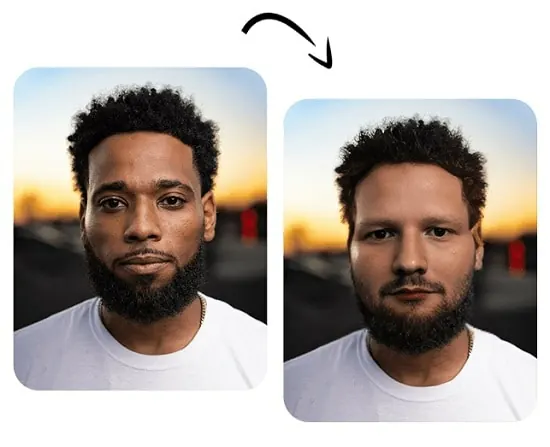
From a technical standpoint, AI FaceSwap Portable is built on a robust and efficient architecture that ensures fast and reliable performance. The software leverages the latest advancements in artificial intelligence and machine learning to deliver accurate and high-quality face swapping results. Its intuitive user interface is designed to streamline the editing process, making it easy for users to achieve their desired outcomes with minimal effort.
AI FaceSwap Portable is the ideal solution for anyone looking to enhance their content with captivating face swaps. Whether it’s for social media, marketing campaigns, or professional projects, the software offers a powerful set of features that cater to a wide range of needs. Its intuitive interface and advanced capabilities make it a valuable asset for content creators and professionals alike.
In conclusion, AI FaceSwap Portable is a sophisticated software solution that offers unparalleled face swapping capabilities. Its advanced features, intuitive interface, and seamless performance make it a valuable tool for anyone looking to create engaging and visually stunning content. Whether it’s for professional editing or personal enjoyment, AI FaceSwap Portable delivers exceptional results with its precision and versatility.
Features
– Realistic face swaps
– Requires only CPU to run
– GPU Accelerator
– Privacy Focused, no data collected
– No watermark, no network required
– User-Friendly Interface
– Bulk Swap
Release Notes:
- Batch swap specific surfaces
- Bug fixes