
Portable AI Text & Image to 3D Generator Pro 3.0.6
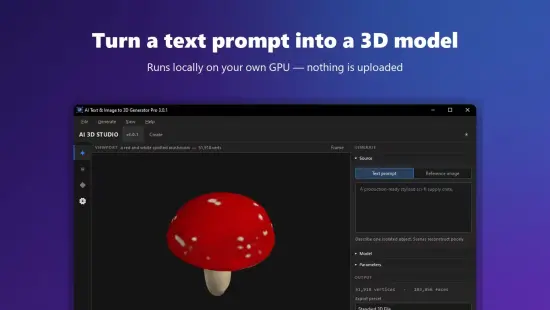
AI Text & Image to 3D Generator Pro Portable is a comprehensive three-dimensional content creation application designed for artists, designers, game developers, architects, educators, and content creators who need to generate 3D models, scenes, and assets from written descriptions or reference images. It is built for people who work with spatial design, virtual environments, or digital assets regularly and want a desktop-based tool that can handle 3D generation tasks without requiring extensive modeling expertise.
The software focuses on bringing together text-to-3D conversion, image-to-3D reconstruction, model refinement, material assignment, scene composition, and export workflows into a single environment that feels organized and approachable. In portable form, the application becomes especially practical for users who move between computers, use shared workstations, or prefer to keep essential utilities in a self-contained folder that can travel with them. That combination of broad 3D generation support and portability gives AI Text & Image to 3D Generator Pro Portable a clear identity as a modern, flexible tool for everyday spatial content production.
3D Generation as the Core
The most important quality of AI Text & Image to 3D Generator Pro Portable is that it treats 3D content generation as the main task rather than a secondary feature. Many 3D tools require users to start with complex modeling workflows, detailed polygon editing, or advanced sculpting techniques, which can be time-consuming and technically demanding. This software takes a different approach by keeping the workspace centered on the generation process itself, providing access to a range of functions that support concept creation, asset development, scene building, and output preparation. That focus matters because 3D content is often needed for prototyping, visualization, or rapid iteration, and the ability to generate it quickly from simple inputs in a single environment can save time, reduce stress, and prevent creative blocks from slowing down production.
This generation-first orientation is especially valuable for people who handle multiple 3D projects simultaneously or who work with concepts that require quick visualization. A game designer may need to prototype character concepts, an architect may want to explore building forms, or an educator may need to create visual aids for teaching spatial concepts. AI Text & Image to 3D Generator Pro Portable supports a more direct approach to these needs by giving users tools that translate descriptive language or reference images into three-dimensional form. The goal is not to replace professional modeling suites, but to provide a powerful starting point that users can refine, adapt, or build upon.
Text to 3D Conversion
One of the strongest features of AI Text & Image to 3D Generator Pro Portable is its text to 3D conversion functionality. Users can describe objects, scenes, characters, or environments in natural language, and the software uses that information to generate three-dimensional models that match the description. This process encourages users to think carefully about how they communicate their ideas, helping them develop a more precise and expressive approach to prompt writing for spatial content.
The text conversion interface is designed to be straightforward, allowing users to type their ideas, review the generated 3D results, and adjust their wording as needed. This level of interaction is particularly valuable when working on projects that require specific visual qualities. Users can experiment with different phrasings, add or remove descriptive elements, and compare the results to see which version best matches their vision. The ability to refine prompts iteratively helps users achieve more accurate and satisfying outcomes.
Text to 3D conversion also supports different levels of detail, from simple one-line descriptions to more complex multi-part requests. The software is built to handle a variety of situations, providing options for quick concept sketches when the user needs a fast 3D reference and more detailed generation when the project requires greater specificity. This flexibility makes it a practical tool for both casual exploration and more structured creative work.
Image to 3D Reconstruction
AI Text & Image to 3D Generator Pro Portable includes robust tools for image to 3D reconstruction, which is especially useful when users have reference images they want to convert into three-dimensional models. Photographs, illustrations, concept art, or technical drawings can all serve as starting points for 3D generation, and the software provides methods for interpreting these images and reconstructing them in three-dimensional space. This makes it possible to turn existing visual content into usable 3D assets without starting from scratch.
The image reconstruction process is designed to be accessible to users with varying levels of experience. The software provides options for single-image conversion, multi-view reconstruction, or depth-based modeling, allowing users to choose the approach that best matches their source material. This is particularly valuable when working on projects that require consistency with existing designs or when the user wants to preserve the visual character of a reference image. The software handles these choices in a way that integrates the image content with the 3D generation process, creating results that feel cohesive and intentional.
Image to 3D also supports experimentation, allowing users to test different reconstruction approaches with the same source image. A user may want to see how a character illustration looks as a low-poly model versus a high-detail sculpt, or how a product photograph translates into a 3D asset for visualization. The software makes it easy to explore these variations, providing flexibility for different types of creative projects. This kind of exploration is essential for discovering the 3D approach that best serves the intended purpose.
Model Refinement and Editing
Another important function of AI Text & Image to 3D Generator Pro Portable is its support for model refinement and editing. The first generated 3D result may be close to what the user wants, but it may also need adjustments in geometry, topology, proportions, or overall structure. The software provides tools that allow users to refine their 3D models without starting from scratch, making it possible to move closer to the desired outcome through careful iteration.
The refinement process is designed to be intuitive, allowing users to adjust geometry, smooth surfaces, modify proportions, or request variations on a particular model. This may involve adding detail to specific areas, simplifying complex geometry, or adjusting the overall scale and orientation. The goal is to provide a smooth workflow that encourages experimentation and helps users develop their 3D ideas over time.
Model editing also supports creative discovery. Sometimes the best 3D results come from unexpected directions, and the software makes it easy to explore those possibilities. A user may begin with one concept and then discover a more compelling 3D approach through the process of generating and refining multiple versions. This kind of creative flexibility is especially valuable for artists, designers, and developers who want to push their work in new directions.
Material Assignment and Surface Control
Beyond geometry generation, AI Text & Image to 3D Generator Pro Portable provides general material assignment and surface control tools that help users define how their 3D models look and interact with light. Materials play a major role in how a 3D asset communicates, and the software provides a range of options that allow users to guide the visual appearance of their models. This may include realistic materials such as metal, wood, glass, or fabric, as well as stylized materials such as cartoon shaders, emission surfaces, or procedural textures.
Material assignment is designed to be accessible to users with varying levels of experience. The software provides preset options for common material types, allowing users to choose a surface treatment that matches their intended mood or purpose. This is particularly valuable when working on projects that require a consistent visual identity, such as a series of assets for a game, a set of product visualizations, or a portfolio of concept models. The software handles these choices in a way that integrates material properties with the geometry, creating results that feel cohesive and intentional.
Surface control also supports experimentation, allowing users to test different material approaches with the same 3D model. A user may want to see how a character looks with realistic skin versus a stylized painted surface, or how a product appears with metallic finishes versus matte plastics. The software makes it easy to explore these variations, providing flexibility for different types of creative projects. This kind of exploration is essential for discovering the visual direction that best serves the intended message.
Scene Composition and Environment Building
AI Text & Image to 3D Generator Pro Portable also includes tools for scene composition and environment building, which is important when users need to place their 3D models in context. Individual assets are often part of larger scenes, and the software provides features for arranging multiple models, adding lighting, setting up cameras, and creating environmental context. This helps users visualize how their 3D content will appear in real-world or virtual settings.
The scene composition process is designed to be intuitive, allowing users to place models, adjust their positions, and organize them into coherent arrangements. This may involve building a room interior, arranging products on a display, or creating a landscape with multiple elements. The goal is to provide a flexible system that adapts to the user’s workflow without imposing rigid composition rules.
Environment building also supports different levels of detail, from simple placeholder scenes to more fully realized environments with lighting, shadows, and atmospheric effects. Users can start with basic arrangements that establish the overall structure of the scene, then progressively add more detail through lighting adjustments, camera positioning, and environmental enhancements. The software handles these operations in a way that maintains responsiveness and stability, even with complex multi-object scenes. This kind of flexibility makes it a practical tool for both simple visualizations and more elaborate environment designs.
Export and Output Management
AI Text & Image to 3D Generator Pro Portable includes features designed to support export and output management for completed 3D models and scenes. When working with 3D content, it is important to be able to move the finished assets out of the application and into other workflows, whether for game engines, rendering software, 3D printing, or archival storage. The software provides tools for exporting models and scenes in formats that are easy to use in other applications.
The export process is designed to help users prepare their 3D content for their intended destination. This may involve exporting as common 3D file formats for compatibility with other software, as optimized assets for real-time engines, or as printable files for 3D manufacturing. The software makes it easy to choose the appropriate format based on the user’s needs, providing flexibility for different types of projects.
Output management also includes the ability to export models with or without materials, textures, or scene elements. This is useful when the same 3D asset needs to be used for different purposes, such as a high-detail version for rendering and a simplified version for real-time use. The software makes it possible to create multiple versions from the same source, providing versatility for different workflows. This kind of flexibility is essential for maintaining efficiency and ensuring that the final output is ready for its intended use.
Privacy and Local Control
AI Text & Image to 3D Generator Pro Portable is built with a focus on local data handling and user control. 3D models, scenes, textures, prompts, reference images, and export files are managed on the user’s own system rather than being sent to external servers. This approach supports greater privacy and gives users more confidence about how their work is being handled. For many people, that distinction is important because 3D projects often include unpublished concepts, proprietary designs, or client work that should remain private.
Local data handling also creates a more predictable workflow. Users are not exposed to variable network conditions, server-side changes, or service limits that can interrupt access to their files. Instead, the software operates within the user’s own system, giving them a consistent way to manage their 3D content. That predictability is especially useful when dealing with large projects, tight deadlines, or time-sensitive work.
Because the software is portable, this control becomes even more convenient. Users can keep their 3D generation environment close at hand and use it consistently across different situations. That combination of local handling and portability makes the application especially appealing to users who care about privacy, flexibility, and operational simplicity at the same time.
Practical Use Cases
AI Text & Image to 3D Generator Pro Portable fits a wide range of real-world 3D content scenarios. It is useful for game developers who want to prototype characters, props, or environments quickly. It is useful for architects who need to explore building forms or interior layouts. It is useful for product designers who want to visualize concepts before detailed modeling. It is useful for educators who need to create 3D visual aids for teaching spatial concepts. Because its functions are broadly relevant, it can become a regular part of a 3D workflow rather than a tool reserved for occasional experimentation.
The software also works well when users need to handle multiple tasks in the same session. A user may want to generate several 3D models from text prompts, refine the best results, assign materials, arrange them in a scene, and then export the final assets all within the same environment. The application supports that variety by keeping the workflow consistent across different functions. That makes it easier to maintain focus and avoid the friction of switching between different tools or methods.
For people who create 3D content frequently, the software can act as a stable generation hub that supports both everyday asset creation and more experimental exploration. That helps build a consistent habit and makes it easier to approach 3D production with confidence. The result is a more orderly and less stressful approach to spatial content creation.
Portable Working Style
The portable form of AI Text & Image to 3D Generator Pro Portable adds a practical layer of flexibility to its already creative design. 3D work is often done in different environments: at home, in a studio, at a client location, or while traveling. A portable setup makes it easier to carry the application and keep it ready wherever it is needed. That is especially useful for users who work on multiple computers or who prefer to keep their tools self-contained.
Portability also supports a cleaner system workflow. Users who prefer not to leave extra traces on shared or temporary computers can work with a tool that stays close to its own files and settings. That makes the software easier to transport and easier to use in a variety of contexts. It aligns well with the everyday reality of 3D production, where the user may need to generate models in different places and at different times.
For users who value consistency, portability means that their preferred 3D generation environment can stay the same from one machine to another. That can reduce confusion and make the experience feel more predictable. In that sense, the portable design is not just about convenience; it is part of the software’s practical usefulness.
Why It Stays Useful
AI Text & Image to 3D Generator Pro Portable remains useful because 3D content creation is a fundamental need that does not change with trends. People will always need a calm, reliable way to generate and refine 3D models, and this software provides that in a creative and practical form. Its emphasis on text-to-3D generation, image-to-3D reconstruction, model refinement, material assignment, scene composition, and export management makes it a practical choice for users who want a tool that can handle both routine tasks and imaginative exploration.
Its focus on essential functions is another reason it stays relevant. Generation, reconstruction, editing, materials, scenes, and output preparation are all core tasks that do not go out of style. The software is built around those needs rather than around temporary features. That gives it a stable role in 3D content creation, especially for users who value order and flexibility. The portable format adds further relevance by making the tool easy to keep available wherever it is needed.
The combination of creative depth, practical workflow, and mobility gives the software a long-term value. It is the kind of utility users can return to whenever they need to work with their 3D ideas, whether for everyday asset generation, artistic experimentation, or polished final delivery.
Conclusion
AI Text & Image to 3D Generator Pro Portable is a practical and imaginative 3D generation application built for users who want a calm, controlled, and consistent environment for transforming text prompts and reference images into three-dimensional models and scenes. It helps users manage their creative work without distraction, refine their 3D content with flexibility, and move through spatial tasks with smooth workflow. The software is especially useful for game developers, architects, product designers, educators, and anyone who needs a reliable tool for 3D content creation. Its portable format makes it easy to carry between systems and use in different environments, which adds to its practicality. For anyone looking for a flexible 3D tool that combines everyday usefulness with self-contained portability, AI Text & Image to 3D Generator Pro Portable offers a solid and dependable solution.
Features at a Glance
- Comprehensive 3D generation environment for text and image-based creation.
- Supports text-to-3D conversion, image-to-3D reconstruction, and model refinement.
- Designed for game assets, architectural concepts, product visualization, and educational content.
- Quiet and unobtrusive interface that keeps attention on the 3D creative process.
- Useful for artists, designers, developers, architects, and educators.
- Smooth workflow for material assignment, scene composition, and export management.
- Simple output preparation for game engines, rendering software, and 3D printing.
- Consistent creative experience across different 3D types and projects.
- Practical for everyday 3D generation, artistic experimentation, and spatial storytelling.
- Helps reduce creative friction with direct prompt-to-3D and image-to-3D tools.
- Supports quality control and organized project management.
- Easy to use for daily 3D tasks and concept development.
- Portable working style for use across different computers and environments.
- Self-contained format suited to shared, temporary, or mobile setups.
- Designed to make 3D creation more orderly and expressive.
