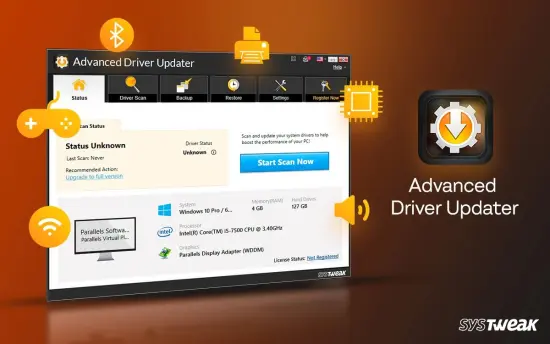
Portable Advanced Driver Updater 4.6.1086.11084
Advanced Driver Updater Portable is a comprehensive driver management solution designed to help Windows users maintain peak system performance by ensuring that hardware drivers remain current, compatible, and optimized. Drivers are essential software components that enable communication between the operating system and hardware devices such as graphics cards, sound controllers, printers, network adapters, USB peripherals, motherboards, monitors, and storage controllers. When these drivers become outdated, corrupted, or incompatible, users may encounter system instability, reduced performance, hardware malfunctions, crashes, or security vulnerabilities.
Advanced Driver Updater Portable provides an efficient way to identify outdated drivers, locate suitable updates, and install them safely. Its automated scanning engine removes the complexity traditionally associated with manual driver maintenance, making it accessible for beginners while still offering advanced functionality for experienced users.
Whether the goal is to improve gaming performance, enhance device compatibility, increase hardware stability, or simply simplify system maintenance, Advanced Driver Updater Portable offers a practical toolset that helps keep Windows operating smoothly and efficiently.
Why Driver Maintenance Matters
Many users focus on updating Windows itself while overlooking device drivers. However, drivers have a direct impact on how hardware performs and interacts with software applications. Manufacturers frequently release updated drivers to address bugs, improve compatibility, deliver performance enhancements, and support newer operating system updates.
Outdated drivers can lead to a variety of issues, including:
- Hardware devices not functioning correctly
- Reduced gaming performance
- Audio problems
- Display anomalies
- Printer communication errors
- Network instability
- Random system crashes
- Device recognition failures
Advanced Driver Updater Portable addresses these problems by continuously monitoring driver status and helping users locate the latest available versions for installed components. Instead of searching dozens of manufacturer websites individually, users can manage updates through a centralized interface.
Streamlined Driver Detection Technology
One of the most impressive aspects of Advanced Driver Updater Portable is its ability to conduct detailed system scans. The software rapidly examines installed hardware components and compares existing drivers against a continuously maintained database.
The scan process is straightforward and efficient. After launching the application, users can initiate a full driver scan with a single click. Within moments, the software generates a detailed report highlighting drivers that require attention.
The resulting information typically includes:
- Driver name
- Current version
- Available version
- Driver age
- Device manufacturer
- Driver status
This clear presentation makes it easy to determine which components need updating and prioritize critical updates.
Unlike manual driver management, which often requires technical expertise and extensive research, Advanced Driver Updater Portable simplifies the process dramatically.
User-Friendly Interface for Every Experience Level
Ease of use is a major strength of Advanced Driver Updater Portable. The interface is designed to provide quick access to all essential functions while remaining simple enough for inexperienced users.
The dashboard presents information in a logical format, helping users navigate scans, updates, backups, and settings without confusion. Buttons are clearly labeled, menus are well organized, and critical information is displayed prominently.
This accessible design reduces the learning curve often associated with system optimization software. New users can perform updates confidently, while advanced users can take advantage of more specialized configuration options.
The clean workflow contributes significantly to the software’s overall appeal and makes routine maintenance less time-consuming.
Fast and Reliable Driver Updates
At the heart of Advanced Driver Updater Portable lies its update engine. Once outdated drivers are detected, the software allows users to download and install updated versions efficiently.
Driver updates can often resolve long-standing issues such as:
- Device instability
- Performance bottlenecks
- Peripheral compatibility conflicts
- Display rendering problems
- Connectivity interruptions
The software reduces the risk associated with manual driver searches by identifying appropriate updates automatically. This helps minimize the possibility of installing incorrect drivers, which can lead to additional system issues.
Users can choose to update individual drivers selectively or process multiple updates in a single operation, greatly improving efficiency.
Improve System Stability and Reliability
System stability depends heavily on properly functioning drivers. A single incompatible or corrupted driver can trigger blue screen errors, application freezes, unexpected reboots, and hardware communication failures.
Advanced Driver Updater Portable contributes to overall stability by ensuring hardware components operate using updated and supported drivers.
The software can be especially useful after major Windows feature updates, where compatibility changes occasionally create conflicts with older driver versions. By keeping drivers current, users can reduce the likelihood of encountering these issues.
As a result, systems can run more predictably while maintaining reliable communication between hardware and software components.
Better Gaming Performance and Hardware Optimization
Gamers frequently benefit from updated drivers, particularly graphics card drivers. Manufacturers regularly release updates that optimize performance for newly released games, improve rendering efficiency, and eliminate bugs.
Advanced Driver Updater Portable helps users identify outdated drivers that may be limiting gaming performance. Keeping graphics, chipset, audio, and peripheral drivers updated can provide a smoother overall gaming experience.
Potential gaming benefits include:
- Improved frame rates
- Better hardware responsiveness
- Enhanced graphical stability
- Reduced crashes
- Improved controller compatibility
- Better support for modern gaming technologies
Beyond gaming, creative professionals and power users may also experience performance improvements in video editing, 3D rendering, engineering software, and media production applications.
Secure Driver Backup Functionality
One of the most valuable features included in Advanced Driver Updater Portable is its integrated backup capability.
Before making significant driver changes, users can create backups of existing drivers. This precaution provides a safety net in the event that a newly installed driver performs unexpectedly or introduces compatibility problems.
Backup functionality offers considerable peace of mind because it allows users to return to a previously working configuration without extensive troubleshooting.
Driver backups can be especially important when:
- Upgrading critical hardware drivers
- Testing new driver versions
- Performing operating system upgrades
- Troubleshooting hardware conflicts
The ability to create restorable backups enhances overall system safety and reduces the risks often associated with driver updates.
Convenient Driver Restoration Options
Complementing its backup features, Advanced Driver Updater Portable includes driver restoration capabilities.
If a new driver causes unexpected behavior, users can restore a previously backed-up version quickly and efficiently. This process minimizes downtime and allows systems to return to a stable state without requiring manual reinstallation.
Restoration tools are particularly useful for enterprise environments, technicians, enthusiasts, and anyone who frequently performs hardware or software testing.
The combination of backup and restoration support transforms driver management from a potentially risky task into a controlled and manageable process.
Scheduled Scans and Automated Maintenance
Modern computers require ongoing maintenance to remain efficient. Advanced Driver Updater Portable addresses this need through scheduling capabilities that automate routine scans.
Rather than remembering to check drivers periodically, users can configure automatic scan schedules according to their preferences.
Scheduling options help ensure:
- Drivers remain current
- Critical updates are not overlooked
- Maintenance becomes more consistent
- Administrative effort is reduced
Automated scanning is especially valuable for users managing multiple computers or maintaining systems used in professional environments.
By integrating routine maintenance into daily operations, the software helps keep systems operating optimally year-round.
Broad Hardware Compatibility
Advanced Driver Updater Portable supports a wide range of hardware categories commonly found in desktop and laptop systems.
Supported device classes often include:
- Graphics cards
- Sound devices
- Network adapters
- USB controllers
- Printers
- Scanners
- Wireless adapters
- Bluetooth hardware
- Motherboards
- Storage controllers
- Chipsets
- Monitors
- Input devices
This broad compatibility allows a single application to manage updates across nearly every major hardware category within a Windows environment.
Rather than relying on multiple vendor-specific utilities, users can centralize maintenance through a unified platform.
Efficient Resource Utilization
Advanced Driver Updater Portable is designed to perform its tasks efficiently without consuming excessive system resources. Driver scans are generally completed quickly and do not require significant processor power.
This lightweight behavior enables users to perform system maintenance without severely impacting productivity.
The software can run comfortably on a wide variety of Windows systems, making it suitable for both older hardware and modern high-performance machines.
Efficient resource management also contributes to a smoother user experience during scans, downloads, and update operations.
Simplified Troubleshooting for Hardware Problems
Hardware issues can be difficult to diagnose because symptoms often appear unrelated to their underlying causes.
For example:
- No sound may result from outdated audio drivers.
- Internet connectivity problems may stem from network driver issues.
- Printer failures may originate from incompatible device drivers.
- Display glitches may be caused by aging graphics drivers.
Advanced Driver Updater Portable assists users by identifying potentially outdated drivers that could be contributing to system problems.
By updating these drivers, many issues can be resolved quickly without lengthy troubleshooting procedures.
This proactive approach reduces frustration and helps users maintain functional, reliable systems.
Improved Device Compatibility
New applications, Windows updates, and emerging technologies often require updated drivers to function correctly.
Advanced Driver Updater Portable helps maintain compatibility between hardware devices and modern software environments. Updated drivers can improve communication standards, protocol support, and operating system integration.
For users regularly installing new peripherals or upgrading software, keeping drivers updated helps ensure smoother operation and fewer compatibility-related interruptions.
The software therefore plays an important role in maintaining a modern and adaptable computing environment.
Ideal for Home Users and IT Professionals
Although Advanced Driver Updater Portable is accessible enough for everyday users, it also provides features attractive to IT professionals.
Home users appreciate:
- Simplicity
- Automated scans
- One-click updates
- Backup protection
Technical users benefit from:
- Detailed driver information
- Selective update control
- Restoration options
- Scheduled maintenance
- Centralized driver monitoring
This balance between simplicity and functionality gives the software broad appeal across diverse user groups.
Enhanced Productivity Through Preventive Maintenance
Preventive maintenance remains one of the most effective strategies for avoiding technical disruptions.
By regularly updating drivers, users can reduce the likelihood of:
- Hardware failures
- Software conflicts
- Crashes
- Device communication errors
- Performance degradation
Advanced Driver Updater Portable supports this preventive approach by streamlining the entire maintenance process.
Instead of reacting to problems after they occur, users can proactively maintain their systems, leading to increased uptime and improved productivity.
Conclusion
Advanced Driver Updater Portable provides a practical and effective solution for managing the complex task of driver maintenance on Windows systems. Combining automated scanning, update detection, backup creation, restoration capabilities, scheduling options, and broad hardware compatibility, it helps users keep their computers operating efficiently and reliably.
From casual home users seeking a simple maintenance utility to professionals responsible for multiple systems, the software offers tools that save time, improve stability, and reduce troubleshooting complexity. By ensuring drivers remain current and compatible, Advanced Driver Updater Portable contributes directly to system performance, hardware reliability, and overall user satisfaction.
Its intuitive interface, dependable update mechanisms, and comprehensive management features make it a valuable addition to virtually any Windows maintenance toolkit.
Features at a Glance
- Automatic detection of outdated drivers
- Comprehensive hardware scanning engine
- One-click driver update functionality
- Detailed driver information display
- Driver backup creation before updates
- Driver restoration and rollback support
- Scheduled automatic scans
- User-friendly interface
- Broad hardware compatibility
- Graphics driver update support
- Sound driver update support
- Network adapter driver management
- USB device driver updates
- Printer and scanner driver support
- Improved hardware stability
- Enhanced system performance
- Reduced compatibility issues
- Faster troubleshooting workflow
- Lightweight system resource usage
- Centralized driver management platform
Latest Release Highlights
- Improved driver detection accuracy for modern hardware platforms.
- Enhanced scanning engine performance for faster system analysis.
- Updated driver database coverage for broader device compatibility.
- Optimized driver download and installation workflows.
- Improved backup and restore reliability.
- Refined user interface for easier navigation and management.
- Better compatibility with recent Windows updates.
- General stability improvements and bug fixes.
- Performance optimizations throughout the application.
- Minor usability enhancements for a smoother user experience.