
Portable Clip Studio Paint EX 5.1.2 (x64) Multilingual
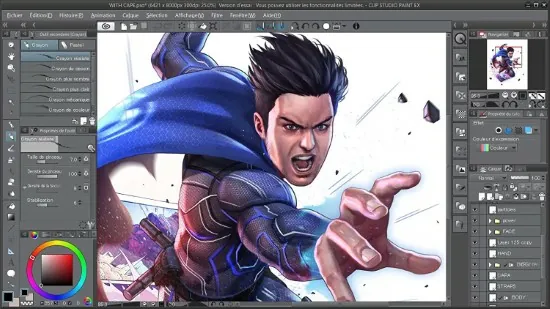
CLIP STUDIO PAINT Portable is the world’s leading comic and manga creation software and delivers powerful art tools for every manga and comic artist. It is designed both for artists wishing to enhance and perfect their pen-and-paper illustrations and for artists wishing to complete the entire process of creating manga and comics digitally. Sketching, inking and coloring your Comics and Manga has never been easier.
What’s New in Clip Studio Paint EX?
Cel animation support (frame-by-frame animation)
Also known as frame-by-frame or traditional animation, this technique makes an object or character appear to move on its own. The artist can draw individual cels (frames), which act as transparent sheets that can be layered, and create the illusion of movement when the series of cels is played as a continuous sequence.
Animation timeline
The timeline provides granular control over timing and display adjustments to create fluid movement of the animations.
Light table function
The light table illuminates pages, rendering them semi-transparent and making it easier to use multiple layers for reference, which is ideal for creating in-betweens (transitions between cels), and clean-line art for cels and illustrations.
Onion skin display
Onion skinning is a technique used in creating animated cartoons and editing movies to see several cels at once, allowing the animator or editor to determine how to create or adjust an image based on the previous image in the sequence.
Multiple export options
Drawings and animations can be exported as sequential images, GIFs, and movie formats.
CLIP STUDIO PAINT EX Features
Formerly Manga Studio. CLIP STUDIO PAINT EX Portable has all of the features of CLIP STUDIO PAINT PRO, professional story creation tools, as well as other special features, that make it the ultimate illustration tool for serious comic, manga and graphic artists.
Coloring
Powerful coloring tool make CLIP STUDIO PAINT your all-in-one manga and comic creation solution. Choose from an abundance of preset colors, create custom color sets or blend colors naturally as if you were mixing them with your own fingers using the color blend options.
Pens, Pencils, Brushes & Tools
Create original sketches using your mouse or draw naturally with a pen tablet. Draw using a suite of familiar tools including pens, pencils, brushes and selection tools. With vector mapping technology and smart pen pressure sensing, CLIP STUDIO PAINT gives you incredible sensation of drawing on paper.
Panels
Save time by easily adding and customizing panels for your pages or create panels of all shapes and sizes using Bezier curves.
Advanced Brush Effects
Simulate real work brushes with the new dedicated air brush which allows multiple air brush effects. Use the tone brush to create and share a wider array of visual effect.
Vector Tools
Vector Toolkit allows maximum flexibility, speeds up production and gives you the ability to view the centerline of vectors makes spotting trouble areas in need of smoothing a breeze. Coupled with the vector snapping tools, artists are now able to achieve exactly the lines they want.
New Advancements
Speed up your workflow with amazing advancements that include new layer effects like screen, overlay and multiply, even brushes can now have effects of their own.
Templates
Design with attention to detail and save time on tedious projects with tons of ready-to-use page template options.
Importing & Exporting
CLIP STUDIO PAINT Portable imports and exports to common file formats including layered PSD files. Resize with no loss in quality.
3D Options
CLIP STUDIO PAINT EX now offers support for 3D objects and figures allows for reference and background materials. Manipulate 3D objects directly on the screen or use preset poses. Drag and Drop other 3D objects on the canvas.
Compatibility
Backwards compatibility allows you to import all of your Manga Studio 4 EX and 4 Debut files including your .CPG page files and your .CST story (project) files into CLIP STUDIO PAINT PRO or CLIP STUDIO PAINT EX.
Text
Advanced text allows adjustments to letter and word spacing, mixing of fonts, anti-aliasing, italics and underline options, line spacing and many more.
Faster Than Ever
64-Bit Architecture & Multi-Core CPU Support makes Manga Studio faster than ever with the capability to handle high definition and multiple layer art projects even more smoothly.
CLIP STUDIO PAINT Portable Is Perfect for Comic Illustration
Adobe Photoshop has become the standard drawing and illustration tool, used in many industries, but it will not only cost you more, it’s primarily a photo editing tool. Photoshop just doesn’t have the tools and features that are ideal for comic illustration, CLIP STUDIO PAINT does.
Multiple-Page Story Layout
Create your whole story with the Multiple-Page Story Layout. This allows manga and comic artists to streamline their creative process and easily access their story files in one convenient area (EX only).
Release Notes:
Drawing & Brush Engines
-
Smart Shape: Automatically cleans up rough hand-drawn lines, geometric shapes, and curves into precise vectors/lines without having to switch off your active brush tool.
-
Speed & Rendering: Faster rendering engine for large brush sizes, thick watercolor edges, high-stabilization stroke previews, and the Fill/Bucket tool.
-
Enhanced Blending: Added high-quality blending modes for ink settings to reduce unwanted color bleeding outside active selections.
-
Velocity Dynamics: Dynamic brush size/opacity scaling based on brush movement speed (via a configurable velocity curve).
3D Model & Workspace Enhancements
-
3D Hand Models: Dedicated 3D hand references with custom sizing controls and compatibility with Hand Scanner and pose materials.
-
Texture & Material Maps: Support for glTF, FBX, and OBJ format parameters with ambient lighting, panorama reflection, glTF import, and direct vertex-UV drawing on 3D objects.
-
3D Object Management: Group multiple 3D models into single folders, set custom pivot points, modify single-part scales along individual axes, and access new 3D primitives like Polygons.
-
3D Panoramas: Fisheye perspective adjustments, UV map export options, and 360° panorama image exports directly from camera viewports.
Layer Management & Transforming
-
Multi-Layer Tonal Correction: Apply adjustment layers or direct color balance/curves across multiple highlighted layers simultaneously.
-
Batch Layer Cleanup: Quick-delete empty or hidden layers across complex projects.
-
Transform Performance: Rotation, Free Transform, Mesh Transformation, and Puppet Warp operate with higher processing speeds and canvas preview response times.
EX-Exclusive & Multi-Page Production
-
Batch Layer Comps: Apply specific Layer Comps to multiple selected pages at once, or batch-export multi-page projects filtered by specific layer configurations.
-
Color Profiles: Define embedded RGB color profiles on initial canvas creation and retain profile previews natively in color palettes and OS file previews (Finder/Explorer).
UI, Organization & Assets
-
Material Palette Upgrades: Pins for top folders, search by catalog/tag/name, subfolder display filters, and automatic installation of downloaded Clip Studio Assets.
-
History Folder: Tracks recently used tools, sub-tools, materials, and color sets in an auto-populated history tab.
-
Continuous Auto-Save: Background crash-recovery saving to prevent work loss without interrupting active strokes.