
Portable Conjure AI Photo & Art Studio 1.0.1
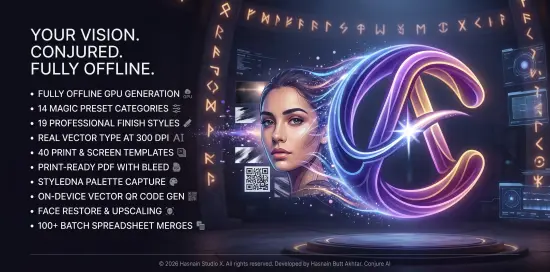
Conjure AI Photo & Art Studio Portable is a creative imaging application designed for users who want to explore photo enhancement, artistic transformation, and visual composition in a single, practical workspace. It is built for photographers, digital artists, designers, and content creators who need an approachable desktop tool that can support both technical image editing and imaginative visual experimentation.
The software focuses on bringing together AI-assisted image generation, photo refinement, artistic styling, and output preparation into one environment that feels organized and flexible. In portable form, the application becomes especially useful for users who move between computers, work in shared spaces, or prefer to keep creative tools in a self-contained folder that can travel with them. That combination of creative depth and portability gives Conjure AI Photo & Art Studio Portable a clear identity as a modern tool for image creation and visual storytelling.
Creative Imaging at the Core
The most important quality of Conjure AI Photo & Art Studio Portable is that it treats image creation as a broad creative process rather than a single-purpose task. Many photo tools focus only on correction or only on stylized effects, leaving users to rely on multiple applications for different stages of a project. This software takes a different approach by keeping the workspace centered on the image as a creative object, providing access to a range of functions that support enhancement, transformation, composition, and presentation. That focus matters because visual work often moves between practical refinement and artistic exploration, and the ability to do both in one environment can save time and make the process feel more fluid.
This creative-first orientation is especially valuable for users who want more than simple editing sliders. A photograph may need exposure correction, but it may also inspire a painterly version, a cinematic reinterpretation, or a stylized social media graphic. Conjure AI Photo & Art Studio Portable supports that broader workflow by giving users tools that address both the technical and expressive sides of visual work. The goal is not to replace the photographer’s judgment or the artist’s imagination, but to provide a flexible environment where those ideas can be shaped with modern digital tools.
Photo Enhancement Tools
One of the strongest features of Conjure AI Photo & Art Studio Portable is its photo enhancement capability. Real-world photographs often need adjustment before they feel complete, whether that means correcting lighting, balancing color, improving contrast, or refining detail. The software provides a structured way to make these improvements while keeping the workflow intuitive and visually clear. Users can start with a single image and work through a series of refinements that make the photograph more polished and more suitable for its intended use.
The enhancement tools are designed to be accessible to users with different levels of experience. The application provides controls for brightness, tone, saturation, sharpness, and other common adjustments, allowing users to improve image quality without requiring technical expertise. This is especially useful when working on images that will be shared online, printed for display, or used as part of a larger creative project. The software makes it possible to bring out the best qualities in an image while still keeping the process manageable.
Enhancement also supports selective improvement, allowing users to focus on specific parts of the image rather than applying the same change everywhere. A portrait may need more attention on the face, while a landscape may benefit from different treatment in the sky and foreground. By providing tools for targeted adjustment, the software helps users work with greater precision and create results that feel more natural and balanced. This makes the application useful not only for correction but also for thoughtful image refinement.
AI-Assisted Artistic Transformation
Another important function of Conjure AI Photo & Art Studio Portable is its ability to transform photographs into artistic interpretations. AI-assisted styling gives users a way to explore new visual directions without manually recreating every texture or brushstroke. The software can apply stylized looks that shift an image toward illustration, painting, fantasy, abstract art, or other expressive forms, depending on the chosen approach. This makes it especially useful for creators who want to experiment with imaginative visuals while still starting from their own source material.
The transformation process is designed to feel creative rather than mechanical. Users can evaluate different artistic directions, compare results, and refine the image until it matches the mood they want. This kind of experimentation is valuable because artistic identity often emerges through iteration. A user may begin with a simple portrait and then discover a dramatic concept art version, a dreamy poster-style composition, or a textured mixed-media look. The software encourages that exploration by making stylization feel accessible and open-ended.
AI-assisted art generation also supports a wide range of creative use cases. It can be used to prepare visual content for social media, album art, thumbnails, concept mockups, editorial graphics, or personal art projects. Because the software works with the user’s own images and inputs, it gives creators a practical way to generate visually distinct results while staying connected to their original material. That balance between source image and artistic reinterpretation is one of the most appealing aspects of the application.
Composition and Visual Framing
Conjure AI Photo & Art Studio Portable includes tools that help users think about composition as part of the creative process. A strong image is not just about color and effect; it also depends on how elements are arranged within the frame. The software supports cropping, framing, repositioning, and layout adjustments that help users guide the viewer’s attention and improve the balance of the image. This is especially useful when preparing images for social platforms, posters, banners, or printed materials where composition has a direct impact on communication.
The framing tools are designed to be practical and intuitive. Users can evaluate how an image looks in different aspect ratios, adjust the crop to suit their intended format, and position the visual focus where it feels strongest. This is valuable when adapting a single source image for multiple purposes. A landscape photograph may need one composition for a website header and another for a square social post, and the software makes those adjustments easier to manage.
Composition also matters in AI-assisted art, where the relationship between subject, background, and visual texture can determine how convincing or striking the final image feels. The software gives users enough control to refine that structure without making the process feel rigid. This balance helps preserve creative spontaneity while still supporting deliberate visual design.
Style Exploration and Mood
One of the most enjoyable aspects of Conjure AI Photo & Art Studio Portable is the ability to explore style and mood through visual changes. Different artistic settings can create dramatically different emotional effects, turning the same image into something soft, dramatic, futuristic, nostalgic, or surreal. The software supports this kind of mood-driven experimentation by allowing users to test multiple visual directions and compare the results side by side.
Style exploration is especially important for creators who work in branding, content creation, or visual storytelling. A single image may need to communicate different ideas depending on the audience or context. The software makes it possible to test those ideas quickly and identify the version that best matches the intended tone. This can be particularly useful when developing concepts for campaigns, album visuals, personal projects, or editorial layouts.
The mood tools also help users build a more distinctive visual identity. Rather than relying on generic edits, creators can establish recurring aesthetic choices that make their images feel consistent and recognizable. Conjure AI Photo & Art Studio Portable supports that process by making style exploration easy to revisit and refine. Over time, that can lead to a stronger and more personal visual voice.
Layered Editing and Fine Control
While the AI features are central to the software’s appeal, Conjure AI Photo & Art Studio Portable also provides layered editing and fine control for users who want to shape their results more directly. This is important because not every creative decision should be left to automatic interpretation. Sometimes the user wants to adjust a specific region, blend visual effects, soften a transition, or refine the overall balance of the image. The software supports this with controls that allow for more hands-on editing.
Layered editing gives users the ability to combine multiple creative treatments in a single image. A photo might include a base enhancement layer, a stylized artistic layer, and a finishing layer for tone or texture. This structure makes it easier to experiment without losing earlier work and helps users stay organized as the image becomes more complex. It also gives the final result a more intentional and polished feel.
Fine control is especially useful when the user wants to maintain realism while still adding artistic flair. A portrait, for example, may benefit from subtle AI styling without becoming unrecognizable. By allowing users to adjust the intensity and placement of effects, the software helps preserve the subject while still enhancing the image’s creative presence. That flexibility makes the application suitable for a wide range of visual goals.
Batch Workflow and Output Preparation
Conjure AI Photo & Art Studio Portable also supports batch workflow and output preparation for users who need to process multiple images efficiently. This is particularly helpful for content creators, freelancers, and small teams who work with collections of photographs or visual assets that need a consistent look. The software makes it possible to apply similar adjustments or styles across a series of images, reducing repetitive work while keeping the overall result cohesive.
Batch workflow is useful for situations where speed matters but visual consistency remains important. A creator may need to prepare several images for a project, each with the same general tone or style, and the software helps simplify that process. By working in batches, the user can maintain a visual standard across a set of assets without having to recreate each edit from scratch. This saves time and supports a more organized production routine.
Output preparation is also an important part of the workflow. The software allows users to export their images in formats and resolutions suited to different purposes, whether for online publishing, print preparation, or archival storage. This makes it easier to move from creative development to final delivery without unnecessary reformatting. The ability to manage output from within the same environment adds convenience and keeps the process more coherent.
Privacy and Local Control
Conjure AI Photo & Art Studio Portable is built with a focus on local handling and user control. Images, projects, and creative outputs are managed on the user’s own system rather than being sent to external servers. This approach supports greater privacy and gives users more confidence about how their work is being handled. For many creators, that distinction is important because photos, concepts, and design drafts often contain personal or unpublished material that should remain under local control.
Local processing also creates a more predictable workflow. Users are not dependent on variable network conditions or remote service changes in order to work with their images. Instead, the software operates within the user’s own environment, giving them a stable way to create and refine visual content. That predictability is especially useful when working with large image files, traveling, or using temporary computer setups.
Because the software is portable, this control becomes even more practical. Users can keep their creative environment close at hand and use it consistently across different situations. That combination of local handling and portability makes the application especially appealing to users who care about privacy, flexibility, and operational simplicity at the same time.
Practical Use Cases
Conjure AI Photo & Art Studio Portable fits a wide range of real-world creative scenarios. It is useful for photographers who want to enhance and stylize images for portfolio work. It is useful for content creators who need eye-catching visuals for social posts, thumbnails, and promotional graphics. It is useful for artists who want to turn source images into imaginative digital artwork. It is useful for designers who need quick visual mockups and mood explorations. Because its functions are broadly relevant, it can become a regular part of a creative workflow rather than a tool reserved for occasional experimentation.
The software also works well when users need to handle multiple creative tasks in the same session. A creator may want to correct a photo, test a few artistic treatments, refine composition, and export the final result all within the same environment. The application supports that variety by keeping the workflow consistent across different functions. That makes it easier to maintain focus and avoid the friction of switching between different tools or methods.
For people who create visual content frequently, the software can act as a stable creative hub that supports both everyday editing and more experimental art-making. That helps build a consistent habit and makes it easier to approach image creation with confidence. The result is a more orderly and less stressful approach to visual production.
Portable Working Style
The portable form of Conjure AI Photo & Art Studio Portable adds a practical layer of flexibility to its already creative design. Visual work is often done in different environments: at home, in a studio, at a client location, or while traveling. A portable setup makes it easier to carry the application and keep it ready wherever it is needed. That is especially useful for users who work on multiple computers or who prefer to keep their tools self-contained.
Portability also supports a cleaner system workflow. Users who prefer not to leave extra traces on shared or temporary computers can work with a tool that stays close to its own files and settings. That makes the software easier to transport and easier to use in a variety of contexts. It aligns well with the everyday reality of creative production, where the user may need to process images in different places and at different times.
For users who value consistency, portability means that their preferred creative environment can stay the same from one machine to another. That can reduce confusion and make the experience feel more predictable. In that sense, the portable design is not just about convenience; it is part of the software’s practical usefulness.
Why It Stays Useful
Conjure AI Photo & Art Studio Portable remains useful because visual creation is a fundamental need that does not change with trends. People will always need a calm, reliable way to improve, transform, and present images, and this software provides that in a creative and practical form. Its emphasis on photo enhancement, artistic styling, composition, batch workflow, and export control makes it a practical choice for users who want a tool that can handle both routine edits and imaginative exploration.
Its focus on essential functions is another reason it stays relevant. Enhancement, stylization, framing, batch processing, and output preparation are all core tasks that do not go out of style. The software is built around those needs rather than around temporary features. That gives it a stable role in creative imaging, especially for users who value order and flexibility. The portable format adds further relevance by making the tool easy to keep available wherever it is needed.
The combination of creative depth, practical workflow, and mobility gives the software a long-term value. It is the kind of utility users can return to whenever they need to work with their images, whether for everyday editing, artistic experimentation, or polished final delivery.
Why People Choose Conjure AI
– Fully offline – nothing leaves your device
– Complete generation engine running on your GPU
– Magic Presets build a professional prompt from pose, framing, wardrobe, lighting and more
– 40 print & screen templates for real design work
– True vector type at 300 DPI – crisp, sharp, print‑ready
– PDF with bleed, crop marks & trim box
– Face restore, upscale, denoise, background removal & inpainting
– Brand Kit & StyleDNA keep every asset visually consistent
– On‑device vector QR codes
– Batch spreadsheet merges for certificates, labels & place cards
Generate Without Guesswork
Prompting is a skill – Conjure AI helps you master it. Choose from 14 preset categories (pose, framing, wardrobe, lighting, era, background, fabric, hair, eyes and more) and the app assembles a properly weighted, professional prompt. Pick from 19 finish styles across photographic, illustrated and product looks. Lock a seed for perfect repeats or shuffle for fresh variations.
A Studio That Actually Prints
Most AI apps melt text. Conjure AI never asks the model to write. The engine paints the artwork, then the app composites your text as real vector type, so your business cards, posters and menus stay sharp at any size.
Templates include
Business cards, letterheads, logos, wedding suites, menus, certificates, posters, flyers, book covers, album covers, labels, thumbnails, ads, social posts and character sheets. QR codes are generated locally and drawn as vector for reliable scanning.
One Look Across Everything
– Capture a palette, an artwork brief and a seed from any image, then apply all three across a full set.
– Build a brand kit from your logo and every template repaints itself around it.
– Merge a spreadsheet to produce hundreds of personalised outputs in one PDF.
Conclusion
Conjure AI Photo & Art Studio Portable is a practical and imaginative imaging application built for users who want a calm, controlled, and consistent environment for enhancing photos, creating art, and shaping visual ideas. It helps users manage their creative work without distraction, refine their images with flexibility, and move through artistic tasks with smooth workflow. The software is especially useful for photographers, digital artists, designers, and content creators who need a reliable tool for visual expression. Its portable format makes it easy to carry between systems and use in different environments, which adds to its practicality. For anyone looking for a flexible creative tool that combines everyday usefulness with self-contained portability, Conjure AI Photo & Art Studio Portable offers a solid and dependable solution.
Features at a Glance
- Creative photo and art studio environment for enhancement and transformation.
- Supports AI-assisted stylization and imaginative image reinterpretation.
- Designed for photo correction, artistic exploration, and composition work.
- Quiet and unobtrusive interface that keeps attention on the creative process.
- Useful for photographers, digital artists, designers, and content creators.
- Smooth workflow for layered editing and visual refinement.
- Simple output preparation for web, print, and archival use.
- Consistent creative experience across different image types and projects.
- Practical for everyday editing, artistic experimentation, and visual storytelling.
- Helps reduce creative friction with direct enhancement and styling tools.
- Supports batch workflow and repeated output preparation.
- Easy to use for daily imaging tasks and concept development.
- Portable working style for use across different computers and environments.
- Self-contained format suited to shared, temporary, or mobile setups.
- Designed to make visual creation more orderly and expressive.
System Requirements
- OS: Windows 10 version 19041.0 or higher
- DirectX: Version 11 (Minimum), DirectX 12 API, Hardware Feature Level 12 (Recommended)
- Memory: 16 GB (Minimum), 20 GB (Recommended)
- Video Memory: 4 GB (Minimum), 6 GB (Recommended)
- Processor: Quad Core Processor X64 (Minimum), Octa Core Processor X64 (Recommended)
- Graphics Processor: Vulkan capable graphics, 4 GB minimum – integrated included (Minimum), Dedicated GPU with 6–8 GB VRAM or more (Recommended)
