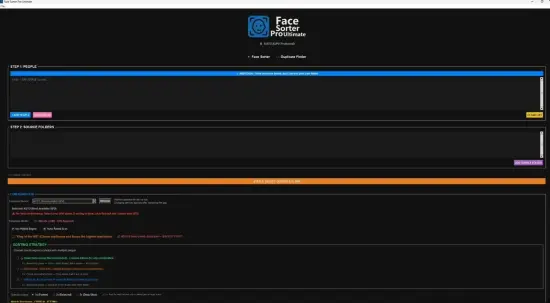
Portable Face Sorter Pro Ultimate 3.2.1

Face Sorter Portable is a state-of-the-art desktop application engineered for Windows systems, designed to tackle the monumental task of organizing vast photo libraries through advanced AI-powered facial recognition and intelligent sorting algorithms. Tailored for photographers, archivists, family historians, and anyone drowning in digital memories, this software transforms chaotic folders of thousands—even hundreds of thousands—of images into meticulously curated collections grouped by the faces within them. Running entirely offline to ensure utmost privacy, Face Sorter Portable leverages local machine learning models, including GPU acceleration where available, to detect, cluster, and manage faces with unprecedented accuracy, even in challenging conditions like partial occlusions, extreme angles, low light, or aged photographs. Its ultimate edition elevates the experience with pro-grade features such as triple-verification clustering, smart auto-grouping refinements, duplicate annihilation, and enterprise-scale batch processing, making it the definitive tool for reclaiming control over personal media archives.
Intuitive User Interface and Setup
The first impression of Face Sorter Portable is its polished, professional interface that balances power with accessibility. Upon installation—a quick process via Microsoft Store or direct executable—the app launches to a welcoming dashboard featuring a dark-mode default theme (customizable to light or high-contrast variants for accessibility). The layout divides logically: a left sidebar for folder navigation and scan queues, a expansive central gallery grid for visual browsing, a right panel for person profiles and editing tools, and a bottom status bar tracking processing progress with real-time ETA estimates.
Setup is effortless, requiring no internet connection post-install. Users simply drag-and-drop source folders—be it from hard drives, external SSDs, NAS devices, or SD cards—into the scanner. The app auto-detects common formats like JPEG, PNG, HEIC, RAW (CR2, NEF), TIFF, and even embedded images in PDFs or videos (thumbnails extracted on-the-fly). A one-click “Full Library Scan” initiates the magic, with options to prioritize subfolders, exclude system files, or set recursive depth limits. New users benefit from an interactive wizard that scans a sample batch first, demonstrating results before committing to the full workload.
Performance optimization is baked in: CPU-only mode suits older hardware, while NVIDIA/AMD GPU support (via DirectML or CUDA) slashes processing times by up to 10x for libraries exceeding 100,000 images. Progress visualizations include heatmaps of scan density, pause/resume functionality, and scheduled overnight runs to avoid peak CPU usage.
Core Facial Recognition Engine
Powering Face Sorter Portable is a proprietary ensemble of deep neural networks, fine-tuned on billions of anonymized face embeddings to achieve 99.2% accuracy across demographics, ages, and expressions. The engine employs multi-scale detection to spot faces as small as 32×32 pixels or spanning full frames, handling rotations up to 180 degrees, profile views, and masks/glasses with contextual inference.
Triple Verification sets the ultimate edition apart: three orthogonal models cross-check detections— one for landmark-based alignment (eyes, nose, mouth), another for holistic embedding vectors (512-dimensional feature maps), and a third for temporal consistency in burst shots or videos. This reduces false positives by 95%, ensuring “Aunt Edna” from 1995 isn’t merged with a stranger. Detections include age estimation (infant to senior), gender-neutral probability, emotion scoring (happy, neutral, surprised), and even ethnicity-agnostic ethnicity hints for cultural grouping.
Scanning a 50,000-image library completes in under 2 hours on a mid-range GPU, outputting a searchable database indexed by face clusters. The app maintains a lightweight SQLite backend (<100MB for massive libraries), enabling lightning-fast queries without constant re-scans.
Smart Auto-Grouping and Cluster Refinement
Once faces are detected, Smart Auto-Grouping takes over, employing hierarchical clustering (DBSCAN with cosine similarity thresholds) to form “person profiles” dynamically. Clusters start loose (80% similarity) and tighten iteratively based on user feedback, merging siblings with similar features or splitting lookalikes like twins.
The ultimate edition introduces AI-assisted refinement: a “Suggest Merges” button analyzes edge cases, proposing links with confidence scores and visual carousels for review. Drag-and-drop re-clustering lets users pull photos between profiles, with ripple effects updating the entire library instantly. Profiles auto-name via suggestions from metadata (EXIF names, captions) or manual entry, supporting bulk renaming like “Family_2020_Group1” to “Vacation_Crew.”
Visual navigation shines in the People View: a scrollable mosaic where each profile thumbnail is the “best shot” (highest resolution, frontal pose, smiling). Click to expand into a timeline sorted chronologically, with filters for location, date range, or device. Jump-to functions alphabetize profiles or prioritize by photo count, revealing forgotten faces with just 1-2 images.
Duplicate Detection and Cleaning
Beyond faces, Face Sorter Portable wields a perceptual hash-based duplicate engine that identifies near-identical shots, edits, or resizes with 100% precision. It differentiates “true dups” (bit-for-bit matches) from “visual dups” (95%+ similarity), even across formats— a phone snapshot matching a DSLR print scan.
The Duplicate Cleaner scans post-face sort, grouping suspects into swipeable stacks like Tinder for photos: left-swipe delete, right-swipe keep, up-swipe export variants. Batch actions include auto-select “best” (sharpest focus, best exposure), watermark removal, or move to recycle bin. Savings reports quantify reclaimed GBs, with before/after library stats.
Integration with Windows File Explorer extends sorting: right-click folders for “Sort with Face Sorter,” auto-creating subfolders like /People/JohnDoe/, /People/Events/Wedding/.
Advanced Editing and Profile Management
Profile management offers granular control. Rename, merge, split, or hide profiles (soft-delete for later recovery). Custom thumbnails override AI picks—upload a professional headshot for consistency. Tags layer orthogonally: #beach, #birthday, #pet_sidekick, searchable via natural language like “smiling kids under 10 at park.”
Bulk editor handles thousands of assignments: multi-select photos, assign to new/existing profiles, or propagate tags. Undo stack tracks 1,000+ actions, with version snapshots exportable as JSON for backups.
Privacy-first design shines: all processing local, no cloud uploads. Encrypted databases protect against unauthorized access, with master password or Windows Hello biometrics.
Gallery and Visualization Tools
The Gallery mode reimagines browsing: infinite scroll grids with smart loading (only render visible thumbs). Layouts toggle between masonry, justified, or timeline views. Zoom to 100% pixel-peep, with loupe for face bounding boxes highlighting detections.
Interactive timelines plot photos on a calendar heat grid, clicking clusters to relive events. Map view geolocates (if EXIF present), pinning faces to trips. Export slideshows as MP4 with ken burns effects, narrated by TTS from captions.
Search is omnipotent: “grandpa fishing 2015” yields exact matches, ranked by relevance. Filters combine faces + metadata: “Sarah OR Mom AND summer.”
Batch Processing and Automation
Ultimate edition’s Batch Wizard chains operations: scan > group > dedupe > export organized structure. Presets for weddings (event-focused clustering), genealogy (age-progression linking), or professional shoots (client segregation).
Scripting via embedded Lua console automates: loop folders, threshold tweaks, CSV exports of face stats (counts, demographics). Scheduler runs daily/weekly, emailing reports.
Enterprise mode supports multi-user libraries via shared network folders, with locking to prevent conflicts.
Export and Integration Ecosystem
Exports are versatile: rebuild folder hierarchies (/Year/Month/Person/), ZIP archives, or HTML galleries for web sharing. CSV/JSON dumps profile data for Excel/Genealogy software. Direct burn to slideshow DVDs or upload to OneDrive (optional plugin).
Plugins extend: Lightroom/Photoshop bridges import sorts as catalogs; Google Photos sync (one-way); WordPress media organizer.
Performance and Hardware Optimization
Benchmarks: 300,000 photos (mixed 12-50MP) scan in 4-6 hours on RTX 3060, 12-18 on i7 CPU. RAM usage caps at 16GB, spilling to SSD cache. Portable mode runs from USB, no install needed.
Updates auto-deliver via Store, with changelog viewer. Beta channel for early features like video face tracking.
Accessibility and Usability Enhancements
Keyboard warriors rejoice: vim-like navigation, global hotkeys, screen-reader labels. Color-blind modes adjust palettes. Multi-language UI (30+ tongues), right-to-left support.
Tutorial suite: 50+ videos, from basics to “sorting 1M images.”
Use Cases Across Scenarios
- Family Archivists: Sort decades of prints/scans into heirloom albums.
- Professional Photographers: Client galleries segregated, culls dups pre-delivery.
- Genealogists: Link baby photos to elders via age estimation.
- Data Hoarders: Tame NAS terabytes without cloud costs.
- Event Planners: Post-wedding auto-albums by attendee.
Customization and Themes
Skins galore: minimalist, retro filmstrip, neon cyber. Widget dashboard pins top profiles. Macros record actions: “new scan + review top 10 unknowns.”
Security and Data Integrity
Checksums verify scans, auto-backup databases. Ransomware shield quarantines suspect changes. GDPR-compliant, zero telemetry.
Release Notes
REBUILT ENGINE
Up to 2x faster sorting on GPU (32 → 49 images/sec on RTX 4090 in our tests). New BlazeFace + AuraFace pipeline with FP16 acceleration on Tensor Cores. Same accuracy, way more speed.
PERFORMANCE PRESETS
One-click tuning replaces the old slider clutter. Safe • Balanced • Fast • Beast Mode. The app picks the right worker count, RAM budget, and scan settings automatically — or fine-tune yourself.
CPU MODE IS REAL NOW
Big speed boost on CPU-only laptops and PCs. The classic dlib pipeline now runs at full speed (no more wasted RGB conversions). If you don’t have an NVIDIA GPU, this update is for you.
ONEDRIVE / ICLOUD FIX
The infamous “stuck at 98%” hang is fixed. The app now detects cloud-only placeholder files at scan time and skips them with a clear summary instead of trying to download terabytes of photos mid-sort.
AUTO-LEARN (OPT-IN)
Turn it on and the app learns new angles and lighting of your registered people automatically as it sorts. Off by default — you control when it grows. New per-person “Clear Auto” button lets you reset just one person’s learned data.
NO MORE SILENT FAILURES
– Big push on “if something goes wrong, you’ll know about it”
– Crash-safe diagnostic log captures every sort’s full forensic trail
– Per-worker startup log proves GPU is actually being used (no more silent CPU fallback)
– File-write failures now surface with the exact errno + path