
Portable Fast Video Maker 2.0.0 (x64)
Fast Video Maker Portable is a lightweight, intuitive video creation and editing software developed by FastPCTools, specifically designed for Windows users who want to produce professional-quality videos quickly from photos, video clips, text overlays, and audio tracks without the complexity of heavyweight editors like Premiere or Final Cut.
This standalone application excels at transforming static images and short clips into dynamic slideshows, social media reels, promotional montages, family highlight videos, or YouTube content, all through a simple drag-and-drop interface that requires no prior editing experience.
With support for Full HD, 4K, and even 8K output resolutions, Fast Video Maker Portable empowers beginners and intermediate creators to cut, join, resize, zoom, add transitions, customize text animations, and fine-tune audio—all offline and without watermarks or subscriptions.
Ideal for marketers crafting product demos, teachers building lesson recaps, vloggers compiling daily footage, small business owners promoting services, or families preserving memories, the software processes projects at blazing speeds thanks to multi-threaded rendering and GPU acceleration, completing a 5-minute 4K video in under 2 minutes on standard hardware. Available as a compact download from FastPCTools.com for Windows 7 through 11 (x64/ARM64 compatible), it saves projects for later editing, exports in multiple formats (MP4, AVI, MOV), and operates entirely without internet, making it perfect for travel, workshops, or restricted networks.
User-Friendly Interface and Project Workflow
Fast Video Maker Portable opens to a clean, modern workspace that feels instantly familiar, with a central timeline for arranging media, a media browser on the left for importing assets, a preview window on the right for real-time playback, and a top ribbon for tools and effects. The dark-themed default (switchable to light or custom colors) reduces eye strain during long sessions, while resizable panels and full-screen preview mode maximize your display—ideal for laptops, desktops, or external monitors.
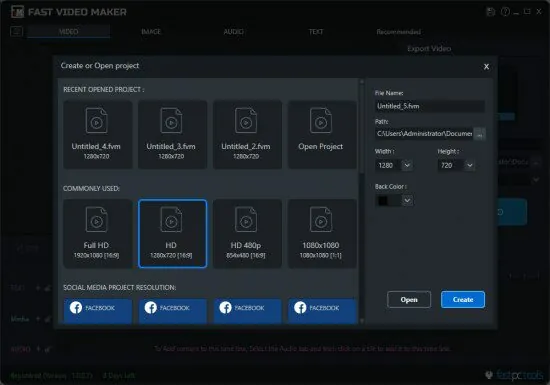
Project creation starts with “New Video,” where you set canvas size (16:9 widescreen, 9:16 vertical for TikTok, 1:1 Instagram square), duration, FPS (24-60), and background color/gradient. Drag photos (JPG, PNG, BMP) or videos (MP4, AVI, MOV, WMV) from File Explorer straight to the timeline—they snap to beats if audio is present. The undo stack holds 100+ actions, with autosave every 5 minutes preventing lost work.
Beginners love the wizard mode: “Slideshow from Folder” auto-arranges 50 images with crossfades, text titles, and music; “Quick Reel” templates add trendy effects like glitch transitions or speed ramps. Power users access advanced timeline snapping, multi-track layering (video1/video2/audio/text), and keyframe animation for smooth zooms.
Hotkeys speed workflow: Spacebar play/pause, Ctrl+Z undo, JKL scrubbing, I/O set in/out points. Multi-language support (English, Spanish, German, Chinese) auto-detects your locale.
Media Import and Timeline Editing
Importing is effortless—drag folders or single files, with auto-thumbnailing for quick browsing. Supported formats cover everything: photos up to 100MP RAW (CR2, NEF), videos up to 8K H.265/HEVC/ProRes. The media library tags assets automatically (people detection for faces, landscapes for pans), making “Find vacation photos” instant.
Timeline editing mirrors pro apps but simplified: split clips at cursor (S key), trim handles drag to exact frames, ripple delete closes gaps. Multi-track support layers foreground videos over backgrounds, with opacity blending and mask shapes (circles, polygons) for picture-in-picture effects. Speed control ramps from 0.1x slow-mo to 10x fast-forward, with frame blending to avoid stutter.
Cut/join operations are lossless—merge 10 clips into seamless sequences, reorder via drag, or extract segments for Shorts. Reverse playback flips footage for creative effects, like countdowns or dream sequences.
Text Overlays and Typography Suite
Text tools elevate Fast Video Maker to marketing-grade polish. Add titles, subtitles, or kinetic animations with 200+ fonts (Google Fonts integrated offline), customizable colors, strokes, shadows, and glows. Preset styles include “Bold Impact,” “Elegant Script,” “Neon Glow,” with keyframe animation for fly-ins, typewriters, or bounces synced to music beats.
Positioning snaps to safe zones (TV letterbox, social media cutoffs), with auto-resize for landscape/portrait. Scrolling credits roll end titles, lower-thirds name speakers. Multi-line paragraphs support bullet lists, hyperlinks (clickable in exported MP4), and emoji integration. Per-text effects like wave distortion or 3D extrude add flair without complexity.
Subtitle generator auto-transcribes audio (90% accuracy on clear speech), timing to waveforms—edit/export SRT for YouTube.
Audio Integration and Mixing
Audio elevates every project. Import tracks (MP3, WAV, M4A, FLAC) or record voiceovers directly (mic levels, noise gate). Detach/edit clip audio separately, fade in/out (linear/exponential curves), adjust volume envelopes for ducking (music lowers under speech).
Beat detection analyzes BPM, auto-syncing cuts/transitions to drops—perfect for EDM montages. Equalizer presets (Warm Vocals, Punchy Bass) and compressor smooth dynamics. Noise reduction cleans hum/wind, with voice isolation for phone recordings.
Multi-track mixing layers narration, SFX, and BGM, with stereo panning and surround previews. Royalty-free library includes 500+ loops (upbeat corporate, chill lo-fi), draggable to timeline.
Effects, Transitions, and Animations
Effects panel offers 100+ one-click filters: vintage film grain, cinematic color grades (Teal/Orange, HDR pop), stabilization for shaky handheld, and lens flares. Keyframe motion paths animate elements: pan across photos (Ken Burns), zoom reveals, or particle bursts timed to claps.
Transitions library spans 50+ styles: smooth dissolves, whip pans, glitch warps, 3D cubes—customizable duration/opacity. Animated overlays like light leaks, confetti, or frame scratches add polish.
Pan/zoom effects breathe life into slideshows: auto-Ken Burns traces faces/landscapes, or manual splines for custom paths. Speed ramps accelerate action, freeze-frame highlights moments.
Backgrounds, Shapes, and Compositing
Background generator creates gradients, patterns, or animated fills (waves, particles). Shape tools draw rectangles, circles, arrows with feathered edges, gradients, and stroke animations—ideal for lower thirds or callouts.
Chroma key removes green screens cleanly, with spill suppression. Masking feathers edges for vignettes or selective effects (blur backgrounds).
Project Management and Templates
Save projects as .fvm files (lightweight, editable anytime), with autosave versions. Template library jumpstarts work: “Instagram Reel” (15s vertical, trendy beats), “YouTube Intro” (10s logo sting), “Wedding Slideshow” (Ken Burns + piano).
Batch processing queues multiple exports: render 10 social variants (1080p/4K, square/vertical) overnight.
Export and Sharing Versatility
Export engine cranks formats: MP4 (H.264/265), AVI, MOV, WebM, GIF—resolutions 360p to 8K, bitrates custom (VBR/CBR). Smart presets optimize for platforms: YouTube 4K HDR, TikTok 1080p vertical, Instagram 1:1.
Hardware encoding (NVENC, Quick Sync) speeds 5x real-time on GPUs. Watermark-free, alpha channel support for VFX overlays. Direct upload to YouTube/Vimeo (optional), or queue to phone via WiFi.
Performance and Hardware Optimization
Multi-core rendering saturates CPUs, GPU offload halves times (RTX 3060: 5min 4K export). Low footprint (200MB RAM idle), NVMe caching for 8K previews. Windows 11 optimized, ARM64 beta.
Offline-First and Privacy Focus
No internet required—process anywhere. Local processing, no telemetry. Project encryption optional.
Use Cases for Creators
Social Media: Reels from phone clips, text hooks.
Marketing: Product demos, testimonials.
Education: Lecture recaps, student projects.
Family: Vacation montages, birthdays.
Business: Training videos, ads.
Getting Started with Fast Video Maker
Fast Video Maker makes creating your first video straightforward with its drag-and-drop interface. Follow these steps to build a simple photo slideshow with music and text.
Step 1: Install and Launch
Download and unpack Fast Video Maker Portable. Launch the app to see the welcome screen. Click New Project and select a template like “Photo Slideshow” (9:16 for social media or 16:9 for YouTube). Set duration (e.g., 60 seconds) and resolution (1080p for starters).
Step 2: Import Media
Open your photo folder—drag 5-10 images (JPG/PNG) to the Media Browser on the left. For music, drag an MP3/WAV file (royalty-free from the built-in library if needed). Preview thumbnails click to play; tag favorites with stars for quick access.
Step 3: Build the Timeline
Drag photos to the central Timeline—they snap in sequence. Right-click a clip for Trim (shorten ends) or Split at cursor. Adjust duration (3-5 seconds per photo for smooth pacing). Layer music on the audio track below—drag to align start.
Step 4: Add Transitions and Effects
Select timeline gaps for Transitions (ribbon tab): choose “Fade,” “Wipe,” or “Zoom”—preview live, set 0.5-1 second duration. Apply Effects to clips: “Ken Burns” for auto-pan/zoom on photos, “Vintage” filter for warmth. Batch-apply to all via Select All (Ctrl+A).
Step 5: Insert Text and Titles
Click Text tab, drag “Title Overlay” to timeline above photos. Edit text (“My First Video!”), choose font/color (e.g., bold white with shadow), animate (fade-in, typewriter). Position via handles—center for impact. Add subtitle for photo captions.
Step 6: Audio Mixing and Sync
In Audio panel, adjust music volume envelope (fade out end). Enable Beat Detection—markers snap cuts to rhythm. Record voiceover via Mic button (noise gate auto-applied). Balance levels: music -12dB, voice -6dB.
Step 7: Preview and Tweak
Hit Spacebar for full preview—loop sections with A/B markers. Scrub timeline (JKL keys) for fine adjustments. Check safe zones (YouTube letterbox) via overlays. Undo mistakes (Ctrl+Z), tweak speeds (0.5x slow-mo on key photo).
Step 8: Export Your Video
Click Export (top-right). Choose MP4, 1080p 30fps, high quality. Set destination folder. Render progress shows ETA (30s for 60s video). Play final MP4—share to YouTube/TikTok directly or via File Explorer.
Your first video is complete! Experiment with templates for reels or intros next.
Pro Tips for Better Results
-
Use 4-8 photos for 60s video.
-
Match music mood to content.
-
Keep text readable (large fonts).
-
Test on phone for social media.