
Portable Franzis COLOR Professional 9.32.04489
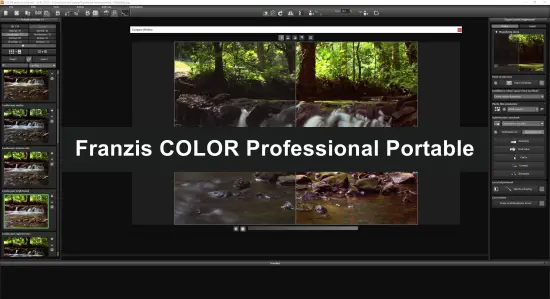
Franzis COLOR Professional 9 Portable is a specialized photo-editing solution designed to bring more life, atmosphere, and visual impact to digital photographs. It focuses on color correction, tonal refinement, creative image styling, and efficient enhancement workflows, allowing photographers to transform ordinary images into polished, expressive results. Whether a picture appears flat because of difficult lighting, lacks contrast due to overcast conditions, or simply needs a stronger visual mood, Franzis COLOR Professional 9 Portable provides a broad selection of tools for improving the final appearance.
The software is suitable for photographers who want more control than a basic one-click editor can provide while still appreciating a fast and approachable workflow. Beginners can start with ready-made presets and automated adjustments, while experienced users can fine-tune individual effects, adjust intensity, combine multiple processing steps, and create a personalized look. This combination makes the program useful for everyday snapshots, travel photography, portraits, landscapes, architecture, nature images, and creative photo projects.
Franzis COLOR Professional 9 Portable is built around the idea that color should be both technically accurate and creatively meaningful. Instead of treating enhancement as a single brightness or saturation adjustment, the software allows users to work with several aspects of an image, including color balance, local contrast, highlights, shadows, clarity, sharpness, atmospheric depth, and overall mood. These controls can be used separately or together, depending on the desired result.
What Is Franzis COLOR Professional 9 Portable?
Franzis COLOR Professional 9 Portable is photo-enhancement software for improving the color, contrast, detail, and atmosphere of digital images. It can be used as a standalone application, giving users a dedicated environment for opening, editing, previewing, and exporting photographs. Its workflow is centered on presets, filters, adjustment controls, and selective editing tools that make it possible to move from a quick correction to a more detailed professional treatment.
The application is particularly useful when a photograph contains the right composition but does not yet communicate the intended feeling. A landscape may need richer greens and more convincing sky tones. A portrait may benefit from gentle color refinement and improved separation between the subject and the background. An architectural photograph may require stronger definition and controlled highlights. Rather than forcing every image into the same style, the program offers a variety of approaches that can be adjusted to match the subject.
The “Portable” suffix describes the requested software presentation and emphasizes convenience. A portable workflow can be useful for photographers who move between workstations, organize editing tools on removable storage, or prefer a flexible setup. Actual portability, installation behavior, licensing, and supported operating systems can vary according to the specific distribution and license edition.
Professional Color Correction for Digital Photos
Color correction is one of the central strengths of Franzis COLOR Professional 9 Portable. Digital photographs often contain color casts caused by artificial lighting, shade, weather, camera settings, or inaccurate white balance. A photograph captured indoors may appear too yellow, while an image taken under a cloudy sky may look cold or muted. The software gives users the ability to correct these issues and establish a more balanced foundation before applying creative effects.
Color correction can be subtle or dramatic. For natural photography, small adjustments can restore believable skin tones, foliage, water, stone, and sky. For creative work, stronger changes can create a warmer sunset atmosphere, a cooler cinematic appearance, or a vibrant high-energy style. Because adjustments can be controlled by strength, users can avoid excessive color that makes an image look artificial.
The software can also help improve color relationships within an image. Increasing overall saturation is not always the best solution because it can make every color stronger at once. A more controlled workflow adjusts contrast, color intensity, and tonal separation in a balanced way. This allows important colors to stand out without overwhelming the entire photograph.
Presets for Fast and Creative Photo Enhancement
Presets provide a fast starting point for editing. Franzis COLOR Professional 9 Portable includes a selection of ready-made image styles intended to produce different visual effects with minimal effort. A preset can change several settings simultaneously, allowing users to preview a complete look instead of adjusting every control individually.
Presets are useful for photographers working with large numbers of images. A wedding photographer, travel photographer, or content creator can quickly explore several treatments and identify a suitable direction. A preset can also serve as a learning tool because users can examine the changes and then modify them to understand how the final appearance was created.
Creative presets may be organized around themes such as vivid color, soft atmosphere, dramatic contrast, seasonal appearance, cinematic tone, landscape enhancement, portrait refinement, and artistic interpretation. The best results often come from treating a preset as a starting point rather than a final answer. Reducing its intensity, changing contrast, or correcting the color balance can produce a more natural and individual result.
Users can build a consistent visual style by applying similar presets and adjustment strategies to a collection of photographs. This is valuable for online galleries, albums, portfolios, social media collections, and client presentations. A consistent color direction helps separate individual images while maintaining a unified appearance across the project.
Advanced Filters and Stackable Effects
Franzis COLOR Professional 9 Portable offers a multilayered approach to image processing through filters and effects. Instead of relying on one permanent adjustment, users can combine several processing steps and refine each one independently. This makes the editing process more flexible and encourages experimentation.
For example, an image may begin with a tonal correction, followed by a color enhancement, a clarity adjustment, a gentle sharpening step, and a final atmospheric effect. Each stage contributes something different. Tonal correction can improve the distribution of light and dark areas. Color enhancement can make the image more expressive. Clarity can strengthen midtone definition, while sharpening can improve perceived detail. A final effect can establish the desired mood.
Stackable effects are especially useful for creative photography because they allow different ideas to be tested without rebuilding the entire edit. Users can preview the result, change the order or strength of adjustments, and compare variations. This encourages a non-destructive style of working in which the original photograph remains available while the edited version develops gradually.
Effect intensity is important. A strong filter may work well for a dramatic landscape but appear unsuitable for a close-up portrait. The ability to control opacity or strength gives users better control over the result. Gentle application often produces a more convincing image, especially when the aim is to improve a photograph without making the processing obvious.
RAW Image Development and Maximum Editing Flexibility
RAW files contain extensive image information captured by a camera before the photograph is converted into a standard format. Working with RAW images gives photographers greater flexibility when adjusting exposure, white balance, highlights, shadows, and color. Franzis COLOR Professional 9 Portable includes a RAW-oriented workflow that can help users prepare images for further color and creative processing.
A RAW workflow is valuable when the original exposure is not perfect. Bright skies, dark foregrounds, mixed lighting, or high-contrast scenes can often be improved more effectively when the image retains its original camera data. Users can establish a suitable base appearance before applying presets and artistic effects.
RAW development also supports more careful color decisions. Instead of immediately increasing saturation, a photographer can first correct white balance, refine exposure, recover highlight detail, and open shadow areas. Once the tonal foundation is balanced, color enhancement becomes easier to control and less likely to produce unnatural results.
Photographers should remember that RAW files may require more processing time and storage space than compressed image formats. The exact RAW formats supported can depend on the release, operating system, and camera model. For important projects, it is sensible to preserve the original files and export edited copies in a suitable format for printing, sharing, or archiving.
Selective Editing for Local Adjustments
One of the most useful features in advanced photo enhancement is the ability to apply changes selectively. Global adjustments affect the entire photograph, but many images contain areas that require different treatment. The sky may need reduced highlights, the foreground may need more brightness, and the subject may benefit from additional detail or color separation.
Franzis COLOR Professional 9 Portable supports a more localized editing approach through selective tools and masking-style controls. These functions allow users to define where an effect should appear instead of applying it equally across the whole image. Local adjustment is useful for maintaining natural results and avoiding unwanted changes to important areas.
A photographer could increase blue intensity in the sky while protecting skin tones. A landscape editor could add clarity to rocks and textures without making distant atmospheric areas look harsh. In a portrait, selective adjustments can draw attention to the eyes or clothing while leaving skin texture more natural. In architectural work, local contrast can emphasize structural details without exaggerating smooth walls or open sky.
Selective editing also improves creative control. A subtle vignette, glow, color shift, or brightness adjustment can guide the viewer’s attention toward a chosen part of the composition. Used carefully, these changes support the visual story of the photograph rather than distracting from it.
Tools for Improving Contrast and Image Depth
Flat lighting can reduce the sense of depth in a photograph. This is common in images taken during overcast weather, in shaded locations, or with limited directional light. Franzis COLOR Professional 9 Portable provides tools for improving tonal structure and making the image feel more dimensional.
Contrast adjustments can separate light areas from dark areas, but contrast should be applied thoughtfully. Excessive contrast may remove shadow detail or create harsh highlights. A more refined approach combines overall contrast with highlight and shadow control. This allows the photographer to strengthen the image while preserving important information.
Clarity and local contrast adjustments can make textures more visible. They are useful for subjects such as stone, wood, clouds, fabric, foliage, and buildings. These tools can add crispness and presence, although portraits generally benefit from a lighter touch. The software’s controls allow users to adapt the treatment according to the subject and intended style.
Improved depth can also come from color separation. Warm colors may appear more prominent, while cooler tones can recede. Adjusting these relationships can make a scene feel more spacious and help distinguish foreground elements from the background.
Photo Film Emulation and Artistic Styling
Franzis COLOR Professional 9 Portable includes creative styling options inspired by the visual character of photographic film and traditional image-making techniques. These effects can introduce distinctive color relationships, softer contrast, grain-like atmosphere, or a nostalgic appearance.
Film-inspired treatments are useful when a technically clean digital image feels too neutral. A carefully selected style can add personality and support the subject’s mood. Street scenes, travel photographs, family archives, interiors, and portraits can all benefit from a more deliberate visual direction.
Film emulation should be adjusted according to the image. Some photographs look best with restrained color and gentle contrast, while others can support a more expressive treatment. Preset strength controls make it possible to retain the character of an effect without allowing it to dominate the composition.
Creative styling can also be combined with local adjustments. For example, a global warm tone may be softened in the shadows, or a color effect may be limited to the background. This allows the photographer to create an artistic result while maintaining subject clarity and visual balance.
Composition Guides and Image Finishing
Good editing is not limited to color and effects. Cropping, framing, and output preparation play an important role in the final presentation. Franzis COLOR Professional 9 Portable includes image-tailoring functions and composition guides that can help users make more considered framing decisions.
Guides based on established compositional principles can be displayed while adjusting the crop. These overlays help users evaluate the placement of horizons, subjects, leading lines, and areas of visual weight. They are useful when preparing images for different formats, including portrait-oriented displays, landscape banners, square layouts, prints, and online galleries.
Templates can speed up common output tasks. A photographer may need to prepare an image for a specific print proportion, presentation format, or digital publication. Starting with a suitable format reduces repeated manual calculations and helps maintain a consistent layout across a collection.
Before exporting, users can compare the edited version with the original image. This is an important step because color enhancement can gradually become stronger during an editing session. A before-and-after view makes it easier to judge whether the changes improve the photograph or simply make it more intense.
Workflow for Beginners and Experienced Photographers
The workflow in Franzis COLOR Professional 9 Portable can accommodate both quick editing and detailed image development. Beginners can open a photograph, browse the available presets, select a promising style, adjust the strength, and export the result. This produces a practical path to better-looking images without requiring advanced technical knowledge.
More experienced users can work through a structured process. First, they can correct the RAW image or establish a balanced base. Next, they can choose a preset or create a custom direction. After that, they can refine exposure, contrast, color, sharpness, and atmosphere. Selective editing can then be used to correct specific areas, followed by cropping and export.
A sensible workflow might look like this:
- Open the original photograph and inspect exposure, focus, and color balance.
- Apply basic RAW corrections where appropriate.
- Browse presets to find a suitable visual direction.
- Reduce or increase preset intensity to match the subject.
- Fine-tune contrast, highlights, shadows, color, and clarity.
- Use selective adjustments for the sky, subject, foreground, or background.
- Review the image at different zoom levels.
- Compare the finished version with the original.
- Crop or tailor the image for its intended destination.
- Export a new copy while preserving the original file.
This method helps prevent over-editing and makes the process easier to repeat. It also allows photographers to save time by establishing a familiar order of operations.
Support for Different Types of Photography
Landscape photographers can use Franzis COLOR Professional 9 Portable to strengthen sky detail, improve foreground definition, enhance natural colors, and create a more convincing sense of depth. Images taken in weak or uneven light can often benefit from carefully balanced contrast and atmospheric adjustments.
Portrait photographers can apply gentle color refinement, improve overall tonal balance, and create a flattering mood. Selective tools make it possible to enhance the subject without applying every effect equally to the skin and background.
Travel photographers can use presets and batch-oriented habits to process large collections efficiently. A consistent style can help photographs from different locations feel like part of the same visual story.
Nature and wildlife images may benefit from controlled color intensity, clarity, and local detail enhancement. Because natural subjects can quickly appear unrealistic when saturation is excessive, adjustable effect strength is particularly useful.
Architectural and interior photographs can be improved with stronger tonal separation, cleaner color relationships, and carefully chosen crops. Selective processing can help emphasize structural details while keeping large uniform surfaces smooth.
Creative photographers can combine multiple effects to develop unusual color treatments, atmospheric styles, and expressive interpretations. The software’s preset-driven workflow offers a convenient starting point, while manual adjustments allow the final result to become more personal.
Performance, Interface, and Practical Usability
Franzis COLOR Professional 9 Portable presents its editing tools within a dedicated image-processing workspace. Presets and effect categories are designed to make visual experimentation straightforward. Previewing a style before committing to it helps users make decisions based on the actual photograph rather than on the name of an effect.
Tooltips, visual previews, and organized adjustment areas can be helpful for users who are still becoming familiar with advanced photo processing. At the same time, the range of available controls gives experienced photographers room to develop a more precise workflow.
Performance depends on the size and complexity of the image, the number of effects applied, available memory, processor speed, graphics support, and the operating system. High-resolution RAW files and multiple stacked effects naturally require more processing resources. Closing unnecessary applications and working with an organized image library can help maintain a smoother editing experience.
The software is best used on a system that meets or exceeds its published requirements for the applicable edition. Users working with large photographs should consider using sufficient memory and free disk space for temporary files, previews, source images, and exported versions.
Exporting and Organizing Finished Images
After editing, photographs can be exported for different purposes. A high-quality version may be prepared for printing or long-term storage, while a smaller version can be created for websites, email, presentations, or social media. Choosing the correct dimensions and file format helps ensure that the image looks appropriate wherever it is displayed.
It is good practice to preserve the original photograph separately from edited exports. Clear file names and organized folders make it easier to locate different versions later. For important projects, photographers may wish to keep an untouched original, a high-resolution master, and smaller copies for online use.
Color management is also important when images are intended for professional printing or display on calibrated equipment. The appearance of colors can vary between screens and output devices. Reviewing the image under suitable conditions helps reduce unexpected differences between the editing screen and the final result.
Why Choose Franzis COLOR Professional 9 Portable?
Franzis COLOR Professional 9 Portable is appealing because it combines speed, creative flexibility, and detailed control in one focused photo-enhancement environment. Users can obtain quick improvements through presets, then continue refining the result with manual controls when a more exact finish is needed.
Its emphasis on color makes it especially useful for photographers who want to improve the emotional impact of their images. Color can suggest warmth, calm, energy, nostalgia, drama, or distance. By adjusting color and tone together, photographers can create images that communicate more clearly and feel more intentional.
The software is also practical for learning. Users can begin with simple corrections and gradually explore selective editing, effect stacking, RAW development, film-inspired styling, and composition tools. This progression makes it possible to grow from basic enhancement to more advanced image creation without changing the overall workflow.
For photographers handling many different subjects, the combination of presets and customizable controls provides a useful balance. A landscape, portrait, architectural image, or travel photograph can each receive a different treatment while remaining within the same application.
Final Evaluation of Franzis COLOR Professional 9 Portable
Franzis COLOR Professional 9 Portable is a versatile solution for photographers who want to improve color, contrast, atmosphere, and detail without turning every editing session into a highly technical process. Its presets make experimentation quick, while its RAW tools, filters, selective adjustments, and composition guides provide room for careful finishing.
The program works particularly well when a photograph needs more than a simple brightness correction. It can help restore balance to difficult lighting, add energy to muted colors, create a distinctive visual mood, and guide attention toward the most important parts of a composition. The ability to combine effects and reduce their intensity gives users control over whether the final result should appear natural, dramatic, nostalgic, or highly creative.
Beginners can use the software as an accessible introduction to advanced photo enhancement, while experienced photographers can use it as a flexible finishing tool. With a thoughtful workflow and moderate adjustments, Franzis COLOR Professional 9 Portable can help turn technically acceptable images into photographs with greater clarity, color, atmosphere, and personality.
Features at a Glance
- Dedicated software for professional color and photo enhancement
- Portable-focused presentation of Franzis COLOR Professional 9
- Standalone image-editing workflow
- RAW image development support
- Ready-made presets for quick photo improvements
- Creative styles for landscapes, portraits, travel images, and nature photography
- Advanced color correction and color balancing tools
- Adjustments for brightness, contrast, highlights, and shadows
- Clarity and local contrast enhancement
- Sharpness and detail refinement
- Stackable filters and effects
- Adjustable effect strength and opacity
- Selective editing for localized corrections
- Tools for enhancing skies, foregrounds, backgrounds, and subjects separately
- Film-inspired color and atmosphere effects
- Customizable creative image styles
- Before-and-after image comparison
- Image-tailoring and cropping tools
- Composition guides for improved framing
- Format templates for different output requirements
- Support for natural and highly creative editing workflows
- Useful for portraits, landscapes, architecture, interiors, wildlife, and travel photography
- Options for preparing images for print and digital publication
- Workflow suitable for beginners and experienced photographers
- Flexible controls for building a consistent personal photo style
Download Franzis COLOR Professional Portable
Filespayout – 968.6 MB
RapidGator – 968.6 MB
Franzis BLACK AND WHITE Manual – 53.9 MB