
Portable HSX DreamVivid AI 1.0.4
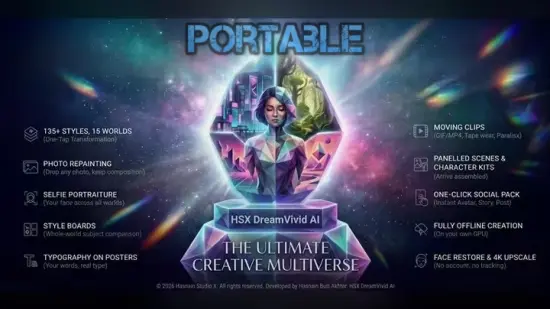
High-res image and clip generation on your own GPU. A local-first generative studio for Windows. HSX DreamVivid AI Portable creates high-resolution pictures and clips on your own graphics card and writes them straight to your Pictures folder — no server, no upload, no account.
What HSX DreamVivid AI does
– High-res image and short-clip generation entirely on-device
– Runs on your own GPU — nothing sent to a server
– Local library with thumbnails and performance index
– Theme, accent and output folder fully under your control
Who it is for
HSX DreamVivid AI Portable is built for creators who want generative tooling on their own GPU, with no API keys, no queue and nothing metered per use.
It sits in the ai tools part of the Hasnain Studio X catalogue, and it follows the same rule as every other title in the range: the work happens on your own hardware. Nothing is uploaded for processing, because there is no server to upload it to.
Local-first, by design
Most software in this category sends your files somewhere to be handled. HSX DreamVivid AI does not. Processing runs on your CPU or GPU, and your files stay in the folders you put them in. The application keeps working with the network switched off.
That is not a setting you enable. It is how the application is built, and it is why there is no account to create, no profile to build and no subscription to lapse. Full detail is in the HSX DreamVivid AI privacy policy.
Whether you are an independent creator, digital artist, content planner, marketer, educator, designer, or enthusiast experimenting with generative technology, HSX DreamVivid AI Portable offers a streamlined approach to creative production. Its portable-oriented design makes it especially suitable for users who value flexibility, simple access, and the ability to maintain a consistent workflow across different working environments.
The software focuses on reducing unnecessary complexity. Instead of forcing users to manage a confusing collection of disconnected tools, HSX DreamVivid AI Portable is intended to bring essential creative functions into one approachable experience. From the first idea to the final revision, users can work through a clear process that supports experimentation, adjustment, and improvement.
What Is HSX DreamVivid AI Portable?
HSX DreamVivid AI Portable is an AI-powered creative application designed to support digital content development. It can be used as a central workspace for turning written concepts into more refined creative outputs, exploring visual themes, developing project directions, and improving the overall presentation of digital material.
The name “DreamVivid” reflects the software’s emphasis on imagination, detail, color, and expressive results. Its purpose is not to replace human creativity, but to help users move from an initial thought to a more complete and visually compelling idea. Users remain in control of the creative process while the software assists with exploration, organization, and refinement.
The “Portable” designation highlights the software’s convenient approach to access and workflow management. Rather than being tied to a complicated installation process or a single fixed workstation, the application is intended for users who prefer a more flexible setup. This can be helpful for students, freelancers, traveling professionals, studio teams, and anyone who works across multiple locations.
HSX DreamVivid AI Portable can serve many purposes, including:
- Developing creative concepts
- Exploring visual styles
- Preparing digital artwork directions
- Creating content ideas
- Refining written prompts
- Organizing project variations
- Supporting marketing visuals
- Planning social media content
- Building presentation concepts
- Experimenting with AI-assisted design
A Simple AI Creative Workflow
One of the most important advantages of HSX DreamVivid AI Portable is its focus on a straightforward creative workflow. Users can begin with a basic description, a mood, a theme, or a rough concept. The software then helps transform that starting point into a more structured direction.
A practical workflow may begin with an idea such as a futuristic city, a peaceful natural landscape, a product presentation, a fantasy character, or an editorial illustration. Instead of needing to describe every detail perfectly from the beginning, users can gradually improve their instructions. They can introduce changes to color, lighting, composition, atmosphere, texture, perspective, and overall mood.
This makes HSX DreamVivid AI Portable useful for both beginners and experienced users. Beginners can rely on simple descriptions and learn through experimentation. More advanced users can create detailed instructions and make precise adjustments to achieve a more controlled result.
The process encourages creative iteration. A first result does not have to be final. Users can review the output, identify what works, determine what needs improvement, and continue refining the concept. This approach makes the software suitable for projects where creative development is more important than producing a single result immediately.
Designed for Creative Freedom
HSX DreamVivid AI Portable is designed to support a broad range of creative directions. The software can accommodate vivid and energetic compositions, calm and minimal scenes, dramatic environments, polished business visuals, imaginative storytelling, and artistic experiments.
Users can work with different visual moods, such as:
- Bright and colorful
- Dark and atmospheric
- Soft and dreamlike
- Clean and professional
- Cinematic and dramatic
- Futuristic and technological
- Natural and organic
- Playful and imaginative
- Elegant and refined
- Abstract and experimental
This flexibility allows the application to adapt to different personal preferences and project requirements. A user preparing a promotional concept may want a clear and polished composition, while an artist exploring an original story may prefer unusual colors, exaggerated forms, or imaginative environments.
The ability to change direction quickly is valuable because creative work rarely follows a perfectly predictable path. HSX DreamVivid AI Portable supports this process by giving users room to test different possibilities without having to rebuild an entire project from the beginning.
An Accessible Experience for Beginners
Artificial intelligence software can sometimes appear intimidating, especially to users who have never worked with prompt-based creative tools. HSX DreamVivid AI Portable is intended to offer a more approachable experience by making the relationship between an idea and an output easier to understand.
New users can begin with short, natural descriptions. They do not need to master specialized terminology immediately. As they become more comfortable, they can add more information about layout, visual tone, subject placement, material appearance, background detail, and lighting.
This gradual learning curve helps users develop better creative habits. They can discover how specific words influence results, how descriptive details shape an image, and how small changes can produce significant differences. Over time, the software becomes not only a production tool but also a learning environment.
A beginner might start with a general phrase such as “a peaceful mountain village at sunrise.” After reviewing the result, the user could expand the concept by adding wooden houses, mist-covered hills, warm golden light, narrow walking paths, and a calm storybook atmosphere. Each adjustment provides a better understanding of how creative instructions work.
Powerful Options for Experienced Creators
While HSX DreamVivid AI Portable can be easy to approach, it is also suitable for users who want deeper creative control. Experienced creators can use detailed descriptions to establish a stronger visual identity and guide the direction of a project.
Advanced creative instructions may include information about:
- Subject positioning
- Camera perspective
- Depth and scale
- Color balance
- Light direction
- Surface texture
- Environmental atmosphere
- Artistic influence
- Background structure
- Composition style
- Contrast and saturation
- Emotional tone
By combining these elements, users can develop more consistent and intentional results. This can be useful when preparing a series of related visuals or when a project requires a recognizable style throughout multiple creative assets.
HSX DreamVivid AI Portable also encourages users to compare variations. A scene may look completely different when the lighting changes from midday to evening. A product concept may become more elegant with a neutral background or more energetic with stronger color contrast. Having the ability to explore alternatives helps users make informed creative decisions.
Useful for Digital Artists
Digital artists can use HSX DreamVivid AI Portable as a source of inspiration, a concept-development assistant, or a way to explore directions before beginning a more detailed project. The software can help artists visualize settings, character ideas, objects, environments, and compositional arrangements.
For example, an artist working on a fantasy illustration may use the application to explore different castle designs, landscape formations, costume directions, or atmospheric effects. An illustrator developing a children’s story may use it to experiment with friendly character concepts and colorful environments.
The software can also help overcome creative blocks. When an artist is unsure how to approach a blank canvas, generating several rough ideas can provide useful inspiration. These concepts can then be adapted, combined, or used as references for original work.
HSX DreamVivid AI Portable is best viewed as a creative companion. It can accelerate brainstorming while leaving the final artistic decisions in the hands of the user.
Support for Content Creators and Marketers
Content creators often need to produce fresh ideas on a regular basis. HSX DreamVivid AI Portable can help support this demand by making it easier to plan visual themes, prepare campaign concepts, and explore different presentation styles.
It may be useful for creating ideas related to:
- Blog illustrations
- Social media graphics
- Video thumbnails
- Promotional concepts
- Newsletter visuals
- Online course materials
- Brand mood boards
- Product presentation ideas
- Event announcements
- Digital advertisements
A content creator can use the software to explore several visual approaches for the same topic. One version may be bold and energetic, another may be minimalist, and a third may use a more emotional or storytelling-focused style. This makes it easier to choose a direction that matches the intended audience.
Marketing teams can also benefit from faster brainstorming. Instead of spending excessive time discussing abstract visual ideas, a team can develop preliminary concepts that make creative conversations more concrete. These early visuals can help guide future design decisions and improve collaboration.
Portable Convenience for Flexible Workflows
The portable nature of HSX DreamVivid AI Portable makes it appealing to users who do not want their creative workflow tied to a single location. Portable software can be useful in home offices, classrooms, studios, co-working spaces, workshops, and travel environments.
This flexibility may help users maintain a familiar working process when moving between computers or changing workspaces. Students can use the software while studying or developing coursework. Freelancers can keep their creative toolkit available during client meetings or remote sessions. Artists can use it as part of a mobile creative setup.
A portable workflow can also help reduce unnecessary preparation. Users can access the application in a way that fits their preferred working habits, rather than rebuilding their settings each time they change environments.
For people who value organization, the portable approach can make it easier to keep creative materials, project notes, and generated concepts associated with the same workflow. Good organization remains important, especially when a project includes many variations.
Prompt Development and Creative Refinement
The quality of an AI-assisted result often depends on how clearly the idea is described. HSX DreamVivid AI Portable can help users develop stronger creative instructions by encouraging them to think about the most important elements of a project.
A useful description may answer several questions:
- What is the main subject?
- Where is the subject located?
- What mood should the scene communicate?
- Which colors should dominate?
- What type of lighting is appropriate?
- Should the result feel realistic, artistic, modern, or imaginary?
- What details should receive the most attention?
- How should the composition be arranged?
The software can be used to refine a basic prompt into a more complete creative brief. For example, instead of writing “a modern office,” a user might describe “a bright contemporary office with natural wood surfaces, large windows, indoor plants, soft morning light, clean architectural lines, and a calm professional atmosphere.”
This style of refinement improves communication between the user and the software. It also encourages users to think more clearly about their own creative goals.
Helpful for Education and Learning
HSX DreamVivid AI Portable can also be used in educational settings. Teachers and students may use it to explore visual storytelling, design principles, creative writing, media studies, and digital communication.
Students can create visual interpretations of historical settings, scientific concepts, fictional worlds, or literary themes. Teachers can use generated concepts to make lessons more engaging or to help explain abstract ideas.
The software may also support project-based learning. Students can begin with a written concept, develop several visual options, evaluate them, and explain why they selected a particular direction. This encourages critical thinking, visual analysis, and creative decision-making.
For digital media courses, the application can demonstrate how language, composition, mood, and design choices influence a finished concept. It provides an opportunity to discuss both the benefits and limitations of AI-assisted creativity.
Organized Project Exploration
Creative projects often produce numerous versions. Without a clear system, it can become difficult to remember which ideas were successful or why certain choices were made. HSX DreamVivid AI Portable is suited to an organized process in which users can explore, compare, and refine multiple directions.
A useful project routine may include:
- Writing the original concept.
- Creating an initial version.
- Identifying strengths and weaknesses.
- Adjusting the description.
- Producing several alternatives.
- Comparing mood, composition, and detail.
- Selecting the most effective direction.
- Refining the chosen concept.
- Preparing the result for its intended use.
This process makes creative work more deliberate. Instead of accepting the first result automatically, users can evaluate each version based on the purpose of the project.
Organization is particularly helpful for larger collections of content. A creator developing a series of social media posts, presentation slides, or themed illustrations can maintain a more consistent visual direction by reviewing previous concepts and building upon successful ideas.
A Tool for Inspiration and Productivity
HSX DreamVivid AI Portable can help users save time during the early stages of a project. Brainstorming, visual planning, and concept exploration can take a considerable amount of effort, particularly when a project begins with only a vague idea.
By providing a quick way to examine creative possibilities, the software can help users move forward more confidently. It can turn an abstract thought into something visible and easier to discuss.
This does not mean every generated result will be ready for immediate publication. The value often lies in the process of exploration. A result may reveal an unexpected color combination, suggest a stronger composition, or inspire an entirely different project direction.
For busy creators, this can make the creative process more productive. Time spent searching for inspiration can be redirected toward refining ideas, improving presentation, and developing a more distinctive final result.
Suitable for Many Creative Styles
HSX DreamVivid AI Portable can support projects that require different levels of realism, imagination, and visual expression. Users may explore realistic environments, stylized artwork, conceptual scenes, decorative designs, or abstract compositions.
Its broad creative use makes it suitable for:
- Personal art projects
- Concept development
- Fiction and storytelling
- Presentation design
- Educational illustrations
- Website content planning
- Creative writing support
- Interior and environment concepts
- Game and animation brainstorming
- Visual experimentation
The software’s value comes from its ability to adapt to the user’s intent. A professional project may require restraint and consistency, while a personal project may benefit from experimentation and unexpected results.
Practical Benefits of HSX DreamVivid AI Portable
HSX DreamVivid AI Portable offers several practical benefits for users who want an efficient and flexible AI-assisted creative workspace.
It helps reduce the distance between imagination and visualization. Ideas that may be difficult to explain verbally can become easier to understand when represented as visual concepts.
It supports faster experimentation. Users can test multiple directions without committing immediately to one approach.
It encourages creative learning. By adjusting descriptions and observing the results, users can develop a better understanding of visual language and design choices.
It promotes flexibility. The portable-oriented format is useful for users who work in different places or prefer a lightweight software setup.
It supports independent work. Freelancers, students, artists, and small teams can explore ideas without relying on a large production process for every early concept.
It improves communication. Preliminary visuals can help teams and clients discuss creative ideas with greater clarity.
Tips for Getting Better Results
Users can improve their experience with HSX DreamVivid AI Portable by starting with a clear purpose. Before writing a description, it helps to decide what the result should communicate and where it will be used.
Specific descriptions are usually more useful than vague instructions. Include details about the main subject, location, mood, colors, lighting, and visual style. However, adding too many unrelated details at once may make the concept less focused.
It is also helpful to make one major change at a time. If the subject, color palette, lighting, composition, and style are all changed together, it can be difficult to understand which adjustment improved the result.
Users should treat early outputs as drafts. The first attempt can reveal what is missing and provide direction for the next version. Reviewing several alternatives is often more effective than trying to create a perfect result immediately.
Finally, users should consider the needs of the intended audience. A visual made for a classroom presentation may need to be clear and informative, while a personal artwork may benefit from a more expressive and unusual style.
Who Should Use HSX DreamVivid AI Portable?
HSX DreamVivid AI Portable is suitable for anyone who wants to combine imagination with an AI-assisted creative workflow. It can be especially useful for:
- Beginners exploring creative technology
- Digital artists developing new concepts
- Freelancers preparing client ideas
- Content creators planning visual material
- Students working on digital projects
- Teachers preparing engaging lessons
- Marketers brainstorming campaign directions
- Writers visualizing scenes and characters
- Designers testing composition ideas
- Hobbyists experimenting with digital creativity
Because the software can be approached at different skill levels, users do not need to be professional artists to benefit from it. A simple idea can be enough to begin.
Final Impression
HSX DreamVivid AI Portable is designed to make creative exploration more accessible, flexible, and efficient. It brings together the imaginative possibilities of artificial intelligence with a workflow that encourages human direction and personal decision-making.
Its portable-oriented format makes it a practical choice for users who want to maintain a convenient creative routine across different environments. Its adaptable approach can support everything from casual experimentation to structured content development.
The software is most valuable when used as part of an active creative process. Users can begin with a thought, develop it into a description, explore several visual possibilities, refine the strongest direction, and continue shaping the result according to their goals.
For anyone looking for a flexible way to turn ideas into vivid digital concepts, HSX DreamVivid AI Portable provides an inviting starting point. It can help users overcome blank-page hesitation, discover new visual directions, organize creative projects, and bring greater energy to everyday digital production.
Features at a Glance
- AI-assisted creative concept development
- Portable-oriented software workflow
- Simple interface for beginners
- Flexible tools for experienced creators
- Prompt-based idea refinement
- Support for visual brainstorming
- Exploration of color, mood, lighting, and composition
- Multiple creative variations for comparison
- Useful for artwork and illustration planning
- Support for marketing and content concepts
- Helpful for educational projects
- Suitable for storytelling and character development
- Flexible use across different creative styles
- Assistance with overcoming creative blocks
- Convenient workflow for mobile and changing work environments
- Project-focused approach to experimentation
- Support for organized creative iteration
- Suitable for personal and professional projects
- Accessible learning experience
- Greater connection between written ideas and visual results