
Portable HSX NanoVisuality 1.0.2
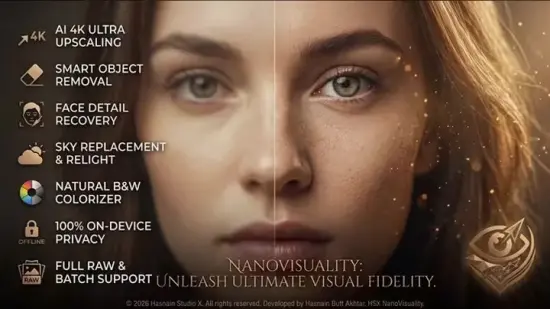
Seventeen photo finishing tools on one local deck. A finishing deck for photographs rather than a single-purpose upscaler. Seventeen tools take a picture all the way to done – upscale, object removal, sky replace, face restore, colourise, exposure merge, document mode and more – with a vault that remembers every result. Everything runs on your own PC, with no account and no upload.
What HSX NanoVisuality Portable does
– Upscale at two or four times the size, rebuilding detail rather than stretching pixels
– Object removal that paints out a sign, a bin or a stranger and fills the gap
– Sky replace with six drawn skies, and the rest of the frame warmed to match
– Face restore, denoise, cutout and colourise for old or damaged photographs
– Document mode that straightens a photographed page and writes a PDF
– A queue, a watched folder and batch actions that chain tools across a whole shoot
Who it is for
HSX NanoVisuality Portable is built for photographers, sellers and anyone finishing a folder of pictures who would rather not upload them to a subscription service.
It sits in the photo & imaging part of the Hasnain Studio X catalogue, and it follows the same rule as every other title in the range: the work happens on your own hardware. Nothing is uploaded for processing, because there is no server to upload it to.
Local-first, by design
Most software in this category sends your files somewhere to be handled. HSX NanoVisuality Portable does not. Processing runs on your CPU or GPU, and your files stay in the folders you put them in. The application keeps working with the network switched off.
That is not a setting you enable. It is how the application is built, and it is why there is no account to create, no profile to build and no subscription to lapse. Full detail is in the HSX NanoVisuality Portable privacy policy.
HSX NanoVisuality Portable is a versatile photo finishing application designed to help users improve, restore, transform, and prepare digital images from one convenient workspace. Instead of limiting creative work to a single type of adjustment, the software brings together a broad collection of practical image tools for photographers, families, designers, content creators, small businesses, archivists, educators, and anyone who wants better results from their photographs.
The application is built around a simple idea: photo editing should make it easier to finish an image, not force users to move between a collection of disconnected tools. With HSX NanoVisuality Portable, you can enlarge a small photograph, remove unwanted objects, replace a sky, restore faces, reduce noise, colorize an old image, create a cutout, merge exposures, or turn a photographed page into a clean PDF. Each task is available from a unified local workspace.
HSX NanoVisuality Portable is intended for Windows users who want practical image processing on their own computer. The software works with individual files as well as larger groups of images through queue management, watched folders, and batch actions. This makes it suitable for quick personal edits and more organized production workflows.
What Is HSX NanoVisuality Portable?
HSX NanoVisuality Portable is an all-in-one image enhancement and photo finishing application. It combines seventeen dedicated tools for improving photographs, correcting common problems, preparing visual content, and recovering useful detail from older or lower-quality images.
The word “finishing” reflects the software’s broader purpose. HSX NanoVisuality Portable is not focused on only one effect or one type of enhancement. It can support a photograph throughout several stages of preparation. A user might begin by reducing noise, restore a face, remove an unwanted background object, enhance the image size, adjust the exposure, and then export the finished result in a suitable format.
The application is also designed for practical everyday use. A photo can be opened, processed, compared, exported, and revisited without requiring a complicated production pipeline. Previous results are stored in a local vault, helping users keep track of completed work and return to earlier versions when needed.
Local Photo Processing on Your Own Computer
HSX NanoVisuality Portable processes images locally on the user’s computer. Files do not need to be uploaded to an online service for the application’s image tools to operate. This makes the software useful for personal photographs, scanned family archives, confidential documents, business images, and other files that users prefer to keep on their own device.
Local processing can also be helpful when working without a reliable internet connection. Once the software and its required components are available on the computer, users can work with supported images without depending on a remote editing platform. Processing speed will naturally depend on the computer’s processor, graphics hardware, available memory, and the size of the images being handled.
HSX NanoVisuality Portable is designed to keep the workflow direct. Open an image, choose an operation, review the result, and save a new version. The original file can remain untouched while the edited result is written separately.
Seventeen Photo Finishing Tools in One Workspace
The central advantage of HSX NanoVisuality Portable is the range of tools available from a single application. Each tool addresses a specific image task, while the overall workspace allows users to combine operations when a photograph needs more than one type of correction.
The toolset includes image enlargement, unwanted-object removal, sky replacement, face restoration, denoising, cutout creation, colorization, exposure merging, document processing, and additional finishing functions. This variety allows the software to support both creative and corrective work.
For example, an old family photograph may need several improvements at once. It might contain faded colors, visible noise, soft facial details, and an unwanted mark in the background. Instead of treating these as unrelated projects, HSX NanoVisuality Portable can provide a sequence for addressing each issue and preserving the resulting versions in the local vault.
AI-Assisted Image Enhancement
Several functions in HSX NanoVisuality Portable use intelligent image processing to interpret image content and produce a more useful result. These tools are designed to assist with tasks that would otherwise require substantial manual work.
The software can analyze visual patterns, identify areas that need repair, improve the appearance of faces, reconstruct missing background regions, and produce more natural-looking image adjustments. These functions are especially helpful for users who want efficient results without spending a long time making detailed selections or repeating manual corrections.
AI-assisted tools are not intended to replace judgment. The best results still depend on the quality of the source image and the user’s chosen settings. A clear, well-lit photograph will generally provide more useful information than a very small, heavily compressed, or severely damaged file. HSX NanoVisuality Portable gives users a convenient way to test an enhancement, inspect the result, and decide whether it suits the intended purpose.
Upscale Images to Two or Four Times Their Original Size
The upscale tool in HSX NanoVisuality Portable is designed to enlarge photographs while rebuilding visual detail instead of simply stretching existing pixels. Users can choose two-times or four-times enlargement, depending on the source image and the intended output.
This can be useful when preparing a small image for printing, creating a larger presentation graphic, improving an old digital photograph, or making an image more suitable for modern displays. Enlargement may also help when a photograph needs to be cropped while retaining a usable final resolution.
Upscaling cannot recover information that was never captured, but intelligent reconstruction can produce a more coherent result than basic resizing. Users can compare the enhanced image with the original and select the version that best matches their needs.
Remove Unwanted Objects from Photographs
The object-removal tool helps users clean up photographs by painting over unwanted elements. A sign, rubbish bin, distracting mark, background object, or passing stranger can be selected for removal, after which the software fills the area with a reconstructed background.
This function is useful for travel photography, property images, family pictures, product photographs, and social media content. It can help simplify a scene without requiring the user to manually clone every surrounding detail.
The quality of the result depends on the complexity of the area being repaired. Plain walls, open skies, grass, and other repetitive surfaces are often easier to reconstruct than intricate patterns, detailed architecture, or overlapping subjects. HSX NanoVisuality Portable provides a straightforward way to test the correction and make another pass when more refinement is needed.
Replace the Sky with Six Included Sky Scenes
HSX NanoVisuality Portable includes a sky-replacement function with six drawn sky options. This tool allows users to change the appearance of the sky while attempting to maintain a balanced look across the rest of the photograph.
Sky replacement can give a flat outdoor image a more dramatic atmosphere, introduce a warmer evening appearance, or add visual interest to a scene with an unappealing or overcast sky. The application also works to warm or adjust the rest of the frame so the replacement sky does not appear completely disconnected from the foreground.
This feature can be useful for landscape images, real-estate photography, travel pictures, creative projects, and promotional visuals. Users should consider the original direction of light, the position of the horizon, and the colors already present in the scene when choosing a suitable sky.
Restore Faces in Old and Damaged Photos
The face-restoration tool is designed for photographs in which facial features appear soft, damaged, faded, or difficult to recognize. It can help improve the apparent clarity of faces in scanned prints, low-resolution images, historical photographs, and pictures affected by compression or motion blur.
Face restoration is particularly valuable for family archives. Many older photographs are important because of the people they show, even when the original print has deteriorated. HSX NanoVisuality Portable offers a way to create a clearer working copy while keeping the original scan preserved.
The result should be viewed as an enhancement rather than a guaranteed recreation of exact historical detail. Intelligent restoration estimates missing or unclear information based on visible patterns. Users may wish to keep both the original and enhanced versions for archival purposes.
Reduce Noise and Improve Image Cleanliness
Digital noise can appear as colored speckles, grain, rough shadows, or uneven texture. It is common in photographs taken in low light, at high sensitivity settings, or with older cameras. The denoise tool in HSX NanoVisuality Portable helps reduce distracting noise while aiming to preserve important edges and recognizable details.
Noise reduction can make photographs appear cleaner and more polished. It may be useful before printing, enlarging, sharing online, or applying additional enhancement tools. When an image is heavily processed, users should inspect fine textures and facial features to ensure that the result remains natural.
A balanced workflow often begins with moderate denoising rather than the strongest available setting. Preserving some natural texture can produce a more convincing result than removing every visible variation.
Create Clean Subject Cutouts
The cutout function helps separate a subject from its background. This can be useful when preparing a portrait, product image, profile picture, thumbnail, presentation graphic, or creative composition.
Creating a cutout manually can be time-consuming, especially around hair, clothing edges, leaves, or other detailed areas. HSX NanoVisuality Portable assists with this separation so users can produce a transparent-background image or prepare the subject for another design.
After creating a cutout, users can place the subject on a new background, use it in promotional artwork, create a collage, or save it for later projects. Careful inspection around fine edges can help ensure that the exported result looks clean.
Colorize Black-and-White Photographs
The colorization tool adds estimated color to black-and-white photographs. It can give historical images, family portraits, and scanned memories a more contemporary appearance while preserving the original monochrome file.
Colorization can make an old photograph easier to view and share, and it may help users imagine details such as clothing, scenery, or surroundings in a different way. The software creates an interpretation of likely colors rather than retrieving colors that were recorded in the original image.
For archival work, it is best to save the colorized result as a separate copy. This preserves the original photograph and allows users to compare both versions.
Merge Multiple Exposures
The exposure-merge tool helps combine photographs captured at different exposure levels. This can be useful when one image contains bright highlights while another preserves more detail in shadows.
By merging exposures, users can create a more balanced photograph with improved tonal range. The feature may be useful for interiors with bright windows, landscapes with strong contrast, architectural images, and scenes photographed under challenging lighting conditions.
For the best results, the source photographs should be aligned as closely as possible. Images captured from a stable position usually provide a cleaner foundation for merging than photographs taken with substantial camera movement.
Document Mode for Photographed Pages
HSX NanoVisuality Portable includes a document mode that can process a photographed page. It can straighten the page perspective and create a PDF, making it easier to read, store, print, or share.
This is useful when a scanner is not available or when users need to capture a receipt, handwritten note, form, textbook page, meeting document, or other physical material with a camera. The perspective correction can help turn an angled photograph into a more readable page.
Document mode is suitable for organizing personal paperwork and creating digital copies of reference material. Users should check the final PDF for legibility, especially when the original page contains small text, unusual lighting, folds, or shadows.
Batch Processing for Larger Image Collections
HSX NanoVisuality Portable supports workflows that involve more than one image. A queue can hold multiple tasks, allowing users to prepare several files for processing instead of opening and completing each image separately.
Watched-folder support provides another practical option. A selected folder can act as an input location, allowing new images placed there to enter a predefined workflow. This can be helpful for photographers importing a regular stream of images or users organizing scans from a larger collection.
Batch actions are useful for repeated tasks such as enlarging a group of photographs, reducing noise across a folder, preparing images for publication, or converting document photographs into finished files. Before processing a large collection, users can test the chosen settings on a small sample to confirm that the output meets expectations.
A Local Vault for Managing Results
The built-in vault helps users keep track of generated results. Instead of relying only on memory or scattered output folders, users can return to a local record of previous image-processing work.
A vault can be valuable when experimenting with different settings. For example, a user may create several versions of a restored photograph, compare different sky choices, or review multiple upscale results before selecting a final copy.
Keeping results organized also supports safer editing habits. Users can preserve the original image, store intermediate versions, and export a final file without overwriting the source. A consistent naming and folder system can make the vault even more useful for long-term projects.
Simple Workflow for Beginners and Experienced Users
HSX NanoVisuality Portable is designed to be approachable for users who want direct controls, while still offering enough flexibility for more involved projects. A typical workflow may look like this:
- Open an image or add files to the processing queue.
- Select the tool that matches the image problem or creative goal.
- Adjust the available options as needed.
- Preview the processed result.
- Compare the result with the original.
- Save the output to a selected folder.
- Continue with another tool or place the result in the local vault.
This approach makes it easy to begin with one improvement and add further steps only when they are needed. Users do not have to apply every function to every photograph. The software is most effective when tools are selected according to the image and the desired outcome.
Useful for Personal, Creative, and Professional Projects
HSX NanoVisuality Portable can support a wide variety of projects. Families can use it to restore scanned photographs, improve portraits, and organize treasured memories. Photographers can enlarge images, remove distractions, prepare batches, and refine difficult exposures.
Content creators can use cutouts, sky replacements, denoising, and enlargement when preparing images for websites, videos, social posts, and presentations. Small businesses can improve product photographs, create clean promotional graphics, and process document images.
Educators and researchers may find document mode useful for creating readable digital copies of physical pages. Archivists and hobbyists can use restoration and colorization tools to produce viewing copies of older photographs while retaining the originals.
Working with Image Quality and Output Expectations
The quality of any finished result begins with the source image. A photograph with reasonable lighting, clear subjects, and sufficient resolution gives HSX NanoVisuality Portable more information to analyze. Very small, blurred, damaged, or highly compressed images may still improve, but the result will depend on how much usable detail remains.
It is also important to choose an output format that matches the project. A high-quality image format may be preferable when preserving detail, while a more compressed format can be convenient for online sharing. Document mode produces PDF files for page-based content.
Users should review enlarged images at their intended display size. A result that appears highly detailed when zoomed in may look unnatural at normal viewing distance, while a subtle enhancement may look excellent in a printed or shared image.
Why Choose HSX NanoVisuality Portable?
HSX NanoVisuality Portable brings numerous common photo tasks into one focused application. Its greatest strength is convenience: users can move from correction to enhancement, restoration, removal, and export without building a complicated collection of separate workflows.
The software is also well suited to users who value local file handling, repeatable processing, and organized output. Its queue, watched-folder, batch, and vault features make it more practical for recurring work than a tool intended only for occasional single-image edits.
Whether the goal is recovering an old family photograph, preparing a group of images for publication, improving a difficult exposure, creating a transparent cutout, or producing a readable PDF from a photographed page, HSX NanoVisuality Portable offers a flexible set of tools for bringing images closer to their intended final form.
Final Overview
HSX NanoVisuality Portable is a practical Windows photo finishing solution that combines enhancement, restoration, creative editing, document processing, and batch workflow features in one local application. It is designed to help users solve everyday image problems efficiently while giving them room to experiment with more creative transformations.
From two-times and four-times enlargement to object removal, sky replacement, face restoration, denoising, colorization, cutouts, exposure merging, and document conversion, the software covers a broad range of useful image tasks. The local vault, queue, watched-folder support, and batch actions add structure for users working with larger collections.
For anyone looking for a straightforward way to improve, restore, organize, and finish photographs on a Windows computer, HSX NanoVisuality Portable provides a capable and flexible workspace.
Features at a Glance
- Seventeen photo finishing tools in one application
- Local image processing on the user’s computer
- No account required for the core workflow
- Image upscaling at two-times or four-times size
- Intelligent detail reconstruction during enlargement
- Unwanted-object removal with painted selection areas
- Background reconstruction after object removal
- Sky replacement with six included sky scenes
- Color and lighting adjustment around replacement skies
- Face restoration for soft, damaged, or low-resolution portraits
- Noise reduction for grainy and low-light photographs
- Subject cutout creation for transparent-background images
- Colorization for black-and-white photographs
- Exposure merging for photographs captured at different brightness levels
- Document mode for photographed pages
- Perspective correction for angled documents
- PDF creation from processed document images
- Queue management for multiple image-processing tasks
- Watched-folder support for recurring workflows
- Batch actions for processing groups of images
- Local vault for remembering generated results
- Separate output handling to help preserve original files
- Support for personal, creative, archival, business, and document projects
- Suitable for individual photographs and larger image collections
- Windows-focused desktop workflow
- Practical controls for beginners and experienced users