

Portable Mingus Music Study Station 1.0.0
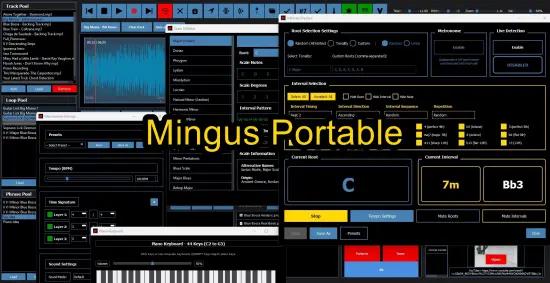
Mingus Music Study Station Portable is a comprehensive desktop software suite crafted specifically for musicians, educators, and dedicated learners seeking to elevate their practice sessions into structured, efficient, and insightful musical journeys. Developed by practicing musicians who understand the frustrations of fragmented tools and scattered apps, this all-in-one platform integrates looping, recording, theory exploration, metronome precision, and session management into a seamless environment that runs locally on Windows and macOS systems.
Whether you’re a beginner building foundational skills, an intermediate player expanding your repertoire, or a professional refining improvisational fluency, Mingus transforms solo practice into a dynamic study station, fostering muscle memory, ear training, and creative vocabulary without the distractions of separate applications or internet dependency.
Core Practice Ecosystem
Mingus revolves around a modular “station” concept, where interconnected apps form a practice hub tailored to daily goals. The Track Pool serves as the central repository for reference tracks—import songs, live recordings, or backing tracks via drag-and-drop, organizing them into customizable playlists with metadata tags for genre, key, tempo, and difficulty. Playback controls offer variable speed (25% to 300% without pitch distortion), A/B looping markers for section repetition, and harmonic transposition across all 12 keys, enabling practice in comfortable ranges regardless of original tuning.
Complementing this, the Looper app extracts precise regions from tracks or recordings, saving them as infinite loops with fade-ins/outs to eliminate clicks. Users define loops by scrubbing waveforms or setting in/out points numerically, layering multiple loops for polyrhythmic exercises—practice a ii-V-I over a drum groove while looping a melody fragment. Phrase Pool extends this by capturing your own licks, riffs, or solos as modular building blocks; record a phrase, assign it a name like “Blues Pentatonic Turnaround,” categorize by scale or position, and recall it instantly for transposition or integration into backing tracks.
Dual-track recording elevates play-along sessions: layer your instrument over imported tracks in real-time, with independent volume, pan, and effects per track. Post-recording, waveform editing tools allow trimming, normalizing, noise reduction, and export to WAV/MP3, creating personalized practice loops or demo reels.
Theory and Analysis Tools
Mingus embeds deep music theory resources directly into practice flows, ensuring conceptual learning translates to instrument application. Chord Extraction analyzes audio tracks automatically, detecting progressions with over 90% accuracy on clean recordings—upload a jazz standard, and it outputs Roman numeral analysis (e.g., | Imaj7 | vi7 | ii7 | V7 |), editable chord sheets with inversions, and transposition buttons to shift entire songs. Visual chord diagrams display guitar/fretboard layouts, piano voicings, or bass shapes, with MIDI playback to hear each inversion.
The Scale Syllabus app catalogs hundreds of scales—Ionian, Dorian, Mixolydian, Hungarian Minor, Whole Tone, Diminished—complete with interval structures, fingerings, and modal relationships. Hover over any scale degree to audition notes via virtual keyboard; transpose to any key and export as PDF charts with notation. Intervals Study app gamifies ear training: randomized quizzes flash perfect fifths, major thirds, or tritones, requiring identification by ear or sight, with progressive difficulty, statistics tracking, and MIDI input for real instrument testing.
Chord Syllabus mirrors this depth, detailing triads, seventh chords, extended voicings, and alterations (e.g., lydian dominant #11), with hover-to-play audio and transposition. Pattern and Lick Transposer lets users input custom phrases via MIDI keyboard, step sequencer, or notation grid, then generates transpositions across 12 keys in seconds—ideal for building technical fluency. Export as engraved PDF booklets with TAB, standard notation, or chord symbols.
Metronome and Rhythm Mastery
The Advanced Multi-Layer Metronome redefines tempo training with three independent subdivision layers: primary beat (quarter notes), secondary (eighths or triplets), and tertiary (sixteenths or swung). Program polyrhythms like 3:2:4 or odd meters (5/4 over 7/8), with accent patterns, volume tapering, and Beat Display—a circular visualizer pulsing colors per subdivision for intuitive feel. Tap tempo, gradual acceleration (ritardando/accelerando ramps), and MIDI output sync external gear or DAWs.
Backing Track Generator creates instant jam accompaniments: select style (blues, rock, funk), key, tempo, and complexity; it layers drums, bass, piano, and guitar with realistic MIDI articulations. Customize chord progressions via drag-and-drop Roman numerals, add fills, or mute instruments for focus drills.
Virtual Instruments and Creativity
A built-in Virtual Piano delivers warm, responsive Rhodes-like tones for quick idea capture or theory exploration—no external setup needed. Record directly to tracks, layer with effects (reverb, chorus, overdrive), and quantize to grid. Global Transposition underpins all tools, accommodating transposing instruments (Bb clarinet, Eb sax) by shifting display and playback automatically.
Notepad integrates lyrics, setlists, song forms (AABA, Verse-Chorus), and practice journals, exporting as formatted PDFs. Documents panel stores PDFs (Real Books, lead sheets), with thumbnail previews and full-text search. Video and Links library embeds YouTube lessons, tutorial playlists, or reference performances, playable in-app with picture-in-picture for side-by-side practice.
Session Management and Productivity
Session Timer enforces Pomodoro-style focus: set intervals (25-min practice/5-min break), with customizable alarms, progress rings, and session logs charting daily/weekly hours by category (scales, improv, sight-reading). Pro Tuner offers chromatic tuning with strobe visuals, cents deviation, and instrument-specific temperaments (equal, just intonation).
Project-based organization groups everything—tracks, phrases, notes, documents—into savable sessions like “Gig Prep: Take the A Train” or “Ear Training Week 5.” Cloud sync (optional) backs up across devices, while autosave prevents data loss.
User Interface and Workflow Efficiency
Mingus sports a dark-themed, modular interface with resizable panels: dock Looper left, Theory apps bottom, Metronome top for glance-free access. Keyboard shortcuts abound—Space for play/pause, number keys for loop banks, arrow keys for nudge editing. Touchscreen gestures support tablets, and MIDI learn maps controllers to any parameter.
Customization shines: theme colors, layout presets (“Improv Station,” “Theory Dive”), and macro buttons for routines like “New ii-V-I Loop in C.” Search unifies all content—type “dominant 7th” to surface chords, scales, tracks.
Performance optimizes for low latency: ASIO/WASAPI audio drivers, GPU-accelerated waveforms, and RAM caching for 100+ tracks. Runs on modest hardware (4GB RAM minimum), with portable USB mode.
Ear Training and Interval Mastery
Intervals app employs spaced repetition: daily drills cycle major/minor seconds through ninths, perfect intervals, and augmented/diminished variants. Play mode sounds root + interval; name mode requires sight recognition; sing-back tests production. Progress graphs proficiency, generating personalized regimens—focus on tritones if accuracy dips below 85%.
Harmonic Dictation challenges transcribe chord progressions from audio, scaffolding from two-chord vamps to 32-bar forms. Melodic Dictation quizzes contour, rhythm, and tonality.
Looping and Transcription Workflow
Advanced looping supports tempo-matching: analyze track BPM, sync your loops precisely. Marker sets divide songs into verses, choruses, solos; jump via hotkeys or MIDI pads. Transcription mode overlays piano roll or spectrum analyzer, slowing to 50% for note hunting.
Dual recording includes overdub punch-ins, with comping to select best takes. AI-assisted chord extraction (post-processing refines guesses via machine learning) suggests voicings matching detected harmony.
Backing Tracks and Jam Sessions
Generator’s style engine draws from 50+ templates—bebop heads, modal vamps, Latin montunos—with editable MIDI patterns. Export stems for DAW import or burn to CD. Randomizer varies progressions endlessly, preventing rote memorization.
Practice Analytics and Goal Tracking
Session logs export CSV for analysis: hours per skill, loop repetition counts, interval accuracy trends. Goal setter assigns targets (“50 Dorian modes daily”), notifying via badges. Heatmaps visualize practice consistency, motivating streaks.
Instrument-Specific Features
Fretboard diagrams for guitar/bass include alternate tunings (DADGAD, Drop D). Keyboard layouts adapt to 61/88-key ranges. Drum set visualizer maps pads for rudiment practice.
Collaboration and Sharing
Export sessions as shareable packages—loops, charts, audio zipped with project file. PDF booklets compile transposed licks into method books. MIDI out drives hardware sequencers.
Accessibility and Learning Aids
High-contrast modes, scalable fonts, voiceover screen reader support. Beginner tours step through apps; tooltips link video demos. Theory glossary defines terms on hover.
Customization Depth
Skin editor crafts pro interfaces; preset libraries share community layouts. Scriptable macros automate workflows—e.g., “Transpose Phrase Pool to Concert Key.”
System Integration
MIDI I/O full duplex; AU/VST host effects (reverb chains). iCloud/Dropbox sync. Auto-import from phone recordings.
Use Cases for All Levels
Beginners: Metronome + scales build timing/sight-reading. Intermediates: Looping + phrases expand improv. Pros: Transcription + analytics refine pedagogy/gigs.
Educators assign student sessions, tracking progress remotely. Ensembles prep charts collaboratively.
Mingus Music Study Station Portable isn’t just software—it’s a practice accelerator, distilling decades of musician wisdom into an intuitive station that turns hours into mastery.