Parted Magic 2026.10_3 Boot ISO (x64)
Parted Magic is a bootable Linux distribution based on Slackware, renowned for its comprehensive suite of disk management, data recovery, cloning, secure erasure, and system rescue tools, all accessible from a live environment without requiring installation or an underlying operating system.
This commercial, standalone OS—continuously updated through 2025—empowers IT professionals, system administrators, hardware technicians, and home users to perform critical operations like non-destructive partitioning, full drive imaging, benchmark testing, and forensic wiping on any compatible PC, supporting a vast array of storage devices including SATA/IDE/SCSI HDDs, SSDs, USB drives, NVMe, and RAID arrays with sector sizes from 512B to 4096B.
With Secure Boot compatibility, 64-bit x86 architecture requiring minimal 2GB RAM (8GB recommended), and broad hardware support encompassing Intel Macs, AMD/Intel CPUs, and modern GPUs, Parted Magic serves as the ultimate portable toolkit for data migration, OS reinstalls, virus scans, password resets, and hardware diagnostics, ensuring mission-critical tasks execute flawlessly even on failing systems.
Boot Process and Live Environment
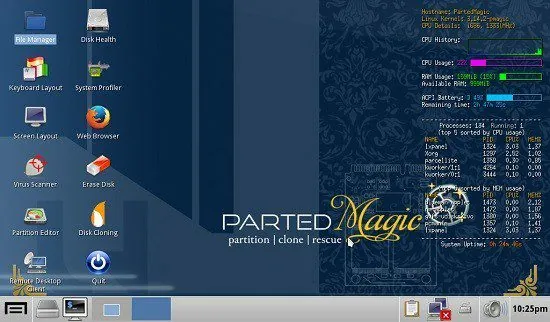
Parted Magic boots directly from USB flash drives (minimum 8GB), CDs/DVDs, or via PXE network boot, presenting a GRUB2 menu with optimized options: Default 64-bit (full RAM loading for speed), Copy2RAM (entire ISO in memory for silent operation), Minimal (low-RAM fallback), and alternate graphical servers for legacy graphics. Secure Boot bypass works on Windows 11 machines, with rEFInd available for EFI troubleshooting. Post-boot, users land in a lightweight Xfce desktop adorned with intuitive icons: Partition Editor (GParted), Disk Cloning, Erase Disk, Disk Health, Virus Scanner, and System Profiler.
The environment runs entirely in RAM for zero disk writes in persistence mode, supporting save sessions for custom configs/packages. Networking via NetworkManager configures wired/wireless effortlessly, with Firefox ESR for updates/downloads. Package management—via Slackware tools—installs extras like ZFS modules or NVIDIA drivers on-the-fly.
Partitioning and Resizing with GParted
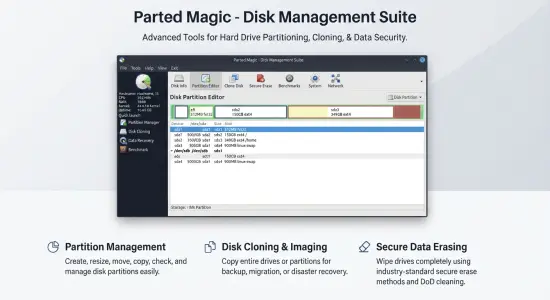
Central to Parted Magic is GParted, the premier partition editor supporting MSDOS, GPT, and advanced tables with MIB alignment or cylinder boundaries. Users resize NTFS/ext4 partitions non-destructively—growing C: drives by shrinking others or reclaiming unallocated space—without data loss, previewing operations in a visual diagram. Copy/move partitions across drives intact, including boot flags (hidden, boot, raid, lvm, swap), with queue management for multi-step safety.
File system tools format to ext2/3/4, FAT16/32, exFAT, NTFS, Btrfs, XFS, JFS, and F2FS, checking/repairing via fsck. Resize2fs expands filesystems post-partition growth; ntfsresize handles Windows volumes safely. Label/UUID edits facilitate bootloader configs, while flags toggle visibility for dual-boots.
Disk Cloning and Imaging
Cloning replicates drives sector-by-sector using Clonezilla or ddrescue: entire disks, partitions, or MBR/GPT tables to images/files, supporting compression (gzip, lzop) and remote storage (SSH, Samba, NFS). Intelligent imaging skips unused blocks via intelligent sector copying, ideal for SSD migrations. Restore images bootably, verifying integrity with hashes.
Multi-threaded cloning handles TB-scale arrays, pausing/resuming for interruptions. Bit-for-bit verification post-clone ensures fidelity, crucial for forensic or archival use.
Secure Erasure and Data Wiping
Erase Disk offers DoD 5220.22-M (3/7 passes), Gutmann 35-pass, Schneier (7 random), or PRNG single-pass wipes, optimized for SSDs with ATA Secure Erase (firmware-level reset returning to factory state). NVMe Secure Erase support handles modern drives. Wipe free space clears deleted file remnants without repartitioning.
Progress meters track sectors, with verification logs. Parallel wiping across drives maximizes throughput.
Data Recovery and Benchmarking
TestDisk/PhotoRec recover partitions/files from corrupted tables or overwritten FAT/NTFS/ext. Foremost carves media from raw images. Disk Health (smartctl) reports S.M.A.R.T. attributes—reallocated sectors, temperature, wear leveling—predicting failures. Benchmarks ( Bonnie++, fio, hdparm) measure sequential/random I/O, latency, and throughput, comparing SSDs/HDDs/RAIDs.
System Profiler inventories hardware (lsusb, lspci, dmidecode), aiding diagnostics.
Windows-Specific Rescue Tools
Virus Scanner (ClamAV) detects/removes malware from offline Windows partitions. Password Reset (chntpw) clears local admin accounts. Boot Repair fixes MBR/UEFI loaders, recreating BCD for Win10/11. NTFS-3G ensures read/write access without hibernation conflicts.
File System and Storage Versatility
Full read/write for ext3/4, FAT/exFAT, NTFS, HFS+/APFS (partial), Btrfs, XFS, with fuse-exfat for compatibility. ZFS support (latest modules) enables pools/snapshots. RAID assembler (mdadm) activates Linux arrays; dmraid for fakeRAID.
Networking and Productivity
Firefox browses/updates; rsync/SCP backs up over networks. Samba shares Windows partitions; SSH tunnels securely. Midnight Commander dual-panes files; Geany edits configs/scripts.
Performance and Hardware Compatibility
Linux 6.x kernel (2025 builds) with Mesa for AMD/Intel graphics, NVIDIA proprietary drivers. 64-bit only since 2020, Secure Boot native. Runs on Intel Macs via EFI, older PCs without PAE.
Persistence saves tweaks across boots; copy2ram silences USB thrashing.
Use Cases Across Scenarios
Tech Support: Clone failing HDDs, reset forgotten passwords, scan viruses offline.
Data Migration: Resize partitions for Windows/Linux dual-boots, clone to SSDs.
Forensics: Secure wipes pre-disposal, recover deleted evidence.
Server Admins: Benchmark NVMe, repair RAID arrays.
Home Users: Expand C: without data loss, test disk health.
Regular 2025 updates (e.g., 2025_09_18 graphics refresh) ensure relevance.
Parted Magic transcends utilities as a self-contained rescue OS, delivering partitioning prowess, cloning reliability, and diagnostic depth in a bootable package. Its hardware breadth, file system mastery, and Windows affinity make it indispensable for disk mastery—proving one USB conquers countless crises.
Disk Partitioning
PartedMagic has the tools to get the job done. With the Partition Editor you can re-size, copy, and move partitions. You can grow or shrink your C: drive. Create space for new operating systems. Attempt data rescue from lost partitions.
Data Rescue
PartedMagic allows you to easily reset or change Windows passwords. Recover lost files. Rescue files from devices with disk read errors.
Disk Cloning
Clone a computer’s entire disk or a single partition. The cloned data could be saved as an image-file or as a duplicated copy of the data. The data could then be saved to a locally attached storage device, an SSH server, a Samba Server, or a Network File System share. The clone file can then be used to restore the original when needed.
Disk Erasing
PartedMagic comes with easy to use solutions for conventional overwrite. Internal Secure Erase. Wiping of only Free Space.
Benchmarking
All the benchmarking tools you would ever need! Bonnie++, IOzone, Hard Info, System Stability Tester, mprime, and stress.
No Installation Required!
PartedMagic is a stand alone Linux operating system. Runs from a CD or USB drive. Nothing installed.
Disk Partitioning Software?
Disk partitioning divides a hard disk into multiple storage units referred to as partitions. A physical disk with multiple partitions is useful for running more than one operating system. Each Partition may use a different file system.
SSD Secure Erase?
When Parted Magic Secure Erase is issued against a SSD drive, all of its cells will be marked as empty.
Benchmarking Software?
A benchmark program tests the relative performance of computer by running a number of standard tests and trials against it.
Features:
– Format internal and external hard drives;
– Move, copy, create, delete, expansion and contraction of partitions on the hard disk;
– Cloning hard drives to create a full backup;
– Verification of hard disks and diagnostics;
– To check the memory for bad sectors;
– Benchmark your computer to assess its level of work;
– Delete all data on the hard disk without the possibility of recovery;
– Provides access to the hard disk when not zagruzayutsya systems, is saving important data;
– Boot from CD / USB memory, then can work without CD / USB;
– Supports network connections.
Parted Magic includes the following programs:
– GParted – partition editor;
– Partition Image – a tool for working with disk images;
– TestDisk – Tool for restoring boot records;
– Fdisk, sfdisk – partition table editor;
– Dosfstools – A utility for creating and verifying the integrity of the partition FAT;
– Ntfsprogs – tools for working with NTFS.
etc.
A complete list of programs
Partition Programs
– cfdisk – curses-based disk partition table manipulator
– fdisk – partition table manipulator
– fixparts – designed to correct common problems with computer partition tables
– gdisk – text-mode partitioning tool that works on GPT disks
– gpart – guess PC-type hard disk partitions
– GParted – partition editor that uses libparted
– parted – partition manipulation program
– sfdisk – partition table manipulator
File System Programs
– btrfs – btrfs is a new copy on write file system for Linux
– Bonnie + + – benchmark suite aimed at performing a number of simple tests
– curlftpfs – file system for accessing FTP hosts based on FUSE and libcurl
– dbench – file system benchmark programs
– diskdev_cmds – OSX-ported, HFS + programs supplying mkfs and fsck
– dosfstools – programs to create and check MS-DOS FAT file systems
– e2fsprogs – ext2 file system programs and libraries
– EncFS – provides an encrypted file system in user space
– fsarchiver – save contents of a file system to a compressed archive file
– FUSE – file system in userspace
– hfsplus – set of tools to access HFS + file systems
– IOzone – file system benchmark tool
– ntfs-3g/ntfsprogs – third generation NTFS driver and tools for doing neat things with NTFS
– ObexFS – FUSE based filesystem using ObexFTP
– reiserfsprogs – user-level tools for ReiserFS file systems
– sshfs – file system client based on SSH
– vmfs-tools – access VMFS through standard Linux VFS via FUSE
– xfsprogs – programs for managing XFS file systems
– zfs-fuse – a port of the ZFS file system from Sun
Booting Loader Programs
– GRUB – GRand Unified Bootloader
– HDT (Hardware Detection Tool) – Syslinux com32 hardware analyzer module
– install-mbr – installs and configures a Master Boot Record manager
– lilo – LInux LOader
– Memtest86 + – advanced memory diagnostic tool
– ms-sys – used to create Microsoft-compatible boot records
– syslinux – bootloaders for FAT12/16/32, bootable “El Torito” (iso9660), ext2/3/4 and brtfs file systems
X Programs
– Audacious – Audacious is an open source audio player
– Asunder – Asunder is a graphical Audio CD ripper and encoder
– arandr – designed to provide a simple visual front end for XRandR
– Blueman Device Manager – Blueman is a GTK + Bluetooth Manager
– ClamTk Virus Scanner – A GUI front-end for ClamAV
– Conky – lightweight system monitor
– CUPS – CUPS is the standards-based, open source printing system
– ddrescue-gui – A python script to make it easier to use ddrescue
– Evince Document Viewer – Evince is a document viewer for multiple document formats
– feh – an X11 image viewer aimed mostly at console users
– File Roller – archive manager
– Firefox – open source web browser
– galculator – GTK + scientific calculator
– GEncFS – GUI to EncFS, for encrypted directory mounting
– gtkdialog – small utility for fast and easy GUI building
– gtk-lshw – GTK + front-end for lshw
– GSmartControl – HDD health inspection tool (GUI for smartctl)
– GSSHFS – GUI to SSHFS, for distant directory over SSH mounting
– hardinfo – system profiler and benchmark
– ISO Master – GUI CD image editor
– Leafpad – GTK + based simple text editor
– lilosetup – a GUI utility to configure LILO bootloader
– Mirage Image Viewer – Mirage is a fast and simple GTK + image viewer
– netwag – a graphical front-end to netwox
– NetworkManager – Great Networking powered by DBUS
– Parcellite – Parcellite is a lightweight GTK + clipboard manager
– pyneighborhood – an OpenSource GTK + based SMB / CIFS Browsing utility
– ROX-Filer – a simple and easy to use graphical file manager for X11
– ROXTerm – ROXTerm is a terminal emulator intended to provide similar features to gnome-terminal, based on the same VTE library
– SciTE – A free source code editor for Win32 and X
– spacefm – a file manager with built-in VFS, udev-based device manager, customizable menu system, and bash integration
– systester – Test your system’s stability and performance by calculating millions of digits of Pi
– TigerVNC Viewer – a high-performance, platform-neutral implementation of VNC
– TrueCrypt – software system for on-the-fly-encrypted volumes
– UNetbootin – create bootable, Live USB drives for Linux distros without burning a CD
– WICD – A network connection manager that aims to simplify wired and wireless networking in Linux
– XChat – IRC chat program
– xclamscan – GUI for the ClamAV anti-virus
– Xdialog – designed to be a drop in replacement for the “dialog” or “cdialog” programs
– xfburn – Xfburn is a simple CD / DVD burning tool based on libburnia libraries
– Yad – (yet another dialog) is a fork of Zenity with many improvements
– Zenity – allows you to display GTK dialog boxes in commandline and shell scripts
Console Programs
– AlsaMixer – soundcard mixer for ALSA soundcard driver, with ncurses interface
– arpwatch – a tool for monitoring Address Resolution Protocol traffic on a computer network
– bar – a simple tool to copy a stream of data and print a display for the user
– BlueZ – official Linux Bluetooth protocol stack
– bzip2recover – recover data from damaged bz2 files
– cdrtools – allows recording to CD / DVD / BluRay media
– chntpw – utility to (re) set passwords of local accounts on Windows systems
– ClamAV – open source (GPL) anti-virus toolkit for UNIX
– Clonezilla – OpenSource clone system
– cmospwd – decrypts passwords stored in CMOS used to access BIOS setup
– consoleKit – ConsoleKit is a framework for defining and tracking users, login sessions, and seats
– cURL – tool for transferring files with URL syntax
– dcfldd – enhanced version of GNU dd
– dc3dd – patched version of GNU dd
– GNU dd – convert and copy a file
– ddrescue – does not abort on errors on the input file
– device-mapper – kernel component that supports LVM
– di (Disk Information Utility) – disk information programs
– diff – compares two files, showing differences line by line
– disktype – detect content format of disk or disk image
– dislocker – designed to read BitLocker encrypted partitions under Linux and Mac OSX systems
– dmidecode – reports information about your system’s hardware
– dmraid – discover and activate software (ATA) RAID
– DRBL – Diskless Remote Boot in Linux
– dvd + rw-tools – makes it possible to burn DVD images
– ELinks – text mode web browser
– ethtool – standard Linux utility for controlling network drivers and hardware
– ext3grep – recover deleted files from an ext3 or ext4 file systems
– extundelete – tool to help recover deleted files on ext3 file systems
– file – determine file type
– flashrom – identify, read, write, verify, erase flash chips
– gptsync – GPT partition table to MBR partition table synchronisation
– hdparm – get / set ATA / SATA drive parameters
– hexedit – view and edit files in hexadecimal
– hfsprescue – scans a damaged image file or partition that is formatted with HFS +
– iptables – administration tool for IPv4 packet filtering and NAT
– lftp – command-line file transfer program
– lm-sensors – Linux hardware monitoring
– lshw – Hardware Lister
– lsof – (LiSt Open Files) displays information about files open to processes
– lspci – lists PCI buses and devices in the system
– lsscsi – lists information about SCSI devices
– lsusb – lists USB devices
– lzip – gzip-like command line tool which uses LZMA compression
– md5deep – a set of programs to compute MD5, SHA-1, SHA-256, Tiger, or Whirlpool message digests on an arbitrary number of files
– mdadm – manage MD devices, aka Linux Software Raid
– Midnight Commander – file manager
– modem-manager – D-Bus service for managing modems
– multipath-tools – used to drive the Device Mapper multipathing driver
– nano – editor aimed to replace Pico
– nbd – network block device, client and server.
– nmap – programs for network discovery and security auditing
– ntp – Network Time Protocol
– Nwipe – run the DBAN dwipe command outside of DBAN
– Open-iSCSI – Open-iSCSI project is a high performance, transport independent, multi-platform implementation of RFC3720
– openSSH – encrypt sessions using the SSH protocol
– openSSL – open source implementation of the SSL and TLS protocols
– partclone – a project similar to the well-known backup utility
– partclone-utils – partclone-utils contains a utility for use with partclone generated images
– partimage – utility which saves partitions to an image file
– perl – a highly capable, feature-rich programming language
– PhotoRec – digital photo recovery
– pigz – parallel implementation of gzip that exploits multiple processors & cores
– plzip – parallel lossless data compressor based on the LZMA algorithm
– polkit – a toolkit for handling the policy that allows unprivileged processes to speak to privileged processes
– pv (pipe viewer) – monitors the progress of data through a pipeline
– pxz – a compression utility that runs LZMA compression of different parts of an input file on multiple processors simultaneously
– rdiff-backup – rdiff-backup backs up one directory to another, possibly over a network
– reglookup – direct analysis of Windows NT-based registry files
– RP-PPPoE – PPPoE client for Linux to connect to PPPoE service providers
– rsync – fast incremental file transfer
– rTorrent – text-based ncurses BitTorrent client
– safecopy – data recovery tool
– samba – the standard Windows interoperability suite of programs for Linux and Unix
– Scrounge NTFS – data recovery program for NTFS
– sdparm – outputs and modifies SCSI device parameters
– shorewall – a gateway / firewall configuration tool for GNU / Linux
– shred – securely delete a file
– smartctl – control and monitor utility for SMART disks
– stress – simple workload generator
– sudo – execute a command as another user
– TestDisk – partition scanner and disk recovery tool
– udevil – a program that mounts and unmounts devices without a password, shows device info, and monitors device changes
– udisks – a daemon that serves as an interface to system block devices, implemented via D-Bus
– UDPcast – transfer tool that can multicast data on a LAN
– unarj – program used to uncompress. arj format archives
– wpa_supplicant – implementation of an IEEE 802.11i supplicant
– wipe – secure, file wiping utility
– zenmap – the official Nmap Security Scanner GUI
– zerofree – Zerofree finds the unallocated, non-zeroed blocks in an ext2 or ext3 file-system and fills them with zeroes
Release Notes:
This update includes Parted Magic Secure Boot, allows Clone to duplicate more installations onto a smaller or larger disk, and makes VisParted safer when it resizes partitions containing Windows.
Parted Magic Secure Boot
Parted Magic Secure Boot has been added. This utility will display every Secure Boot list, PK, KEK, db and dbx, as well as shim’s MOK and MOKX. It will provide the entity that issued each certificate, and the date by which each one expires. All entries can be copied into a directory. It can add Microsoft’s 2023 certificates and the latest revocation list, using Microsoft’s own signed files. As these files reside within Parted Magic, there is no need for network access. Prior to writing the revocation list, it checks Parted Magic’s boot files to ensure they are not listed. It provides the option for users to either add or remove their Machine Owner Keys via shim’s MokManager. Also included is the enrollment of your own Platform Key, KEK and db key within Setup Mode. Users will locate it on the Desktop and in the System menu. Included is mokutil.
Clone 2.31
Clone has been updated to duplicate those installs it would previously refuse to clone or would simply make a bit-by-bit copy of. BitLocker remains encrypted. When cloning to a larger disk, the new space is placed immediately after C:. However, if the disk uses GPT and the target disk is smaller than the source disk, Clone will calculate how much you should reduce the size of 😄 in Windows first. Clone will resize your non-encrypted LVM Linux installs, and your LUKS-encrypted ones once you have entered your passphrase. The cloned install retains the same encryption key. Clone can now shrink ext4 partitions that it previously could not read.
In previous versions of Clone, any Windows install that had been powered down with Fast Startup enabled or was in Hibernation mode was resized while in one of those states. Now, Clone will leave 😄 at its current size and, when cloning to a smaller disk, will prompt you to restart Windows before continuing. A resized NTFS copy will be clean again, so Windows can extend or shrink 😄 right away. On an MBR disk, Clone will now allow you to grow and move C:, and Clone adjusts Windows’ boot and recovery configuration accordingly.
VisParted
When VisParted reduces the size of Windows’ C:, it now allocates enough space for Windows Reserved Storage (which is required for Windows to successfully start). If you request a smaller size, VisParted identifies the DISM command that turns off reserved storage.
I discovered a bug in ntfsresize where it could potentially place part of a file outside of an NTFS partition that has been reduced in size. Parted Magic’s version of ntfsresize has been corrected to fix this issue, and VisParted now verifies all NTFS reductions in size. If the check fails, VisParted will stop reducing the partition size before completing the operation.
An NTFS volume resized by VisParted is no longer marked dirty. Therefore, Windows does not require a scan to perform Extend Volume, nor does Windows deny the request to extend a volume based upon being dirty. The minimum NTFS size now allocates at least 1 MiB of unused space, allowing Windows to mount the volume. Warning messages have been added for deleting Windows 11’s Microsoft reserved partition, since deleting this partition prevents Windows 11 from booting. An interrupted JFS grow, and an NTFS reduction in size that was interrupted while close to completion, will complete as soon as you resume.
Erase
Erase has changed so that the scroll bar on the drive list is always visible. Thus, identifying drives that appear below the bottom edge of the window is easier. Spinning the mouse wheel above a method menu now scrolls the list rather than changing the method.
Plain language
All messages, help screens and manuals in Erase, Clone, VisParted, Rescue, PSID Unlocker, Disk Verifier, Drive Grader, ATA Security Disable, Wipe Free Space and the Erase menu are now written using plain language. The warning that every revert erases your data has been removed from PSID Unlocker, since a drive whose locking was never turned on keeps its data.