
Portable ASCOMP Screencapt Pro 2.006 Multilingual
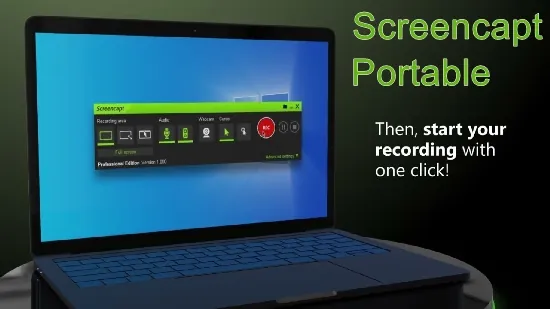
Screencapt Portable is a professional-grade screen recording and capture software designed to provide a robust, versatile, and user-friendly solution for creating high-quality videos and screenshots on Windows systems. This software is ideal for a wide range of users, from educators and trainers to gamers, marketers, software developers, and business professionals who need to record their screen activities with precision, clarity, and efficiency. It combines powerful recording capabilities with real-time editing features, flexible recording modes, and advanced output options, making it a comprehensive tool for producing instructional videos, product demos, presentations, gameplay footage, and webinars. The following comprehensive description elaborates on its features, usability, technical specifications, and the added value it offers.
Core Features and Functionality
Screencapt Portable’s core purpose centers on capturing screen activity as video or still images, ensuring versatile usability with different capturing modes. It allows users to record the entire screen, a specific window, or a custom-defined region, giving maximal control over what content is recorded. This flexibility suits diverse needs, for example, focusing on specific application behavior during software demos or capturing the whole desktop for tutorials.
Video capture is performed using high-efficiency H.264 codec compression, which balances excellent image quality with relatively small file sizes. This ensures recordings are sharp and smooth while conserving disk space and enabling easier sharing or uploading. Screencapt Portable supports a maximum frame rate of up to 120 frames per second, making it suitable not only for standard video recording but also for capturing fast-paced content such as gameplay where fluid motion and detail are critical.
In addition to video capture, Screencapt Portable allows users to take screenshots in multiple formats (PNG, JPEG, BMP, PDF), catering to users’ needs for static images rather than video. This versatility allows Screencapt Portable to serve as a one-stop solution for multimedia content generation, whether users need dynamic video content or static documentation.
Real-Time Annotation and Editing
A distinctive and invaluable aspect of Screencapt Portable is its live annotation and drawing capabilities that engage users during recording sessions. Users can add annotations, highlight specific areas, or draw directly onto the screen in real-time, enabling better communication of key points during tutorials, presentations, or product walkthroughs.
The live drawing features include options for arrows, freehand pens, rectangles, circles, and text notes. These annotations can be adjusted on the fly, giving the presenter or content creator a powerful toolset to emphasize important areas or guide viewers through complex interfaces and processes.
Additionally, Screencapt Portable offers live highlighting effects and cursor emphasis options that add visual cues enhancing viewer focus and engagement. These real-time editing tools eliminate the need for post-production editing in many cases, streamlining the content creation process and reducing the time from recording to publishing.
Webcam Integration and Commentary
Screencapt Portable supports integrating webcam input into the screen recordings, allowing for picture-in-picture video overlays. This feature is crucial for content creators who want to include their facial expressions or live reactions during presentations, tutorials, or live gaming streams. Such integration personalizes the content, fosters viewer connection, and increases the video’s engagement quotient.
Moreover, users can record system sounds along with microphone audio simultaneously, enabling seamless commentary or narrations to be added directly to the video during recording. This built-in audio functionality means that users do not need additional software to sync audio and video later, simplifying the recording workflow significantly.
Flexible Output and Export Options
The software supports exporting recordings in multiple popular formats, including MP4, AVI, and FLV. MP4 is often the preferred choice due to its compatibility across almost all devices and platforms, whereas AVI and FLV provide options for particular use cases where different encoding or file container preferences exist. High-quality audio and video encoding ensure that the final output maintains professional standards suitable for publication or distribution.
Screencapt Portable also offers customizable output settings, including resolution, bitrate, and frame rate adjustments. Users can tailor the final file’s quality and size according to their needs, whether that’s maximizing video quality for promotional content or compressing files for easier sharing in resource-constrained environments.
User Interface and Ease of Use
Screencapt Portable boasts an intuitive and modern interface designed to streamline navigation and operation. Its layout emphasizes accessible workflows with clearly labeled functions and easy-to-understand icons. Users can initiate recordings, adjust screen capture areas, toggle webcam overlays, and manage audio inputs with minimal clicks.
The software includes a handy live toolbar that appears during recordings, giving quick access to annotation and drawing tools without interrupting the session. Additional shortcut keys and “Alt” key combinations speed up the usage and reduce reliance on mouse navigation, catering to power users and those who prefer keyboard shortcuts.
This user-focused design makes Screencapt Portable suitable for both beginners and professionals by balancing simplicity with advanced features.
Performance and System Compatibility
Technologically, Screencapt Portable is optimized to perform efficiently even on mid-range Windows machines. It is compatible primarily with Windows 7 and above, ensuring a broad user base can utilize it without needing the latest hardware. Its lightweight architecture minimizes the load on system resources, allowing smooth screen capture without system slowdowns or instability during intensive multitasking.
The program’s support for hardware-accelerated video encoding reduces CPU load and speeds up the processing of videos, improving both usability and output speed. This is vital for professional users who require reliability and speed during long recording sessions or when handling large files.
Use Cases and Applications
Screencapt Portable finds versatility across numerous application domains:
- Educational Content Creation: Teachers and trainers can create instructive tutorials, step-by-step guides, and interactive presentations enhanced with live annotations and webcam presence.
- Software Demos and Bug Reporting: Developers and tech support teams can capture software behavior, showcase product features, or document bugs with precise video evidence.
- Gaming and Streaming: Gamers can use high frame-rate recording and webcam overlay to produce engaging gameplay videos and streams, complete with commentary.
- Business Presentations: Marketing and corporate teams can prepare polished presentations or webinar recordings, leveraging real-time highlighting and drawing to focus attention.
- Personal Productivity: Individuals can record workflows, save meeting sessions, or capture moments on their screen for various personal or professional documentation needs.
Licensing and Availability
Screencapt Portable offers a free version targeted at private users and personal evaluation purposes. This free version inserts a watermark on recorded videos but provides fully functional capabilities for consumption by casual users.
For business or professional users, a paid version is available at an affordable price point, removing watermarks and including technical support and additional advanced features. This tiered licensing structure allows users to choose the level of investment that matches their usage needs.
Summary of Key Features
- Multiple recording modes: full screen, custom region, and specific window capture
- High-quality video output with H.264 codec compression and up to 120 FPS frame rate
- Real-time annotation, drawing, and highlighting tools for enhanced presentation quality
- Webcam overlay integration for live video in recordings
- Simultaneous recording of system sounds and microphone input for commentary
- Flexible export to MP4, AVI, FLV and multiple screenshot image formats (PNG, JPG, BMP, PDF)
- Streamlined user interface with live toolbar and shortcut keys for optimal workflow
- Lightweight and hardware-accelerated for efficient performance on Windows systems
- Free version with watermark for personal use, paid edition with watermark-free output and support for professionals
Conclusion
Screencapt Portable constitutes a leading-edge screen recording software solution that meets the demands of modern multimedia content creators and professional users alike. Its combination of powerful recording technology, real-time editing tools, webcam integration, and flexible output options presents a comprehensive approach to screen capture.
The software’s thoughtful design focuses on user experience, allowing seamless transition from recording to final output with minimal friction. Its multi-purpose utility across education, business, gaming, and personal productivity ensures it can serve diverse users effectively.
With Screencapt Portable, users gain the capability to produce clear, engaging, and professionally polished screen recordings with ease. Whether the objective is tutorial creation, software showcasing, webinar delivery, or gameplay streaming, Screencapt Portable offers the robust features and reliable performance to fulfill these needs effectively, making it an essential tool in the digital content creation arsenal.