
Portable The Bat! Professional 12.4.0 (x64) Multilingual
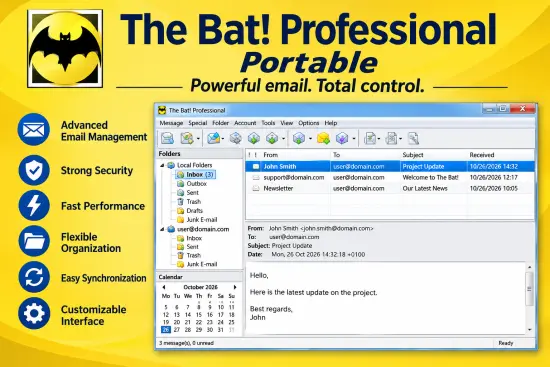
The Bat! Portable is a popular email client that can work with an unlimited number of mailboxes. Plus, it features powerful sorting filters, fully customizable message templates, an email dispatcher, and much more. The main task of the program is to protect communications from data theft and surveillance by third parties. bat! Manage an unlimited number of email accounts and process and store an unlimited number of messages.
The program offers an automatic message filtering system, a simple template system, and a message editor with a spell checker. And many other useful functions. bat! We protect your information in a number of ways. This includes message-based encryption on disk and encryption of email traffic. This email client protects your data with multiple encryption streams. We also ensure that your correspondence is private.
Finally, it protects confidential data by working without Web interfaces and without using global email providers that keep your messages in the cloud.The Bat! is perfect for work or at home. It has no restriction on the number of email accounts or messages you can have, high security and built-in features like automatic filters, templates, a spell-checker and more.
The Bat! Professional Edition is a full-featured e-mail client especially designed to meet the evolving requirements of the corporate user, bringing to the table advanced options for handling a growing volume of messages.
Seamless installation and simple-to-handle environment
The setup process does not pose any issues such as browser settings changes or offers from third-party products, and it is over in a few moments. Completing it brings you to a clear-cut interface which encloses a menu bar, several buttons and a few panes which display all folders created, included messages and the actual contents of a selected e-mail. Along with comprehensive help content, the tool caters to all types of users, including those with little or no computer experience.
Protect your information across multiple accounts
Compared to the Home Edition, this Professional version adds security-related features such as biometrics, on-the-fly encryption, and security token support. It uses the OpenPGP protocol for message encryption to protect your communications from prying eyes.
The Bat! Professional Edition supports POP3, IMAP and MAPI protocols and can manage multiple email accounts. Use the multitasking capabilities of Windows to process incoming and outgoing messages in the background without overloading your computer. This application provides users with rich features for efficient email management. Advanced filtering and searching features, email scheduling, built-in address book, email notification options, message reminders, delivery receipts, duplicate detection, message splitting, color coding, and more.
Support for spell checker, email signature and QR code generator
The message editor includes an HTML viewer and multilingual spell checker. It also includes a collection of customizable templates that make sending regular or bulk emails much easier.
Image download management tool, QR code generator, email signing and encryption, S/MIME and PGP support are other benefits offered by this application.
The multilingual interface lets you preview incoming emails, manage all your accounts, and easily organize your mailbox into different explorer-like folders. Also, the layout is fully customizable, so you can change it however you like.
Features:
Strong Encryption
Backup and restore
PGP, GnuPG and S/MIME support
The own Address Book
Message Parking
Internal HTML Viewer
Image Download Manager for background retrieval of HTML images
Selective download
Antivirus interface
Safe handling of attached files
ASLR and DEP
64-bit version
Electronic discovery protection
Easily import .mbox and other file formats from a variety of third party email clients.
Sort email messages based on addressee or issue with Sorting Office.
Quick and powerful search features allow for easy retrieval of archived messages.
The Bat Portable Release Notes:
New features
- Major Calendar rework
- One dialog at shutdown lists every editor holding unsaved data, with per-row save flags
- The shutdown dialog stays on as a progress view until every editor has really closed
- Release history in the update window: per channel, three newest releases open, Expand all
- A manual update check now opens the update window even when your version is the newest
- Mouse wheel scroll step for the HTML/CEF panes, settable in Preferences -> System (up to 99 lines)
- Taskbar badge and tray animation can now count unread in selected folders only
- The template editor offers the RichText editor as well, like the message editor
- Mail Ticker: the “Very fast” scroll speed is now available in the preferences dialog
- The “Colour group” column is painted in the group’s own colour, not as plain text
- Thread view: attachments beside the message, a resizable list, documents scaled to their column
- Tab / Shift+Tab indent and outdent a selected block of lines in the plain text and HTML editors
- Classic view pane: every attachment gets a tab; ones nothing can render show a save/open panel
- Thread view: an attached HTML page is rendered (scripts stripped) instead of shown as source
- CardDAV: Google contact labels sync both ways with address book groups (People API)
- CardDAV: sync progress and result shown in the address book; manual sync reports via a toast
- CardDAV: HTTPS via HTTP proxy (CONNECT); without a configured proxy, Windows proxy/PAC/WPAD is used
- Colour emoji in the RichText and plain-text message editors
- Editor: new “Cell background colour” command for tables (popup, Table menu, template editor)
- Colour picker: “Transparent” button for text background and cell background
- Editor status bar: light-yellow “autosaved” state for the modified icon
- Preferences — Tabs: option to hide the close button on regular tabs
- Message list: rubber-band (lasso) selection by dragging from empty space; Ctrl inverts
- All editors follow Windows Accessibility text cursor thickness and the text cursor indicator
- Connections are re-established after sleep/resume, after a network drop and on going online
- Help|Diagnostincs panel to use diagnostics command line options without command line
- Calendar window: Scheduler section – tasks as cards in four views; Tools|Scheduler opens it
- Calendar window: To Do section is offered by default; to-dos can now pop up a reminder
- Delayed sending: new sortable “Send time” column in the message list
- Text cut with an ellipsis in any list or tree is shown in full in a hint laid over the cell
- Shift+F8 (or Shift+click on the toolbar button) opens the other address book (old/new)
- New address book: import from Outlook, Outlook Express (WAB) and Windows Contacts
- Old address book: Memo column; new address book: contact card sections on one scrolling page
- Tabs: “Shown Tabs” submenu to show/hide tabs; double-click on empty strip opens Configure Tabs
- Pure HTML editor: the status bar shows the caret’s line:column
- Exit window: lists everything the exit waits for, with Stop / Save / Discard / Exit immediately
- Toast history: every toast is kept (last 200, across restarts; encrypted with the encrypted layer)
- Notifications window (status bar, tray, Ctrl+Shift+N, Ctrl+click on a toast) with Go to / Copy
- New setting “Maximum quote depth” (default 20) and template macro %MAXQUOTEDEPTH=N
Improvements
- Dialogs laid out for the 12pt form font; captions fit every translation; Tab follows the screen
- Preferences: “Check for beta updates” no longer depends on the update-check mode
- Chromium engine updated from 144 to 151 (CEF 151.3.24)
- Chromium now runs in a dedicated helper process instead of copies of The Bat! itself
- TLS handshake failures now name the signature scheme the server chose
- The embedded browser now runs in its own subprocess host, thebatsubprc.exe
- TLS 1.3: SHA-512 signature schemes are verified, so servers picking them connect
- Connection errors in the log carry their numeric code and a message that says what failed
- POP and IMAP log every failed address of a multi-homed server with its own reason
- IPv6 candidates that the machine cannot use are no longer offered at all
- The update window uses the same control set as the thread view
- The CEF cache is dropped when the CEF version changes, so an upgrade or rollback still starts
- Every translated Format() string is validated at language load; a broken one falls back to English
- “Ignore” in the spell checker applies to every occurrence, in every editor, for the session
- Updates no longer leave a full copy of every previous version in %LOCALAPPDATA%\The Bat!\Main
- PDF viewer window is titled with the attachment name, reused for the same file, and restored
- Address book and mass mailing: silent beeps replaced by toasts that say what went wrong
- Calendar database (Calendar.db) is on by default; Events.CFG is converted on the first start
- Calendar: if Events.CFG changed behind the database’s back, the program asks which to keep
- Calendar: repeats more often than daily are left to the scheduler, with a hint where to go
- Spell checker engine updated from hunspell 1.3 to 1.7.5
- Message Headers settings: Yes/No flags switch on click; locked flags explain why
- Message list: rubber-band selection can also start from a row’s tree indent
- Tab strip: first/prev/next/last scroller on message list and folder tabs; wheel scrolls by tab
- Address book import: unreadable or empty files are listed with the reason
- Address book: “Add to group” takes several groups; book info counts contacts and groups apart
- Removed the Google ClientLogin import/export (dead since 2015); Google sync via OAuth stays
- CEF panels rebuilt with the new UI design system and the Geist font
- About 80 modal “OK” boxes that only reported an outcome are now non-blocking toasts
- Notifications window: errors red, warnings orange; multi-select copy; no flicker; remembers place
- Conversation view loads thread messages in the background, current message first
- Exit window can be resized; CEF windows no longer wait forever for their page on close
- IMAP: no answer for the whole IDLE period is logged as a warning, not an “account failed” error
- Mail error toasts no longer end with “Click to open the log.”
Fixes
- Fixed TLS 1.3 handshakes failing with “decrypt error” on ECDSA P-521 and RSA-PSS SHA-512 servers
- Other applications no longer freeze when opening a file by association while The Bat! is running
- No more white flash when a window opens in a dark theme
- Unreadable text in PDF attachment previews (symbol fonts, lost spaces, ligatures) fixed
- Attachment file names: header encoding setting honoured, RFC 2231 filename* emitted correctly
- RFC 2231 decoding fixed: “_” in names, split filename*0= parameters, per-segment %XX
- Printing and preview of HTML messages: non-UTF-8 parts, inline images, margins on comma locales
- Page margins from Page Setup were ignored until the dialog was reopened
- Mail Ticker no longer sticks to the mouse after a double click
- IMAP command lines shortened to ~900 octets: Courier-IMAP rejected the long ones
- IMAP “Remove duplicates” no longer reports “no folder processing is necessary”
- Notes of deleted duplicate messages are kept and merged into the surviving copy
- SOCKS5: a refused connection was taken for an established one and failed later at random
- An editor with a header field being edited was not counted as unsaved at shutdown
- Pasted tabs were swallowed by the layout in PureHTML messages
- The certificate hint in the account log was clipped at 125% text size
- Fixed heap corruption and crashes in regular expression search and regex filters
- Fixed a crash on moving/copying messages caused by mistranslated Format() strings
- The memo, the tags and the colour group now survive an IMAP move, copy and APPEND
- Fixed tag handles being scrambled across messages when a new tag was created
- Tag menu text is readable on the dark theme; the bogus “( None )” row is gone
- A filtered message list (Unread, Colored…) now refreshes when a change crosses the filter
- Restored Ctrl+Num +/- and Ctrl+MouseWheel zoom in the plain-text message viewer
- *.RTF attachments render in the auto-preview and print correctly again
- Inline pictures survive undo, copying and pasting, and no longer go out twice as strays
- Pictures inside an attached .eml resolve instead of showing as broken images
- A spell correction from the context menu is inserted at the word, not at the line start
- Address auto-completion no longer replaces a whole pasted address while the caret is inside it
- Address book search folds case for Cyrillic, umlauts and accented letters
- Attachment names containing ‘/’ work on drag-and-drop and PDF signing
- The HTML form of the message body is no longer listed as an attachment
- Shift+Tab returns focus to the header from the PureHTML editor, and moves cell-to-cell in tables
- The PureHTML caret no longer stays painted in the body after the editor loses focus
- In corner-mark mode a colour group no longer recolours the text of the whole row or folder name
- The colour group name is drawn with the row’s own font and contrast colour
- The active folder no longer borrows the colour group’s Normal text colour
- Header fields complete from history again: Subject, To/CC and tags (regression)
- Message editor: closing again after “Cancel” on “Save the message?” no longer does nothing
- Pressing Return at the end of a heading now starts a “Normal” paragraph, not another heading
- PureHTML: dropped text and clicks land on an empty line, not at the end of the line above
- Forwarding or re-editing HTML mail no longer stores every inline picture twice
- Forwarding HTML mail no longer adds a stray Part1.txt attachment
- Thread view: Ctrl+A and Select All select the whole focused message, in any message of a thread
- Pictures attached to a message but referenced by https URL are shown from the message itself
- The “load external resources” bar appears whenever pictures stay hidden, not only while loading
- Thread view: a message whose body is text/xml (or another text/* type) is no longer blank
- XML attachments preview in the thread view whatever their encoding, UTF-16 included
- UTF-16 .txt and .html attachments preview as text instead of garbage
- Attachments with an unknown extension preview as text when their content is text
- Text attachment previews no longer show their content twice
- Thread view: a password-protected PDF opens in the PDF viewer, which asks for the password
- Closing the PDF viewer no longer leaves an empty window behind
- A huge-range spreadsheet preview no longer eats memory until The Bat! dies
- XLSX whose styles omit optional format/font/fill ids previews instead of showing an error
- XLSX currency formats print the symbol (e.g. the rouble sign), not a raw [$P-19] token
- Mass mailing from the address book no longer crashes when the account has no quick templates
- “Start with Windows” no longer keeps launching the old version after an update
- Emoji outside the BMP turned into dots after a draft was closed and reopened
- Plain-text editor: caret, Backspace and Delete no longer split an emoji into broken halves
- Editor: fixed crashes – document background without a picture, Copy format on a table, closing
- Editor: caret no longer jumps to the start of the message after the table properties dialog
- Quick templates: %Cursor lands in the right place in RichText, HTML and plain-text editors
- Quick templates: HTML template converted to plain text no longer gets blank lines between lines
- Editor: autosave no longer stores the same unchanged message on every timer tick
- Saving a message in the editor keeps it focused in the Outbox/Drafts list
- Header editor: opening a field’s history list moves focus into the field so the list stays open
- CardDAV/Google: no endless 401 loop, no duplicates after switching book type, no phantom downloads
- CardDAV: request timeout is 60 s (was 60000 s); TLS handshake no longer hangs
- CEF: first HTML message after start no longer waits ~4 s (Chrome omnibox preload disabled)
- CEF: mouse wheel scrolling no longer stalls while the message page is busy
- Every PGP/MIME send left the plaintext copy of the message in %TEMP%; it is now deleted
- Empty bat*.tmp files piled up in %TEMP% until no message could be sent (“not relayed”)
- Other temp-file leaks closed: Save As, encrypted backup restore, external-program filter, GnuPG
- ZIP and other binary attachments could go out raw, without Content-Transfer-Encoding
- TLS/S/MIME: a trusted root marked CA:FALSE no longer refuses the chain (RFC 5280 6.1)
- Undeletable empty messages dated 1 Jan 1970 (damaged index records) are now marked and removable
- IMAP Outbox kept counting a message after a reply was sent from it
- IMAP: the last message of a folder lost its colour group on servers that store no keywords
- IMAP: unsubscribing on mail.ru did not stick; the folder is now hidden locally, with a notice
- IMAP folder manager: Gmail subscription glitches ([Gmail], \Noselect, last folder of a batch)
- Folder maintenance hung on accounts that never connect; second run showed no progress/0 folders
- Folder repair reported “Unlisted error FFFFFF85” for IMAP folders that have no local copy yet
- Reply/forward of a decrypted message quoted the ciphertext or nothing; now the decrypted text
- HTML-to-text: nested quotes kept (‘>’ per level) and doubled line breaks fixed
- Quoting a light-theme HTML message turned the dark-theme HTML editor white
- Thread view: no Decrypt button for S/MIME messages whose smime.p7m is not the first part
- Start-up stalled behind the splash when the program was launched without getting focus
- Blank or wrong HTML editor toolbar buttons and status bar selection-mode icons
- HTML editor selected text while the styled scroll bar thumb was dragged
- HTML editor: Enter on the last visible line did not scroll the caret into view
- Message editor header rows (To, Subject…) back to their earlier, more compact height
- Address book: wrong group member counts after deleting contacts; blank “New message to” items
- SmartBat: right-click on a misspelled word now shows suggestions and dictionary items
- SmartBat window drifted right on every start with the taskbar on the left
- Crashes fixed: on exit after a memo or a closed editor window, on OK in Preferences
- Tools|Scheduler was empty with the calendar database off; a save could turn an event into a task
- Calendar reminders were not shown at all in release builds with the calendar database on
- Program stopped responding: scheduler queue filled with copies of the mail-resend task
- A daily scheduler task ran a day after program start instead of at its start time
- Delayed sending: deleting one draft could cancel another message’s delayed send
- Delayed sending: changing or removing the delay in the editor was not rescheduled on save
- Delayed sending: send times in the past or after 2300 are refused with a reason
- Spell check: user dictionary ignored when the mail directory path has non-ASCII characters
- Decrypt command said “not encrypted” on a message the security button could decrypt
- Read confirmations: skipped when marked read by hand or in the thread view; repeated on re-read
- Outbox: flags and priority could not be changed (Ctrl+G and the Flags submenu did nothing)
- Message editor: a priority or receipt-request change alone was dropped on close without asking
- Message base: index user flags were never saved
- Saved messages showed “Modified” 30.12.1899 until the folder was read again
- A changed autosave interval was ignored by editors already open
- Switching Plain/RichText/PureHTML lost caret and selection; RichText duplicated selected text
- Plain-text editor: %Cursor put the caret in the wrong place (soft wrap, tabs, selection)
- HTML editor: Insert Table crashed in an empty new message and did not mark it modified
- Forward/quote: absolutely positioned HTML (e.g. SAP forms) jumped out of the quoted block
- Addresses tab listed deleted messages regardless of “Show deleted”
- View → Headers checks did not match the headers shown after header settings were saved
- CEF preview ignored header “scroll” flags and View > Headers > Show; Edit headers did nothing
- Thread view: PDF preview, chat bubbles and Markdown viewer dropped the selection on mouseup
- Message list avatars: edited contacts not refreshed; GIF/BMP photos showed another contact
- Address book INI import found nothing in files exported by The Bat! itself (UTF-8 BOM)
- Address book sync: Google labels over 1000 contacts refused at every sync; wrong upload counts
- Address book: crash on exit during sync; “Invalid pointer operation” in the new book’s dialogs
- New address book could keep The Bat! running hidden after exit
- New address book: “All files (*.*)” in the import dialog ran the Outlook import
- New account wizard: login was cut to the part before ‘@’ instead of the full address
- Tabs: middle-click on empty space crashed; “Switch to” was always empty; hidden tabs came back
- Tabs: “Close All Quick Search Tabs” closed the wrong tabs; the scroller jerked back and forth
- Fixed The Bat! staying in the tray forever on exit when something was still running
- Fixed filter auto-replies stopping for every account after an IMAP queue lost its connection
- Fixed conversation view and editor freezing for minutes on long reply chains
- Fixed IMAP full-download sync spending 20-47 min per folder just queuing message downloads
- SMTP “Server reply -” with nothing after it now says why there was no reply
- Fixed restoring deleted message groups asking the “delete groups” question
- Exit window: a stuck filter no longer shows “last activity 0 s ago”; it says what it waits for
- Toasts no longer take the focus from the window you are working in
- Fixed a crash when the editor’s properties were refreshed before it was fully set up
- Fixed thread messages being loaded twice (and the first copy leaked) in the conversation view
- System Resnd mail event was leaking resources