
Portable TryFit Virtual Try-On 1.0.0
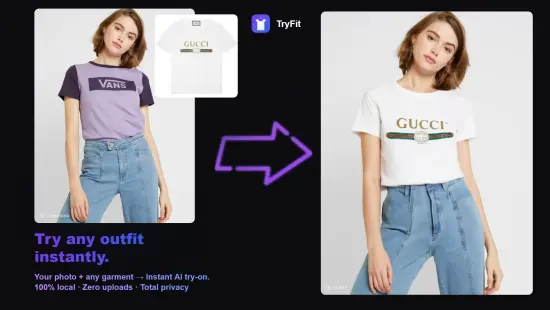
TryFit Portable lets you try on clothes virtually with AI. Snap a garment photo and see it on any model instantly. Fully offline, private, and batch-ready for sellers. Try on any outfit instantly — no dressing room required. Take a photo of any garment and see it on yourself or your model in seconds. TryFit brings realistic AI virtual fitting to your desktop — completely offline, completely private.
TryFit Portable is a practical sizing and fit visualization application designed to help users make more informed decisions about clothing, footwear, and wearable accessories before making a purchase or committing to a specific size. It is built for people who want to reduce the uncertainty that often comes with online shopping, remote ordering, or selecting items without the ability to try them on in person. The software focuses on creating a clearer connection between the user’s own measurements and the specifications of the products they are considering, offering a structured way to compare, visualize, and evaluate fit without relying on guesswork. In portable form, the application becomes especially useful for users who move between computers, use shared workstations, or prefer to keep essential utilities in a self-contained folder that can travel with them. That combination of fit analysis and portability gives TryFit Portable a clear identity as a modern, practical tool for everyday sizing decisions.
Fit as the Core
The most important quality of TryFit Portable is that it treats fit as the main task rather than a secondary feature. Many shopping tools and size guides offer only basic charts or generic recommendations that do not account for individual body differences. This software takes a different approach by keeping the workspace centered on the user’s own measurements and how they relate to specific product dimensions. That focus matters because fit is personal. Two people with the same general size label may have very different proportions, and a tool that ignores that reality cannot provide truly useful guidance. TryFit Portable supports a more individualized approach to sizing.
This fit-first orientation is especially valuable for people who shop frequently online or who order items from multiple brands with different sizing standards. A shirt that fits well from one manufacturer may not fit the same way from another, even if the labeled size is identical. The software helps users navigate that inconsistency by providing a structured way to compare their own data with the product’s specifications. The goal is not to replace personal judgment, but to give the user a clearer foundation for making decisions.
Measurement and Profile Setup
TryFit Portable begins with the user’s own measurements. The application provides a simple framework for entering key body dimensions such as height, weight, chest, waist, hips, inseam, shoulder width, and other relevant metrics depending on the type of item being evaluated. This information forms the basis of the user’s personal profile, which can be saved and reused for future comparisons. The setup process is designed to be straightforward, allowing users to input their data without unnecessary complexity.
Having a personal profile is important because it eliminates the need to re-enter measurements every time the software is used. Once the profile is established, the user can quickly load it and begin comparing items. This makes the workflow faster and more convenient, especially for people who use the tool regularly. The profile can also be updated as measurements change over time, ensuring that the recommendations remain accurate and relevant.
The software supports multiple profiles, which is useful for users who manage sizing for more than one person. A parent may want to keep profiles for several children, or a household may share the application among family members with different measurements. The ability to switch between profiles makes it easy to evaluate items for different people without losing track of individual data. This flexibility adds to the practical value of the application.
Product Comparison and Sizing
One of the main functions of TryFit Portable is to compare the user’s measurements with the specifications of specific products. The software allows users to input or import product dimensions, size charts, or fit descriptions and then evaluate how well those items align with their personal profile. This comparison helps identify potential fit issues before a purchase is made, reducing the likelihood of ordering the wrong size or receiving items that do not fit as expected.
The comparison process is designed to be clear and easy to interpret. The software presents the relationship between the user’s measurements and the product’s dimensions in a way that highlights key areas of fit. For example, it may show whether a shirt is likely to be tight across the chest, loose at the waist, or short in sleeve length. This level of detail helps users make more informed decisions rather than relying on generic size labels alone.
Product comparison also supports side-by-side evaluation of multiple items. A user may be considering two similar jackets from different brands and want to know which one is more likely to fit comfortably. The software makes it possible to compare both options against the same personal profile, providing a clearer picture of how each item will perform. This kind of analysis is especially valuable when shopping online, where returns can be inconvenient or costly.
Visual Fit Indicators
TryFit Portable uses visual indicators to help users understand fit relationships at a glance. Instead of relying only on numbers or text descriptions, the software can represent fit quality through color coding, progress bars, or simple graphical markers that show where an item aligns well and where it may fall short. This visual approach makes it easier to interpret the data quickly without needing to analyze every measurement in detail.
Visual indicators are particularly useful when comparing multiple items. A user can see at a glance which product offers the best overall fit based on their profile. This helps narrow down choices and reduces the mental effort of evaluating each option individually. The visual system also highlights specific areas of concern, such as sleeves that may be too long or a waist that may be too loose, allowing the user to focus on the most relevant details.
The visual approach also supports better communication when sharing fit information with others. A user may want to show a friend or family member why one item is a better choice than another. The visual indicators make it easier to explain the reasoning behind a recommendation without needing to walk through every measurement manually. This adds to the practical usefulness of the software in everyday decision-making.
Category Support
TryFit Portable is designed to handle a variety of clothing and accessory categories, each with its own fit considerations. Tops, bottoms, outerwear, footwear, and other wearable items all have different measurement priorities. A shirt may focus on chest and shoulder width, while pants may emphasize waist, hips, and inseam. Footwear requires attention to length, width, and arch support. The software supports these differences by allowing category-specific profiles and comparisons.
Category support is important because it ensures that the most relevant measurements are used for each type of item. A user evaluating a pair of jeans does not need to see sleeve length data, just as someone assessing a jacket does not need inseam information. The software organizes the data in a way that matches the item being considered, making the comparison process more focused and efficient.
The application also accommodates different styles within each category. A slim-fit shirt will have different fit expectations than a relaxed-fit version, even if both are labeled the same size. TryFit Portable allows users to account for these style differences by adjusting the comparison criteria or adding notes about fit preferences. This flexibility helps ensure that the recommendations reflect not just body measurements, but also personal comfort and style choices.
Fit Preferences and Comfort
Fit is not only about measurements; it is also about how the user prefers to feel in their clothing. Some people like a snug, tailored fit, while others prefer a looser, more relaxed feel. TryFit Portable allows users to incorporate these preferences into their evaluations by adjusting fit tolerance settings or adding notes about desired comfort levels. This ensures that the recommendations align with personal style as well as body dimensions.
Fit preferences can vary by category as well. A user may want a tight fit for athletic wear but a looser fit for casual clothing. The software supports this by allowing different preference settings for different types of items. This makes the recommendations more accurate and more useful in real-world situations where comfort and style are just as important as measurements.
The ability to save fit preferences as part of the user profile adds to the convenience of the workflow. Once preferences are established, they can be applied automatically to future comparisons, reducing the need to re-enter the same information repeatedly. This helps maintain consistency across multiple shopping sessions and ensures that the software continues to provide relevant guidance over time.
Shopping and Decision Support
TryFit Portable is designed to support the shopping process from start to finish. Users can evaluate items before purchasing, compare multiple options, and make decisions with greater confidence. The software helps reduce the uncertainty that often comes with online shopping by providing a structured way to assess fit before committing to a purchase. This is especially valuable when returns are difficult, expensive, or time-consuming.
Decision support also includes the ability to save and review past comparisons. A user may want to revisit a previous evaluation to confirm a choice or compare a new item against an older option. The software makes it easy to keep track of these evaluations, creating a personal history of fit assessments that can inform future decisions. This helps build a more informed and consistent approach to sizing over time.
The application can also be used to plan purchases across multiple brands or retailers. A user may want to find the best-fitting option among several similar products. TryFit Portable makes it possible to evaluate all options against the same personal profile, providing a clear basis for comparison. This kind of analysis helps users avoid the frustration of ordering multiple sizes only to return most of them.
Data Privacy and Local Control
TryFit Portable is built with a focus on local data handling and user control. Personal measurements and fit profiles are stored on the user’s own system rather than being sent to external servers. This approach supports greater privacy and gives users more confidence about how their data is being handled. For many people, that distinction is important because body measurements are personal information that they prefer to keep under their own control.
Local data handling also creates a more predictable workflow. Users are not exposed to variable network conditions, server-side changes, or service limits that can interrupt access to their profiles. Instead, the software operates within the user’s own system, giving them a consistent way to manage their sizing information. That predictability is especially useful when dealing with multiple shopping sessions or when the user needs to reference their profile quickly.
Because the software is portable, this control becomes even more convenient. Users can keep their sizing environment close at hand and use it consistently across different situations. That combination of local handling and portability makes the application
Private & offline
All AI processing runs on your device. Nothing is uploaded.
Batch processing
Process multiple garments at once for catalogs and lookbooks.
GPU-accelerated local AI
Fast, realistic try-on powered by your own hardware.
Works fully offline
No internet connection needed after installation.
For any garment. Shirts, dresses, jackets, pants — upload a photo and see the fit.
Ideal for e-commerce sellers creating product listings, boutique owners offering virtual previews, fashion designers prototyping collections, and photographers streamlining lookbooks. TryFit replaces expensive sample photography with instant AI virtual try-on.