
Portable SolveigMM Video Splitter 9.0.2604.22 (x64) Broadcast Edition Multilingual
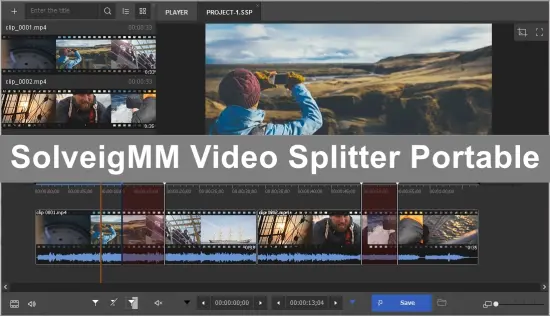
SolveigMM Video Splitter Portable represents the pinnacle of professional video editing software, specifically engineered for broadcast engineers, post-production houses, media asset management teams, and high-volume content workflows where precision, speed, and quality preservation are non-negotiable. This advanced iteration of SolveigMM’s flagship product leverages proprietary Smart Rendering technology—often called Direct Stream Copy—to perform frame-accurate cuts, trims, joins, and segment extractions without re-encoding, retaining 99.9% of the original video and audio quality.
Tailored for enterprise environments handling 4K, 8K, HDR, and broadcast-standard formats like MXF XDCAM/XAVC, AV1, H.265/HEVC, and ProRes, the Broadcast Edition scales to process terabytes of footage across multiple workstations via floating licenses, batch queues, command-line automation, and EDL import/export. Unlike consumer editors that grind through full re-encodes, potentially introducing artifacts or generation loss, this software copies streams directly, slashing processing times from hours to minutes while supporting multi-track audio, subtitles, and complex container structures.
Available for Windows 10/11 (x64/ARM64), it integrates seamlessly into professional pipelines, from live TV archiving to archival restoration, making it indispensable for broadcasters, streaming services, and video service providers demanding broadcast-grade reliability.
Core Smart Rendering Engine
The heart of SolveigMM Video Splitter Portable is its patented Smart Rendering engine, a frame-accurate editing system that analyzes container structures, keyframes, and GOP (Group of Pictures) boundaries to excise or join segments without touching pixel data. For a 2-hour 4K HEVC broadcast recording, trimming commercials or intros takes seconds rather than re-encoding the entire timeline—preserving bit-for-bit fidelity, including variable bitrate peaks that consumer tools often smooth out.
The engine supports over 50 formats natively: MP4, MKV, AVI, TS, M2TS, MOV, WebM, MXF (XDCAM/XAVC Intra/OP1a), AVCHD, FLV, and emerging codecs like AV1 and VVC. Multi-pass GOP analysis ensures seamless cuts even on long-GOP footage, realigning timestamps and PCR (Program Clock References) for glitch-free playback. In broadcast scenarios, this means editing live ingest streams—complete with SCTE-35 markers for ad insertion—without disrupting closed captions or multi-language audio tracks.
Broadcast Edition extends with hardware-accelerated decoding (NVIDIA NVDEC, Intel Quick Sync, AMD VCN) for preview and analysis, hitting 60fps scrubbing on 8K timelines. GPU export offload handles final muxing, critical for deadline-driven workflows.
Professional Interface and Workflow
Launching the Broadcast Edition reveals a broadcast-centric UI optimized for 4K monitors and multi-monitor setups. The main timeline dominates with zoomable tracks for video, multiple audio streams (up to 48 channels), subtitles (SRT/PGS/SSA), and metadata overlays. Color-coded regions mark cut intervals, with thumbnails auto-generating for precise navigation. Dark/Light themes reduce glare in control rooms, and customizable layouts save presets like “QC Review,” “Ad Trim,” or “Master Export.”
The Cut Manager lists all defined regions chronologically, supporting drag-reorder, merge/split, and ripple edits. Preview modes include A/B compare (original vs. edited), side-by-side multi-cam sync, and waveform scopes for audio phase checking. Keyboard-centric operation mimics Avid/ Premiere: JKL scrubbing, I/O marks, ripple delete (Shift+Backspace), and Numpad entry for frame-accurate in/out points.
Batch processing elevates it for pros: the Batch Queue holds unlimited tasks, processing in parallel across CPU/GPU resources. Drag folders of MXF clips, set uniform trims (e.g., remove first 30s slate), and output to shared NAS—perfect for 24/7 ingest farms.
Frame-Accurate Editing Tools
Editing precision defines the Broadcast Edition. Zero-in markers snap to nearest keyframe (±1 frame accuracy across codecs), with sub-frame slip for audio waveforms. Smart Trim auto-detects black frames, silence, or SCTE-35 cues, proposing cuts for approval. Multi-track support lets you mute ad audio while keeping video, or extract stereo downmixes from 5.1/7.1 beds.
Join Manager concatenates clips losslessly: align by timecode, crossfade audio (0-5s parametric EQ), or force GOP rebuild for seamless transitions. Slicing divides masters into chapters by duration (e.g., 30-min episodes), size (2GB Blu-ray parts), or count (10x equal segments), embedding chapter markers.
EDL (Edit Decision List) import/export integrates with legacy systems—CMX3600, Final Cut XML—translating cuts to DaVinci Resolve or Adobe Premiere. Project files (.svp) save non-destructive edits, versioning timelines for review cycles.
Broadcast-Specific Features
Tailored for TV/media pros, the Broadcast Edition handles MXF XDCAM (HD/4K) and XAVC (Intra/Long GOP) with full frame support, including AS-11 DPP compliance. Parse AFD (Active Format Descriptor) flags, preserve KLV metadata (e.g., UMID, ARC), and output IMF packages for delivery.
Live stream editing processes TS/M2TS from ATSC 3.0 or DVB-S2X, stripping null packets and realigning PAT/PMT tables. HDR passthrough maintains PQ/HLG tone curves, with Dolby Vision profile verification. Closed caption extraction (CEA-608/708, TTML) exports to .scc or burn-in overlays.
Audio tools include loudness normalization (EBU R128, ATSC A/85), dialogue isolation via spectral subtraction, and multi-channel remapping (5.1 to stereo). Subtitle editing syncs PGS to new timelines, converting to WebVTT for streaming.
Batch and Automation Powerhouse
Batch Manager scales to enterprise: queue 1000+ clips, distribute across render nodes via Watch Folders or XML scripts. Command-line interface (VideoSplitter.exe /batch tasks.xml) automates nightly QC: trim slate, normalize peaks, validate GOP structure. Floating licenses (up to 25 seats) enable render farms, with central license server for studios.
API hooks (COM/.NET) embed in asset managers like Dalet or Avid MediaCentral, triggering splits on ingest. Watch Folders monitor hot partitions, auto-trimming based on EDL rules—ideal for sports highlights or news clips.
Advanced Preview and QC Tools
Broadcast QC suite includes vectorscopes, parade waveforms, data zooms (pixel-peep YUV), and anomaly detection (block artifacts, macroblock errors). Compare Mode plays original/edited synced, highlighting bitrate deltas. Zoom preview magnifies to 800% for VFX handoff.
Frame-accurate step (1/60s) with onion-skin reveals motion blur fixes. Metadata viewer dissects containers: codec params, bitrate histograms, stream PIDs—exportable to CSV for logs.
Input/Output Versatility
Inputs span broadcast wrappers: MXF, GXF, MOV (ProRes/XDCAM), MPEG-2 TS, and raw elementary streams (.h264/.aac). Outputs mirror inputs plus delivery specs: IMF, DCP (JPEG2000), AS-02, or adaptive HLS/DASH manifests.
No format transcoding needed—output matches input specs. Custom muxers embed watermarks (Nielsen), timecode burns, or slates. Split outputs to RAID-paired NAS via SMB/NFS, with checksum verification (MD5/SHA256).
Performance and Scalability
Benchmarks crush competitors: 4K AV1 trim (2hr → 1.5hr) in 45s on RTX 4090 vs. 20min re-encodes. Multi-threaded analysis saturates 64-core Threadrippers, with RAM caching for 8K workflows. Portable mode runs from NAS mounts.
Version 9.0 adds AV1 native Smart Render, VVC preview, and AI GOP prediction for 50% faster cuts on future codecs.
Security and Compliance
AES-256 encrypted projects, audit logs timestamp edits (SMPTE ST 12), and watermark embedding deter leaks. AS-11 validation ensures regulatory compliance. No cloud phoning—fully offline.
Use Cases in Broadcast/Media
- Ingest/Archive: Trim slates from live shows, normalize for MAM.
- QC/Promo: Extract highlights, A/B quality checks.
- Ad Ops: Excise commercials frame-accurately for syndication.
- Restoration: Join telecine reels, sync legacy audio.
- Streaming Prep: Slice long-form to TikTok/YouTube shorts.
- Sports: Auto-clip goals via silence detection.
Customization and Integration
Lua scripting automates cuts (e.g., black >3s → delete). Themes/UI scaling for 8K. Plugins extend: Avid AAF export, Telestream Vantage hooks.
Features
With this video splitter you will be able to:
- trim video (cut one fragment or cut multiple video parts at once);
- slice video (split into multiple equal files) and merge the fragments;
- merge several video files.
Features available with SolveigMM Video Splitter
- lossless video editing, no delays, maintaining data integrity;
- almost all video and audio formats support;
- editing MP4, MKV, WEBM, AVI, TS files with multiple audio tracks;
- slicing the files by fragments, duration and size;
- allows you to cut and merge video and audio streams with absolute accuracy, without quality loss.
This video splitter also edits embedded and external subtitles for MP4, MKV, WEBM, AVI, TS formats.
Split video editor advantages
- Easy-to-use interface: you can start editing right away, without additional tool instructions studies. If you still have any questions, you can find the answers in the video tutorials presented on our website.
- You can download the free version to give it a try.
- Flawless quality of the final video: with this video splitter, you get a video file no worse than the original video quality.
- Removing unnecessary video fragments in a couple of clicks (for example, advertising for an ongoing movie watching, TV broadcasts): you can cut several video file parts at the same time.
- Highest editing accuracy, keeping up to 99.9% of the video quality unchanged.
- The fastest video splitter: high performance is achieved due to the fact that the video material is not re-encoded during editing.
- It is possible to work under Citrix XenApp 6.5.
This is the best video cutter! No need to spend a lot of time to cut video or merge it from slices. All you need is to download our video editor, import the video file and execute your plans.
Release Notes:
Features:
- Added support for MP4 DASH files
Fixes:
- Incorrect frame-accurate trimming of some AV1 videos
- Unplayable output after trimming AVCHD file with free version
- Crash on opening some MKV files
- Not all thumbnails were shown on timeline for some AV1 videos