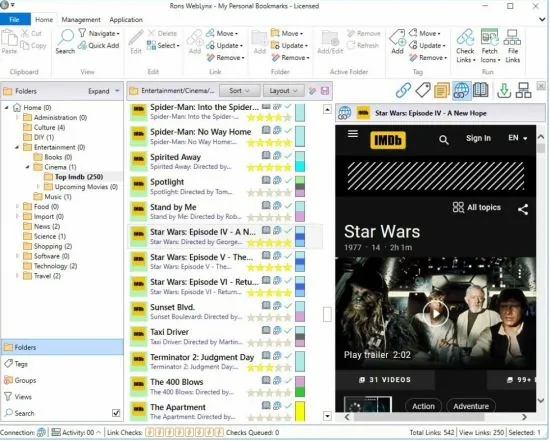
Portable Rons WebLynx Pro 2026.10.15.1000
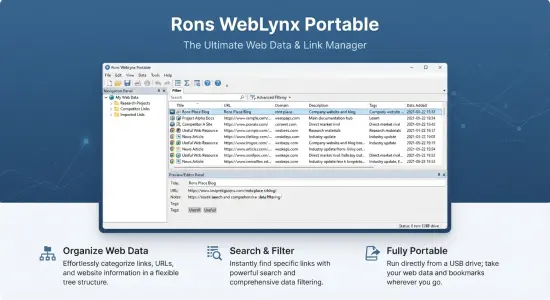
Rons WebLynx Pro Portable is a bookmark and web-resource organizer for people who want more control over the links they collect. Instead of leaving every useful page buried in a browser’s bookmark menu, it gives users a dedicated place to gather, sort, describe, search, and review online resources. The result is a structured reference library that can support everyday browsing, research, study, project work, and long-term information management.
The application is designed for Windows desktop use. Its approach is centered on organizing collections of links rather than simply saving a page and hoping it will be easy to find later. Users can arrange resources in folders, apply tags, add notes, assign ratings, and use search and filtering tools to retrieve items from a growing collection. It can therefore serve as a more deliberate home for web references than a browser’s basic bookmarking feature. ronsplace.ca
The Pro edition removes the free edition’s limit on saving links and its advertising banner, while retaining the application’s other options. That makes it the version intended for users who expect to build a large collection and want to use the program without those restrictions. ronsplace.ca
A Desktop Workspace for Bookmarks and Web Resources
A conventional browser bookmark is often little more than a title and an address. That can be enough for a small collection, but it becomes less helpful when hundreds or thousands of pages accumulate. Names may be vague, folders may become crowded, and useful links can be hard to distinguish from duplicates or abandoned references. Rons WebLynx Pro Portable is built around the idea that saved web resources can be treated as a searchable, organized collection.
The program can hold links for many kinds of purposes: research references, technical documentation, articles, tutorials, blogs, news sources, study materials, professional resources, and personal interests. Rather than treating everything as one undifferentiated list, users can divide a collection into folders and add tags to describe the subjects or roles of individual links. A resource can then be found through its location, its descriptive labels, or a search query.
This method is useful when a link belongs in more than one conceptual category. A folder can represent a project or area of work, while tags can describe the specific themes covered by a page. For example, a folder might hold material for a product launch, while tags identify resources about design, analytics, customer research, or writing. The same basic structure can be adapted for coursework, hobby research, software development, client projects, or personal reading lists.
The aim is not to replace the browser itself. Browsers remain useful for visiting pages and saving quick favorites. WebLynx provides a separate workspace for organizing material after it has been collected, particularly when a user wants more context and classification than a browser’s built-in tools provide.
Organize Links with Folders, Tags, and Custom Views
Folders provide a familiar way to establish a hierarchy. Users can create broad categories, then add subfolders to separate projects, topics, clients, or stages of work. This structure can help keep a large library understandable without requiring every item to sit in a single long list.
Tags offer another way to arrange the same material. A link can be labeled with descriptive terms and colored tags, allowing users to group resources across different folders. This is especially useful when the same subject appears in several projects or when a single resource is relevant to multiple interests. Instead of copying the same bookmark into several locations, users can apply labels that make it discoverable from different angles.
Rons WebLynx Pro Portable also supports custom grouping, combining folders and tags into collections that fit a particular workflow. These views can help users focus on a subset of their resources without changing the underlying organization. A researcher might want to see all sources tagged “background reading,” for instance, while a project manager might assemble a view around a particular client or task.
The application includes ways to identify links that are new, broken, or duplicated, helping users pay attention to the condition and usefulness of their collection. Rather than treating a bookmark library as something that only grows, these views support ongoing maintenance. Users can review recently added links, find repeated entries, and investigate resources that may no longer be available.
Search and Filtering for Growing Collections
A link library is only valuable if users can retrieve what they need. Rons WebLynx Pro Portable includes search and filtering tools designed to locate items across folders, tags, and other resource details. A search can narrow a large collection to relevant results, while filters help users focus on categories or properties that matter for a particular task.
Searching within folders can be helpful when a user already knows the broad location of a resource. Searching across tags can be more useful when the topic is clear but the folder is not. The combination offers flexibility: users do not have to remember exactly where a link was filed if they remember a phrase, label, or other detail associated with it.
Custom views can further simplify retrieval by presenting selected kinds of resources together. For example, a user may want a view of links that have not yet been classified, recently added items, duplicates, or links with a particular rating. Such views make it easier to move from collecting resources to acting on them—reviewing, categorizing, cleaning up, or revisiting them.
These functions become more valuable as a collection grows. A few dozen links may be manageable by browsing folders manually. A much larger library benefits from multiple routes to the same information: folder hierarchy, tags, search terms, ratings, and special-purpose views. Using these methods together can reduce the time spent scanning lists and make it easier to recover resources saved weeks or months earlier.
Add Notes, Descriptions, and Ratings
A saved address does not always explain why a page matters. Rons WebLynx Pro Portable lets users keep notes and descriptions alongside links, preserving useful context at the point where it will be needed later. Notes can capture a summary, a reminder, a quotation reference, an observation, or a next step associated with a resource.
For research, notes can record why a source was saved, which section is relevant, or how it relates to another page. In a work setting, they might summarize a technical solution, identify a product detail, or remind a teammate what to review. For personal use, a note could capture a recipe adjustment, a travel idea, or the reason a particular article was worth saving. Keeping this information beside the bookmark can make the collection more meaningful than a list of titles alone.
Ratings offer a quick visual way to prioritize resources. The program supports star ratings, allowing users to distinguish especially useful or important links from items that are merely worth keeping for reference. A rating can help when revisiting a long reading list or deciding which sources deserve attention first.
The application also offers the option to protect notes with a password. This can be useful when users want an additional layer of privacy for note content within a collection. As with any password-protected feature, it is sensible to choose a password that can be remembered or safely stored, and to consider what information is appropriate to place in a note. ronsplace.ca
Import Bookmarks and Gather Links from Different Sources
Starting a new link manager does not have to mean rebuilding a collection by hand. WebLynx can import bookmarks from supported browsers, including Chrome, Edge, Firefox, and Brave. Existing browser bookmarks can be brought into the program and organized using folders, tags, and the other management tools.
The application’s External Bookmarks side panel displays bookmark structures from compatible browsers installed on the computer. Users can browse that external tree and transfer individual bookmarks or entire folders into their WebLynx collection. This can make migration more manageable: rather than importing everything at once, users can select useful sections and organize them as they go.
Links can also be collected from sources beyond a browser’s bookmark menu. The program supports methods such as dragging and dropping text, files, or directories, pasting addresses, and manually entering bookmarks. It can extract hyperlinks from Outlook emails, Word documents, PDFs, and websites. This gives users a way to bring scattered references into a single organized collection, including resources encountered while reading documents or messages. ronsplace.ca
A landing-zone panel provides a shared space for gathering links before deciding where they belong. This can suit users who collect quickly while browsing and prefer to sort later. Instead of interrupting a task to choose a folder and apply tags immediately, they can place new links in the landing zone, then review and classify them in a later pass.
The combination of browser imports, document extraction, drag-and-drop, clipboard input, and manual entry means the program can accommodate different habits. Some users may prefer a careful, immediate filing routine. Others may gather links rapidly and organize them in batches. Both approaches can work within the same collection.
Automatic Link Filing and Collection Maintenance
For people who add resources regularly, manual filing can become repetitive. Automatic Link Filing lets users create rules that process newly added links. Depending on the configured rules, links can be tagged, categorized, or moved into folders. This can help maintain consistency and reduce the amount of routine sorting required. ronsplace.ca
Rules are especially useful when links arrive from recurring sources or follow predictable patterns. A user who frequently saves material about a few core topics may establish a set of filing rules to handle common cases, then manually review links that need special treatment. This approach combines automation with the ability to make individual decisions when necessary.
Collection maintenance is also supported by features for finding duplicates and checking link validity. Duplicate detection can help identify repeated addresses that have accumulated through imports or repeated saving. Link validation can help find resources that may no longer be accessible. These tools are valuable because a bookmark collection is not static: websites move, pages disappear, and the same address can be saved more than once over time.
A practical maintenance routine might include reviewing new links, applying missing tags, checking flagged links, and removing or consolidating duplicates. The point is not to keep every collection perfectly polished, but to make it easier to trust and use when a relevant resource is needed.
Built-In Web Viewing and Browser Integration
Rons WebLynx Pro Portable includes a built-in web viewer for previewing bookmarked pages without leaving the application. This can help users inspect a resource while they are organizing or reviewing their collection, reducing the need to switch repeatedly between the link manager and a separate browser window. ronsplace.ca
Browser integration complements this viewer. The External Bookmarks panel can display bookmarks from supported browsers, and the landing-zone feature provides a place to collect incoming links across multiple WebLynx windows. The intended workflow is to make bookmarking less disruptive: users can keep browsing as usual, collect useful pages, and organize them within the dedicated application when appropriate. ronsplace.ca
These features are relevant to users who want a dedicated library without abandoning familiar browser habits. A browser can remain the main tool for everyday web navigation, while WebLynx handles deeper organization, research notes, and review. The two roles can work alongside each other rather than competing.
RSS Feeds and Ongoing Research
Rons WebLynx documentation also describes following website updates with RSS feeds. For users who monitor publications, blogs, news sources, or other regularly updated sites, RSS can support a research routine that goes beyond saving individual pages. A feed can help bring new material from a source into view, while the broader collection provides a place to keep selected references and related notes.
This is useful when a topic evolves over time. Rather than remembering to revisit every site manually, users can follow updates from sources they consider relevant, then retain particular links for later review. The workflow can connect discovery with organization: new material is noticed, useful items are saved, and selected resources are filed into the appropriate folders or tagged for future retrieval.
RSS is most helpful when used selectively. Following too many feeds can create another overwhelming stream of information, so users may want to focus on sources that consistently provide valuable updates. Combined with tags, notes, and custom views, feed-related material can become part of a more intentional reference library rather than a separate, disconnected reading queue.
Export Options and Separate Collections
WebLynx supports exporting bookmarks with their folders and tags in several formats, including HTML, XML, Linker Exchange, and Content formats. Exports can be saved to a file or copied to the clipboard, providing options for backup, transfer, or sharing. ronsplace.ca
Export capabilities are important for portability between tools and for keeping a recoverable copy of a collection. Users can preserve an organized set of links outside the application or prepare material for another workflow. The available format may determine how much of the structure is retained, so users should choose an export type suited to the intended destination.
The program also stores resources in portable files, allowing separate collections to be maintained independently. Users might create distinct files for professional projects, study, personal interests, or long-term research. Separate collections can be backed up, shared, archived, or reopened as needed. This approach helps prevent unrelated material from becoming one enormous database, while still allowing each collection to have its own structure. ronsplace.ca
For example, a consultant could maintain separate collections for different clients, while a student could keep course materials apart from personal reading. A software developer might use one collection for documentation and another for project research. The ability to separate files gives users flexibility in how they define boundaries around their information.
Who Can Benefit from Rons WebLynx Pro Portable?
The software is suited to people who save more online material than a basic browser bookmark system can comfortably manage. Researchers may use folders and tags to organize sources, while notes preserve the reasons particular pages matter. Students can keep reading lists and course references together. Professionals can build organized collections of documentation, industry resources, and project material.
It can also appeal to users who prefer a desktop application and want a structured collection that they can manage on their computer. The use of separate collection files supports distinct projects and makes it possible to maintain focused libraries rather than mixing everything together. The available import and export methods are useful for people who are moving bookmarks between browsers or preserving collections for future use.
The Pro edition is the natural choice for users who anticipate saving more links than the Lite edition allows or who prefer an experience without an advertising banner. Its value depends on the user’s needs: someone with a small, casual bookmark list may not require the additional capacity, while an active researcher or frequent collector may appreciate having no link-saving limit. ronsplace.ca
A Practical Way to Build a Useful Link Library
The best results usually come from adopting a simple, repeatable system rather than trying to classify every link perfectly from the outset. Users can begin by importing a small selection of existing bookmarks, creating a few broad folders, and applying tags only when they add clear value. Notes can be reserved for links that need context, while ratings can help highlight especially useful material.
A manageable routine might look like this: collect links into a landing zone while browsing, review them periodically, move each useful item into a suitable folder, add one or two descriptive tags, and write a brief note when the purpose is not obvious from the title. Search and custom views can help locate items later, while duplicate detection and link checking support occasional cleanup.
Automatic Link Filing can be introduced once recurring patterns become clear. Instead of creating rules before understanding the collection, users can first observe how links tend to arrive and where they belong. Rules can then handle predictable cases, leaving unusual or important items for manual review.
This gradual approach keeps the system useful without turning organization into a separate project. A bookmark library does not need elaborate taxonomy to be effective. It needs enough structure for users to recognize where things belong and retrieve them when needed.
Rons WebLynx Pro Portable in Summary
Rons WebLynx Pro Portable combines bookmark management with tools for collecting and maintaining a larger body of web resources. Its core features include folder and tag organization, custom groupings, notes, ratings, search, filtering, duplicate detection, link checking, imports from browsers and documents, automatic filing rules, a built-in viewer, RSS-related workflows, and export options. The Pro edition removes the free version’s link-saving cap and advertising banner.
The software’s central strength is its focus on making saved links more useful over time. A bookmark can be categorized, described, prioritized, and revisited as part of a project or research library. For users who routinely collect online material and want more structure than a browser’s bookmark menu provides, it offers a dedicated environment for turning scattered links into an organized reference collection.
Features at a Glance
- Windows desktop bookmark and web-resource management
- No link-saving limit in the Pro edition
- Ad-free Pro edition
- Folder-based organization
- Color-coded tags and custom groupings
- Notes and descriptions attached to links
- Optional password protection for notes
- Star ratings for prioritizing resources
- Search and filtering across collections
- Views for new, broken, or duplicate links
- Automatic Link Filing rules
- Imports from Chrome, Edge, Firefox, and Brave
- Link collection from Outlook, Word documents, PDFs, websites, files, folders, and clipboard text
- External Bookmarks panel and landing-zone workflow
- Built-in web viewer
- RSS feed-related research workflow
- Export to HTML, XML, Linker Exchange, and Content formats
- Separate portable collection files for different projects or interests
Release Notes:
- Ribbon removed.
- Look and feel reviewed and streamlined.
- Internal consolidation and optimisation.
- Removal of unneeded external components.
- Components updated.
- Side panel added for adding browser bookmarks to WebLynx.
- Browser integration removed.
- Opera support added.
- Visual updates – smoothing.