
Portable ADB AppControl Extended 1.8.6.0
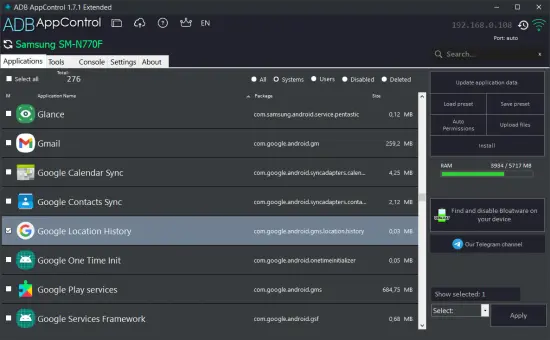
ADB AppControl Portable is an advanced, Windows‑based companion tool that lets you manage, tweak, and maintain Android applications and system behavior directly from your PC using the Android Debug Bridge (ADB) protocol. It builds on the free ADB AppControl application by adding a suite of “power‑user” features that make controlling apps, bloatware, updates, and permissions more convenient, consistent, and automated. The Extended version is aimed at Android enthusiasts, modders, frequent device‑flashers, multi‑device owners, and anyone who wants to keep several Android phones or tablets lean, fast, and privacy‑oriented without digging into raw ADB commands every time.
Core idea and target audience
The central idea behind ADB AppControl Portable is that ADB is powerful but verbose, and most users only want it for one or two practical tasks: disabling bloatware, uninstalling or backing up apps, and tweaking permissions. The software wraps ADB into a lightweight, graphical, one‑stop‑shop manager that lets you perform these operations at scale, across multiple devices, with better organization and automation than typing lines into a command prompt.
The target audience includes:
-
Android power users and tinkerers who routinely disable system bloat, manage permissions, or back up apps before flashing ROMs.
-
Multi‑device owners who manage several phones, tablets, or Android TVs and want to keep consistent app‑lists and tweaks across them.
-
Privacy‑minded users who want to strip out trackers, analytics, and unwanted Google or OEM services without needing root.
-
Casual but curious users who want to remove pre‑installed apps that cannot be uninstalled normally, but who are not comfortable with the Android SDK or ADB command line.
For these users, ADB AppControl Extended essentially becomes a centralized ADB control panel for the app layer of Android, one that sits next to your firmware‑flash tools but focuses only on software, not on system images or partitions.
Key capabilities inherited from the base version
Before covering what “Extended” adds, it helps to understand the core operations that ADB AppControl (free and Extended) provides:
-
View all apps: The program lists every installed application on the connected Android device, including both user‑installed apps and system‑preinstalled packages.
-
Disable and uninstall without root: You can disable or remove many pre‑installed apps that normally refuse to uninstall through the standard Settings app, using ADB rather than needing root access.
-
Backup APKs: You can extract the APK (or APK‑split / APKS) file of any installed app, creating a backup that can be reinstalled later or transferred to another device.
-
Permissions management: The interface lets you see which permissions an app requests and, depending on Android version and ADB support, adjust or revoke some permissions from the PC side.
-
Data management: You can clear app data or cache, reset default apps, or trigger other ADB‑related actions without touching the device’s UI.
-
Batch install and debloat: You can install multiple APKs at once and run a “Debloat Wizard” that suggests which system packages can be safely disabled based on community‑tested patterns.
These features alone make the base ADB AppControl very useful, but they are mostly exposed through a relatively simple, functional UI. The Extended version wraps that same raw power in a more configurable, persistent, and streamlined environment.
What “Extended” actually adds
The Extended edition of ADB AppControl is not a separate tool but a feature‑rich unlock layer on top of the regular application, activated via a license key tied to a single PC. The Extended functions are mainly about customization, persistence, convenience, and workflow automation, rather than adding entirely new ADB operations. The most important Extended features include:
1. Full‑tier access to the Debloat Wizard
The Debloat Wizard is a built‑in assistant that suggests which system apps and services can be safely disabled or uninstalled. In the base version, you may only see one level of recommendations, while the Extended version unlocks:
-
All levels of the Debloat Wizard, including more aggressive or experimental profiles that target navigation aids, OEM services, analytics components, and other deeply‑embedded packages.
-
More granular control over which categories of bloat are targeted (for example, only Google‑related, only OEM‑bloat, or only analytics/telemetry).
This lets you choose how conservative or aggressive you want to be with bloat‑removal, without the Extended version forcing you into a single preset.
2. Dark theme and interface customization
The Extended edition includes styling options that make the interface more comfortable for long‑term use:
-
A dark theme for the app, reducing eye strain during late‑night sessions or when working with multiple open tools.
-
Super Settings that let you:
-
Adjust the transparency of the main window, giving you a glass‑like or semi‑faded look if you wish.
-
Change the font size in the application list, which is helpful if you are working on a high‑resolution monitor or if you just want larger text for clarity.
-
Resize the icons in the app list, making them smaller for dense lists or larger when you want a more visual, icon‑driven view.
-
These cosmetic tweaks do not change the underlying ADB behavior, but they significantly improve the day‑to‑day user experience, especially for people who regularly manage large app inventories.
3. Persistent device and app lists
Managing multiple devices or large app‑sets often means you keep re‑connecting and re‑doing the same steps. The Extended version adds stronger state‑saving and persistence features:
-
Saving the history of IP addresses and devices: If you use ADB over Wi‑Fi, you can store a list of known device IPs so you do not need to type them in every time you reconnect.
-
Saving and loading app‑list presets: You can create named “profiles” of selected apps (for example, “default debloat for Samsung,” “privacy‑tightened‑Nokia,” “TV‑only‑apps”) and reuse them across devices or after re‑flashing.
-
Saving the icon cache: The program can store a cache of app icons, which speeds up data loading and reduces network chatter when you reconnect the same device. This is especially useful if you are repeatedly plugging in and unplugging the same phone or tablet for quick app‑maintenance sessions.
This level of persistence makes it easier to treat certain app‑lists and debloat‑sets as “templates” that you can roll out automatically to new or re‑flashed devices.
4. Sorting, hiding, and better organization
The Extended version enhances the app‑list UX so you can work more efficiently with hundreds of entries at once:
-
Sort apps by name, size, or selection state: Instead of a fixed alphabetical order, you can sort the list by size (to quickly find heavy system packages), by name, or by selection state so that the apps you have checked for disable/uninstall are grouped together.
-
Hide application icons: In dense lists, icons can clutter the view; the Extended edition lets you hide them, giving you a cleaner, more spreadsheet‑like display when you only care about package names and sizes.
-
Quick filtering and search: The interface often includes search and filtering so you can type in a partial package name and jump directly to the app you want to tweak, rather than scrolling through the whole list.
These changes are small individually but, together, they transform the app list from a static dump into a more interactive, organized management console.
5. Silent mode and batch‑operation enhancements
Frequent use of the tool can become annoying if every action prompts a confirmation dialog. The Extended edition adds a silent mode option that:
-
Suppresses non‑critical confirmations and pop‑ups, speeding up repeated operations such as disabling many apps one after another.
-
Still preserves warnings for irreversible actions (such as uninstalling core system components), so you do not accidentally brick a device through mistakes.
In addition, the Extended version improves batch and drag‑and‑drop workflows:
-
Ability to send multiple files to a device: You can push multiple APKs or other files to the Android device at once, instead of queuing them one‑by‑one.
-
Add APKs to the Install list by dragging and dropping the file into the program window, which is quicker than using the file‑explorer dialog multiple times.
-
This batch‑style behavior is especially useful when you are:
-
Restoring apps from a mass backup after a ROM flash.
-
Installing several helper tools (Tasker, MacroDroid, ADB‑control utilities) in one go.
-
Pushing test builds or custom‑built apps to multiple APK locations.
-
These workflow refinements reduce the friction of repetitive tasks, making ADB AppControl Extended feel less like a one‑off tool and more like a permanent part of your Android‑maintenance routine.
6. Network‑related optimizations and update control
Because many users rely on wireless ADB, the Extended version includes network‑related improvements:
-
Disable auto‑updating data: When you connect multiple devices or work in a busy environment, constant background data refresh can slow down the UI; the Extended edition lets you turn this off, manually refreshing when you choose.
-
Improved network‑connection handling: The program is tuned to handle lost or unstable ADB‑over‑Wi‑Fi links more gracefully, reconnecting or re‑initializing more reliably.
-
Extended version activation and updates:
-
The activation key is tied to one PC and does not expire, giving you access to all current and future Extended features.
-
Some functions (such as network features and activation) require an internet connection, but once activated, the ADB‑control operations themselves can be done offline.
-
This combination makes the tool more robust for users who manage devices remotely or in environments where the network is not always rock‑solid.
User interface and workflow design
The UI of ADB AppControl Extended is intentionally simple and focused on the app list as the central object rather than a flashy, multi‑panel console. Typical elements include:
-
A large app‑list view that shows icons, app names, package names, and sizes, often with checkboxes next to each entry.
-
Action buttons for common operations such as disable, uninstall, backup, clear data, and manage permissions, applied to the currently selected apps.
-
A toolbar or ribbon with tools for the Debloat Wizard, presets, network‑connect, and batch‑install.
-
A status bar that shows the connected device, ADB status, and any ongoing operations.
Because everything is triggered from that main list, the workflow is usually:
-
Enable USB Debugging on the Android device (and ADB over Wi‑Fi if you use wireless).
-
Connect the device via USB or Wi‑Fi and authorize the ADB connection.
-
Let ADB AppControl scan the device and build the app list, optionally loading a saved icon cache.
-
Use the Debloat Wizard presets or manually select apps to disable or uninstall, with the ability to apply those choices in one batch.
-
Use the batch‑install or send‑multiple‑files features to push APKs back to the device if needed.
-
Save your app‑list selections and presets for reuse on the same or other devices.
The Extended version never makes the interface overly complex; it just gives you more ways to control how that list looks, how it is sorted, and how it behaves over time.
Use cases and practical workflows
ADB AppControl Extended is especially effective in several recurring scenarios:
-
Post‑flash debloat and setup: After flashing a new ROM or factory‑resetting a phone, you can apply a saved debloat‑preset to quickly disable a whole set of pre‑installed apps without re‑checking each package.
-
Privacy‑hardening: You can systematically remove or disable analytics, tracking, and OEM telemetry packages across multiple devices, then save that configuration as a “privacy‑profile” preset.
-
Backup‑and‑restore for app archives: You can back up the APKs of all your favorite or important apps before a risky update or ROM change, then restore them in one batch when the new system is stable.
-
Testing and development: Developers and testers can push and remove test builds, debug tools, or ADB‑helper apps in bulk, without manually typing long ADB commands.
-
IT / device‑fleet management: For small organizations or power users managing a handful of devices, the program lets you standardize app‑sets and debloat‑profiles across all devices, ensuring a consistent, clean experience everywhere.
In each of these workflows, the Extended features—presets, saved device‑lists, batch‑import, batch‑uninstall, and silent mode—make the process dramatically faster and more repeatable than using raw ADB.
Strengths and limitations
ADB AppControl Extended brings a clear set of strengths to the table:
-
No‑root app management: You can disable and remove many system apps without needing root, which is a major convenience for most users.
-
Batch operations and debloat wizard: The ability to apply changes to many apps at once, guided by community‑tested patterns, greatly reduces manual effort.
-
Full icon‑ and list‑persistence: Saved presets, device‑lists, and icon caches make the tool feel tailored to your specific devices and workflows.
-
Quiet, efficient UI: The dark theme, font‑size and icon‑resizing options, and silent mode make long‑term use much more comfortable.
-
Cross‑device and cross‑ROM value: The same presets and workflows can follow you from phone to tablet to Android TV, and from one custom ROM to another, as long as ADB is available.
However, it also has some inherent limitations:
-
It does not replace system‑level tools for partition modifications, bootloader unlocking, or full‑image flashing; it only works at the app and ADB level.
-
Some deeply‑integrated system components cannot be safely removed without risking boot problems or breaking core services, so the Debloat Wizard and user judgment must be used carefully.
-
User‑data backup (settings, game progress, etc.) is not covered by the APK‑backup feature; that still requires other tools or cloud‑based sync.
These trade‑offs are natural for a tool that focuses specifically on the app and ADB layer, but they are important to keep in mind when deciding how aggressively to debounce or disable system components.
Overall user experience and positioning
In practice, ADB AppControl Extended feels like a minimalist but powerful ADB wrapper that sits on top of the Android SDK and makes its app‑management features easy enough for non‑developers while still flexible enough for power users. The Extended features are not about radically changing what ADB can do—they are about making the experience of doing the same things more often, more consistently, and more comfortably.
For someone who regularly tweaks Android devices, resets ROMs, or manages multiple phones or tablets, the value of saving presets, device‑lists, and icon caches, combined with batch uninstall, batch install, and silent mode, quickly pays off in reduced setup time and fewer repeated mistakes. The dark theme, font‑size controls, and list‑sorting options make the interface feel like it was built for long‑term daily use, not just occasional one‑off edits.
Ultimately, ADB AppControl Extended positions itself as the quiet, behind‑the‑scenes manager for your Android app ecosystem: a tool that lives on your PC, stays out of the way, and lets you keep your devices clean, fast, and personalized with minimal manual effort every time you connect a new phone or reinstall a ROM.
Release Notes:
- Updated platform tools to version 35.0.2.
- Problem with saving apks files has been solved.
- Secondary server address if the primary is not available.
- Fixed bug when IP history was not saved.
- The "Save icon cache" setting obsolete and was removed.
- The "About app" menu option has been returned.