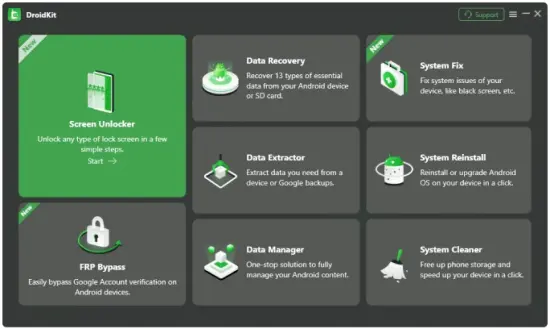
Portable DroidKit 2.3.9.20260727 (x64) Multilingual

DroidKit Portable is a comprehensive Android device management and data recovery application designed for users who need a reliable, structured, and efficient way to handle mobile data, recover lost content, transfer files between devices, and maintain overall device health. It is built for people who work with Android smartphones and tablets on a regular basis and want a desktop-based tool that can support a wide range of practical tasks without requiring multiple separate utilities.
The software focuses on bringing together data recovery, data transfer, system repair, and device management into a single environment that feels organized and approachable. In portable form, the application becomes especially practical for users who move between computers, use shared workstations, or prefer to keep essential utilities in a self-contained folder that can travel with them. That combination of broad device support and portability gives DroidKit Portable a clear identity as a modern, flexible tool for everyday Android maintenance and data handling.
Device Management as the Core
The most important quality of DroidKit Portable is that it treats device management as the main task rather than a secondary feature. Many mobile tools offer only limited functions such as simple file transfer or basic backup, leaving users to rely on multiple applications for different needs. This software takes a different approach by keeping the workspace centered on the Android device as a whole, providing access to a range of functions that support data protection, recovery, transfer, and system stability. That focus matters because mobile devices are central to daily life, and the ability to manage them effectively from a computer can save time, reduce stress, and prevent data loss.
This management-first orientation is especially valuable for people who rely heavily on their Android devices for work, communication, and personal use. A phone or tablet often contains contacts, messages, photos, documents, app data, and other information that would be difficult or time-consuming to replace if lost. DroidKit Portable supports a more comprehensive approach to device care by providing tools that address multiple aspects of mobile data handling in one place. The goal is not to replace native device functions, but to give the user a more structured and powerful way to manage their mobile environment.
Data Recovery Capabilities
One of the strongest features of DroidKit Portable is its data recovery functionality. Mobile devices are prone to accidental deletion, software glitches, failed updates, and physical damage that can result in lost data. The software provides a structured way to attempt recovery of important content such as photos, videos, contacts, messages, call logs, documents, and app data. This is particularly valuable when the information is not backed up elsewhere and cannot be easily recreated.
The recovery process is designed to be straightforward, guiding users through a series of steps that help identify what can be recovered and how to proceed. The software scans the device or available backups to locate recoverable data, then presents the findings in a way that is easy to review. Users can select specific items to restore, allowing for targeted recovery rather than an all-or-nothing approach. This level of control is important because not all recovered data may be needed, and users often want to focus on the most critical files first.
Data recovery also supports different scenarios, including deleted files, damaged devices, locked screens, and system failures. The software is built to handle a variety of situations, providing options for quick recovery when the device is still functional and more advanced recovery methods when the device is compromised. This flexibility makes it a practical tool for both everyday data loss and more serious device issues.
Device Transfer and Migration
DroidKit Portable includes robust tools for transferring data between Android devices, which is especially useful when upgrading to a new phone or tablet. Moving content from one device to another can be a complex process, especially when the user wants to preserve contacts, messages, photos, apps, and settings without losing anything important. The software simplifies this process by providing a structured workflow that handles the transfer in an organized and efficient manner.
The transfer process supports a wide range of data types, allowing users to move their entire digital environment from one device to another. This includes personal data such as contacts and messages, media files such as photos and videos, and application data that helps maintain continuity across devices. The software handles the transfer in a way that preserves the structure and organization of the data, making it easier to resume normal use on the new device without spending hours reconfiguring settings or re-downloading content.
Transfer capabilities also support cross-platform scenarios in some cases, allowing users to move data between Android and other systems when needed. This is valuable for people who switch between different types of devices or who need to integrate Android data into a broader digital workflow. The software makes it possible to manage these transitions with greater confidence, reducing the risk of data loss or incomplete transfers.
System Repair and Troubleshooting
Another important function of DroidKit Portable is its system repair capabilities. Android devices can experience a range of software issues that affect performance, stability, and usability. These may include boot loops, frozen screens, unresponsive apps, failed updates, or system errors that prevent normal operation. The software provides tools to diagnose and address these issues, helping users restore their devices to a functional state.
The repair process is designed to be accessible to users who may not have technical expertise. The software guides users through the steps needed to identify the problem and apply the appropriate fix. This may involve reinstalling system components, clearing corrupted data, or restoring the device to a stable configuration. The goal is to resolve issues without requiring professional service or expensive repairs, saving users time and money.
System repair also supports different levels of intervention, from soft fixes that preserve user data to more comprehensive repairs that may require a full system reset. The software allows users to choose the level of repair that best matches their situation, providing flexibility for different types of issues. This makes it a practical tool for both minor glitches and more serious system problems.
Backup and Restore Workflow
DroidKit Portable includes a comprehensive backup and restore system that allows users to create copies of their device data and recover it when needed. Regular backups are essential for protecting against data loss, and the software makes it easy to create complete or selective backups that include the most important content. This is particularly valuable for users who want to ensure their data is safe before making changes to their device or before traveling.
The backup process supports multiple data types, allowing users to choose what to include in each backup. This may include contacts, messages, photos, videos, documents, app data, and system settings. The software organizes the backup in a way that makes it easy to restore later, preserving the structure and relationships between different types of data. This helps ensure that the restored device feels familiar and functional rather than fragmented or incomplete.
Restore capabilities allow users to recover data from backups quickly and efficiently. This is useful when setting up a new device, recovering from data loss, or reverting to a previous state after a problematic update. The software handles the restore process in a way that minimizes disruption, allowing users to resume normal use with minimal downtime. This kind of reliability is essential for maintaining confidence in the backup system.
File Management and Organization
Beyond recovery and transfer, DroidKit Portable provides general file management tools that help users organize and maintain their Android device content. The software allows users to browse device storage, view files by category, and manage content in a structured way. This is useful for cleaning up unnecessary files, organizing photos and documents, and ensuring that the device does not become cluttered with unused data.
File management also supports bulk operations, allowing users to move, copy, or delete multiple files at once. This is particularly valuable when preparing a device for transfer, freeing up storage space, or organizing content for backup. The software makes it easy to perform these operations without needing to navigate through the device’s native file manager, which may be limited or inconvenient for certain tasks.
The ability to manage files from a desktop environment also provides a clearer view of the device’s content. Users can see their data in a larger, more organized interface, making it easier to identify what is important and what can be removed. This kind of visibility helps users maintain better control over their digital environment and reduces the risk of accidentally deleting important files.
Privacy and Data Control
DroidKit Portable is built with a focus on local data handling and user control. Device data, backups, and recovery operations are managed on the user’s own system rather than being sent to external servers. This approach supports greater privacy and gives users more confidence about how their information is being handled. For many people, that distinction is important because mobile data often includes personal, financial, and professional information that should remain private.
Local data handling also creates a more predictable workflow. Users are not exposed to variable network conditions, server-side changes, or service limits that can interrupt access to their data. Instead, the software operates within the user’s own system, giving them a consistent way to manage their device content. That predictability is especially useful when dealing with large backups, recovery operations, or time-sensitive transfers.
Because the software is portable, this control becomes even more convenient. Users can keep their device management environment close at hand and use it consistently across different situations. That combination of local handling and portability makes the application especially appealing to users who care about privacy, flexibility, and operational simplicity at the same time.
Practical Use Cases
DroidKit Portable fits a wide range of real-world device management scenarios. It is useful for people who have accidentally deleted important files and need to recover them. It is useful for users who are upgrading to a new Android device and want to transfer their data smoothly. It is useful for individuals who experience system issues and need to repair their device without professional help. It is useful for anyone who wants to maintain regular backups and keep their device organized. Because its functions are broadly relevant, it can become a regular part of device maintenance rather than a tool reserved for emergencies.
The software also works well when users need to handle multiple tasks in the same session. A user may want to back up their device, transfer some files, and clean up storage all at once. The application supports that variety by keeping the workflow consistent across different functions. That makes it easier to maintain focus and avoid the friction of switching between different tools or methods.
For people who manage multiple Android devices, the software can act as a stable maintenance hub that supports both everyday tasks and special operations. That helps build a consistent habit and makes it easier to approach device care with confidence. The result is a more orderly and less stressful approach to mobile device management.
Portable Working Style
The portable form of DroidKit Portable adds a practical layer of flexibility to its already focused design. Device management is often needed in different environments: at home, in an office, at a client location, or while traveling. A portable setup makes it easier to carry the application and keep it ready wherever it is needed. That is especially useful for users who work on multiple computers or who prefer to keep their tools self-contained.
Portability also supports a cleaner system workflow. Users who prefer not to leave extra traces on shared or temporary computers can work with a tool that stays close to its own files and settings. That makes the software easier to transport and easier to use in a variety of contexts. It aligns well with the everyday reality of device management, where the user may need to handle urgent tasks in different places and at different times.
For users who value consistency, portability means that their preferred management environment can stay the same from one machine to another. That can reduce confusion and make the experience feel more predictable. In that sense, the portable design is not just about convenience; it is part of the software’s practical usefulness.
Why It Stays Useful
DroidKit Portable remains useful because mobile device management is a fundamental need that does not change with trends. People will always need a calm, reliable way to handle their Android devices, and this software provides that in a comprehensive and practical form. Its emphasis on data recovery, transfer, backup, and system repair makes it a practical choice for users who want a tool that can handle multiple tasks without requiring separate applications.
Its focus on essential functions is another reason it stays relevant. Recovery, transfer, backup, repair, and file management are all core tasks that do not go out of style. The software is built around those needs rather than around temporary features. That gives it a stable role in device management, especially for users who value order and predictability. The portable format adds further relevance by making the tool easy to keep available wherever it is needed.
The combination of comprehensive functionality, practical workflow, and mobility gives the software a long-term value. It is the kind of utility users can return to whenever they need to manage their Android devices, whether for everyday maintenance, emergency recovery, or device upgrades.
Conclusion
DroidKit Portable is a practical and comprehensive Android device management application built for users who want a calm, controlled, and consistent environment for handling mobile data, recovery, transfer, and system maintenance. It helps users manage their devices without distraction, organize their content with ease, and move through tasks with smooth workflow. The software is especially useful for everyday users, professionals, and anyone who needs a reliable tool for Android device care. Its portable format makes it easy to carry between systems and use in different environments, which adds to its practicality. For anyone looking for a flexible device management tool that combines everyday usefulness with self-contained portability, DroidKit Portable offers a solid and dependable solution.
Features at a Glance
- Comprehensive Android device management and data handling environment.
- Supports data recovery for deleted, lost, or inaccessible content.
- Designed for device transfer, migration, and cross-device data movement.
- Quiet and unobtrusive interface that keeps attention on the tasks.
- Useful for contacts, messages, photos, videos, documents, and app data.
- Smooth workflow for backup, restore, and system repair operations.
- Simple file organization for managing device storage and content.
- Consistent management experience across different Android devices.
- Practical for everyday maintenance, emergency recovery, and upgrades.
- Helps reduce data loss risk with reliable backup and recovery tools.
- Supports system troubleshooting and software issue resolution.
- Easy to use for daily device management and data handling tasks.
- Portable working style for use across different computers and environments.
- Self-contained format suited to shared, temporary, or mobile setups.
- Designed to make Android device management more orderly and efficient.