
Portable Coolmuster Mobile Transfer 4.1.22
Coolmuster Mobile Transfer Portable is a comprehensive desktop application designed to facilitate seamless data migration between mobile devices across different operating systems and generations. The software operates from a Windows computer, serving as an intermediary hub that connects two mobile devices simultaneously through USB cables to enable direct phone-to-phone data transfer without requiring cloud services, network connectivity, or intermediate storage solutions.
This architecture provides users with complete control over their data migration process while maintaining privacy and security through local processing that never exposes personal information to external servers. The portable distribution model ensures that the application can run from any directory or removable storage device without requiring formal installation or system registry modifications, making it ideal for users who value system cleanliness, work across multiple computing environments, or need to perform data transfers on shared or restricted computers where software installation is not permitted.
Universal Platform Compatibility and Cross-System Migration
The foundation of Coolmuster Mobile Transfer Portable lies in its extensive platform support, encompassing the full spectrum of mobile operating systems and device generations currently in use. The application handles Android-to-Android transfers, iOS-to-iOS transfers, and critically, cross-platform migrations between Android and iOS devices in both directions. This bidirectional cross-platform capability addresses one of the most challenging scenarios in mobile data migration, where users switching from one ecosystem to another traditionally face significant obstacles in transferring their personal data, media libraries, and communication histories. The software bridges these ecosystem divides by implementing proprietary translation layers that convert data formats between platforms while preserving content integrity and metadata.
For Android device support, the application maintains compatibility with devices from all major manufacturers including Samsung, Sony, LG, Huawei, ZTE, Motorola, and numerous other brands that populate the diverse Android marketplace. This broad compatibility extends across Android version generations, from older legacy devices to the latest releases, ensuring that users upgrading from aging hardware to new flagship devices can migrate their data without compatibility concerns. The software handles the fragmentation inherent in the Android ecosystem by implementing multiple connection protocols and data access methods that adapt to different manufacturer implementations and Android version characteristics.
iOS device support encompasses the complete Apple mobile product line including all iPhone models from legacy devices through the latest releases, as well as iPad and iPod Touch devices. The application interfaces with iOS devices through established protocols that enable comprehensive data access while respecting Apple’s security architecture. This support extends to devices running various iOS versions, with the software automatically adapting its connection methods to accommodate differences in data access permissions and security requirements across iOS generations. For users maintaining multiple Apple devices or transitioning between iPhone generations, this comprehensive support ensures that no data remains stranded on old hardware.
The cross-platform transfer capabilities represent the software’s most technically sophisticated feature set, enabling seamless migration between fundamentally different operating system architectures. When transferring from Android to iOS, the application converts contact formats, message structures, and media metadata to align with iOS database schemas and file organization patterns. Conversely, Android-to-iOS transfers involve translating iOS-specific data formats into Android-compatible structures while preserving as much metadata and organization as the target platform supports. This bidirectional translation capability eliminates the traditional barriers that have made cross-platform migration difficult or impossible using native tools alone.
Comprehensive Data Type Support and Transfer Capabilities
Coolmuster Mobile Transfer Portable handles an extensive array of data types, ensuring that users can migrate virtually all personally significant content from their old devices to new ones. Contact transfer represents one of the most critical functions, as the contact database forms the foundation of personal and professional communication networks. The software transfers complete contact records including names, multiple phone numbers, email addresses, physical addresses, notes, profile photos, and custom fields that users may have created. For cross-platform transfers, the application intelligently maps contact fields between different data models, ensuring that maximum information is preserved even when the target platform uses different field structures or limitations.
Message history transfer encompasses SMS text messages, MMS multimedia messages, and in some configurations, messaging app conversations. This capability proves invaluable for users who maintain important message threads for personal, legal, or business purposes and cannot afford to lose their communication history during device transitions. The software preserves message timestamps, sender and recipient information, and message threading to maintain the chronological and contextual integrity of conversation histories. For cross-platform transfers, the application converts message formats between platform-specific database structures while maintaining readability and organization in the target environment.
Call log transfer captures complete call history including incoming, outgoing, and missed calls with associated metadata such as timestamps, call duration, and contact associations. This feature serves both practical and compliance purposes, enabling users to maintain records of their communication patterns and providing continuity in call history that might otherwise be lost during device transitions. The transferred call logs integrate seamlessly with the target device’s native call history interface, appearing as if the calls had been made on the new device.
Media file transfer encompasses photos, videos, and music libraries, representing some of the most storage-intensive and personally valuable data that users need to migrate. The software handles large media libraries efficiently, implementing intelligent transfer algorithms that verify file integrity and preserve metadata such as capture timestamps, GPS coordinates for photos, and ID3 tags for music files. For photos and videos, the application maintains folder organization and album structures where the target platform supports such organization, ensuring that users’ carefully curated media collections retain their organizational context after transfer.
eBook transfer supports common digital book formats including PDF and ePub files, enabling users to migrate their digital libraries between devices and platforms. This capability is particularly valuable for users who have invested in digital book collections and wish to maintain access to their purchases and personal documents across device transitions. The software transfers eBook files along with associated metadata such as reading position, bookmarks, and annotations where the target platform and reading application support such features.
Application data transfer represents one of the more complex capabilities, as different platforms and individual applications have vastly different data storage architectures and security models. The software transfers application lists and, where possible, associated data such as settings, saved states, and user-generated content. For cross-platform transfers, the application identifies equivalent applications available on the target platform and provides guidance on data migration strategies for applications that do not have direct equivalents or compatible data formats.
Calendar and bookmark transfer ensures that users maintain their scheduling information and web browsing shortcuts across device transitions. Calendar transfers include event details, recurring event patterns, reminders, and associated notes, integrating seamlessly with the target device’s calendar application. Safari bookmark transfers preserve browsing history organization and enable users to maintain their web research and navigation patterns across device transitions, particularly important for iOS-to-Android and Android-to-iOS migrations where different browsers and bookmark systems are involved.
Streamlined User Interface and Three-Step Workflow
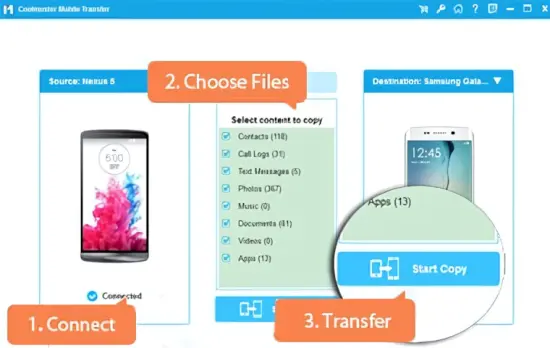
Coolmuster Mobile Transfer Portable employs a deliberately simplified user interface designed to make complex data migration operations accessible to users regardless of technical proficiency. The entire transfer process is organized around a three-step workflow that guides users through device connection, data selection, and transfer execution with minimal complexity or confusion. This streamlined approach reduces the cognitive load typically associated with data migration tasks, enabling users to focus on selecting the content they wish to transfer rather than navigating complex technical configurations or troubleshooting connection issues.
The first step involves connecting both source and target devices to the computer running the software via USB cables. The application automatically detects connected devices, identifies their operating systems and models, and displays them in a clear visual representation showing the direction of data flow. This automatic detection eliminates the need for users to manually specify device types or configure connection parameters, reducing potential sources of error and confusion. The interface provides clear visual feedback about connection status, indicating when devices are properly recognized and ready for data transfer operations.
The second step centers on data selection, where users specify which categories of content they wish to transfer from the source device to the target device. The interface presents available data types in an organized list with checkboxes, allowing users to select individual categories or use convenience options to select all available data types. For each data category, the application can display approximate data volumes to help users understand the scope of the transfer and estimate completion time. This transparency enables users to make informed decisions about what to transfer, particularly relevant when migrating to devices with limited storage capacity or when users wish to perform selective migration rather than complete data duplication.
The third and final step involves initiating the transfer process with a single click, after which the software handles all aspects of data extraction, conversion, and writing to the target device. During transfer, the interface displays real-time progress indicators showing overall completion percentage, current data category being transferred, and estimated time remaining. This continuous feedback keeps users informed about transfer status and provides reassurance that the process is proceeding normally. Upon completion, the software displays a summary report indicating which data categories were successfully transferred and any items that encountered issues, along with guidance on resolving common problems if necessary.
Performance Optimization and Transfer Efficiency
Transfer performance is optimized through multiple technical strategies that maximize throughput while maintaining data integrity and system stability. The software implements intelligent data chunking algorithms that break large transfers into manageable segments, enabling efficient memory usage and providing natural checkpoint opportunities for recovery in case of interruptions. This chunking approach also allows the software to display granular progress information and provides opportunities for parallel processing where the source and target devices support concurrent read and write operations.
USB connection optimization takes advantage of the highest-speed protocols supported by both connected devices and the host computer’s USB controllers. The software automatically negotiates optimal connection speeds and data transfer modes, adapting to device capabilities and cable quality to achieve maximum practical throughput. For devices supporting USB 3.0 or higher standards, the software leverages these capabilities to significantly accelerate transfer times compared to legacy USB 2.0 connections, particularly beneficial when migrating large media libraries or extensive application data.
Data verification mechanisms operate transparently during transfer operations, ensuring that all migrated content matches the source data exactly. The software employs checksum verification for critical data categories, comparing source and target data to confirm successful transfer without corruption or modification. This verification is particularly important for large media files and complex database transfers where even minor corruption could render data unusable or cause application malfunctions on the target device. When verification detects discrepancies, the software automatically retries the transfer of affected data segments to ensure complete and accurate migration.
Memory management strategies enable the software to handle large data transfers efficiently even on computers with limited RAM. The application implements streaming transfer architectures that process data in transit rather than loading entire datasets into memory before transfer, reducing memory footprint and enabling migration of datasets that exceed available system memory. This approach also reduces the risk of data loss in case of system crashes or power failures, as only the currently processing data segment is at risk rather than the entire transfer dataset.
Privacy and Security Architecture
Coolmuster Mobile Transfer Portable is designed with privacy and security as foundational principles, ensuring that users’ personal data remains protected throughout the migration process. The software operates entirely locally on the user’s computer, with all data processing, conversion, and transfer operations occurring within the local system environment. No data is transmitted to external servers, cloud services, or third-party systems, eliminating exposure to network-based security threats and ensuring that sensitive personal information never leaves the user’s direct control.
The local-only architecture provides particular benefits for users migrating sensitive data such as private messages, confidential contacts, or proprietary business information. By avoiding cloud-based transfer services, the software eliminates risks associated with data interception during transmission, unauthorized access to cloud storage, or potential data mining by service providers. This privacy-preserving approach aligns with increasing user awareness of data security and regulatory requirements in many jurisdictions that mandate strict controls over personal data handling.
Temporary file handling during transfer operations employs secure practices that prevent data remnants from persisting on the host computer after transfer completion. The software cleans up temporary files and cached data automatically upon successful transfer completion, leaving no trace of the migrated content on computers used for the transfer process. This cleanup is particularly important for users performing transfers on shared or public computers where leaving personal data remnants could pose security risks.
Connection security between the software and connected mobile devices leverages established protocols and authentication mechanisms to prevent unauthorized access during the transfer process. The software verifies device identities and establishes secure communication channels that protect against man-in-the-middle attacks or unauthorized device impersonation. These security measures ensure that data transfers occur only between the intended source and target devices without risk of interception or redirection to unauthorized recipients.
Error Handling and Recovery Capabilities
Robust error handling is essential for any data migration tool, as interruptions or failures during transfer operations could potentially result in data loss or corruption. Coolmuster Mobile Transfer Portable implements comprehensive error detection and recovery mechanisms that minimize the impact of common failure scenarios and provide clear guidance for resolving issues that require user intervention. The software monitors all aspects of the transfer process continuously, detecting connection problems, device errors, and data integrity issues in real-time.
Connection interruption handling addresses one of the most common failure modes in mobile data transfer, where USB cables may become disconnected accidentally or devices may enter sleep modes that disrupt communication. The software detects connection losses immediately and attempts automatic reconnection when devices become available again. For transfers that were in progress when the interruption occurred, the software can resume from the last successfully completed data segment rather than restarting the entire transfer, saving time and reducing the risk of duplicate or conflicting data on the target device.
Device compatibility issues are detected early in the transfer process, with the software providing clear error messages and guidance when connected devices are not fully supported or require specific configurations to enable data transfer. This early detection prevents users from investing time in data selection and transfer initiation only to encounter failures later in the process. The software maintains a compatibility database that is updated to reflect new device releases and operating system versions, ensuring that users receive accurate information about their specific device combinations.
Data conflict resolution becomes relevant when transferring data to target devices that already contain some of the same data categories being migrated. The software detects potential conflicts and provides users with options for handling duplicate or conflicting data, such as merging records, replacing existing data with source data, or skipping duplicate items. This flexibility allows users to choose the approach that best suits their specific situation, whether they are performing a complete device replacement migration or selectively adding content to an already-configured target device.
Portability and System Independence
The portable nature of Coolmuster Mobile Transfer Portable extends beyond simple execution from removable media to encompass a comprehensive approach to system independence and user control. All configuration data, device profiles, and transfer history are stored within the application directory, ensuring that the software leaves no trace on the host system registry or file system outside its own directory structure. This design philosophy supports users who work in shared or restricted environments where software installation is not permitted or where system cleanliness is a priority.
License management in the portable version operates without requiring online activation or persistent internet connectivity, enabling use in offline or air-gapped environments where necessary. License files can be transferred between systems along with the application directory, maintaining full functionality across different workstations without requiring re-activation or online verification. This approach respects user privacy and provides maximum flexibility for deployment scenarios ranging from personal use to enterprise distribution across multiple computers.
USB driver management is handled intelligently to accommodate the portable nature of the software while ensuring reliable device connectivity. The application includes necessary drivers for common mobile devices and can download additional drivers when needed, storing them within the application directory to maintain portability. This self-contained driver management eliminates the need for system-wide driver installations that would compromise the portable nature of the software while ensuring that the application can connect to a wide range of devices regardless of the host computer’s existing driver configuration.
Advanced Features and Configuration Options
While the default three-step workflow suits most users, Coolmuster Mobile Transfer Portable offers advanced configuration options for users with specific requirements or preferences. Transfer filters enable fine-grained control over which data is migrated, allowing users to specify date ranges for messages and call logs, select specific contact groups, or filter media files by format or size. This selective transfer capability is valuable for users who wish to migrate only recent data or specific subsets of their content rather than performing complete data duplication.
Transfer direction control provides flexibility beyond the standard source-to-target paradigm, enabling users to perform bidirectional synchronization where appropriate. This capability is useful for users who maintain multiple devices and wish to keep certain data categories consistent across all devices rather than performing one-way migration. The software intelligently handles bidirectional transfers by detecting and resolving conflicts based on timestamps or user-specified preferences, ensuring that the most current data is preserved across all synchronized devices.
Batch transfer capabilities enable users to queue multiple transfer operations for sequential execution, particularly valuable for users who need to migrate data to or from multiple devices. The software can process these queued operations automatically, reducing the need for user intervention and enabling unattended transfer operations for extended periods. This automation is particularly useful in enterprise or educational environments where multiple devices require standardized data migration or configuration.
Conclusion
Coolmuster Mobile Transfer Portable represents a comprehensive solution for mobile data migration that combines extensive platform compatibility, broad data type support, and streamlined user experience with robust technical foundations ensuring reliability, security, and performance. The application’s ability to handle cross-platform transfers between Android and iOS devices addresses one of the most challenging scenarios in mobile data migration, while its support for all major data types ensures that users can migrate virtually all personally significant content during device transitions. The three-step workflow makes complex data migration accessible to users regardless of technical proficiency, while advanced configuration options provide the flexibility required for specialized use cases. The portable distribution model respects user preferences for system cleanliness and deployment flexibility, while the local-only processing architecture ensures maximum privacy and security for sensitive personal data. For anyone facing the challenge of migrating data between mobile devices, whether for device upgrades, platform transitions, or data backup purposes, Coolmuster Mobile Transfer Portable offers a reliable, efficient, and user-friendly solution that addresses the full spectrum of modern mobile data migration requirements.