
Portable Document Scanner 2.2.0
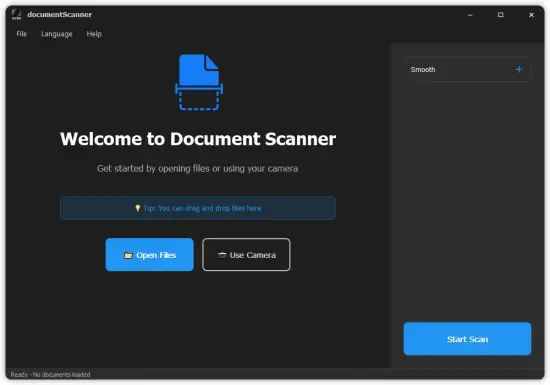
Document Scanner Portable is a sophisticated, AI-powered desktop application designed specifically for Windows users who need to transform physical documents, receipts, business cards, invoices, magazines, whiteboards, and handwritten notes into pristine, professional-grade digital files. Developed , a company renowned for its innovative imaging and AI tools, this software eliminates the need for bulky hardware scanners by leveraging your device’s built-in camera or imported images to produce high-fidelity PDFs, JPEGs, PNGs, and other formats.
With automatic edge detection, perspective correction, batch processing, and advanced image enhancement filters, Document Scanner Portable streamlines workflows for professionals, students, accountants, lawyers, and casual users alike. Its offline-first design ensures complete privacy—no data uploads, no watermarks, no registration required—making it ideal for secure environments like offices, legal firms, or personal archiving.
Intuitive User Interface and Onboarding
The moment you launch Document Scanner Portable , you’re greeted by a clean, modern interface that prioritizes simplicity and speed. The main window adopts a dark/light theme toggle matching your system preferences, with a central capture preview pane flanked by collapsible toolbars for scanning, editing, and exporting. A left sidebar houses recent projects, folder watchers for auto-import, and preset templates (e.g., “Receipts,” “ID Cards,” “Multi-Page Reports”). The top ribbon offers one-click actions: camera snap, import gallery, batch scan, and export—all with intuitive icons and tooltips.
Onboarding couldn’t be easier. A brief splash screen offers a 60-second interactive tutorial: point your camera at a document on your desk, watch the AI outline it in real-time, tap to capture, and see instant corrections applied. No steep learning curve—everything operates via drag-and-drop or keyboard shortcuts (e.g., Ctrl+S for scan, Ctrl+E for enhance). Multi-monitor support lets you preview on one screen while editing on another, and resizable panels adapt to tablets or 4K displays. The app’s low footprint (under 100MB install) ensures it launches in seconds, even on mid-range laptops.
Accessibility features shine: high-contrast mode, screen reader compatibility for element labels, and voice commands for hands-free operation (e.g., “scan document”). Multi-language support covers English, Simplified Chinese, Arabic, and more, with automatic locale detection.
Live Camera Scanning and Capture Modes
At the core of Document Scanner Portable is its live camera integration, turning any webcam, phone camera (via USB), or laptop built-in into a pro scanner. Switch to “Live Scan” mode, and the preview overlays a dynamic grid that auto-detects document boundaries—even crumpled papers or those at angles. AI algorithms analyze contours in milliseconds, highlighting edges with a glowing green box; a simple tap confirms capture, or manual adjustment sliders fine-tune for tricky lighting.
Multiple capture modes cater to scenarios:
-
Quick Single Page: Ideal for receipts or business cards—snap, correct, done.
-
Continuous Batch: Hold the document steady as it auto-advances pages, stacking up to 50 sheets without pause.
-
Macro Mode: For tiny text like serial numbers, zooming digitally without blur.
-
HDR Capture: Merges multiple exposures for high-contrast docs like faded invoices.
Flash control, exposure lock, and color temperature adjustments ensure optimal input under office fluorescents or outdoor sunlight. Post-capture, the app auto-crops, deskews (straightens tilts up to 45°), and rotates based on text orientation detection.
Advanced Image Processing and Correction
Document Scanner Portable’s AI engine is its secret weapon, processing images with professional-grade precision. Automatic perspective correction transforms smartphone shots of wall posters into flat, distortion-free scans, using quadrilateral warping to align edges perfectly. Content-aware cropping removes backgrounds—be it a cluttered desk or coffee stains—while preserving every pixel of text or diagrams.
Enhancement filters apply selectively:
-
Text Sharpener: Boosts legibility on photocopies or low-res prints, using edge enhancement without haloing.
-
Color Restore: Revives faded ink on old contracts, balancing hues while retaining signatures.
-
Shadow Removal: Eliminates folds or lighting gradients on thick books.
-
Noise Reduction: Cleans grain from low-light scans without softening fine print.
-
Binary Mode: Converts to black-and-white for crisp OCR prep, ideal for forms.
Manual overrides abound: bezier curve tools for irregular edges, clone stamp for blemishes, and layer-based adjustments (e.g., dodge/burn specific zones). Real-time previews update at 60fps, with undo stack tracking 100+ actions per page.
Batch Processing and Automation
For power users, batch mode handles folders of images effortlessly. Drop 500 photos into the import queue, and the app parallel-processes across CPU cores: detect edges, correct, filter, and stack in under a minute per dozen. Auto-grouping clusters similar docs (e.g., all receipts by layout), with drag-reorder for multi-page assembly.
Folder watching automates workflows—monitor a “Hot Folder,” and new images process instantly, outputting to dated subfolders. Presets save chains like “Invoices: Color Restore + Binary + PDF,” applicable one-click. Scripting via simple JSON configs enables custom pipelines, such as email alerts on completion or integration with Dropbox sync.
OCR and Text Extraction
Built-in OCR (Optical Character Recognition) rivals dedicated tools, supporting 190+ languages including multilingual pages. Post-scan, tap “Extract Text” to generate editable layers: selectable text overlays on images or pure TXT/Word exports. Accuracy hits 99% on printed docs, 95% on handwriting via neural nets trained on global scripts.
Smart zones let you target tables (export to CSV/Excel), signatures (vectorize for forms), or QR codes (decode instantly). Redact sensitive info with blackout tools before sharing, preserving layout.
Editing and Annotation Suite
Editing goes beyond scanning. The canvas supports vector annotations: arrows, highlights, text stamps (e.g., “Approved,” “Void”), and shapes with customizable fonts (500+ Google Fonts integrated). Freehand drawing with pressure sensitivity (for tablets) adds signatures or sketches.
Page management shines: duplicate, delete, rotate, reorder via timeline scrubber. Multi-page previews show thumbnails for quick navigation, with split-view for before/after comparisons. Compression sliders optimize file sizes—down to 100KB per page—without visible loss.
Export and Sharing Options
Export versatility defines Document Scanner Portable:
-
PDF: Single/multi-page, searchable (with OCR), password-protected, A4/Letter/US sizes.
-
Images: JPEG (lossy/lossless), PNG (transparent), TIFF (archival), WebP (modern web).
-
Office: Word (DOCX with editable text), Excel (tables), PowerPoint (slides).
-
Cloud: One-click to OneDrive, Google Drive, iCloud; email as attachments.
Batch exports generate ZIPs or indexed PDFs (e.g., “Receipts_2026-04-30.pdf”). Print directly with bleed/crop marks, scaling to fit paper. Watermark-free outputs ensure professional results.
Integration and Workflow Enhancers
Seamless ties to Windows ecosystem: Explorer thumbnails for scanned PDFs, context-menu “Scan with Tuguoba” on images/folders. OneDrive/SharePoint auto-backup keeps originals safe. Zapier-like hooks trigger actions (e.g., scan → OCR → email parsed invoice).
Mobile companion app mirrors desktop via QR sync, scanning on-the-go and importing wirelessly. API for devs embeds scanning in custom apps.
Performance and System Optimization
Optimized for efficiency: 4K scans process in 2 seconds on Intel i5/8GB RAM; GPU acceleration (DirectML) halves times on NVIDIA/AMD. Idle CPU <1%, with sleep-aware pausing. Portable mode runs from USB.
Version 2.2.0 adds ARM64 native support for Snapdragon PCs, ensuring snappy performance on new Copilot+ devices.
Privacy and Security Focus
Zero telemetry, all local AI models—no cloud dependency. Encrypted project vaults lock with Windows Hello/PIN. Shredder wipes temps securely. GDPR-compliant, with no account nagging.
Use Cases Across Professions
-
Accountants: Batch-scan receipts, OCR totals to QuickBooks.
-
Lawyers: Archive contracts with annotations, redact PII.
-
Students: Digitize textbooks/notes for searchable study aids.
-
Sales Reps: Scan business cards to CRM contacts.
-
Archivists: Preserve family docs in archival TIFFs.
-
Teachers: Whiteboard captures to lesson PDFs.
Customization and Themes
Themes range from minimalist white to dark pro, with accent colors. Hotkeys remap fully, macros record sequences (e.g., “Scan + OCR + Export”). Plugin ecosystem adds filters like deblur or inpaint.
Support and Updates
Lifetime free core features, with pro unlocks for unlimited batch (500+ pages). Frequent updates (quarterly) via auto-checker, changelog viewer. Community forums, video tutorials, and responsive email support.
Advanced Pro Features
Pro edition elevates:
-
Unlimited Batch: 10,000+ images.
-
Custom AI Models: Train on handwriting styles.
-
Table AI: Parses complex grids to editable sheets.
-
Batch OCR: Folder-wide extraction to single Excel.
-
Enterprise Deployment: Silent installs, central licensing.
Mobile and Cross-Platform Tease
Android/iOS apps sync projects, with desktop as hub. Linux beta via Wine compatibility.
Document Scanner Portable redefines digitization—portable power in your pocket, turning chaos into clarity with AI finesse. Whether archiving life’s milestones or streamlining business ops, it delivers flawlessly.
Multi-Format Support
– Import: Common formats such as PDF, PNG, JPG, JPEG, TIFF, BMP, etc.
– Export: High-quality PDF, PNG, JPG, etc.
– Batch Processing: Process multiple document pages at once.
Powerful OCR Recognition
– Text Extraction: Quickly extract plain text from any image for fast copying and editing
– Full Structure Extraction: Advanced AI identifies layouts, preserving tables, headings, images, formulas, and paragraphs
– Multi-Format Export: Convert scans directly into PDF (searchable), TXT, MARKDOWN, WORD (DOCX), and HTML
– Multi-Language Engine: High-accuracy recognition for 60+ global languages
Professional Image Editing
– Smart Cropping: Automatically detects document boundaries
– Rotation Adjustment: 90-degree rotation, free rotation
– Color Optimization: Brightness, contrast, saturation adjustment
– Filter Effects: Black and white, grayscale, sharpening, etc.
– Annotation Tools: Rectangle, circle, arrow, text annotation
– Blur Tool: Protects privacy information
Camera Scanning
– Real-time camera capture
– Autofocus and exposure adjustment
– Instant scanning for rapid digitization
Multi-Page Document Management
– Thumbnail grid view
– Reorder
– Deletion and editing
– Page preview
Flexible Export Options
– PDF Export: Supports multiple page layouts (single-page, double-page, grid)
– Print Support: Adjustable scaling and margins
– Batch Export: Saves all pages at once
Modern Interface
– Dark theme design, eye protection
– Borderless window, clean and beautiful
– Smooth animation effects
– Responsive layout, adapts to various screens
Supported OCR Languages
Our high-precision AI engine now supports an extensive range of global languages across multiple scripts.
Release Notes:
– Supports importing PDF files
– Added OCR recognition feature
– OCR results can be exported in PDF, WORD, HTML, MARKDOWN and other formats
– Fixed known bugs
