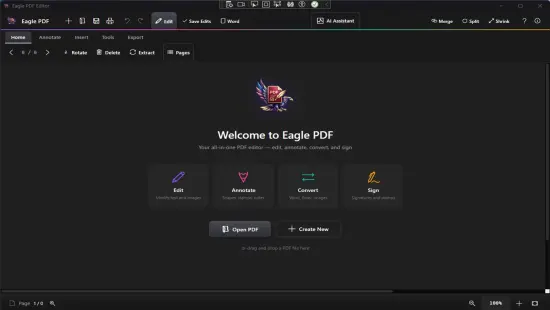
Portable Eagle PDF Editor 1.9.0

Eagle PDF Editor Portable is a powerful, professional-grade PDF creation, editing, and management software tailored for Windows users who need comprehensive control over their digital documents without the complexity or cost of enterprise suites. This standalone application excels at transforming scanned papers, Word files, images, and blank canvases into polished, searchable PDFs, while offering deep editing capabilities for text, images, forms, annotations, and layouts.
Designed for lawyers, accountants, educators, marketers, and small business owners, Eagle PDF Editor Portable combines an intuitive interface with advanced features like AI-powered OCR, Bates numbering, redaction tools, electronic signatures, and batch processing, all operating entirely offline to ensure maximum privacy and speed. Unlike subscription-based competitors that lock features behind paywalls, Eagle PDF Editor Portable uses a one-time purchase model with lifetime free updates, supporting Windows 10 and 11 (x64/ARM64) on everything from laptops to high-end workstations.
With virtual printer integration, Explorer context menus, and export options to Word, Excel, PowerPoint, and images, it streamlines workflows from document ingestion to professional delivery, handling everything from single-page invoices to 1,000-page technical manuals with ease.
Modern Ribbon Interface and Workflow
Eagle PDF Editor Portable launches to a clean, ribbon-style interface familiar to Microsoft Office users, balancing accessibility with pro-level depth. The central canvas displays full-page previews with smooth zoom (10-1000%) and pan, surrounded by collapsible panels for Pages, Layers, Comments, Bookmarks, and Properties. Dark, Light, and High-Contrast themes sync with Windows settings, while resizable toolbars and dockable panels adapt to multi-monitor setups or tablet use.
Tabbed document handling supports dozens of PDFs simultaneously, with drag-and-drop reordering and split-view comparisons. The Start screen offers quick actions: Scan to PDF, Convert Word, Merge Files, or Recent Projects grid. Global search scans text across entire libraries instantly, with thumbnail previews and filters by page range or keywords. Keyboard shortcuts abound: Ctrl+T edit text, F5 refresh, Alt+drag for nudges, Spacebar hand tool.
Performance optimization ensures 500-page documents load in seconds, with GPU-accelerated rendering for 4K displays. Touch gestures handle pinch-zoom and two-finger scroll on Surface devices, while stylus support enables precise markup.
PDF Creation from Any Source
Creation tools make Eagle PDF Editor Portable a virtual printing press. The Eagle Printer captures output from any Windows app—browsers, Excel spreadsheets, CAD drawings—producing customizable PDFs with DPI settings (72-2400), color spaces (RGB/CMYK/Grayscale), and compression levels. Combine wizard merges multiple files: interleave invoices with contracts, auto-rotate by content, or N-up impose for brochures.
Template library includes 50+ pro designs: invoices, resumes, proposals, flyers—fully editable with drag-and-drop placeholders. Blank page mode starts with rulers, guides, and snap grids for custom layouts. Headers/footers automate page numbers, dates, or logos via dynamic fields linking to document properties.
Batch creation processes folders: convert 200 Word docs to PDFs overnight, applying uniform watermarks or Bates stamps. Security locks apply instantly, enforcing compliance from the outset.
Direct Text and Object Editing
True editable text sets Eagle apart—you click paragraphs to modify like Word, changing fonts (800+ families), sizes, colors, spacing, or alignment; edits reflow across columns/pages intelligently. Multi-line selections preserve hierarchy, with spellcheck across 25 languages and auto-hyphenation preventing widows/orphans.
Objects unlock layout power: resize images with content-aware cropping (face/edge detection), vectorize logos, crop vector paths, or group elements. Tables edit dynamically—add rows, merge cells, apply formulas (SUM/AVERAGE), style borders/shading. Insert hyperlinks, QR codes, multimedia (embedded video thumbnails), or 3D models (U3D/PRC).
Alignment tools snap to grids/guides, distribute spacing evenly, or measure precisely (mm/inches/points). Master pages propagate designs to sections, with overrides for exceptions. Infinite undo tracks 10,000 actions, with version snapshots for client reviews.
AI-Powered OCR and Scanning
OCR engine converts scans/images to editable/searchable PDFs with 99% printed text accuracy, 92% handwriting recognition across 150+ languages. Zone selection targets tables (Excel-exportable), signatures (auto-vectorize), or equations. Pre-OCR cleanup auto-deskews, removes holes/punchmarks, and enhances contrast.
TWAIN/WIA scanner support handles flatbeds/feeders, auto-cropping multi-page stacks. Import phone photos with perspective correction, outputting layered PDFs (image + text).
Page Management and Assembly
Pages panel provides surgical control: insert/duplicate/delete/reorder via drag, extract ranges to new files, rotate/crop/scale (fit A4/Letter/Legal). Compare tool overlays documents, highlighting differences pixel-by-pixel with color-coded changes.
Merge/split operations interleave intelligently: combine chapters from separate files, auto-number continuously. Bookmarks generate table of contents automatically, editable hierarchically.
Forms and Interactive Design
Form Designer rivals Acrobat: drag text fields, checkboxes, signatures, date pickers, with JavaScript validation (email format, numeric ranges). Calculate fields sum invoices, set read-only post-submit. Flatten forms for printing, or export XFDF data.
Interactive elements include popups, rollover effects, audio annotations, and video links. Accessibility tags ensure screen reader compliance (Alt text, reading order).
Annotations and Review Collaboration
Markup suite: highlights, underlines, strikethroughs, callouts, freehand drawings (stylus-optimized), stamps (Approved/Rejected custom sets). Audio/video notes embed playback. Measure tools calibrate blueprints (area/volume/perimeter).
Shared review tracks changes with user initials/timestamps, threaded replies in comments. Bates numbering applies sequential IDs (LEGAL-000001) across batches, tamper-proof.
Redaction and Security Suite
Redaction blacks out permanently—search “SSN” across 500 pages, one-click blackout. Patterns detect credit cards/emails automatically. Sanitize metadata (authors, hidden layers, JavaScript).
AES-256 encryption sets granular permissions: print/copy/edit disabled separately. Digital signatures (PAdES/LTV) verify authenticity with certificates/visual seals. Password tiers: open vs. permissions.
Batch Processing and Automation
Batch wizard chains operations: OCR > redact keywords > Bates stamp > export Word. Process 1,000 files overnight, renaming via templates (Invoice_[DATE]_[SEQ]). Watch folders auto-import scans from hot folders.
Macro recorder captures edits, replayable via toolbar or hotkey. VBScript automates workflows: watch email attachments → OCR → file.
Conversion and Export Versatility
Bidirectional: PDF to Word/Excel/PPTX (layout/tables preserved 98%), images (JPEG/TIFF 1200DPI), HTML, RTF. Roundtrip editing retains fidelity.
Export reflows to EPUB, splits to single TIFFs for archiving, compresses 95% lossless. Virtual printer reverses: print Word to editable PDF.
Performance and Compatibility
Direct2D rendering scrubs 2,000 pages at 120fps. PDF 2.0/A3B support, XFA forms editable/flattened. ARM64 native, 500MB RAM idle.
Portable edition USB-run. Windows Sandbox compatible.
Use Cases by Profession
Legal: Bates discovery sets, redact PII, e-sign contracts.
Accounting: OCR invoices to Excel, batch forms.
Education: Annotate textbooks, export study guides.
Marketing: Brochures from InDesign, interactive catalogs.
Engineering: CAD PDFs measurable, technical manuals.
Customization and Integration
Themes/skins, ribbon personalization. Office plugins embed PDFs in Word. Explorer thumbnails, “Edit with Eagle” right-click.
Accessibility Built-In
WCAG tags, reflow mode, dyslexia fonts, high-contrast, TTS export.
Eagle PDF Editor Portable delivers Acrobat power at fraction cost—intuitive, offline, unlimited—mastering documents with precision and ease.
Release Notes:
• Fixed bugs freezing rotation.
• Added new Premium Templates
• New Features
• Fixed editing
• Language Support, English, German, Spanish, French, Italian, Albanian, Chinese, Polish, Russian, Portuguese.
• Light, Dark Themes support.
• Fixed new bugs, enhanced editor.
• Create PDFs with 24 stunning professional templates
• Edit text, images, and pages directly in your documents
• Merge multiple PDFs into a single document
• Split PDFs into pages or custom ranges
• Convert PDF to Word, PowerPoint, and images
• Annotate with highlights, stamps, and freehand drawing
• AI-powered OCR text recognition from scans
• Add headers, footers, watermarks, and page numbers
• Drag-and-drop page reorder and rotation
• 100% offline processing — files never leave your PC
• Open and render large PDFs instantly
• Invoice, contract, resume, and report templates built-in