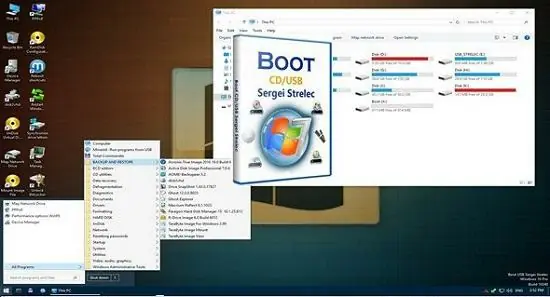
WinPE 11-10 Sergei Strelec 2026.09.08 (x64)

WinPE (Windows Preinstallation Environment) itself is a lightweight version of Windows, designed to prepare systems for installation, deployment, and recovery purposes. WinPE provides a minimal Windows operating system environment that can boot from various media such as USB sticks, CDs, or network locations.
WinPE 11-10 Sergei Strelec expands this foundation by integrating numerous utilities and tools specifically aimed at system installation, partition management, data recovery, malware scanning, hardware diagnostics, and much more. It is a customized build based on the official WinPE versions accompanying Windows 10 and Windows 11, enhanced with additional software designed to support a wide array of IT tasks.
The name “Sergei Strelec” is associated with the developer who curated this particular distribution, recognized for blending advanced functionality with user-friendly accessibility, creating a highly respected solution in the technical community.
Core Components and Features
WinPE 11-10 Sergei Strelec packs a comprehensive set of tools and features categorized broadly into system deployment, recovery, diagnostics, and repair. These include:
1. Windows PE Base (WinPE 10 & WinPE 11 Engine)
Built on Microsoft’s WinPE 10 and WinPE 11 environments, it supports modern hardware and Windows file system features, including UEFI boot modes and GPT partitions. Users benefit from native driver support, networking capabilities, and command-line access to Windows toolsets.
2. Bootable Media Compatibility
The distribution can be created on various boot media:
- USB flash drives,
- CDs/DVDs,
- Virtual boot from network environments via PXE.
The flexibility of booting options ensures compatibility in diverse scenarios.
3. Advanced Partition and Disk Management Utilities
The toolkit contains powerful disk utilities such as:
- Partition management tools for creating, resizing, formatting, and deleting partitions (DiskGenius, Partition Wizard, etc.).
- Disk cloning and imaging software supporting sector-by-sector replication.
- File system repair tools capable of fixing NTFS, FAT, and other volumes.
- Secure disk wiping and formatting utilities to prepare drives securely.
- Tools for mapping and handling RAID arrays.
These utilities allow comprehensive control over physical and virtual disk structures.
4. Data Recovery Framework
WinPE 11-10 Sergei Strelec integrates multiple data recovery tools facilitating:
- Deleted file retrieval,
- Partition recovery,
- Corrupted filesystem repair,
- File preview and selective extraction.
Support for recovering various file types across different partitioning schemes enhances data retrieval possibilities after inadvertent loss or disk failures.
5. System Diagnostics and Hardware Utilities
To evaluate and troubleshoot hardware, the package includes:
- CPU, RAM, and GPU testing tools,
- Hardware information viewers,
- Stress test utilities,
- Temperature monitoring,
- Device driver installers.
This diagnostics suite helps identify potential hardware faults and incompatibilities.
6. Network Tools and Internet Utilities
Connectivity can be crucial during recovery; thus, WinPE 11-10 Sergei Strelec bundles:
- Network diagnostics and configuration tools,
- FTP and web browser clients,
- Remote desktop clients,
- Remote management and scripting tools.
These support remote troubleshooting or file transfers when local access is limited.
7. Malware Scanners and Security Tools
Included are lightweight antivirus scanners and malware removal utilities specifically suited to run in a preinstallation environment with offline scanning capabilities, empowering users to clean infected systems without booting the compromised OS.
8. Windows Installation and Activation Tools
The environment includes utilities to:
- Install fresh copies of Windows 10 and 11,
- Apply updates,
- Manage Windows activation and licensing,
- Backup and restore system state,
- Manage system backups and snapshots.
This makes it ideal for rapid deployment or system repair tasks.
9. Boot Loader and BIOS/UEFI Utilities
For managing startup configurations, users find tools to:
- Repair boot sectors and bootloaders (BCD repair),
- Reset BIOS or UEFI passwords,
- Backup and restore BIOS settings,
- Configure hardware startup routines.
Such functionalities are essential to recover systems stymied by boot-related corruption.
10. Customization and Scripting Capabilities
Power users and IT administrators can customize their WinPE boot environment by:
- Adding custom scripts,
- Loading additional drivers,
- Integrating proprietary tools,
- Automating routine diagnostics or recovery processes.
This adaptability aligns the platform to individual organizational policies or personal preferences.
User Interface and Usability
Although based on a minimal Windows environment, Sergei Strelec’s WinPE is equipped with a graphical user interface designed for ease and efficiency:
- Start Menu-like Launcher: Provides categorized easy access to utilities.
- Multiple Desktop Environments: Options include lightweight shells to suit performance or familiarity preferences.
- Multi-Window Support: Enables multitasking modules running simultaneously.
- Mouse and Keyboard Navigation: Supports standard Windows interaction paradigms.
- Multilingual Support: Available in multiple languages for global accessibility.
The user experience focuses on fast navigation and task completion, suitable for experienced technicians and less advanced users alike.
Practical Applications
WinPE 11-10 Sergei Strelec serves a broad spectrum of applications across many IT domains.
System Maintenance and Repair Technicians
Featuring robust system repair, driver installation, and malware removal tools, it functions as an all-in-one recovery station to troubleshoot and fix diverse PC issues effectively.
Data Recovery Specialists
The integrated recovery and imaging tools allow data recovery professionals to rescue data from damaged drives and prepare images for forensic analysis.
Network Administrators and IT Professionals
With network utilities and remote management, it facilitates widespread system deployment, troubleshooting, and maintenance across enterprise environments.
Software Deployment and Imaging
The Windows installation utilities and automation scripts enable companies to rapidly roll out standardized Windows builds, updates, or patches.
Educational Use for System Training
It provides a flexible, real-world environment for training students and new technicians on Windows troubleshooting without risking live systems.
Benefits of Using WinPE 11-10 Sergei Strelec
- Comprehensive Toolkit: Consolidates hundreds of utilities for every phase of system maintenance and recovery.
- Modern Windows Compatibility: Supports the latest hardware and Windows architectures, including TPM and Secure Boot.
- Highly Customizable: Allows incorporation of additional software or scripts specific to use cases.
- Lightweight and Fast: Bootable environment loads rapidly and runs on minimal hardware.
- Offline Operation: Does not rely on full operating system boot, vital for damaged or infected machines.
- Extensive Hardware Support: Compatible with wide-ranging devices due to integrated driver packs.
- Free to Use: Unlike costly recovery suites, it is freely available, making it accessible for budget-conscious setups.
Step-by-Step Sample Workflow: Recovering a Corrupted Windows Installation
- Prepare Bootable Media: Using a USB drive, create a bootable environment with WinPE 11-10 Sergei Strelec.
- Boot Target System: Start the computer from the USB media.
- Load Environment: Select preferred GUI and wait for WinPE to initialize all tools.
- Diagnose Issue: Run hardware diagnostics checks to rule out physical problems.
- Mount Partitions: Use disk management to access system drives and verify integrity.
- Repair Startup: Utilize bootloader repair tools to fix corrupted boot configuration.
- Scan For Malware: Launch offline antivirus scan to detect and remove threats.
- Recover Data: Use file recovery tools to extract critical files to external media.
- Reinstall or Repair Windows: Run Windows installation or repair tools included.
- Finalize and Remove: Exit environment and reboot into repaired system.
System Requirements and Compatibility
WinPE 11-10 Sergei Strelec is compatible with:
- Windows 7 / 8 / 10 / 11 hardware platforms,
- USB 2.0 / 3.0 or CD/DVD boot,
- Works on UEFI and legacy BIOS systems.
Its design ensures operability even on older or resource-limited hardware.
WinPE 11-10 Sergei Strelec as the Essential Toolkit for Windows System Professionals
In conclusion, WinPE 11-10 Sergei Strelec is a uniquely powerful and flexible Windows Preinstallation Environment that combines a modern and comprehensive utility suite with the reliability of Microsoft’s WinPE foundation. It empowers users with tools to deploy, repair, recover, and maintain Windows systems efficiently and effectively.
Its extensive capabilities cover every critical aspect from low-level hardware diagnostics to high-level OS deployment, making it the preferred choice for professionals across IT domains. The software’s free availability, regular updates, and stunning breadth of features ensure it remains indispensable for those managing complex Windows environments in today’s fast-paced technical landscape.
Whether addressing emergency system failures, orchestrating mass deployments, or performing forensic data recovery, WinPE 11-10 Sergei Strelec delivers unmatched versatility and performance – a true powerhouse for Windows system professionals worldwide.
X64 Image contains:
Acronis True Image 30.1.1 Build 42386
Acronis True Image 2019 Build 17750
Acronis True Image 2016 Build 6595
Acronis True Image 2014 Build 6673
Acronis Cyber Protect 15.0.27009
EaseUS Todo Backup 16.3.0 Build 20250122
Active Disk Image 25.0.6
StorageCraft Recovery Environment 5.2.5.37836
R-Drive Image 7.3.7312
Veritas System Recovery 22.0.0.62226
Symantec Ghost 12.0.0.11761
TeraByte Image for Windows 3.64
AOMEI Backupper 8.1.0
Hasleo Backup Suite 5.5.2.2
Drive SnapShot 1.50.0.1816
Macrium Reflect 10.0.8750
Macrium Reflect 8.1.8631
QILING Disk Master 8.7
Disk2vhd 2.02
Acronis Disk Director 12.5 Build 163
Paragon Hard Disk Manager 17.20.17
Paragon Hard Disk Manager 15 10.1.25.1137
MiniTool Partition Wizard 13.5
AOMEI Partition Assistant 10.10.0
AOMEI Dynamic Disk Manager 1.2.0
NIUBI Partition Editor 10.2.0
EaseUS Partition Master 19.23.0 build 202510091552
DiskGenius 6.0.1.1645
Active Partition Manager 25.0.1
Defraggler 2.22.995
O&O Defrag 23.0
HDD Low Level Format Tool 4.50
Active KillDisk 25.0.23
Active Disk Editor 25.0.7
DiskCopy 1.4.5.0
Diskpart GUI Micro 2.0
HD Tune 6.00
Check Disk GUI
Victoria 5.37
Hard Disk Sentinel 6.30
CrystalDiskInfo 9.7.2
CrystalDiskMark 9.0.1
AIDA64 8.20.8100
BurnInTest 8.1 Build 1025
PerformanceTest 10.2 Build 1002
CPU-Z 2.18
HWiNFO 8.40.5900
HDDScan 4.1.0.29
PassMark MonitorTest 4.0 Build 1002
OCCT 10.0.5
Keyboard Test Utility 1.4.0
HDD Regenerator 2024
IsMyLcdOK 6.11
Drevitalize 4.10
Linpack Xtreme 1.1.8
LinX 0.6.5
HWMonitor 1.55
Opera
PENetwork 0.59.B12
TeamViewer 15
Ammyy Admin 3.9
AeroAdmin 4.9.3786
AnyDesk 9.6.7
Supremo 4.11.6.2935
HopToDesk 1.45.5
RustDesk 1.4.5
µTorrent 3.5.5
FileZilla 3.68.1
Internet Download Accelerator 6.18.1.1633
PuTTY 0.83
FtpUse 2.2
OpenVPN 2.6.13
UltraVNC 1.6.4.0
TightVNC 2.8.84
Radmin 3.5.2.1
Radmin VPN 2.0.4899.9
Advanced IP Scanner 2.5.4594.1
ZOC Terminal 7.25.5
Windows Login Unlocker 2.3.0.6404
Reset Windows Password 9.3.0.93
PCunlocker 5.6
Simplix Password Reset 5.1
UltraISO 9.7.5.3716
PowerISO 9.0
gBurner 5.5
Total Commander 9.00
FastStone Capture 7.7
IrfanView 4.38
STDU Viewer
Microsoft Office 2007
Bootice 1.3.4
Unlocker 1.9.2
7-ZIP
WinNTSetup 5.4.2
78Setup 2.4 (author conty9)
Double Driver 4.1.0
Imagex
GImageX 2.1.1
USB Safely Remove 7.0.5.1320
Media Player Classic
EasyBCD 2.4.0.237
EasyUEFI 6.2.0
Far Manager 3.0 Build 6161
Dism++ 10.1.1002.1
WinHex 20.8 SR1
CIHexViewer 2.0
TeraCopy 3.6.0.4
FastCopy 3.85
Everything 1.4.1.1026
WinDirStat 2.2.2
TreeSize 9.0.1.1830
HardLink ShellExtension 3.9.2.4
NirLauncher 1.30.21
Remote Registry Editor
Registry Editor PE
Runtime Captain Nemo 7.00
Acronis Shell Extension
OemKey
ShowKeyPlus 1.1.18.0
CMOS De-Animator 3
Paragon HFS+ for Windows 11.4.298
Paragon Linux File Systems for Windows 5.2.1183
Windows Recovery Environment (WinPE 10, 11)
Data Recovery
R-Studio 9.5.191671
Active File Recovery 25.1.2
Active Partition Recovery 25.1.2
Runtime GetDataBack 5.76
Runtime GetDataBack for NTFS 4.33
Runtime GetDataBack for FAT 4.33
Runtime Raid Reconstructor 5.16
EaseUS Data Recovery Wizard 20.1.0 Build 20260107
TestDisk 7.3
Recover Keys 12.0.6.311
ShadowCopyView 1.16
Restore WLAN passwords
Encryption
DiskCryptor Build 1.3 Beta
VeraCrypt 1.26.24
HDDaRTs 20.03.2025
BIBM++ 1.92
MemTest86 11.6.1000 (UEFI)
HDD Regenerator 2011
MHDD 4.6
Victoria 3.52
Memtest86+ 7.20 (UEFI/DOS)
HDAT2 7.6
GoIdMemory PRO 7.85
Active Password Changer Professional 5.0
Ghost 11.5
BootIt Bare Metal 1.92
DiskGenius 5.2.0.878
Kon-Boot for Windows 2.5.0
Hard Disk Sentinel for DOS 1.21
DRevitalize 3.32
CHZ Monitor Test 2.0
Release Notes:
Programs updated:
Hasleo Backup Suite 5.9.2.2
EaseUS Todo Backup 16.3.1 Build 20260721
MAKE Disk Master 8.8
Drive SnapShot 1.51.0.1869
MiniTool Partition Wizard 13.9
EaseUS Partition Master 20.8.0 Build 202609011518
EaseUS Disk Copy 7.2.0 Build 20260723
Aomei Partition Assistant 10.12.1
AIDA64 Extreme 8.35.8400
CrystalDiskInfo 9.9.2
CPU-Z 3.01
HWiNFO 8.52
WinDirStat 2.8.0
RustDesk 1.4.9
HopToDesk 1.46.40
AnyDesk 9.7.15
Supreme 5.0.3.3883
PuTTY 0.85
Added:
ECOMTECH BOOT Fixer 1.0.2
A script has been added to WinPE x64 to remove unnecessary Appx applications
Removal is possible on an installed system where you were not logged in as a user
For example, immediately after unpacking the image using WinNTSetup
Or when installing from an ISO image with the first reboot in WinPE.
As well as the “Remove Capability” and “Enable/Disable Feature” scripts
If, following a Windows or BIOS update, your system with Secure Boot enabled fails to load the bootloader signed by the UEFI CA 2011 certificate and requires the UEFI CA 2023 certificate, switch to the version signed with the new certificate.
Follow the instructions in the Readme.txt file in the EFI\boot folder on your bootable USB drive.