
Portable Folio On-Device Document OCR 1.0.0
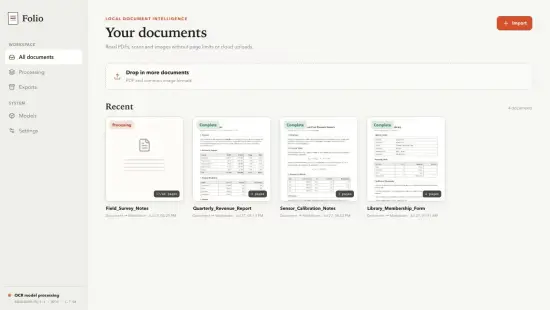
Folio On-Device Document OCR Portable is a focused text recognition application designed to extract written content from scanned documents, images, and photographed pages without requiring cloud processing or persistent internet connectivity. It is built for users who need a reliable, private, and efficient way to convert visual text into editable and searchable material directly on their own machine. The software is especially useful for people who work with scanned paperwork, research materials, historical archives, handwritten notes, printed forms, invoices, receipts, and other text-heavy documents that need to be turned into usable digital text. In portable form, the application becomes particularly practical for users who move between computers, use shared workstations, or prefer to keep essential utilities in a self-contained folder that can travel with them. That combination of on-device processing, local control, and mobility gives Folio On-Device Document OCR Portable a clear identity as a modern, privacy-conscious tool for turning images of text into structured written content.
On-Device Processing Philosophy
The defining characteristic of Folio On-Device Document OCR Portable is its commitment to local processing. Many OCR tools rely on remote servers to analyze images and return text, which can introduce delays, dependency on internet access, and concerns about where the document data actually goes. This software takes a different approach by performing the recognition work entirely on the user’s own system. That means the document never has to leave the local environment unless the user chooses to send it somewhere else afterward. For many people, that distinction is important because it keeps sensitive or confidential information under direct control.
On-device processing also creates a more predictable workflow. Users are not exposed to variable network conditions, server-side changes, or service limits that can interrupt recognition tasks. Instead, the software operates within the user’s own system, giving them a consistent way to handle documents. That predictability is especially useful when dealing with large batches of material, time-sensitive projects, or documents that require repeated passes for accuracy. The portable format reinforces this by letting users keep the application ready in a familiar place, whether they are working at home, in an office, or on the move.
This local-first approach also supports a more disciplined document workflow. Users can maintain their own rhythm for scanning, recognizing, reviewing, and organizing text without relying on an external platform. That makes the software suitable for people who want to keep their document handling private, efficient, and self-contained. It becomes a practical tool for personal, professional, and academic use where control over data matters as much as the accuracy of the result.
Text Recognition Core
The heart of Folio On-Device Document OCR Portable is its text recognition engine, which is designed to handle a wide variety of document types and visual conditions. Printed text can appear in many forms: clean digital scans, photographed pages, slightly skewed images, low-contrast documents, or materials with mixed fonts and sizes. A good OCR system must be able to cope with that variety if it is going to remain useful in everyday work. The software is built around that reality, aiming to provide accurate extraction from material that may not be perfectly prepared.
The recognition process works by analyzing the visual structure of the document, identifying character shapes, and converting them into corresponding text values. This is more complex than simple pattern matching because real documents often contain irregular spacing, overlapping elements, faint print, or background noise. The software handles these challenges by using a recognition model that can adapt to different visual conditions and still produce readable output. That makes it especially valuable for users who need to work with older documents, scanned archives, or materials that were not originally created for digital processing.
Text recognition accuracy is not only about identifying letters correctly. It is also about preserving the structure of the document in a way that makes sense for later use. Line breaks, paragraph spacing, and basic layout behavior can all affect how usable the extracted text feels. The software is designed to keep that structure as intact as possible so that the result does not require excessive reformatting before it can be used. That attention to practical usability is one of the reasons the application feels more like a real document tool than a simple converter.
Scanned Documents and Image Sources
Folio On-Device Document OCR Portable is designed to work with a broad range of source materials. Users may be processing formal scans from a document scanner, photographs taken with a phone or camera, screenshots of text, or images saved from other sources. The software treats these inputs as opportunities for recognition rather than obstacles. That flexibility is important because people rarely work with perfectly prepared documents in real life. More often, they need to extract text from whatever they have on hand, whether it is a quick snapshot of a page or a carefully scanned file.
This variety makes the software useful for many different workflows. A researcher may photograph a page from a book and turn it into editable notes. A student may scan lecture handouts and convert them into searchable text. An office worker may extract information from printed forms or invoices. A hobbyist may digitize old letters or archived materials for preservation. In each case, the source may look different, but the goal is the same: turn the visible text into something that can be edited, searched, and reused.
The software also handles mixed content well. A single document may contain headings, body text, captions, and tables that all need to be treated carefully during recognition. The application is designed to respect that complexity by processing the image in a way that keeps the text coherent and usable. That makes it more than a simple image-to-text converter; it becomes a practical bridge between paper-based material and digital workflows.
Privacy and Data Control
Privacy is one of the strongest reasons users prefer on-device OCR tools, and Folio On-Device Document OCR Portable fits that need well. Documents often contain personal, financial, legal, medical, or business information that users do not want to send to external servers. Local processing gives the user more confidence about where the content resides and how it is being handled. That sense of control is particularly valuable in environments where confidentiality is important or where data-handling policies are strict.
Data control is also about workflow ownership. A user who processes documents locally can decide when to recognize text, how to review the output, and what to keep afterward. This reduces dependence on external services and makes the process more predictable. It also allows users to build their own habits around document handling without worrying about service limits or changing online conditions. For many people, that autonomy is one of the strongest reasons to choose a local OCR application.
Because the software is portable, this control becomes even more convenient. Users can keep their OCR environment close at hand and use it consistently across different situations. That combination of local handling and portability makes the application especially appealing to users who care about privacy, flexibility, and operational simplicity at the same time. It turns document recognition into a routine that can be managed safely and efficiently.
Practical Document Workflows
Folio On-Device Document OCR Portable is built for real-world document handling, not just theoretical conversion. The software supports workflows where the recognized text is meant to be used for something meaningful: studying, reference, filing, note-taking, research, reporting, or content creation. That means the output needs to be readable, editable, and structured in a way that makes the next step easier. The application is designed around that goal, helping users move from image to text without losing the value of the content along the way.
For many users, the workflow begins with a document that needs to be preserved or repurposed. A scanned contract may need key terms extracted. A research article may need to be converted into notes. A set of forms may need to be made searchable. A page of handwritten instructions may need to be turned into a typed reference. The software supports these uses by giving users a dependable way to bring text into a digital form that can be organized and reused. That makes it a practical assistant for information-heavy work.
Document workflows also benefit from the ability to handle batches of material. Users often need to process multiple pages or files in a single session. The software is designed to make that process manageable rather than tedious. It allows users to move through documents with a clear rhythm: load, recognize, review, and save. That predictability is what makes the tool useful for recurring tasks rather than only occasional conversions.
Language and Text Variety
Text recognition is not only about one language or one style of writing. People work with documents in many languages, with different fonts, sizes, and formatting conventions. Folio On-Device Document OCR Portable is built to support that variety so that it remains useful in real-world settings. A user may be working with English documents, multilingual materials, or content in other languages depending on their field of study or work. The software aims to handle that diversity with a practical level of adaptability.
Font and style variation also matter. Printed text can appear in serif or sans-serif fonts, bold or light weights, large headings or small footnotes. A good OCR system must be able to recognize characters across these differences without breaking the flow of the text. The application is designed to manage that variation by treating the document as a complete visual structure rather than a collection of isolated letters. That helps preserve readability and keeps the output usable for further editing.
Mixed content is another important consideration. Documents may include numbers, dates, symbols, and special characters that are essential to the meaning of the text. The software is built to handle these elements carefully so that the recognized text does not lose important details. That makes it especially valuable for technical documents, financial records, research materials, and other content where accuracy is critical.
Review and Refinement
OCR output is rarely perfect on the first pass, and Folio On-Device Document OCR Portable is designed to support the review and refinement process that follows recognition. Users often need to check the result for small errors, spacing issues, or formatting irregularities before the text is ready for use. The software fits into that workflow by making it easy to move from raw recognition into a more polished final form. That is important because the value of OCR depends not only on speed, but on how usable the final text feels.
Refinement is especially important when the document will be used for publication, study, or formal documentation. A small error in a name, number, or technical term can change the meaning of the content. The software supports careful review by keeping the recognition process clear and the output easy to inspect. This makes it easier for users to catch mistakes and correct them before the text is finalized. That attention to detail is what makes the tool suitable for professional and academic use.
The review stage also helps users develop better scanning habits over time. By seeing how different image qualities affect the recognition result, they can learn to prepare documents in a way that improves accuracy. This creates a feedback loop that makes future work more efficient. The software becomes not just a converter, but a practical guide to better document handling.
Productivity and Daily Use
Folio On-Device Document OCR Portable is especially valuable for productivity-driven use cases. People who deal with paper-based material on a regular basis often need a way to convert that content into digital text quickly so they can search, share, summarize, or archive it. The software helps by turning images into something easier to work with in everyday digital life. That may mean creating searchable notes from printed materials, drafting content from scanned pages, or preparing reference material for later use. The value is not only in accuracy, but also in how much time the software can save when a user needs to work efficiently.
The portable format adds another layer of practicality. A user can keep the software available in a familiar location and use it wherever document recognition is needed. That is helpful for people who work across several systems or who travel with a laptop and want a consistent tool they can rely on. When OCR is part of a daily routine, the ability to launch a known environment quickly can make the whole process feel smoother and less disruptive. This portability aligns well with the software’s broader identity as a focused utility rather than an all-purpose suite.
In busy workflows, small efficiencies matter. A few saved steps can make document recognition much more approachable as a routine task. The software contributes to that by keeping the process centered on the task itself rather than on setup complexity. This means users can move more quickly from image to text and spend more of their time on the actual work of reviewing and using the document.
Use Cases
Folio On-Device Document OCR Portable can be used in a wide variety of real-world situations. A student can turn printed lecture notes into editable study material. A researcher can convert scanned articles into searchable text for analysis. An office worker can extract information from invoices, forms, or reports. A writer can transform printed drafts into digital text for editing. A hobbyist can digitize old letters, recipes, or archived materials for preservation. In each case, the software helps transform visual content into something easier to review, edit, and reuse.
It is also useful for personal organization. Scanned receipts, bills, and records can be turned into searchable text for easier filing and reference. Printed instructions or manuals can be converted into digital documents that are easier to navigate. Notes from meetings or events can be captured and preserved in a more flexible form. These day-to-day use cases show how OCR can become a practical productivity habit rather than a specialized technical task.
The software’s portability broadens these uses further. Since the tool can be kept in a self-contained format, it is suitable for people who move between study spaces, offices, home workstations, and travel setups. The same familiar OCR environment can be available wherever work happens, which makes the software easier to integrate into a flexible lifestyle or professional routine.
Workflow Simplicity
Another important advantage of Folio On-Device Document OCR Portable is its focus on keeping the workflow understandable. A good OCR tool should not require a complicated setup just to begin recognizing text. The software is best understood as a practical bridge from image to text, and that simplicity is part of its value. The user needs to be able to bring in a document, start the recognition process, review the output, and continue with their work. By remaining centered on those steps, the application stays approachable and efficient.
Workflow simplicity also reduces mental friction. When a tool is easy to use, users are more likely to rely on it regularly rather than only when they have extra time. That matters because document recognition is often most useful when it can happen quickly, while the material is still fresh in the user’s mind. The software supports that timing by keeping the process direct and predictable. It turns OCR into something that can be woven naturally into a daily routine.
This kind of simplicity does not mean the software is basic in a limiting sense. Instead, it means the application is focused. Its purpose is clear, and the workflow reflects that purpose. Users who want a capable recognition tool without a lot of unnecessary complexity will likely find this approach appealing.
Why It Stands Out
Folio On-Device Document OCR Portable stands out because it combines several qualities that are often difficult to find together in one tool: on-device processing, modern recognition, privacy-conscious design, and a portable workflow. Each of these qualities matters on its own, but together they create a recognition environment that feels practical and modern. It is not trying to be a general document platform or a cloud service with many unrelated features. Instead, it is designed to do one important task very well and in a way that respects the user’s need for control and flexibility.
The software also stands out because it serves a broad range of users without losing its identity. A student, researcher, office worker, writer, or hobbyist can all use the same tool for different recognition goals. That versatility is a sign of a well-designed utility. It is specific enough to feel focused, but broad enough to remain useful across many different kinds of work. This makes it a practical choice for anyone who regularly works with documents that need to be digitized.
Its portable nature strengthens that identity by making the tool easier to move, easier to keep ready, and easier to fit into changing workflows. For users who need a recognition environment they can rely on in more than one place, this is a major advantage.
Conclusion
Folio On-Device Document OCR Portable is a focused text recognition application built for users who want practical, private, and efficient document conversion. Its on-device processing model supports greater control over sensitive material, while its recognition engine aims to provide accurate text from a variety of printed and photographed sources. The portable format makes the software especially useful for people who move between systems or prefer a self-contained workflow. The application is well suited to research, study, office work, content creation, and personal organization, where visual text needs to become clear, usable digital content. For users who want a recognition tool that combines flexibility, privacy, and modern local performance, Folio On-Device Document OCR Portable offers a compelling and practical solution.
Features at a Glance
- On-device text recognition for scanned documents and images.
- Supports printed text from a variety of sources and visual conditions.
- Useful for research, study, office work, and personal organization.
- Local processing approach that supports greater control over document content.
- Designed for private and confidential document handling.
- Useful for converting pages into editable and searchable text.
- Supports review and refinement workflow for improved accuracy.
- Practical for batch processing of multiple pages or files.
- Works well for turning printed material into digital documents.
- Portable working style for use across different computers and environments.
- Self-contained format that fits mobile and shared workflows.
- Useful for productivity routines where printed information must be captured quickly.
- Designed to be straightforward, focused, and easy to integrate into daily work.
- Balances recognition accuracy, privacy, and practical control in one tool.
- Adaptable to different document types, fonts, and text styles.
What languages does it support?
The interface is available in English, Simplified and Traditional Chinese, Japanese, Korean, French, German, Spanish and Italian. Text recognition covers considerably more languages than the interface itself offers.