
Portable MediaHuman mTube 2.9.10 (0928)
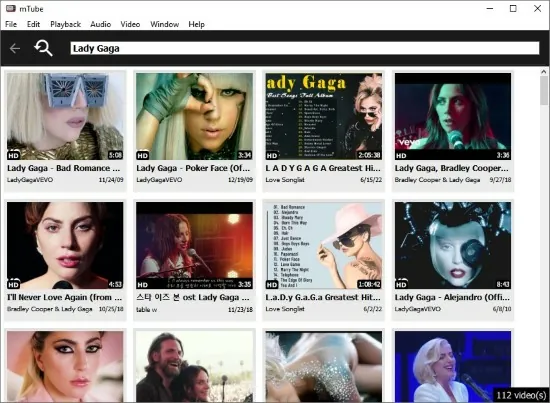
MediaHuman mTube Portable is a specialized media player software designed to enhance and simplify the experience of watching YouTube videos on desktop operating systems such as Windows and macOS. It offers a user-centric approach to viewing YouTube content by removing common distractions like ads and comments, delivering a smooth video playback environment without the typical interruptions encountered when using traditional web browsers for the same purpose.
Core Functionality and User Experience
At its core, mTube Portable acts as a standalone application for streaming YouTube videos without a browser. Users can start watching by either using a built-in search feature to find videos by title or by directly pasting a YouTube URL into the program. Once the video is loaded, it plays in a simple and clean interface focused entirely on the video content. One of the primary appeals of mTube is that it eliminates advertisements that normally appear on YouTube videos, making for an uninterrupted viewing experience. Additionally, the software has no comments section displayed alongside videos, which contributes to a more focused and less cluttered interface.
Users can control playback through basic functionality including play, pause, and fullscreen mode. There is also the option to select from various available video qualities, allowing users to choose resolutions supported by the video itself to optimize performance or data usage. The experience is streamlined to be straightforward and relaxing, removing the noise often associated with the YouTube browsing experience.
Features and Convenience
mTube includes several features aimed at convenience and efficient video consumption:
-
Ad-Free Viewing: Ads that typically play before or during YouTube videos are completely blocked, enabling a cleaner and faster viewing experience without interruptions.
-
No Comments Displayed: By hiding the comments section, mTube removes distractions and potential negativity, focusing the interface solely on the video content and related videos.
-
Built-In Search: The app features its own search bar, allowing users to find videos by keywords without opening a browser or loading the full YouTube website.
-
Related Videos Display: To keep users engaged, mTube shows related videos alongside the currently watched content, facilitating easy discovery of additional videos.
-
Direct URL Input: Users may simply copy and paste the YouTube video URL into the app to start playback immediately, bypassing the need for browsing or navigating web pages.
-
Video Quality Selection: The user can select the preferred video resolution from available options, balancing video clarity and streaming performance according to their device capabilities and network conditions.
-
Fullscreen Mode: A fullscreen viewing option enhances immersion, allowing users to watch videos without any interface distractions.
Platform Compatibility and Interface
MediaHuman mTube is available for both Windows and macOS, offering broad compatibility with popular desktop environments. The interface is designed to be minimalist and intuitive, ensuring ease of use for people of all experience levels. The player’s controls and search function are straightforward, requiring minimal learning or configuration. Although it is a desktop application, its operation closely mimics the convenience of mobile or web-based apps but improves the experience by eliminating ads and clutter.
Use Case and Audience
mTube is especially valuable for users who frequently watch YouTube but are frustrated by the advertisements, distracting comments, and clutter that accompany videos on the platform. It serves well as a dedicated offline-style desktop player for YouTube content, offering a distraction-free alternative to using regular web browsers for video streaming.
It appeals to:
-
Users seeking a cleaner viewing experience free from ads.
-
Those wanting to avoid YouTube comments and other social distractions.
-
Individuals who prefer a lightweight desktop client for video playback over a web interface.
-
Users with limited bandwidth who want control over video quality.
-
Anyone who desires a quick and easy way to start watching specific YouTube videos without navigating the full site.
Technical and Performance Aspects
The app is lightweight and runs cleanly on supported systems, requiring minimal resources compared to full web browsers loaded with modern web technologies and ads. Playback is generally smooth, and the app handles YouTube’s video streams efficiently. The integrated search function, while functional, may respond slightly slower than the web version of YouTube, but this tradeoff is offset by the removal of ads and comments.
mTube supports both 32-bit and 64-bit versions of Windows and macOS, ensuring compatibility with a wide range of hardware. It keeps the interface simple but functional, targeting essential video playback needs without introducing unnecessary complexity.
Summary
MediaHuman mTube is a dedicated YouTube video player designed to offer an ad-free, comment-free, distraction-minimized viewing experience for desktop users. It features built-in search capabilities, direct video URL input, video quality controls, and fullscreen mode, all wrapped in a minimalist, user-friendly interface. Its core strength lies in providing a cleaner and more focused way to watch YouTube videos on Windows and macOS, making it a useful tool for users frustrated by the conventional YouTube interface and its advertising and social features.
Overall, mTube Portable represents an elegant solution for hassle-free YouTube video consumption, blending ease of use with performance in a lightweight desktop application. This software is ideal for anyone looking to enhance their video viewing experience by eliminating ads and comments while maintaining quick access to video content through search or direct URL playback.