
Portable Wise Program Uninstaller Pro 3.3.1.277
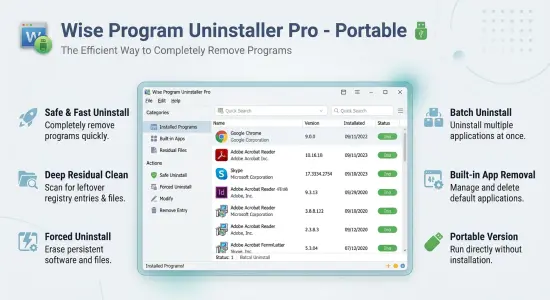
Wise Program Uninstaller Pro Portable is a specialized Windows application designed to help users completely remove installed software, unwanted applications, obsolete programs, and stubborn entries that standard Windows uninstall methods often fail to eliminate entirely. While the built-in Windows uninstaller is sufficient for basic software removal, it frequently leaves behind folders, registry keys, temporary files, settings, and other residual data that can gradually clutter the operating system. Wise Program Uninstaller Pro Portable addresses this issue by combining advanced uninstall technologies with deep system scanning capabilities.
The software is built around the idea that removing a program should be as thorough as installing it. Over time, computers accumulate dozens or even hundreds of applications, many of which are no longer needed. Every uninstallation can potentially leave traces behind, which may consume disk space, create registry clutter, and make system maintenance more difficult. Wise Program Uninstaller Pro Portable provides an efficient way to identify and eliminate these remnants while offering greater control over software management.
The application is suitable for everyday home users, IT technicians, advanced enthusiasts, and professionals who regularly install and remove software. Its intuitive interface allows inexperienced users to perform thorough uninstalls while still providing powerful tools for advanced maintenance and cleanup tasks.
User-Friendly Interface for Efficient Program Management
One of the most noticeable strengths of Wise Program Uninstaller Pro Portable is its clean and organized interface. The application immediately displays a comprehensive list of installed software, helping users gain a clear overview of what’s currently present on their systems.
Program entries are categorized and displayed with useful information, including software names, publishers, installation dates, versions, and sizes. This allows users to quickly identify applications that may no longer be necessary or that occupy significant amounts of storage space.
The search functionality makes it easy to locate specific applications within large software collections. Rather than manually browsing through extensive program lists, users can instantly find the target application and initiate the removal process.
The streamlined design helps reduce complexity without sacrificing functionality. Essential tools remain easily accessible while advanced features are available when needed.
Advanced Uninstallation Technology
At the core of Wise Program Uninstaller Pro Portable lies its advanced uninstall engine. Standard Windows uninstallers typically launch the original removal routine provided by software developers. While this often removes the main program files, it may not address leftover data scattered throughout the system.
Wise Program Uninstaller Pro Portable supplements standard removal processes by performing additional scans after the primary uninstall operation has completed. These scans search for:
- Residual folders
- Configuration files
- Registry entries
- Temporary files
- Cache data
- Obsolete shortcuts
- Empty directories
- Application-related remnants
By locating and deleting these leftovers, the software helps ensure a cleaner and more complete uninstallation experience.
This approach can lead to a better-maintained operating system with fewer unnecessary files and registry entries accumulating over time.
Force Uninstall for Stubborn Applications
Certain software packages can become difficult or impossible to remove using traditional methods. Corrupted uninstallers, missing installation files, damaged registry entries, or incomplete installations can all prevent successful removal.
Wise Program Uninstaller Pro Portable incorporates a powerful Force Uninstall feature designed specifically for such situations.
When activated, the tool analyzes file locations, registry entries, installation paths, and associated data connected to the target program. Instead of relying solely on the original uninstaller, it directly removes the components associated with the application.
This functionality proves particularly valuable when dealing with:
- Broken installations
- Corrupted programs
- Uninstall errors
- Incomplete software updates
- Abandoned applications
- Legacy utilities
- Partially removed software
Force Uninstall can help users regain control over software that would otherwise remain stuck within the system.
Comprehensive Leftover Scanning
Residual program files are among the most common causes of unnecessary system clutter. Even small programs may leave hundreds of files distributed throughout different directories.
Wise Program Uninstaller Pro Portable uses deep scanning methods to identify these remnants after a program has been removed. The software carefully examines areas commonly used by applications, including user profiles, shared directories, application data locations, and registry branches.
The cleanup process helps reduce:
- Wasted disk space
- Orphaned registry entries
- Empty folders
- Duplicate references
- Invalid shortcuts
Although leftover files may not immediately affect system performance, removing them contributes to better organization and easier long-term maintenance.
Efficient Software Health Management
Modern software environments become increasingly complex over time. Applications generate logs, temporary files, update packages, caches, and various supporting data structures.
Wise Program Uninstaller Pro Portable introduces software health management features that help users monitor and maintain cleaner application environments.
These maintenance tools can identify obsolete software-related data and provide recommendations for cleanup. By reducing unnecessary digital clutter, users may improve overall system organization and reclaim valuable storage space.
The software health functionality acts as a supplementary maintenance layer, extending beyond simple program removal and helping to keep installed applications better managed.
Removal of Windows Applications
In addition to traditional desktop software, Wise Program Uninstaller Pro Portable supports the management of modern Windows applications.
Many users install numerous applications through Microsoft’s integrated app ecosystem. Over time, some of these apps become unnecessary yet remain on the system.
The software simplifies the process of viewing and removing modern application packages through a unified interface. Instead of navigating multiple system menus, users can manage both desktop and Windows applications from a single location.
This capability streamlines software administration and saves time when maintaining a clean operating environment.
Custom Uninstall Functionality
Not all software appears correctly in Windows application listings. Certain portable programs, partially removed applications, or manually installed utilities may lack standard uninstall entries.
Wise Program Uninstaller Pro Portable addresses this challenge through its Custom Uninstall feature.
The user simply points the software toward the application’s installation directory, executable file, or remaining program folder. The tool then performs a detailed analysis to determine related components and removable items.
This feature can be particularly useful for:
- Legacy software
- Hidden installations
- Portable applications
- Incomplete installations
- Unregistered programs
Custom Uninstall expands the software’s flexibility and ensures that difficult software scenarios remain manageable.
Program Repair Capabilities
Software removal is not always the desired solution. Sometimes applications malfunction due to damaged files, interrupted updates, or corrupted configuration settings.
Wise Program Uninstaller Pro Portable includes program repair options for supported software.
Rather than immediately removing problematic programs, users may attempt repair operations that restore missing components and correct installation issues.
This can save time and preserve valuable configurations while resolving software stability concerns.
The ability to repair applications before uninstalling them provides additional flexibility for troubleshooting and maintenance workflows.
Context Menu Integration
Convenience plays a significant role in effective system administration.
Wise Program Uninstaller Pro Portable offers context menu integration, allowing users to initiate removal operations directly from desktop shortcuts or application icons.
Instead of opening the software, locating the program, and selecting uninstall options, users can begin the process with a few simple clicks.
This streamlined workflow is especially beneficial for technicians and power users who regularly manage software installations across multiple systems.
Improved Registry Management
The Windows Registry serves as a central database for software settings and operating system configuration.
When programs are removed improperly, registry entries often remain behind. Over time, these abandoned references may accumulate and contribute to system clutter.
Wise Program Uninstaller Pro Portable scans for and removes obsolete registry entries associated with deleted applications.
The cleanup process focuses on software-related references, helping maintain a more organized registry structure without requiring users to manually search for leftovers.
This automated approach minimizes risk while improving efficiency.
Safe Uninstall Mode
For users who prefer a more conservative approach, Wise Program Uninstaller Pro Portable provides Safe Uninstall functionality.
Safe Uninstall initiates the application’s official removal mechanism before conducting post-uninstall analysis for residual files and registry entries.
This method preserves software vendor removal procedures while enhancing their effectiveness through additional scanning and cleanup stages.
Safe Uninstall offers an excellent balance between reliability and thoroughness.
Enhanced Productivity for IT Professionals
System administrators and support technicians often spend considerable time uninstalling problematic software and resolving installation conflicts.
Wise Program Uninstaller Pro Portable helps reduce this workload through automation and intelligent scanning technologies.
Technicians can use the software to:
- Remove failed installations
- Clean software leftovers
- Troubleshoot conflicts
- Eliminate stubborn programs
- Recover disk space
- Maintain cleaner workstation environments
The software’s efficiency makes it a valuable addition to professional maintenance toolkits.
Lightweight Performance and Fast Operation
Despite its extensive feature set, Wise Program Uninstaller Pro Portable remains relatively lightweight.
The application launches quickly, consumes minimal system resources, and performs scans efficiently. This allows users to conduct maintenance operations without significantly impacting overall system responsiveness.
The lightweight design also makes it a practical choice for older computers as well as modern high-performance systems.
Because resource consumption remains low, users can perform software cleanup tasks while continuing other activities with minimal disruption.
Suitable for Home and Business Environments
Wise Program Uninstaller Pro Portable adapts well to a variety of usage scenarios.
Home users benefit from simplified software management and cleaner systems, while business users appreciate reliable removal capabilities and reduced maintenance workloads.
The software can be useful in:
- Home computers
- Office workstations
- Educational environments
- Technical support departments
- Repair shops
- Managed IT infrastructures
Its flexible feature set enables effective deployment across different computing environments.
Why Wise Program Uninstaller Pro Portable Stands Out
Many uninstall utilities focus solely on removing software. Wise Program Uninstaller Pro Portable goes further by emphasizing comprehensive cleanup, software health monitoring, and advanced removal scenarios.
Key areas where it excels include:
- Thorough leftover detection
- Force removal capabilities
- Support for modern applications
- User-friendly operation
- System maintenance integration
- Flexible uninstall methods
- Efficient resource usage
These strengths make it an attractive solution for users seeking greater control over software management and system cleanliness.
Conclusion
Wise Program Uninstaller Pro Portable provides a comprehensive solution for removing unwanted software, cleaning residual files, and maintaining a more organized Windows environment. Its blend of standard removal procedures, advanced scanning technologies, force uninstall capabilities, software health tools, and maintenance functions offers significantly more control than traditional Windows uninstall methods.
Whether users need to remove obsolete software, eliminate stubborn applications, repair problematic installations, or simply keep their systems clean and organized, Wise Program Uninstaller Pro Portable delivers a practical and efficient toolkit. With its intuitive interface, thorough cleanup capabilities, and flexible feature set, it remains a valuable utility for anyone serious about maintaining a well-managed Windows computer.
Features at a Glance
- Complete software removal solution
- Advanced leftover file detection
- Deep registry cleanup capabilities
- Force Uninstall for stubborn applications
- Safe Uninstall mode
- Custom Uninstall functionality
- Support for Windows desktop programs
- Support for modern Windows applications
- Program repair options
- Software Health management tools
- Cleanup of residual folders and files
- Removal of obsolete shortcuts
- Detailed software information display
- Fast application search function
- Context menu integration
- Lightweight system resource usage
- User-friendly graphical interface
- Efficient maintenance workflow
- Improved software organization
- Suitable for home and business users
Release Notes:
1. Refined the cleanup rules for "Uninstallation leftovers" and "Software redundant files" under the "Software Health" feature.
2. Polished and updated user interface icons.
3. Removed the feature that prompted to uninstall the corresponding program when deleting a desktop shortcut.
4. Resolved known bugs from the previous version.
