Portable Auslogics ChillMate 1.1.0.6 Multilingual

Auslogics ChillMate Portable is a Windows utility built for users who want more control over laptop temperatures, fan noise, battery behavior, and performance balance without having to dig through complicated system settings. It focuses on one practical goal: helping a computer stay cooler, quieter, and more responsive under everyday workloads or heavier tasks. For anyone who notices heat build-up during gaming, editing, browsing with many tabs, or long work sessions, this kind of software can make the machine feel more stable and easier to live with.
What makes Auslogics ChillMate Portable appealing is its mix of monitoring and adjustment tools in one place. Instead of treating overheating as a problem that only appears after the system becomes sluggish, it gives users a way to watch important hardware indicators in real time and respond before temperatures climb too far. That approach is useful because heat does not just affect comfort; it can also influence speed, noise, battery drain, and long-term hardware wear. By combining visibility and control, the program tries to reduce guesswork and make thermal management feel more manageable.
Another strength of Auslogics ChillMate Portable is that it does not ask the user to become a hardware expert first. Many people know their laptop gets hot, but they do not always know which component is under pressure, which activity is causing the rise, or which system changes are safe. This software is designed to simplify that process by translating temperature and performance data into a more practical workflow. It helps turn technical concerns into everyday decisions such as choosing a lighter profile, giving an app more resources, or letting the system conserve energy when maximum speed is not needed.
Main Purpose
Auslogics ChillMate Portable is centered on maintaining a healthier temperature range for Windows devices, especially laptops that are more vulnerable to heat than larger desktop systems. Laptops often have limited cooling space, compact fans, and dense internal layouts, so a sustained workload can quickly create uncomfortable surface temperatures and loud fan activity. The software aims to reduce that strain by keeping system behavior aligned with what the computer is actually doing at the moment.
The practical result is a smoother experience during tasks that normally push hardware harder. When the machine is working lightly, the tool can support quieter and more economical behavior. When the load increases, it can help organize performance in a more controlled way rather than letting the system drift into unnecessary heat and noise. That makes it especially relevant for users who switch frequently between office work, media playback, web browsing, and demanding applications.
It is also useful for people who want a more proactive relationship with their device. Instead of waiting for the fan to roar or the system to slow down, they can use the software to monitor conditions and choose a suitable operating mode. This is a simple idea, but it is one that can noticeably improve day-to-day comfort, especially on a machine used for long stretches.
Monitoring Tools
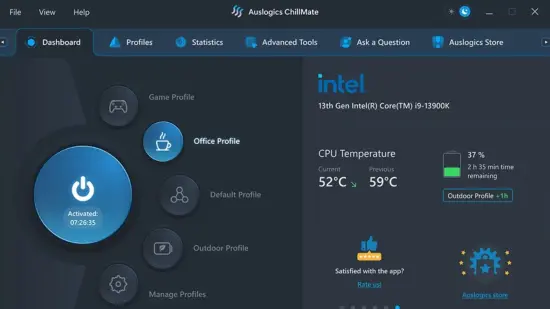
One of the most practical parts of Auslogics ChillMate Portable is its real-time monitoring view. The software tracks key values such as CPU temperature, GPU temperature, battery level, RAM usage, and other system activity indicators. This gives users a broader picture of how the computer is behaving rather than focusing on only one measurement. In real use, that broader view matters because overheating is often connected to multiple factors at once.
The value of monitoring lies in pattern recognition. For example, a user may notice that the laptop stays cool while browsing, but temperature spikes quickly when a certain game, export task, or background process starts. That makes it easier to identify what is placing pressure on the system and which kind of profile or adjustment may help. Over time, those observations can lead to better habits and fewer unpleasant surprises.
Real-time data also helps users build confidence. If the software shows that the CPU and GPU are operating within reasonable limits, they can continue working without unnecessary concern. If the readings begin to rise, they have a clearer signal that the machine may benefit from a more conservative profile or a change in workload. This kind of feedback loop is one of the most valuable qualities of a cooling utility because it replaces vague suspicion with visible information.
Performance Profiles
Auslogics ChillMate Portable includes performance profiles designed to match different everyday scenarios. Instead of forcing the system to behave the same way at all times, it lets users shift between modes that favor speed, balance, or efficiency depending on what they are doing. That flexibility is important because the ideal thermal setup for a quiet office session is not the same as the ideal setup for gaming or heavy creative work.
A profile-based approach makes the software more approachable. Users do not need to adjust every component manually each time they change activities. They can choose a mode that suits the current task and let the application handle the rest. This reduces friction and makes the tool feel less like a technical utility and more like a practical assistant.
The benefit of profiles is not only thermal control but also consistency. Once a user finds a configuration that works well for a specific kind of task, they can return to it whenever needed. That kind of repeatability is valuable in environments where stability matters, such as remote work, long editing sessions, meetings, or late-night use when fan noise needs to stay low.
App Priority Control
Another notable aspect of Auslogics ChillMate Portable is its focus on application-level optimization. Instead of treating the whole system as one fixed block of resources, the software allows certain programs to receive priority treatment when they are in use. That means the machine can devote more attention to the task that matters most while background activity is handled more conservatively.
This approach can be helpful in situations where a single application deserves smoother performance than the rest of the system. For example, a user working in a demanding creative app may prefer the program to feel responsive even if other processes are running in the background. By organizing resource use in this way, the software tries to reduce slowdowns and make the user’s main task feel more fluid.
The idea is not to maximize everything at once, because that is often unrealistic on a laptop. Instead, the software attempts to distribute attention intelligently so the system behaves in a more controlled and purposeful way. For many users, that is a better experience than trying to force the machine into a constant high-performance state that creates extra heat and fan noise.
Battery Behavior
Battery management is another area where Auslogics ChillMate Portable can be useful. Laptop users often want a balance between performance and endurance, especially when working away from a charger. A device that runs too aggressively can drain faster than expected and may also become warmer than necessary. By helping shape power usage more carefully, the software supports a more efficient mobile workflow.
This matters in real life because battery life is about more than just minutes on screen. A cooler, better-managed system often feels more dependable during travel, meetings, classes, or long workdays. The user is less likely to experience sudden thermal discomfort or rapid power loss, and the laptop can remain usable for a longer stretch without constant attention.
The battery-focused design also reinforces the broader purpose of the software. Cooling, performance, and power consumption are connected, not separate issues. By approaching them together, Auslogics ChillMate Portable creates a more coherent experience for users who care about mobility as much as speed.
Noise Reduction
Fan noise is one of the first signs that a laptop is under stress, and it is also one of the most annoying. Auslogics ChillMate Portable aims to reduce that irritation by helping the system stay cooler and run more efficiently. When temperatures are controlled more effectively, the fans often do not need to ramp up as aggressively, which can make the device more pleasant to use in quiet rooms, offices, or shared spaces.
A quieter laptop can change how a user experiences the whole machine. It makes calls less distracting, video playback more comfortable, and late-night work sessions less intrusive. That does not mean the computer becomes silent in every situation, but it does mean the software is trying to reduce unnecessary acoustic pressure by addressing the underlying temperature problem.
This is one of the reasons thermal utilities have practical value beyond raw performance. A cooler system is not just faster or safer; it is also easier to live with. When the fan stops becoming the dominant sound in the room, the laptop feels calmer and more refined.
Everyday Use Cases
Auslogics ChillMate Portable fits naturally into a wide range of daily scenarios. Someone working from home may use it to keep a laptop comfortable through long video calls and document editing. A student may use it to manage heat during lectures, research, and media use on battery power. A gamer or creative user may rely on it to help the system stay under control during longer, more intensive sessions.
The software is also useful for people who simply do not want to think about thermal issues until they become a problem. It provides a way to stay ahead of overheating without constant manual intervention. That can be especially valuable on thin laptops or older hardware that tends to run warmer than expected even under moderate load.
In that sense, the program is less about dramatic tuning and more about practical daily stability. It is designed to fit into normal computer use rather than demand a special workflow. That makes it accessible to general users while still being interesting to more technical ones.
User Experience
A strong point of Auslogics ChillMate Portable is the way it tries to make system management feel straightforward. Cooling software can sometimes become overly technical, but this type of utility is most useful when it stays readable and focused. Users want to know what the machine is doing, what mode it is in, and whether the current setting is helping.
That simplicity is important because most people do not want to spend time interpreting advanced hardware terminology just to keep their laptop comfortable. They want clear choices, visible status information, and enough flexibility to match their workload. The software’s value comes from reducing friction and making the process of adjustment feel natural.
For users who enjoy more hands-on control, the program still offers room to experiment. They can observe how the machine reacts to different profiles and resource settings, then settle on the arrangement that feels best. For others, the main benefit may simply be that the laptop stays calmer with less effort. Either way, the experience is centered on convenience and stability.
Why It Stands Out
Auslogics ChillMate Portable stands out because it connects thermal monitoring, power awareness, fan relief, and resource balance in one package. That combination is especially important on laptops, where limited cooling capacity can affect everything from speed to comfort. Rather than treating heat as a separate nuisance, the software makes it part of the broader system-management picture.
It also stands out because it addresses a problem many users recognize but often ignore until it becomes disruptive. Heat, noise, and battery drain are easy to dismiss when they are mild, but they can gradually shape how pleasant a laptop feels to use. This tool gives people a way to respond early and more intelligently.
For users who value practical control, this is a strong direction. The software aims to make the machine behave more appropriately for the moment, whether that means conserving power, easing fan strain, or supporting a more demanding task. That adaptability gives it lasting usefulness across different routines.
Final Impressions
Auslogics ChillMate Portable is a focused Windows utility for users who want better control over laptop temperature, fan noise, battery use, and performance behavior. Its strengths lie in real-time monitoring, task-oriented profiles, application priority handling, and a general emphasis on keeping the system cool and efficient. Those qualities make it relevant for both everyday users and more experienced Windows users who want a cleaner way to manage thermal comfort.
The software does not try to be everything at once. Instead, it concentrates on one important area and handles it in a way that feels practical and easy to understand. That focus gives it value for laptops that run hot, noisy, or power-hungry during regular use. For anyone who wants the machine to stay more composed under pressure, Auslogics ChillMate Portable offers a sensible and modern approach to thermal management.
NOTE: This software relies on the shfolder.dll file, which several antivirus programs flag as malicious… The only way to get it to work is to add version.dll to your antivirus program’s exclusion list, or better yet, purchase the original software.